build 7bbbddf7 | content blog-content@c8490fa · 338 posts | profiles 20 · corpus 267 | 0 skipped | | format
apiVersion: soultec.ch/v1kind: Postmetadata: name: how-to-monitor-vsphere-supervisor-and-guest-clusters-with-aria-operations locale: en labels: author: yannick-gerber series: how-to capability/monitoring: 2.71 capability/containers: 2.39 vendor/vmware: 0.88 annotations: source: blog-content/posts/en/how-to-monitor-vsphere-supervisor-and-guest-clusters-with-aria-operations.md route: /en/insights/how-to-monitor-vsphere-supervisor-and-guest-clusters-with-aria-operations/ schema: /nerd/schema/posts.json markdown: /en/insights/how-to-monitor-vsphere-supervisor-and-guest-clusters-with-aria-operations.mdspec: title: Monitor vSphere Supervisor and Guest Clusters with VCF Operations date: 2025-03-26 author: yannick-gerber locale: en summary: >- Monitoring vSphere Supervisor Cluster and Kubernetes Guest Cluster with the Kubernetes Management Pack in VCF (Aria) Operations. The Monitoring is a great alternative to prometheus and grafana. capabilities: [monitoring, containers] vendors: [vmware] series: how-to hero: >- /blog-assets/how-to-monitor-vsphere-supervisor-and-guest-clusters-with-aria-operations/hero.webp legacySlug: >- how-to-monitor-vsphere-supervisor-and-guest-clusters-with-aria-operations migrated: 2026-08-24 draft: false sections: - body: | Monitoring vSphere Supervisor Cluster and Kubernetes Guest Cluster with the Kubernetes Management Pack in VCF (Aria) Operations. The Monitoring is a great alternative to prometheus and grafana. No Installations necessary on the Kubernetes Guest Clusters. # Goal The Goal is to monitor the vSphere Supervisor Cluster and every Kubernetes Guest Cluster, also monitoring newly provisioned Guest Clusters automatically. ![](/blog-assets/how-to-monitor-vsphere-supervisor-and-guest-clusters-with-aria-operations/01.webp) # Logical Diagram The Kubernetes Management Pack works the following way: ![](/blog-assets/how-to-monitor-vsphere-supervisor-and-guest-clusters-with-aria-operations/02.webp) # Prerequisites - Aria Operations 8.18.x - Kubernetes Management Pack (2.2) - vCenter already added in Aria Ops - heading:

Gather Required Data

body: | We need the following Data to configure a Account on the Aria Operations Kubernetes Management Pack: - Supervisor IP (VIP) - certificate-authority-data - client-certificate-data - client-key-data ### Step 1 – SSH Login to Control Plane Nodes SSH to the vCenter Appliance with the root user, then run (bash shell): ```bash sshpass -p `/usr/lib/vmware-wcp/decryptK8Pwd.py | \ grep PWD | \ awk '{print $2}'` ssh -o StrictHostKeyChecking=no root@`/usr/lib/vmware-wcp/decryptK8Pwd.py | \ grep IP | \ awk '{print $2}'` ``` If the bash shell is not enabled, run: ```bash shell.set --enabled=true ``` View the kubeconfig file on one of the CP Nodes an gather the following data: - certificate-authority-data - client-certificate-data - client-key-data ```bash cat ~/.kube/config ``` - heading:

Aria Operations

body: | #### Add the Kubernetes Management Pack (.pak) File Administration > Integrations > Repository ![](/blog-assets/how-to-monitor-vsphere-supervisor-and-guest-clusters-with-aria-operations/03.webp) ![](/blog-assets/how-to-monitor-vsphere-supervisor-and-guest-clusters-with-aria-operations/04.webp) #### Add the Supervisor Cluster Administration > Integrations > Add Cloud Account > Kubernetes ![](/blog-assets/how-to-monitor-vsphere-supervisor-and-guest-clusters-with-aria-operations/05.webp) - Control Plane URL: Supervisor VIP - Kubelet - Advanced Settings: Autodiscover TGK Guest Cluster (vCenter needs to be added to Aria Ops already) ![](/blog-assets/how-to-monitor-vsphere-supervisor-and-guest-clusters-with-aria-operations/06.webp) Credentials: ![](/blog-assets/how-to-monitor-vsphere-supervisor-and-guest-clusters-with-aria-operations/07.webp) ### Inventory If Autodiscovery is enabled, your Kubernetes Guest Clusters will show up after a few minutes. ![](/blog-assets/how-to-monitor-vsphere-supervisor-and-guest-clusters-with-aria-operations/08.webp) # Dashboards The Kubernetes Management Pack includes lots of useful dashboards to explore. ![](/blog-assets/how-to-monitor-vsphere-supervisor-and-guest-clusters-with-aria-operations/09.webp)status: corpus: 267 alsoLike: - {ref: posts/howto-monitor-cronjobs-with-aria-operations, score: 0.67} - {ref: posts/vmware-automatically-deleting-vmware-vm-snapshots, score: 0.67} - {ref: solutions/vmware/vmware-cloud-foundation/addon/business-operations, score: 0.58}
{ "apiVersion": "soultec.ch/v1", "kind": "Post", "metadata": { "name": "how-to-monitor-vsphere-supervisor-and-guest-clusters-with-aria-operations", "locale": "en", "labels": { "author": "yannick-gerber", "series": "how-to", "capability/monitoring": "2.71", "capability/containers": "2.39", "vendor/vmware": "0.88" }, "annotations": { "source": "blog-content/posts/en/how-to-monitor-vsphere-supervisor-and-guest-clusters-with-aria-operations.md", "route": "/en/insights/how-to-monitor-vsphere-supervisor-and-guest-clusters-with-aria-operations/", "schema": "/nerd/schema/posts.json", "markdown": "/en/insights/how-to-monitor-vsphere-supervisor-and-guest-clusters-with-aria-operations.md" } }, "spec": { "title": "Monitor vSphere Supervisor and Guest Clusters with VCF Operations", "date": "2025-03-26", "author": "yannick-gerber", "locale": "en", "summary": "Monitoring vSphere Supervisor Cluster and Kubernetes Guest Cluster with the Kubernetes Management Pack in VCF (Aria) Operations. The Monitoring is a great alternative to prometheus and grafana.", "capabilities": [ "monitoring", "containers" ], "vendors": [ "vmware" ], "series": "how-to", "hero": "/blog-assets/how-to-monitor-vsphere-supervisor-and-guest-clusters-with-aria-operations/hero.webp", "legacySlug": "how-to-monitor-vsphere-supervisor-and-guest-clusters-with-aria-operations", "migrated": "2026-08-24", "draft": false }, "sections": [ { "body": "Monitoring vSphere Supervisor Cluster and Kubernetes Guest Cluster with the Kubernetes Management Pack in VCF (Aria) Operations.\n\nThe Monitoring is a great alternative to prometheus and grafana. No Installations necessary on the Kubernetes Guest Clusters.\n\n# Goal\n\nThe Goal is to monitor the vSphere Supervisor Cluster and every Kubernetes Guest Cluster, also monitoring newly provisioned Guest Clusters automatically.\n\n![](/blog-assets/how-to-monitor-vsphere-supervisor-and-guest-clusters-with-aria-operations/01.webp)\n\n# Logical Diagram\n\nThe Kubernetes Management Pack works the following way:\n\n![](/blog-assets/how-to-monitor-vsphere-supervisor-and-guest-clusters-with-aria-operations/02.webp)\n\n# Prerequisites\n\n- Aria Operations 8.18.x\n- Kubernetes Management Pack (2.2)\n- vCenter already added in Aria Ops" }, { "heading": "

Gather Required Data

",
"body": "We need the following Data to configure a Account on the Aria Operations Kubernetes Management Pack:\n\n- Supervisor IP (VIP)\n- certificate-authority-data\n- client-certificate-data\n- client-key-data\n\n### Step 1 – SSH Login to Control Plane Nodes\n\nSSH to the vCenter Appliance with the root user, then run (bash shell):\n\n```bash\n \nsshpass -p `/usr/lib/vmware-wcp/decryptK8Pwd.py | \\\ngrep PWD | \\\nawk '{print $2}'` ssh -o StrictHostKeyChecking=no root@`/usr/lib/vmware-wcp/decryptK8Pwd.py | \\\ngrep IP | \\\nawk '{print $2}'`\n```\n\nIf the bash shell is not enabled, run:\n\n```bash\n \nshell.set --enabled=true\n```\n\nView the kubeconfig file on one of the CP Nodes an gather the following data:\n\n- certificate-authority-data\n- client-certificate-data\n- client-key-data\n\n```bash\n \ncat ~/.kube/config\n```" }, { "heading": "

Aria Operations

",
"body": "#### Add the Kubernetes Management Pack (.pak) File\n\nAdministration > Integrations > Repository\n\n![](/blog-assets/how-to-monitor-vsphere-supervisor-and-guest-clusters-with-aria-operations/03.webp)\n\n![](/blog-assets/how-to-monitor-vsphere-supervisor-and-guest-clusters-with-aria-operations/04.webp)\n\n#### Add the Supervisor Cluster\n\nAdministration > Integrations > Add Cloud Account > Kubernetes\n\n![](/blog-assets/how-to-monitor-vsphere-supervisor-and-guest-clusters-with-aria-operations/05.webp)\n\n- Control Plane URL: Supervisor VIP\n- Kubelet\n- Advanced Settings: Autodiscover TGK Guest Cluster (vCenter needs to be added to Aria Ops already)\n\n![](/blog-assets/how-to-monitor-vsphere-supervisor-and-guest-clusters-with-aria-operations/06.webp)\n\nCredentials:\n\n![](/blog-assets/how-to-monitor-vsphere-supervisor-and-guest-clusters-with-aria-operations/07.webp)\n\n### Inventory\n\nIf Autodiscovery is enabled, your Kubernetes Guest Clusters will show up after a few minutes.\n\n![](/blog-assets/how-to-monitor-vsphere-supervisor-and-guest-clusters-with-aria-operations/08.webp)\n\n# Dashboards\n\nThe Kubernetes Management Pack includes lots of useful dashboards to explore.\n\n![](/blog-assets/how-to-monitor-vsphere-supervisor-and-guest-clusters-with-aria-operations/09.webp)" } ], "status": { "corpus": 267, "alsoLike": [ { "ref": "posts/howto-monitor-cronjobs-with-aria-operations", "score": "0.67" }, { "ref": "posts/vmware-automatically-deleting-vmware-vm-snapshots", "score": "0.67" }, { "ref": "solutions/vmware/vmware-cloud-foundation/addon/business-operations", "score": "0.58" } ] }}
apiVersion = "soultec.ch/v1"kind = "Post"[metadata]name = "how-to-monitor-vsphere-supervisor-and-guest-clusters-with-aria-operations"locale = "en"[metadata.labels]author = "yannick-gerber"series = "how-to""capability/monitoring" = "2.71""capability/containers" = "2.39""vendor/vmware" = "0.88"[metadata.annotations]source = "blog-content/posts/en/how-to-monitor-vsphere-supervisor-and-guest-clusters-with-aria-operations.md"route = "/en/insights/how-to-monitor-vsphere-supervisor-and-guest-clusters-with-aria-operations/"schema = "/nerd/schema/posts.json"markdown = "/en/insights/how-to-monitor-vsphere-supervisor-and-guest-clusters-with-aria-operations.md"[spec]title = "Monitor vSphere Supervisor and Guest Clusters with VCF Operations"date = 2025-03-26author = "yannick-gerber"locale = "en"summary = "Monitoring vSphere Supervisor Cluster and Kubernetes Guest Cluster with the Kubernetes Management Pack in VCF (Aria) Operations. The Monitoring is a great alternative to prometheus and grafana."capabilities = ["monitoring", "containers"]vendors = ["vmware"]series = "how-to"hero = "/blog-assets/how-to-monitor-vsphere-supervisor-and-guest-clusters-with-aria-operations/hero.webp"legacySlug = "how-to-monitor-vsphere-supervisor-and-guest-clusters-with-aria-operations"migrated = 2026-08-24draft = false[[sections]]body = '''Monitoring vSphere Supervisor Cluster and Kubernetes Guest Cluster with the Kubernetes Management Pack in VCF (Aria) Operations.The Monitoring is a great alternative to prometheus and grafana. No Installations necessary on the Kubernetes Guest Clusters.# GoalThe Goal is to monitor the vSphere Supervisor Cluster and every Kubernetes Guest Cluster, also monitoring newly provisioned Guest Clusters automatically.![](/blog-assets/how-to-monitor-vsphere-supervisor-and-guest-clusters-with-aria-operations/01.webp)# Logical DiagramThe Kubernetes Management Pack works the following way:![](/blog-assets/how-to-monitor-vsphere-supervisor-and-guest-clusters-with-aria-operations/02.webp)# Prerequisites- Aria Operations 8.18.x- Kubernetes Management Pack (2.2)- vCenter already added in Aria Ops'''[[sections]]heading = "

Gather Required Data

"
body = '''We need the following Data to configure a Account on the Aria Operations Kubernetes Management Pack:- Supervisor IP (VIP)- certificate-authority-data- client-certificate-data- client-key-data### Step 1 – SSH Login to Control Plane NodesSSH to the vCenter Appliance with the root user, then run (bash shell):```bash sshpass -p `/usr/lib/vmware-wcp/decryptK8Pwd.py | \grep PWD | \awk '{print $2}'` ssh -o StrictHostKeyChecking=no root@`/usr/lib/vmware-wcp/decryptK8Pwd.py | \grep IP | \awk '{print $2}'````If the bash shell is not enabled, run:```bash shell.set --enabled=true```View the kubeconfig file on one of the CP Nodes an gather the following data:- certificate-authority-data- client-certificate-data- client-key-data```bash cat ~/.kube/config```'''[[sections]]heading = "

Aria Operations

"
body = '''#### Add the Kubernetes Management Pack (.pak) FileAdministration > Integrations > Repository![](/blog-assets/how-to-monitor-vsphere-supervisor-and-guest-clusters-with-aria-operations/03.webp)![](/blog-assets/how-to-monitor-vsphere-supervisor-and-guest-clusters-with-aria-operations/04.webp)#### Add the Supervisor ClusterAdministration > Integrations > Add Cloud Account > Kubernetes![](/blog-assets/how-to-monitor-vsphere-supervisor-and-guest-clusters-with-aria-operations/05.webp)- Control Plane URL: Supervisor VIP- Kubelet- Advanced Settings: Autodiscover TGK Guest Cluster (vCenter needs to be added to Aria Ops already)![](/blog-assets/how-to-monitor-vsphere-supervisor-and-guest-clusters-with-aria-operations/06.webp)Credentials:![](/blog-assets/how-to-monitor-vsphere-supervisor-and-guest-clusters-with-aria-operations/07.webp)### InventoryIf Autodiscovery is enabled, your Kubernetes Guest Clusters will show up after a few minutes.![](/blog-assets/how-to-monitor-vsphere-supervisor-and-guest-clusters-with-aria-operations/08.webp)# DashboardsThe Kubernetes Management Pack includes lots of useful dashboards to explore.![](/blog-assets/how-to-monitor-vsphere-supervisor-and-guest-clusters-with-aria-operations/09.webp)'''[status]corpus = 267[[status.alsoLike]]ref = "posts/howto-monitor-cronjobs-with-aria-operations"score = "0.67"[[status.alsoLike]]ref = "posts/vmware-automatically-deleting-vmware-vm-snapshots"score = "0.67"[[status.alsoLike]]ref = "solutions/vmware/vmware-cloud-foundation/addon/business-operations"score = "0.58"
<?xml version="1.0" encoding="UTF-8"?><manifest kind="Post"> <apiVersion>soultec.ch/v1</apiVersion> <metadata> <name>how-to-monitor-vsphere-supervisor-and-guest-clusters-with-aria-operations</name> <locale>en</locale> <labels> <author>yannick-gerber</author> <series>how-to</series> <entry key="capability/monitoring">2.71</entry> <entry key="capability/containers">2.39</entry> <entry key="vendor/vmware">0.88</entry> </labels> <annotations> <source>blog-content/posts/en/how-to-monitor-vsphere-supervisor-and-guest-clusters-with-aria-operations.md</source> <route>/en/insights/how-to-monitor-vsphere-supervisor-and-guest-clusters-with-aria-operations/</route> <schema>/nerd/schema/posts.json</schema> <markdown>/en/insights/how-to-monitor-vsphere-supervisor-and-guest-clusters-with-aria-operations.md</markdown> </annotations> </metadata> <spec> <title>Monitor vSphere Supervisor and Guest Clusters with VCF Operations</title> <date>2025-03-26</date> <author>yannick-gerber</author> <locale>en</locale> <summary>Monitoring vSphere Supervisor Cluster and Kubernetes Guest Cluster with the Kubernetes Management Pack in VCF (Aria) Operations. The Monitoring is a great alternative to prometheus and grafana.</summary> <capabilities> <item>monitoring</item> <item>containers</item> </capabilities> <vendors> <item>vmware</item> </vendors> <series>how-to</series> <hero>/blog-assets/how-to-monitor-vsphere-supervisor-and-guest-clusters-with-aria-operations/hero.webp</hero> <legacySlug>how-to-monitor-vsphere-supervisor-and-guest-clusters-with-aria-operations</legacySlug> <migrated>2026-08-24</migrated> <draft>false</draft> </spec> <sections> <section> <body>Monitoring vSphere Supervisor Cluster and Kubernetes Guest Cluster with the Kubernetes Management Pack in VCF (Aria) Operations.The Monitoring is a great alternative to prometheus and grafana. No Installations necessary on the Kubernetes Guest Clusters.# GoalThe Goal is to monitor the vSphere Supervisor Cluster and every Kubernetes Guest Cluster, also monitoring newly provisioned Guest Clusters automatically.![](/blog-assets/how-to-monitor-vsphere-supervisor-and-guest-clusters-with-aria-operations/01.webp)# Logical DiagramThe Kubernetes Management Pack works the following way:![](/blog-assets/how-to-monitor-vsphere-supervisor-and-guest-clusters-with-aria-operations/02.webp)# Prerequisites- Aria Operations 8.18.x- Kubernetes Management Pack (2.2)- vCenter already added in Aria Ops </body> </section> <section> <heading>

Gather Required Data

</heading>
<body>We need the following Data to configure a Account on the Aria Operations Kubernetes Management Pack:- Supervisor IP (VIP)- certificate-authority-data- client-certificate-data- client-key-data### Step 1 – SSH Login to Control Plane NodesSSH to the vCenter Appliance with the root user, then run (bash shell):```bash sshpass -p `/usr/lib/vmware-wcp/decryptK8Pwd.py | \grep PWD | \awk '{print $2}'` ssh -o StrictHostKeyChecking=no root@`/usr/lib/vmware-wcp/decryptK8Pwd.py | \grep IP | \awk '{print $2}'````If the bash shell is not enabled, run:```bash shell.set --enabled=true```View the kubeconfig file on one of the CP Nodes an gather the following data:- certificate-authority-data- client-certificate-data- client-key-data```bash cat ~/.kube/config``` </body> </section> <section> <heading>

Aria Operations

</heading>
<body>#### Add the Kubernetes Management Pack (.pak) FileAdministration &gt; Integrations &gt; Repository![](/blog-assets/how-to-monitor-vsphere-supervisor-and-guest-clusters-with-aria-operations/03.webp)![](/blog-assets/how-to-monitor-vsphere-supervisor-and-guest-clusters-with-aria-operations/04.webp)#### Add the Supervisor ClusterAdministration &gt; Integrations &gt; Add Cloud Account &gt; Kubernetes![](/blog-assets/how-to-monitor-vsphere-supervisor-and-guest-clusters-with-aria-operations/05.webp)- Control Plane URL: Supervisor VIP- Kubelet- Advanced Settings: Autodiscover TGK Guest Cluster (vCenter needs to be added to Aria Ops already)![](/blog-assets/how-to-monitor-vsphere-supervisor-and-guest-clusters-with-aria-operations/06.webp)Credentials:![](/blog-assets/how-to-monitor-vsphere-supervisor-and-guest-clusters-with-aria-operations/07.webp)### InventoryIf Autodiscovery is enabled, your Kubernetes Guest Clusters will show up after a few minutes.![](/blog-assets/how-to-monitor-vsphere-supervisor-and-guest-clusters-with-aria-operations/08.webp)# DashboardsThe Kubernetes Management Pack includes lots of useful dashboards to explore.![](/blog-assets/how-to-monitor-vsphere-supervisor-and-guest-clusters-with-aria-operations/09.webp) </body> </section> </sections> <status> <corpus>267</corpus> <alsoLike> <item> <ref>posts/howto-monitor-cronjobs-with-aria-operations</ref> <score>0.67</score> </item> <item> <ref>posts/vmware-automatically-deleting-vmware-vm-snapshots</ref> <score>0.67</score> </item> <item> <ref>solutions/vmware/vmware-cloud-foundation/addon/business-operations</ref> <score>0.58</score> </item> </alsoLike> </status></manifest>
How-To · 2025-03-26

Monitor vSphere Supervisor and Guest Clusters with VCF Operations

Monitoring vSphere Supervisor Cluster and Kubernetes Guest Cluster with the Kubernetes Management Pack in VCF (Aria) Operations. The Monitoring is a great alternative to prometheus and grafana.

2025-03-26Date
Yannick GerberAuthor
1Min read
Topics Monitoring 2.71 Containers 2.39
Vendors VMware 0.88

Monitoring vSphere Supervisor Cluster and Kubernetes Guest Cluster with the Kubernetes Management Pack in VCF (Aria) Operations.

The Monitoring is a great alternative to prometheus and grafana. No Installations necessary on the Kubernetes Guest Clusters.

Goal

The Goal is to monitor the vSphere Supervisor Cluster and every Kubernetes Guest Cluster, also monitoring newly provisioned Guest Clusters automatically.
Logical Diagram

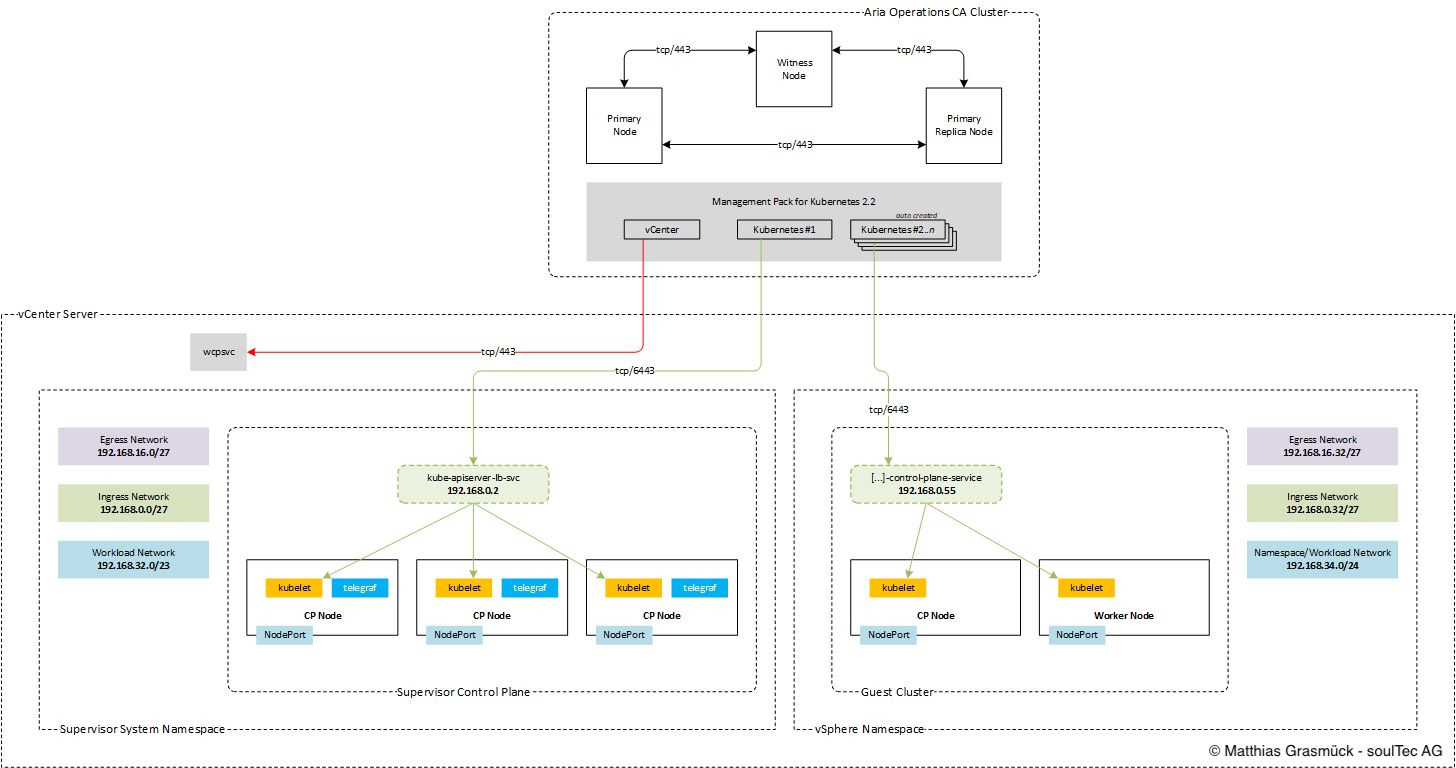
The Kubernetes Management Pack works the following way:
Prerequisites

  • Aria Operations 8.18.x
  • Kubernetes Management Pack (2.2)
  • vCenter already added in Aria Ops

Gather Required Data

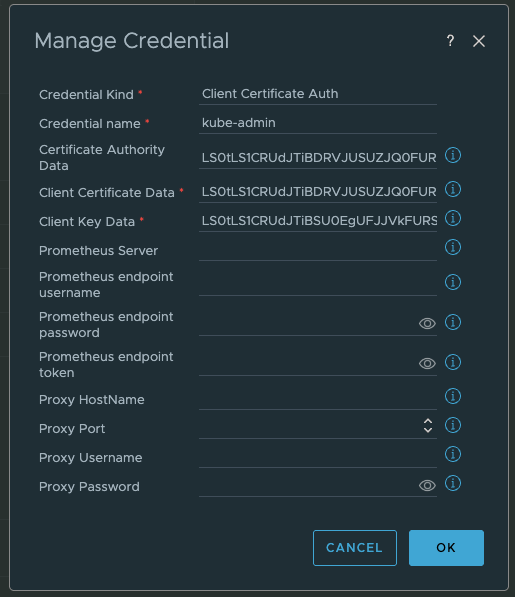
We need the following Data to configure a Account on the Aria Operations Kubernetes Management Pack:

  • Supervisor IP (VIP)
  • certificate-authority-data
  • client-certificate-data
  • client-key-data

Step 1 – SSH Login to Control Plane Nodes

SSH to the vCenter Appliance with the root user, then run (bash shell):

 
sshpass -p `/usr/lib/vmware-wcp/decryptK8Pwd.py | \
grep PWD | \
awk '{print $2}'` ssh -o StrictHostKeyChecking=no root@`/usr/lib/vmware-wcp/decryptK8Pwd.py | \
grep IP | \
awk '{print $2}'`

If the bash shell is not enabled, run:

 
shell.set --enabled=true

View the kubeconfig file on one of the CP Nodes an gather the following data:

  • certificate-authority-data
  • client-certificate-data
  • client-key-data
 
cat ~/.kube/config

Aria Operations

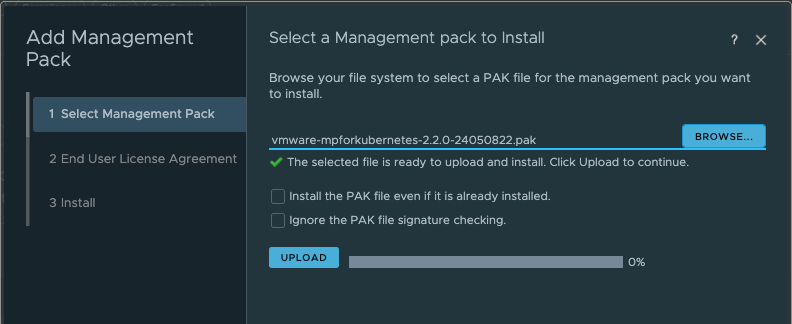
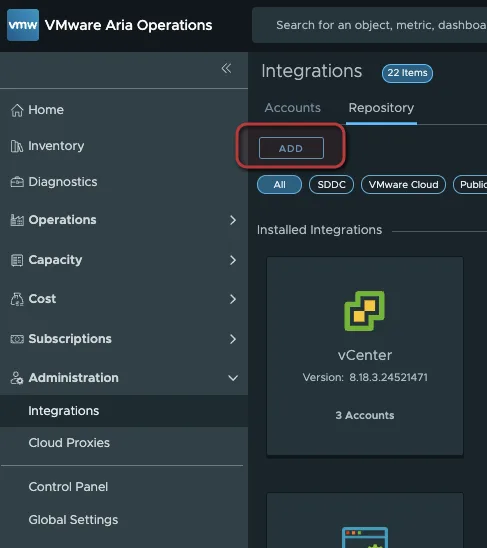
Add the Kubernetes Management Pack (.pak) File

Administration > Integrations > Repository
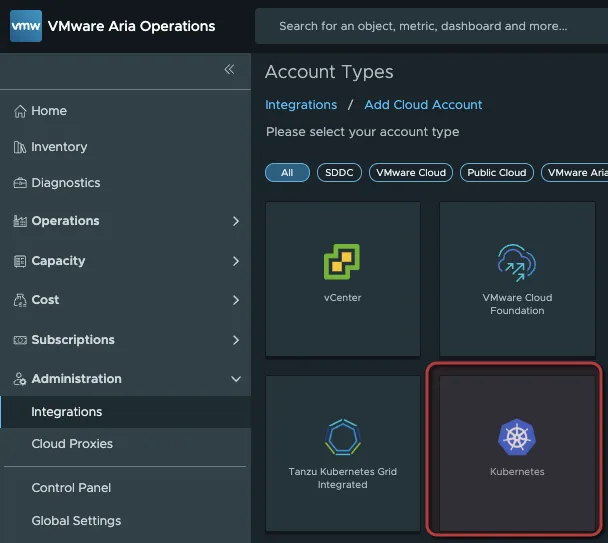
Add the Supervisor Cluster

Administration > Integrations > Add Cloud Account > Kubernetes
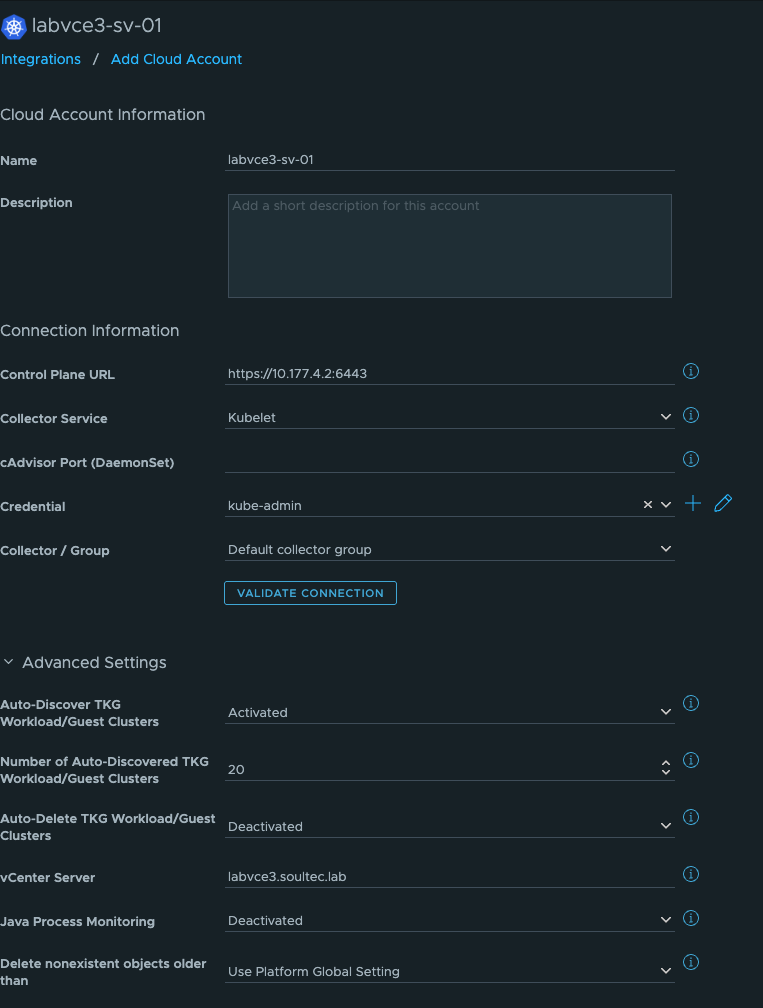
  • Control Plane URL: Supervisor VIP
  • Kubelet
  • Advanced Settings: Autodiscover TGK Guest Cluster (vCenter needs to be added to Aria Ops already)
Credentials:
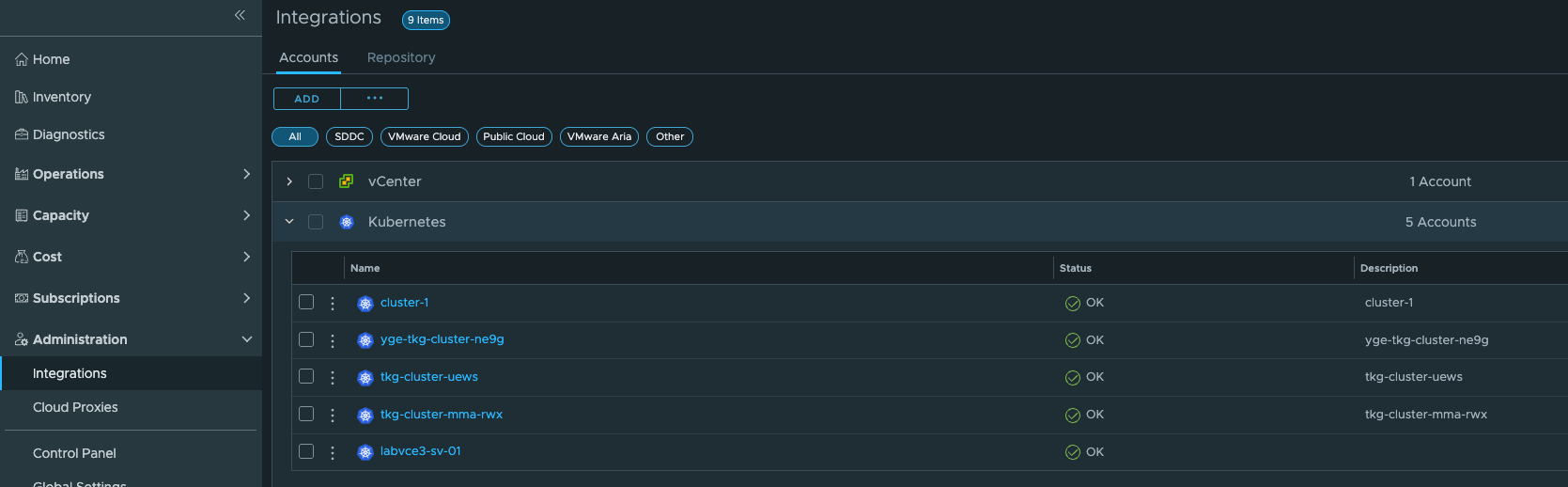
Inventory

If Autodiscovery is enabled, your Kubernetes Guest Clusters will show up after a few minutes.
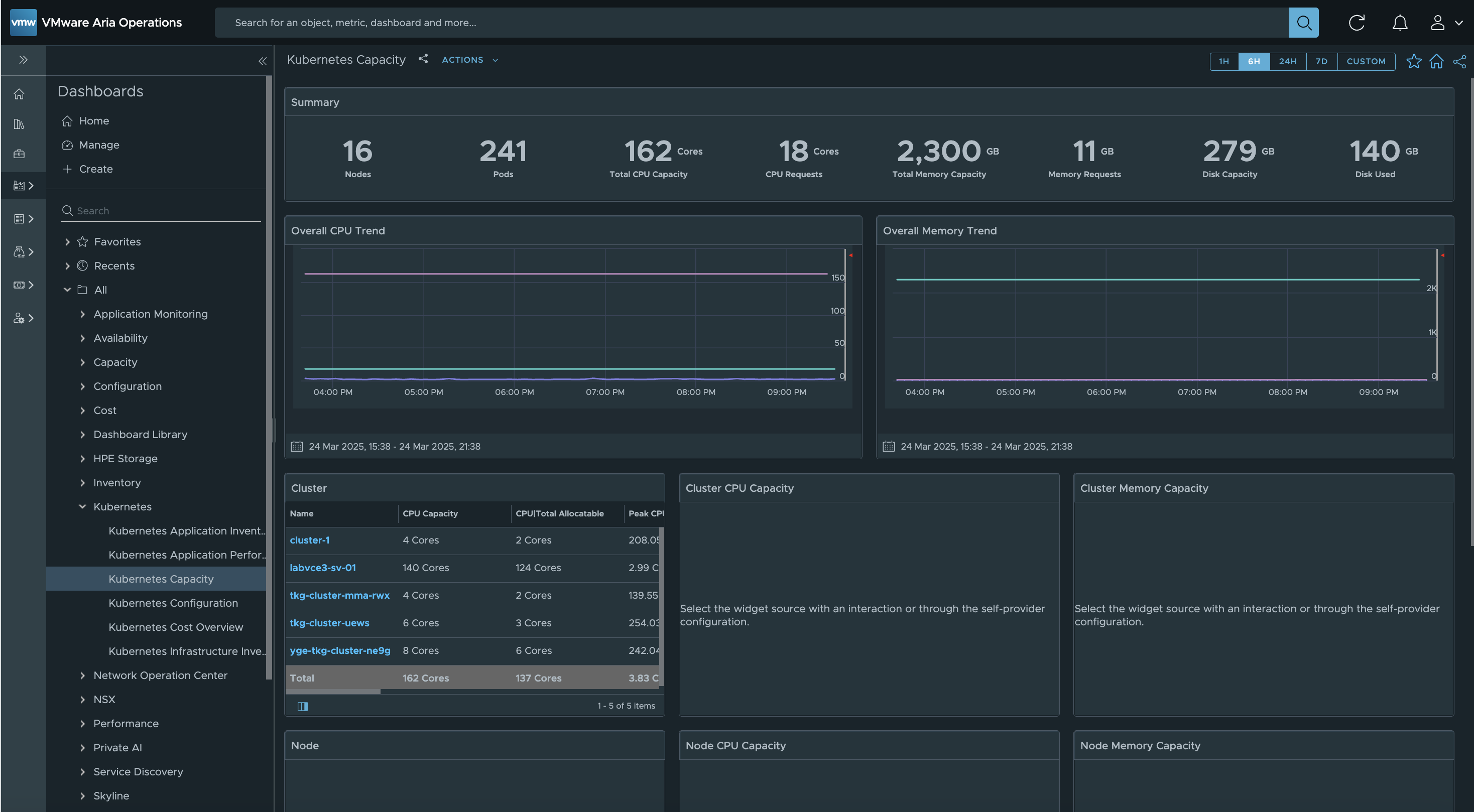
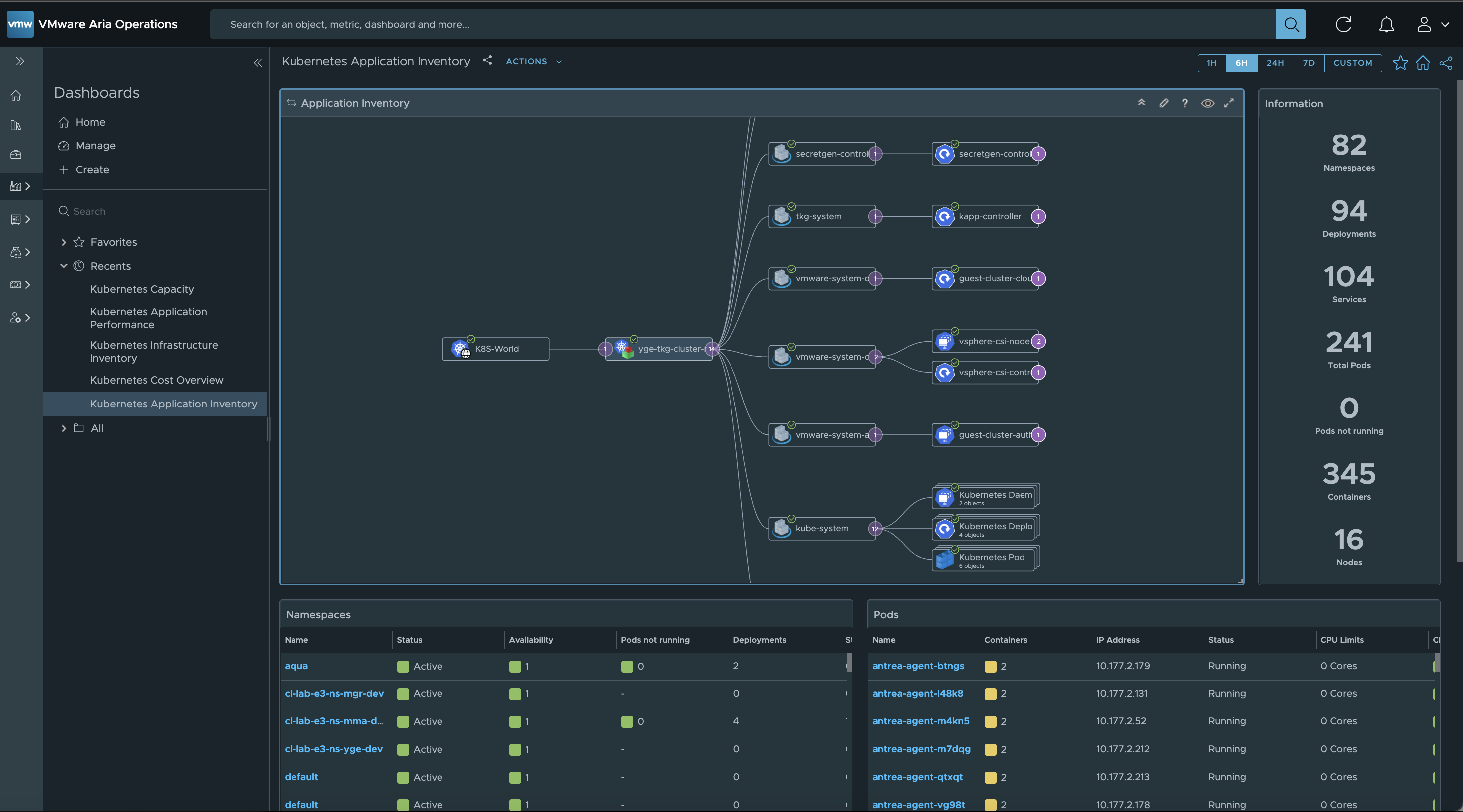
Dashboards

The Kubernetes Management Pack includes lots of useful dashboards to explore.
You might also like