

build 7bbbddf7 | content blog-content@c8490fa · 338 posts | profiles 20 · corpus 267 | 0 skipped | | format
apiVersion: soultec.ch/v1kind: Postmetadata: name: howto-monitor-cronjobs-with-aria-operations locale: en labels: author: dario-doerflinger series: how-to capability/monitoring: 2.71 vendor/vmware: 0.88 annotations: source: blog-content/posts/en/howto-monitor-cronjobs-with-aria-operations.md route: /en/insights/howto-monitor-cronjobs-with-aria-operations/ schema: /nerd/schema/posts.json markdown: /en/insights/howto-monitor-cronjobs-with-aria-operations.mdspec: title: Monitor Cronjobs with Aria Operations date: 2024-02-22 author: dario-doerflinger locale: en summary: >- On a professional services project the customer wanted the VMware SRM backup monitored automatically, with a warning raised if the backup job ever failed. Here is how I did it. capabilities: [monitoring] vendors: [vmware] series: how-to hero: /blog-assets/howto-monitor-cronjobs-with-aria-operations/hero.webp migrated: 2026-08-24 translationReviewed: false draft: false sections: - body: | On a [professional services](https://soultec.ch/bevorzugter-vmware-pso-partner/) project the customer had a requirement for the VMware SRM backup: it had to be monitored automatically and raise a warning if the backup job ever failed. This post shows how I did it. - heading:

The starting point

body: | The project had a particular starting point. - An installed VMware Site Recovery Manager instance - with its backup set up as a cronjob, [following the documentation](https://docs.vmware.com/en/Site-Recovery-Manager/8.7/com.vmware.srm.install_config.doc/GUID-98615D2E-C99F-4B4C-AF23-F47DAA694E76.html) - An installed VMware Aria Operations instance - An installed VMware Aria Operations for Logs instance - The two integrated with each other The requirement was to monitor that cronjob and raise a warning automatically, on the right object, if the job ever failed. - heading:

The solution

body: | Conceptually it is very simple. ![concept of cronjob monitoring with aria operations and aria operations for logs](/blog-assets/howto-monitor-cronjobs-with-aria-operations/01.webp) ### Adjusting the cronjob With ```bash crontab -e ``` (as root) you edit the root user's crontab. There, a logger command has to be appended to the existing entry from the SRM export job's backup setup. ```bash 2>&1 | logger -t export_sh -n syslog.soultec.ch -P 514 -T ``` The complete entry could then look like this: ```bash 45 15 * * * /usr/bin/sudo /bin/bash /opt/vmware/impex/bin/export.sh 2>&1 | logger -t export_sh -n syslog.soultec.ch -P 514 -T ``` That way, errors from the export.sh script are handed to logger, which forwards the entry to the syslog server. ### Defining the alert in Aria Operations for Logs The second step is to define an alert that also raises a warning in Aria Operations. ![Aria Operations for Logs alert definition, 1 of 2](/blog-assets/howto-monitor-cronjobs-with-aria-operations/02.webp) In the first section we set the text filter to "Export failed." and the source has to contain the FQDN of our SRM server. Within a five-minute window the alert triggers as soon as more than zero occurrences are counted, so on the first one. ![Aria Operations for Logs alert definition, 2 of 2](/blog-assets/howto-monitor-cronjobs-with-aria-operations/03.webp) We tick "Send to VMware Aria Operations" and set the fallback object to the SRM server. In our case the criticality is only a warning, and we have an auto cancel after 24 hours (1440 minutes). The warning disappears again if the message does not repeat within a day. That is a cronjob monitored with the logger command, Aria Operations for Logs and Aria Operations. - heading:

Next steps

body: | Do you have more challenges along these lines? Our [team of experts](https://soultec.ch/vmware-vexpert/) is ready to help. Just [get in touch](https://soultec.ch/contact-us/), no strings attached.status: corpus: 267 alsoLike: - {ref: posts/vmware-automatically-deleting-vmware-vm-snapshots, score: 1.00} - {ref: posts/vmware-aria, score: 0.72} - {ref: solutions/vmware/vmware-cloud-foundation/addon/business-operations, score: 0.72}
{ "apiVersion": "soultec.ch/v1", "kind": "Post", "metadata": { "name": "howto-monitor-cronjobs-with-aria-operations", "locale": "en", "labels": { "author": "dario-doerflinger", "series": "how-to", "capability/monitoring": "2.71", "vendor/vmware": "0.88" }, "annotations": { "source": "blog-content/posts/en/howto-monitor-cronjobs-with-aria-operations.md", "route": "/en/insights/howto-monitor-cronjobs-with-aria-operations/", "schema": "/nerd/schema/posts.json", "markdown": "/en/insights/howto-monitor-cronjobs-with-aria-operations.md" } }, "spec": { "title": "Monitor Cronjobs with Aria Operations", "date": "2024-02-22", "author": "dario-doerflinger", "locale": "en", "summary": "On a professional services project the customer wanted the VMware SRM backup monitored automatically, with a warning raised if the backup job ever failed. Here is how I did it.", "capabilities": [ "monitoring" ], "vendors": [ "vmware" ], "series": "how-to", "hero": "/blog-assets/howto-monitor-cronjobs-with-aria-operations/hero.webp", "migrated": "2026-08-24", "translationReviewed": false, "draft": false }, "sections": [ { "body": "On a [professional services](https://soultec.ch/bevorzugter-vmware-pso-partner/) project the customer had a requirement for the VMware SRM backup: it had to be monitored automatically and raise a warning if the backup job ever failed. This post shows how I did it." }, { "heading": "

The starting point

",
"body": "The project had a particular starting point.\n\n- An installed VMware Site Recovery Manager instance\n - with its backup set up as a cronjob, [following the documentation](https://docs.vmware.com/en/Site-Recovery-Manager/8.7/com.vmware.srm.install_config.doc/GUID-98615D2E-C99F-4B4C-AF23-F47DAA694E76.html)\n- An installed VMware Aria Operations instance\n- An installed VMware Aria Operations for Logs instance\n- The two integrated with each other\n\nThe requirement was to monitor that cronjob and raise a warning automatically, on the right object, if the job ever failed." }, { "heading": "

The solution

",
"body": "Conceptually it is very simple.\n\n![concept of cronjob monitoring with aria operations and aria operations for logs](/blog-assets/howto-monitor-cronjobs-with-aria-operations/01.webp)\n\n### Adjusting the cronjob\n\nWith\n\n```bash\n crontab -e \n```\n\n(as root) you edit the root user's crontab.\n\nThere, a logger command has to be appended to the existing entry from the SRM export job's backup setup.\n\n```bash\n2>&1 | logger -t export_sh -n syslog.soultec.ch -P 514 -T\n```\n\nThe complete entry could then look like this:\n\n```bash\n45 15 * * * /usr/bin/sudo /bin/bash /opt/vmware/impex/bin/export.sh 2>&1 | logger -t export_sh -n syslog.soultec.ch -P 514 -T\n```\n\nThat way, errors from the export.sh script are handed to logger, which forwards the entry to the syslog server.\n\n### Defining the alert in Aria Operations for Logs\n\nThe second step is to define an alert that also raises a warning in Aria Operations.\n\n![Aria Operations for Logs alert definition, 1 of 2](/blog-assets/howto-monitor-cronjobs-with-aria-operations/02.webp)\n\nIn the first section we set the text filter to \"Export failed.\" and the source has to contain the FQDN of our SRM server.\n\nWithin a five-minute window the alert triggers as soon as more than zero occurrences are counted, so on the first one.\n\n![Aria Operations for Logs alert definition, 2 of 2](/blog-assets/howto-monitor-cronjobs-with-aria-operations/03.webp)\n\nWe tick \"Send to VMware Aria Operations\" and set the fallback object to the SRM server. In our case the criticality is only a warning, and we have an auto cancel after 24 hours (1440 minutes). The warning disappears again if the message does not repeat within a day.\n\nThat is a cronjob monitored with the logger command, Aria Operations for Logs and Aria Operations." }, { "heading": "

Next steps

",
"body": "Do you have more challenges along these lines? Our [team of experts](https://soultec.ch/vmware-vexpert/) is ready to help. Just [get in touch](https://soultec.ch/contact-us/), no strings attached." } ], "status": { "corpus": 267, "alsoLike": [ { "ref": "posts/vmware-automatically-deleting-vmware-vm-snapshots", "score": "1.00" }, { "ref": "posts/vmware-aria", "score": "0.72" }, { "ref": "solutions/vmware/vmware-cloud-foundation/addon/business-operations", "score": "0.72" } ] }}
apiVersion = "soultec.ch/v1"kind = "Post"[metadata]name = "howto-monitor-cronjobs-with-aria-operations"locale = "en"[metadata.labels]author = "dario-doerflinger"series = "how-to""capability/monitoring" = "2.71""vendor/vmware" = "0.88"[metadata.annotations]source = "blog-content/posts/en/howto-monitor-cronjobs-with-aria-operations.md"route = "/en/insights/howto-monitor-cronjobs-with-aria-operations/"schema = "/nerd/schema/posts.json"markdown = "/en/insights/howto-monitor-cronjobs-with-aria-operations.md"[spec]title = "Monitor Cronjobs with Aria Operations"date = 2024-02-22author = "dario-doerflinger"locale = "en"summary = "On a professional services project the customer wanted the VMware SRM backup monitored automatically, with a warning raised if the backup job ever failed. Here is how I did it."capabilities = ["monitoring"]vendors = ["vmware"]series = "how-to"hero = "/blog-assets/howto-monitor-cronjobs-with-aria-operations/hero.webp"migrated = 2026-08-24translationReviewed = falsedraft = false[[sections]]body = "On a [professional services](https://soultec.ch/bevorzugter-vmware-pso-partner/) project the customer had a requirement for the VMware SRM backup: it had to be monitored automatically and raise a warning if the backup job ever failed. This post shows how I did it."[[sections]]heading = "

The starting point

"
body = '''The project had a particular starting point.- An installed VMware Site Recovery Manager instance - with its backup set up as a cronjob, [following the documentation](https://docs.vmware.com/en/Site-Recovery-Manager/8.7/com.vmware.srm.install_config.doc/GUID-98615D2E-C99F-4B4C-AF23-F47DAA694E76.html)- An installed VMware Aria Operations instance- An installed VMware Aria Operations for Logs instance- The two integrated with each otherThe requirement was to monitor that cronjob and raise a warning automatically, on the right object, if the job ever failed.'''[[sections]]heading = "

The solution

"
body = '''Conceptually it is very simple.![concept of cronjob monitoring with aria operations and aria operations for logs](/blog-assets/howto-monitor-cronjobs-with-aria-operations/01.webp)### Adjusting the cronjobWith```bash crontab -e ```(as root) you edit the root user's crontab.There, a logger command has to be appended to the existing entry from the SRM export job's backup setup.```bash2>&1 | logger -t export_sh -n syslog.soultec.ch -P 514 -T```The complete entry could then look like this:```bash45 15 * * * /usr/bin/sudo /bin/bash /opt/vmware/impex/bin/export.sh 2>&1 | logger -t export_sh -n syslog.soultec.ch -P 514 -T```That way, errors from the export.sh script are handed to logger, which forwards the entry to the syslog server.### Defining the alert in Aria Operations for LogsThe second step is to define an alert that also raises a warning in Aria Operations.![Aria Operations for Logs alert definition, 1 of 2](/blog-assets/howto-monitor-cronjobs-with-aria-operations/02.webp)In the first section we set the text filter to "Export failed." and the source has to contain the FQDN of our SRM server.Within a five-minute window the alert triggers as soon as more than zero occurrences are counted, so on the first one.![Aria Operations for Logs alert definition, 2 of 2](/blog-assets/howto-monitor-cronjobs-with-aria-operations/03.webp)We tick "Send to VMware Aria Operations" and set the fallback object to the SRM server. In our case the criticality is only a warning, and we have an auto cancel after 24 hours (1440 minutes). The warning disappears again if the message does not repeat within a day.That is a cronjob monitored with the logger command, Aria Operations for Logs and Aria Operations.'''[[sections]]heading = "

Next steps

"
body = "Do you have more challenges along these lines? Our [team of experts](https://soultec.ch/vmware-vexpert/) is ready to help. Just [get in touch](https://soultec.ch/contact-us/), no strings attached."[status]corpus = 267[[status.alsoLike]]ref = "posts/vmware-automatically-deleting-vmware-vm-snapshots"score = "1.00"[[status.alsoLike]]ref = "posts/vmware-aria"score = "0.72"[[status.alsoLike]]ref = "solutions/vmware/vmware-cloud-foundation/addon/business-operations"score = "0.72"
<?xml version="1.0" encoding="UTF-8"?><manifest kind="Post"> <apiVersion>soultec.ch/v1</apiVersion> <metadata> <name>howto-monitor-cronjobs-with-aria-operations</name> <locale>en</locale> <labels> <author>dario-doerflinger</author> <series>how-to</series> <entry key="capability/monitoring">2.71</entry> <entry key="vendor/vmware">0.88</entry> </labels> <annotations> <source>blog-content/posts/en/howto-monitor-cronjobs-with-aria-operations.md</source> <route>/en/insights/howto-monitor-cronjobs-with-aria-operations/</route> <schema>/nerd/schema/posts.json</schema> <markdown>/en/insights/howto-monitor-cronjobs-with-aria-operations.md</markdown> </annotations> </metadata> <spec> <title>Monitor Cronjobs with Aria Operations</title> <date>2024-02-22</date> <author>dario-doerflinger</author> <locale>en</locale> <summary>On a professional services project the customer wanted the VMware SRM backup monitored automatically, with a warning raised if the backup job ever failed. Here is how I did it.</summary> <capabilities> <item>monitoring</item> </capabilities> <vendors> <item>vmware</item> </vendors> <series>how-to</series> <hero>/blog-assets/howto-monitor-cronjobs-with-aria-operations/hero.webp</hero> <migrated>2026-08-24</migrated> <translationReviewed>false</translationReviewed> <draft>false</draft> </spec> <sections> <section> <body>On a [professional services](https://soultec.ch/bevorzugter-vmware-pso-partner/) project the customer had a requirement for the VMware SRM backup: it had to be monitored automatically and raise a warning if the backup job ever failed. This post shows how I did it.</body> </section> <section> <heading>

The starting point

</heading>
<body>The project had a particular starting point.- An installed VMware Site Recovery Manager instance - with its backup set up as a cronjob, [following the documentation](https://docs.vmware.com/en/Site-Recovery-Manager/8.7/com.vmware.srm.install_config.doc/GUID-98615D2E-C99F-4B4C-AF23-F47DAA694E76.html)- An installed VMware Aria Operations instance- An installed VMware Aria Operations for Logs instance- The two integrated with each otherThe requirement was to monitor that cronjob and raise a warning automatically, on the right object, if the job ever failed. </body> </section> <section> <heading>

The solution

</heading>
<body>Conceptually it is very simple.![concept of cronjob monitoring with aria operations and aria operations for logs](/blog-assets/howto-monitor-cronjobs-with-aria-operations/01.webp)### Adjusting the cronjobWith```bash crontab -e ```(as root) you edit the root user's crontab.There, a logger command has to be appended to the existing entry from the SRM export job's backup setup.```bash2&gt;&amp;1 | logger -t export_sh -n syslog.soultec.ch -P 514 -T```The complete entry could then look like this:```bash45 15 * * * /usr/bin/sudo /bin/bash /opt/vmware/impex/bin/export.sh 2&gt;&amp;1 | logger -t export_sh -n syslog.soultec.ch -P 514 -T```That way, errors from the export.sh script are handed to logger, which forwards the entry to the syslog server.### Defining the alert in Aria Operations for LogsThe second step is to define an alert that also raises a warning in Aria Operations.![Aria Operations for Logs alert definition, 1 of 2](/blog-assets/howto-monitor-cronjobs-with-aria-operations/02.webp)In the first section we set the text filter to "Export failed." and the source has to contain the FQDN of our SRM server.Within a five-minute window the alert triggers as soon as more than zero occurrences are counted, so on the first one.![Aria Operations for Logs alert definition, 2 of 2](/blog-assets/howto-monitor-cronjobs-with-aria-operations/03.webp)We tick "Send to VMware Aria Operations" and set the fallback object to the SRM server. In our case the criticality is only a warning, and we have an auto cancel after 24 hours (1440 minutes). The warning disappears again if the message does not repeat within a day.That is a cronjob monitored with the logger command, Aria Operations for Logs and Aria Operations. </body> </section> <section> <heading>

Next steps

</heading>
<body>Do you have more challenges along these lines? Our [team of experts](https://soultec.ch/vmware-vexpert/) is ready to help. Just [get in touch](https://soultec.ch/contact-us/), no strings attached.</body> </section> </sections> <status> <corpus>267</corpus> <alsoLike> <item> <ref>posts/vmware-automatically-deleting-vmware-vm-snapshots</ref> <score>1.00</score> </item> <item> <ref>posts/vmware-aria</ref> <score>0.72</score> </item> <item> <ref>solutions/vmware/vmware-cloud-foundation/addon/business-operations</ref> <score>0.72</score> </item> </alsoLike> </status></manifest>
How-To · 2024-02-22

Monitor Cronjobs with Aria Operations

On a professional services project the customer wanted the VMware SRM backup monitored automatically, with a warning raised if the backup job ever failed. Here is how I did it.

2024-02-22Date
Dario DörflingerAuthor
2Min read
Topics Monitoring 2.71
Vendors VMware 0.88

On a professional services project the customer had a requirement for the VMware SRM backup: it had to be monitored automatically and raise a warning if the backup job ever failed. This post shows how I did it.

The starting point

The project had a particular starting point.

  • An installed VMware Site Recovery Manager instance
  • An installed VMware Aria Operations instance
  • An installed VMware Aria Operations for Logs instance
  • The two integrated with each other

The requirement was to monitor that cronjob and raise a warning automatically, on the right object, if the job ever failed.

The solution

Conceptually it is very simple.
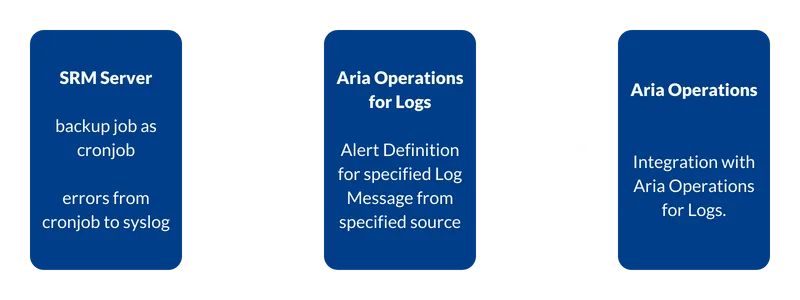
concept of cronjob monitoring with aria operations and aria operations for logs

Adjusting the cronjob

With

 crontab -e 

(as root) you edit the root user’s crontab.

There, a logger command has to be appended to the existing entry from the SRM export job’s backup setup.

2>&1 | logger -t export_sh -n syslog.soultec.ch -P 514 -T

The complete entry could then look like this:

45 15 * * * /usr/bin/sudo /bin/bash /opt/vmware/impex/bin/export.sh 2>&1 | logger -t export_sh -n syslog.soultec.ch -P 514 -T

That way, errors from the export.sh script are handed to logger, which forwards the entry to the syslog server.

Defining the alert in Aria Operations for Logs

The second step is to define an alert that also raises a warning in Aria Operations.
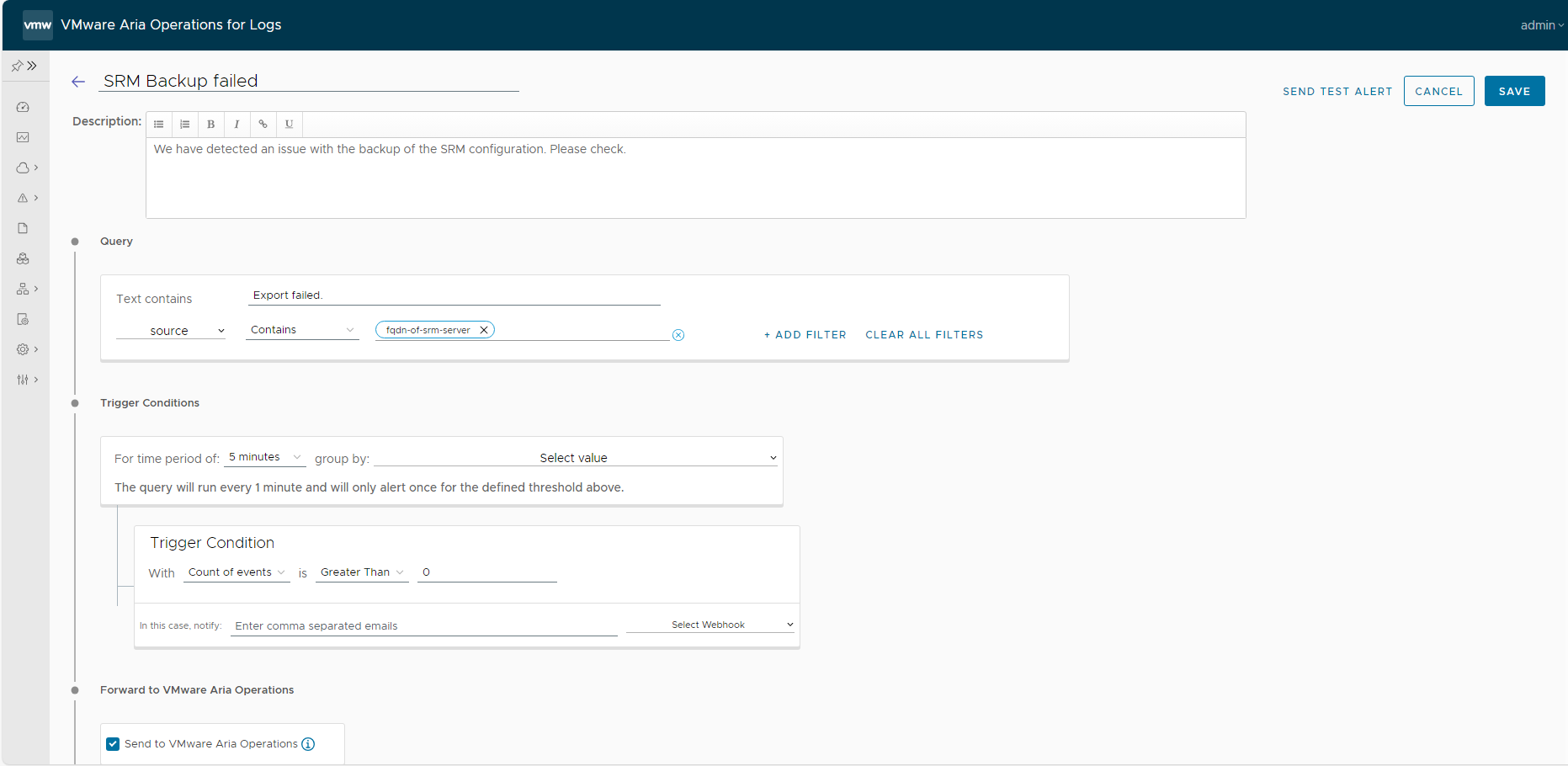
Aria Operations for Logs alert definition, 1 of 2

In the first section we set the text filter to “Export failed.” and the source has to contain the FQDN of our SRM server.

Within a five-minute window the alert triggers as soon as more than zero occurrences are counted, so on the first one.
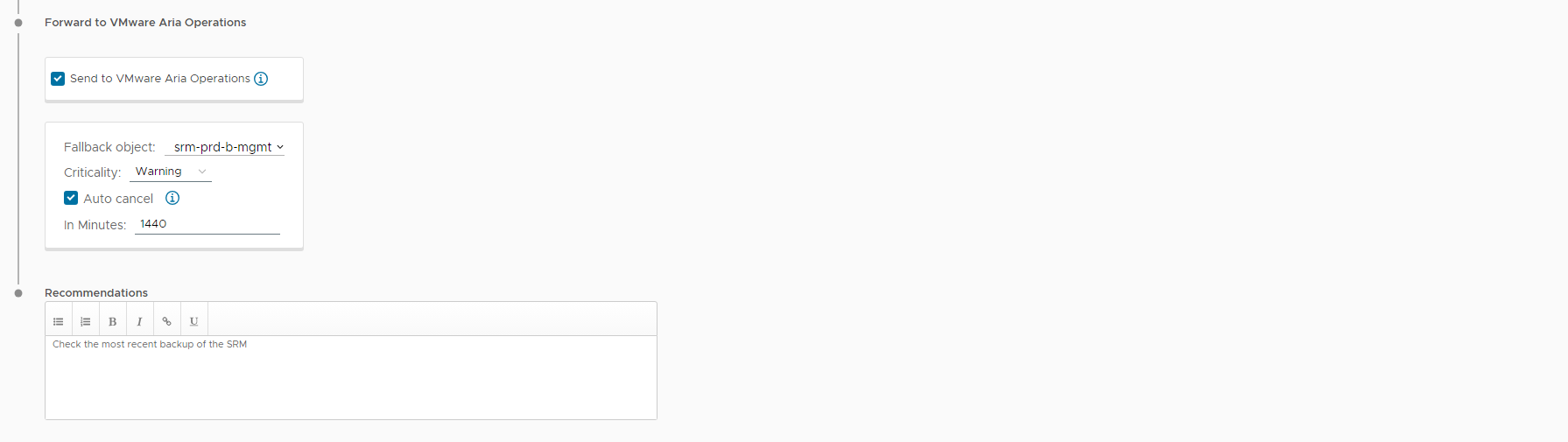
Aria Operations for Logs alert definition, 2 of 2

We tick “Send to VMware Aria Operations” and set the fallback object to the SRM server. In our case the criticality is only a warning, and we have an auto cancel after 24 hours (1440 minutes). The warning disappears again if the message does not repeat within a day.

That is a cronjob monitored with the logger command, Aria Operations for Logs and Aria Operations.

Next steps

Do you have more challenges along these lines? Our team of experts is ready to help. Just get in touch, no strings attached.
You might also like