build 7bbbddf7 | content blog-content@c8490fa · 338 posts | profiles 20 · corpus 267 | 0 skipped | | format
apiVersion: soultec.ch/v1kind: Postmetadata: name: how-to-monitor-vsphere-supervisor-and-guest-clusters-with-aria-operations locale: de labels: author: yannick-gerber series: how-to capability/monitoring: 2.71 capability/containers: 2.39 vendor/vmware: 0.88 annotations: source: blog-content/posts/de/how-to-monitor-vsphere-supervisor-and-guest-clusters-with-aria-operations.md route: /de/insights/how-to-monitor-vsphere-supervisor-and-guest-clusters-with-aria-operations/ schema: /nerd/schema/posts.json markdown: /de/insights/how-to-monitor-vsphere-supervisor-and-guest-clusters-with-aria-operations.mdspec: title: vSphere Supervisor und Guest Cluster mit VCF Operations überwachen date: 2025-03-26 author: yannick-gerber locale: de summary: >- vSphere Supervisor Cluster und Kubernetes Guest Cluster mit dem Kubernetes Management Pack in VCF (Aria) Operations überwachen. Eine gute Alternative zu Prometheus und Grafana. capabilities: [monitoring, containers] vendors: [vmware] series: how-to hero: >- /blog-assets/how-to-monitor-vsphere-supervisor-and-guest-clusters-with-aria-operations/hero.webp migrated: 2026-08-24 translationReviewed: false draft: false sections: - body: | vSphere Supervisor Cluster und Kubernetes Guest Cluster mit dem Kubernetes Management Pack in VCF (Aria) Operations überwachen. Das ist eine gute Alternative zu Prometheus und Grafana. Auf den Kubernetes Guest Clustern ist keine Installation nötig. # Ziel Das Ziel ist, das vSphere Supervisor Cluster und jedes Kubernetes Guest Cluster zu überwachen, und neu bereitgestellte Guest Cluster automatisch dazuzunehmen. ![](/blog-assets/how-to-monitor-vsphere-supervisor-and-guest-clusters-with-aria-operations/01.webp) # Logisches Diagramm So arbeitet das Kubernetes Management Pack: ![](/blog-assets/how-to-monitor-vsphere-supervisor-and-guest-clusters-with-aria-operations/02.webp) # Voraussetzungen - Aria Operations 8.18.x - Kubernetes Management Pack (2.2) - vCenter bereits in Aria Ops hinzugefügt - heading:

Die nötigen Daten sammeln

body: | Für die Konfiguration eines Accounts im Kubernetes Management Pack von Aria Operations brauchen wir: - Supervisor IP (VIP) - certificate-authority-data - client-certificate-data - client-key-data ### Schritt 1: per SSH auf die Control Plane Nodes Verbinde dich per SSH als root mit der vCenter Appliance und führ aus (bash shell): ```bash sshpass -p `/usr/lib/vmware-wcp/decryptK8Pwd.py | \ grep PWD | \ awk '{print $2}'` ssh -o StrictHostKeyChecking=no root@`/usr/lib/vmware-wcp/decryptK8Pwd.py | \ grep IP | \ awk '{print $2}'` ``` Falls die bash shell nicht aktiviert ist: ```bash shell.set --enabled=true ``` Sieh dir auf einem der CP Nodes die kubeconfig an und hol dir diese Daten: - certificate-authority-data - client-certificate-data - client-key-data ```bash cat ~/.kube/config ``` - heading:

Aria Operations

body: | #### Das Kubernetes Management Pack (.pak) hinzufügen Administration > Integrations > Repository ![](/blog-assets/how-to-monitor-vsphere-supervisor-and-guest-clusters-with-aria-operations/03.webp) ![](/blog-assets/how-to-monitor-vsphere-supervisor-and-guest-clusters-with-aria-operations/04.webp) #### Das Supervisor Cluster hinzufügen Administration > Integrations > Add Cloud Account > Kubernetes ![](/blog-assets/how-to-monitor-vsphere-supervisor-and-guest-clusters-with-aria-operations/05.webp) - Control Plane URL: Supervisor VIP - Kubelet - Advanced Settings: Autodiscover TGK Guest Cluster (das vCenter muss bereits in Aria Ops sein) ![](/blog-assets/how-to-monitor-vsphere-supervisor-and-guest-clusters-with-aria-operations/06.webp) Credentials: ![](/blog-assets/how-to-monitor-vsphere-supervisor-and-guest-clusters-with-aria-operations/07.webp) ### Inventory Wenn Autodiscovery aktiviert ist, tauchen deine Kubernetes Guest Cluster nach wenigen Minuten auf. ![](/blog-assets/how-to-monitor-vsphere-supervisor-and-guest-clusters-with-aria-operations/08.webp) # Dashboards Das Kubernetes Management Pack bringt eine ganze Reihe nützlicher Dashboards mit. ![](/blog-assets/how-to-monitor-vsphere-supervisor-and-guest-clusters-with-aria-operations/09.webp)status: corpus: 267 alsoLike: - {ref: posts/howto-monitor-cronjobs-with-aria-operations, score: 0.67} - {ref: posts/vmware-automatically-deleting-vmware-vm-snapshots, score: 0.67} - {ref: solutions/vmware/vmware-cloud-foundation/addon/business-operations, score: 0.58}
{ "apiVersion": "soultec.ch/v1", "kind": "Post", "metadata": { "name": "how-to-monitor-vsphere-supervisor-and-guest-clusters-with-aria-operations", "locale": "de", "labels": { "author": "yannick-gerber", "series": "how-to", "capability/monitoring": "2.71", "capability/containers": "2.39", "vendor/vmware": "0.88" }, "annotations": { "source": "blog-content/posts/de/how-to-monitor-vsphere-supervisor-and-guest-clusters-with-aria-operations.md", "route": "/de/insights/how-to-monitor-vsphere-supervisor-and-guest-clusters-with-aria-operations/", "schema": "/nerd/schema/posts.json", "markdown": "/de/insights/how-to-monitor-vsphere-supervisor-and-guest-clusters-with-aria-operations.md" } }, "spec": { "title": "vSphere Supervisor und Guest Cluster mit VCF Operations überwachen", "date": "2025-03-26", "author": "yannick-gerber", "locale": "de", "summary": "vSphere Supervisor Cluster und Kubernetes Guest Cluster mit dem Kubernetes Management Pack in VCF (Aria) Operations überwachen. Eine gute Alternative zu Prometheus und Grafana.", "capabilities": [ "monitoring", "containers" ], "vendors": [ "vmware" ], "series": "how-to", "hero": "/blog-assets/how-to-monitor-vsphere-supervisor-and-guest-clusters-with-aria-operations/hero.webp", "migrated": "2026-08-24", "translationReviewed": false, "draft": false }, "sections": [ { "body": "vSphere Supervisor Cluster und Kubernetes Guest Cluster mit dem Kubernetes Management Pack in VCF (Aria) Operations überwachen.\n\nDas ist eine gute Alternative zu Prometheus und Grafana. Auf den Kubernetes Guest Clustern ist keine Installation nötig.\n\n# Ziel\n\nDas Ziel ist, das vSphere Supervisor Cluster und jedes Kubernetes Guest Cluster zu überwachen, und neu bereitgestellte Guest Cluster automatisch dazuzunehmen.\n\n![](/blog-assets/how-to-monitor-vsphere-supervisor-and-guest-clusters-with-aria-operations/01.webp)\n\n# Logisches Diagramm\n\nSo arbeitet das Kubernetes Management Pack:\n\n![](/blog-assets/how-to-monitor-vsphere-supervisor-and-guest-clusters-with-aria-operations/02.webp)\n\n# Voraussetzungen\n\n- Aria Operations 8.18.x\n- Kubernetes Management Pack (2.2)\n- vCenter bereits in Aria Ops hinzugefügt" }, { "heading": "

Die nötigen Daten sammeln

",
"body": "Für die Konfiguration eines Accounts im Kubernetes Management Pack von Aria Operations brauchen wir:\n\n- Supervisor IP (VIP)\n- certificate-authority-data\n- client-certificate-data\n- client-key-data\n\n### Schritt 1: per SSH auf die Control Plane Nodes\n\nVerbinde dich per SSH als root mit der vCenter Appliance und führ aus (bash shell):\n\n```bash\n \nsshpass -p `/usr/lib/vmware-wcp/decryptK8Pwd.py | \\\ngrep PWD | \\\nawk '{print $2}'` ssh -o StrictHostKeyChecking=no root@`/usr/lib/vmware-wcp/decryptK8Pwd.py | \\\ngrep IP | \\\nawk '{print $2}'`\n```\n\nFalls die bash shell nicht aktiviert ist:\n\n```bash\n \nshell.set --enabled=true\n```\n\nSieh dir auf einem der CP Nodes die kubeconfig an und hol dir diese Daten:\n\n- certificate-authority-data\n- client-certificate-data\n- client-key-data\n\n```bash\n \ncat ~/.kube/config\n```" }, { "heading": "

Aria Operations

",
"body": "#### Das Kubernetes Management Pack (.pak) hinzufügen\n\nAdministration > Integrations > Repository\n\n![](/blog-assets/how-to-monitor-vsphere-supervisor-and-guest-clusters-with-aria-operations/03.webp)\n\n![](/blog-assets/how-to-monitor-vsphere-supervisor-and-guest-clusters-with-aria-operations/04.webp)\n\n#### Das Supervisor Cluster hinzufügen\n\nAdministration > Integrations > Add Cloud Account > Kubernetes\n\n![](/blog-assets/how-to-monitor-vsphere-supervisor-and-guest-clusters-with-aria-operations/05.webp)\n\n- Control Plane URL: Supervisor VIP\n- Kubelet\n- Advanced Settings: Autodiscover TGK Guest Cluster (das vCenter muss bereits in Aria Ops sein)\n\n![](/blog-assets/how-to-monitor-vsphere-supervisor-and-guest-clusters-with-aria-operations/06.webp)\n\nCredentials:\n\n![](/blog-assets/how-to-monitor-vsphere-supervisor-and-guest-clusters-with-aria-operations/07.webp)\n\n### Inventory\n\nWenn Autodiscovery aktiviert ist, tauchen deine Kubernetes Guest Cluster nach wenigen Minuten auf.\n\n![](/blog-assets/how-to-monitor-vsphere-supervisor-and-guest-clusters-with-aria-operations/08.webp)\n\n# Dashboards\n\nDas Kubernetes Management Pack bringt eine ganze Reihe nützlicher Dashboards mit.\n\n![](/blog-assets/how-to-monitor-vsphere-supervisor-and-guest-clusters-with-aria-operations/09.webp)" } ], "status": { "corpus": 267, "alsoLike": [ { "ref": "posts/howto-monitor-cronjobs-with-aria-operations", "score": "0.67" }, { "ref": "posts/vmware-automatically-deleting-vmware-vm-snapshots", "score": "0.67" }, { "ref": "solutions/vmware/vmware-cloud-foundation/addon/business-operations", "score": "0.58" } ] }}
apiVersion = "soultec.ch/v1"kind = "Post"[metadata]name = "how-to-monitor-vsphere-supervisor-and-guest-clusters-with-aria-operations"locale = "de"[metadata.labels]author = "yannick-gerber"series = "how-to""capability/monitoring" = "2.71""capability/containers" = "2.39""vendor/vmware" = "0.88"[metadata.annotations]source = "blog-content/posts/de/how-to-monitor-vsphere-supervisor-and-guest-clusters-with-aria-operations.md"route = "/de/insights/how-to-monitor-vsphere-supervisor-and-guest-clusters-with-aria-operations/"schema = "/nerd/schema/posts.json"markdown = "/de/insights/how-to-monitor-vsphere-supervisor-and-guest-clusters-with-aria-operations.md"[spec]title = "vSphere Supervisor und Guest Cluster mit VCF Operations überwachen"date = 2025-03-26author = "yannick-gerber"locale = "de"summary = "vSphere Supervisor Cluster und Kubernetes Guest Cluster mit dem Kubernetes Management Pack in VCF (Aria) Operations überwachen. Eine gute Alternative zu Prometheus und Grafana."capabilities = ["monitoring", "containers"]vendors = ["vmware"]series = "how-to"hero = "/blog-assets/how-to-monitor-vsphere-supervisor-and-guest-clusters-with-aria-operations/hero.webp"migrated = 2026-08-24translationReviewed = falsedraft = false[[sections]]body = '''vSphere Supervisor Cluster und Kubernetes Guest Cluster mit dem Kubernetes Management Pack in VCF (Aria) Operations überwachen.Das ist eine gute Alternative zu Prometheus und Grafana. Auf den Kubernetes Guest Clustern ist keine Installation nötig.# ZielDas Ziel ist, das vSphere Supervisor Cluster und jedes Kubernetes Guest Cluster zu überwachen, und neu bereitgestellte Guest Cluster automatisch dazuzunehmen.![](/blog-assets/how-to-monitor-vsphere-supervisor-and-guest-clusters-with-aria-operations/01.webp)# Logisches DiagrammSo arbeitet das Kubernetes Management Pack:![](/blog-assets/how-to-monitor-vsphere-supervisor-and-guest-clusters-with-aria-operations/02.webp)# Voraussetzungen- Aria Operations 8.18.x- Kubernetes Management Pack (2.2)- vCenter bereits in Aria Ops hinzugefügt'''[[sections]]heading = "

Die nötigen Daten sammeln

"
body = '''Für die Konfiguration eines Accounts im Kubernetes Management Pack von Aria Operations brauchen wir:- Supervisor IP (VIP)- certificate-authority-data- client-certificate-data- client-key-data### Schritt 1: per SSH auf die Control Plane NodesVerbinde dich per SSH als root mit der vCenter Appliance und führ aus (bash shell):```bash sshpass -p `/usr/lib/vmware-wcp/decryptK8Pwd.py | \grep PWD | \awk '{print $2}'` ssh -o StrictHostKeyChecking=no root@`/usr/lib/vmware-wcp/decryptK8Pwd.py | \grep IP | \awk '{print $2}'````Falls die bash shell nicht aktiviert ist:```bash shell.set --enabled=true```Sieh dir auf einem der CP Nodes die kubeconfig an und hol dir diese Daten:- certificate-authority-data- client-certificate-data- client-key-data```bash cat ~/.kube/config```'''[[sections]]heading = "

Aria Operations

"
body = '''#### Das Kubernetes Management Pack (.pak) hinzufügenAdministration > Integrations > Repository![](/blog-assets/how-to-monitor-vsphere-supervisor-and-guest-clusters-with-aria-operations/03.webp)![](/blog-assets/how-to-monitor-vsphere-supervisor-and-guest-clusters-with-aria-operations/04.webp)#### Das Supervisor Cluster hinzufügenAdministration > Integrations > Add Cloud Account > Kubernetes![](/blog-assets/how-to-monitor-vsphere-supervisor-and-guest-clusters-with-aria-operations/05.webp)- Control Plane URL: Supervisor VIP- Kubelet- Advanced Settings: Autodiscover TGK Guest Cluster (das vCenter muss bereits in Aria Ops sein)![](/blog-assets/how-to-monitor-vsphere-supervisor-and-guest-clusters-with-aria-operations/06.webp)Credentials:![](/blog-assets/how-to-monitor-vsphere-supervisor-and-guest-clusters-with-aria-operations/07.webp)### InventoryWenn Autodiscovery aktiviert ist, tauchen deine Kubernetes Guest Cluster nach wenigen Minuten auf.![](/blog-assets/how-to-monitor-vsphere-supervisor-and-guest-clusters-with-aria-operations/08.webp)# DashboardsDas Kubernetes Management Pack bringt eine ganze Reihe nützlicher Dashboards mit.![](/blog-assets/how-to-monitor-vsphere-supervisor-and-guest-clusters-with-aria-operations/09.webp)'''[status]corpus = 267[[status.alsoLike]]ref = "posts/howto-monitor-cronjobs-with-aria-operations"score = "0.67"[[status.alsoLike]]ref = "posts/vmware-automatically-deleting-vmware-vm-snapshots"score = "0.67"[[status.alsoLike]]ref = "solutions/vmware/vmware-cloud-foundation/addon/business-operations"score = "0.58"
<?xml version="1.0" encoding="UTF-8"?><manifest kind="Post"> <apiVersion>soultec.ch/v1</apiVersion> <metadata> <name>how-to-monitor-vsphere-supervisor-and-guest-clusters-with-aria-operations</name> <locale>de</locale> <labels> <author>yannick-gerber</author> <series>how-to</series> <entry key="capability/monitoring">2.71</entry> <entry key="capability/containers">2.39</entry> <entry key="vendor/vmware">0.88</entry> </labels> <annotations> <source>blog-content/posts/de/how-to-monitor-vsphere-supervisor-and-guest-clusters-with-aria-operations.md</source> <route>/de/insights/how-to-monitor-vsphere-supervisor-and-guest-clusters-with-aria-operations/</route> <schema>/nerd/schema/posts.json</schema> <markdown>/de/insights/how-to-monitor-vsphere-supervisor-and-guest-clusters-with-aria-operations.md</markdown> </annotations> </metadata> <spec> <title>vSphere Supervisor und Guest Cluster mit VCF Operations überwachen</title> <date>2025-03-26</date> <author>yannick-gerber</author> <locale>de</locale> <summary>vSphere Supervisor Cluster und Kubernetes Guest Cluster mit dem Kubernetes Management Pack in VCF (Aria) Operations überwachen. Eine gute Alternative zu Prometheus und Grafana.</summary> <capabilities> <item>monitoring</item> <item>containers</item> </capabilities> <vendors> <item>vmware</item> </vendors> <series>how-to</series> <hero>/blog-assets/how-to-monitor-vsphere-supervisor-and-guest-clusters-with-aria-operations/hero.webp</hero> <migrated>2026-08-24</migrated> <translationReviewed>false</translationReviewed> <draft>false</draft> </spec> <sections> <section> <body>vSphere Supervisor Cluster und Kubernetes Guest Cluster mit dem Kubernetes Management Pack in VCF (Aria) Operations überwachen.Das ist eine gute Alternative zu Prometheus und Grafana. Auf den Kubernetes Guest Clustern ist keine Installation nötig.# ZielDas Ziel ist, das vSphere Supervisor Cluster und jedes Kubernetes Guest Cluster zu überwachen, und neu bereitgestellte Guest Cluster automatisch dazuzunehmen.![](/blog-assets/how-to-monitor-vsphere-supervisor-and-guest-clusters-with-aria-operations/01.webp)# Logisches DiagrammSo arbeitet das Kubernetes Management Pack:![](/blog-assets/how-to-monitor-vsphere-supervisor-and-guest-clusters-with-aria-operations/02.webp)# Voraussetzungen- Aria Operations 8.18.x- Kubernetes Management Pack (2.2)- vCenter bereits in Aria Ops hinzugefügt </body> </section> <section> <heading>

Die nötigen Daten sammeln

</heading>
<body>Für die Konfiguration eines Accounts im Kubernetes Management Pack von Aria Operations brauchen wir:- Supervisor IP (VIP)- certificate-authority-data- client-certificate-data- client-key-data### Schritt 1: per SSH auf die Control Plane NodesVerbinde dich per SSH als root mit der vCenter Appliance und führ aus (bash shell):```bash sshpass -p `/usr/lib/vmware-wcp/decryptK8Pwd.py | \grep PWD | \awk '{print $2}'` ssh -o StrictHostKeyChecking=no root@`/usr/lib/vmware-wcp/decryptK8Pwd.py | \grep IP | \awk '{print $2}'````Falls die bash shell nicht aktiviert ist:```bash shell.set --enabled=true```Sieh dir auf einem der CP Nodes die kubeconfig an und hol dir diese Daten:- certificate-authority-data- client-certificate-data- client-key-data```bash cat ~/.kube/config``` </body> </section> <section> <heading>

Aria Operations

</heading>
<body>#### Das Kubernetes Management Pack (.pak) hinzufügenAdministration &gt; Integrations &gt; Repository![](/blog-assets/how-to-monitor-vsphere-supervisor-and-guest-clusters-with-aria-operations/03.webp)![](/blog-assets/how-to-monitor-vsphere-supervisor-and-guest-clusters-with-aria-operations/04.webp)#### Das Supervisor Cluster hinzufügenAdministration &gt; Integrations &gt; Add Cloud Account &gt; Kubernetes![](/blog-assets/how-to-monitor-vsphere-supervisor-and-guest-clusters-with-aria-operations/05.webp)- Control Plane URL: Supervisor VIP- Kubelet- Advanced Settings: Autodiscover TGK Guest Cluster (das vCenter muss bereits in Aria Ops sein)![](/blog-assets/how-to-monitor-vsphere-supervisor-and-guest-clusters-with-aria-operations/06.webp)Credentials:![](/blog-assets/how-to-monitor-vsphere-supervisor-and-guest-clusters-with-aria-operations/07.webp)### InventoryWenn Autodiscovery aktiviert ist, tauchen deine Kubernetes Guest Cluster nach wenigen Minuten auf.![](/blog-assets/how-to-monitor-vsphere-supervisor-and-guest-clusters-with-aria-operations/08.webp)# DashboardsDas Kubernetes Management Pack bringt eine ganze Reihe nützlicher Dashboards mit.![](/blog-assets/how-to-monitor-vsphere-supervisor-and-guest-clusters-with-aria-operations/09.webp) </body> </section> </sections> <status> <corpus>267</corpus> <alsoLike> <item> <ref>posts/howto-monitor-cronjobs-with-aria-operations</ref> <score>0.67</score> </item> <item> <ref>posts/vmware-automatically-deleting-vmware-vm-snapshots</ref> <score>0.67</score> </item> <item> <ref>solutions/vmware/vmware-cloud-foundation/addon/business-operations</ref> <score>0.58</score> </item> </alsoLike> </status></manifest>
How-To · 2025-03-26

vSphere Supervisor und Guest Cluster mit VCF Operations überwachen

vSphere Supervisor Cluster und Kubernetes Guest Cluster mit dem Kubernetes Management Pack in VCF (Aria) Operations überwachen. Eine gute Alternative zu Prometheus und Grafana.

2025-03-26Datum
Yannick GerberAutor
1Min. Lesezeit
Themen Monitoring 2.71 Container 2.39
Hersteller VMware 0.88

vSphere Supervisor Cluster und Kubernetes Guest Cluster mit dem Kubernetes Management Pack in VCF (Aria) Operations überwachen.

Das ist eine gute Alternative zu Prometheus und Grafana. Auf den Kubernetes Guest Clustern ist keine Installation nötig.

Ziel

Das Ziel ist, das vSphere Supervisor Cluster und jedes Kubernetes Guest Cluster zu überwachen, und neu bereitgestellte Guest Cluster automatisch dazuzunehmen.
Logisches Diagramm

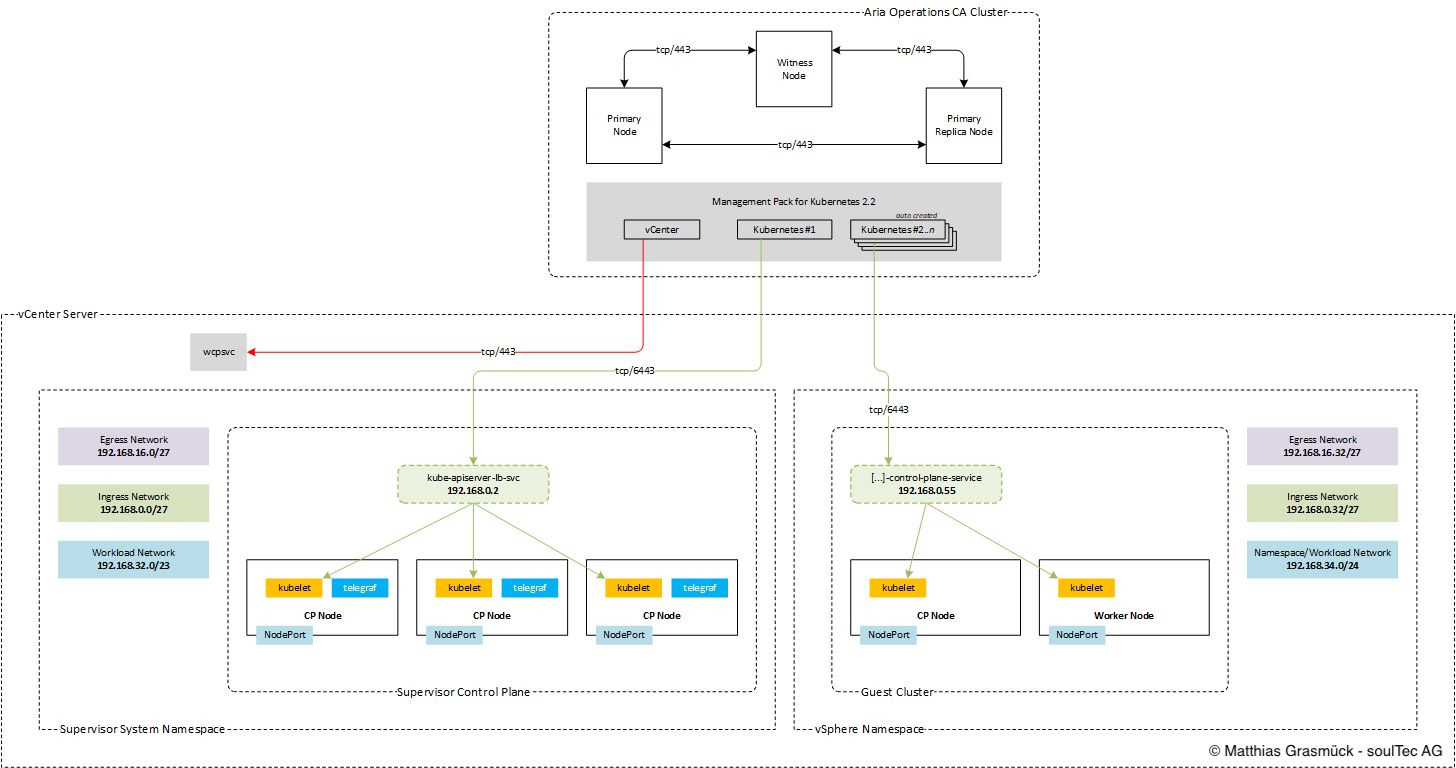
So arbeitet das Kubernetes Management Pack:
Voraussetzungen

  • Aria Operations 8.18.x
  • Kubernetes Management Pack (2.2)
  • vCenter bereits in Aria Ops hinzugefügt

Die nötigen Daten sammeln

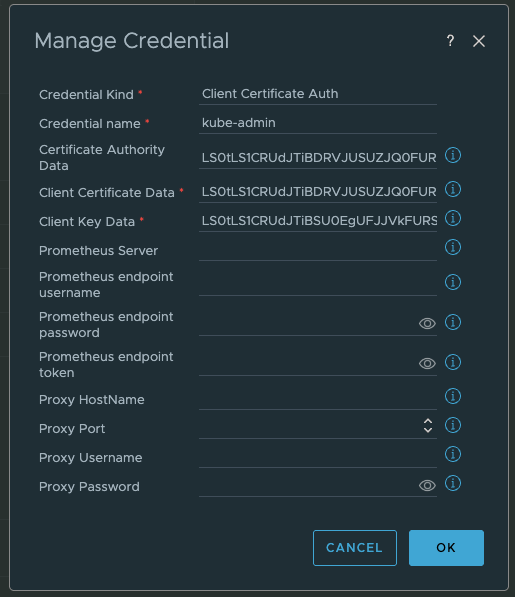
Für die Konfiguration eines Accounts im Kubernetes Management Pack von Aria Operations brauchen wir:

  • Supervisor IP (VIP)
  • certificate-authority-data
  • client-certificate-data
  • client-key-data

Schritt 1: per SSH auf die Control Plane Nodes

Verbinde dich per SSH als root mit der vCenter Appliance und führ aus (bash shell):

 
sshpass -p `/usr/lib/vmware-wcp/decryptK8Pwd.py | \
grep PWD | \
awk '{print $2}'` ssh -o StrictHostKeyChecking=no root@`/usr/lib/vmware-wcp/decryptK8Pwd.py | \
grep IP | \
awk '{print $2}'`

Falls die bash shell nicht aktiviert ist:

 
shell.set --enabled=true

Sieh dir auf einem der CP Nodes die kubeconfig an und hol dir diese Daten:

  • certificate-authority-data
  • client-certificate-data
  • client-key-data
 
cat ~/.kube/config

Aria Operations

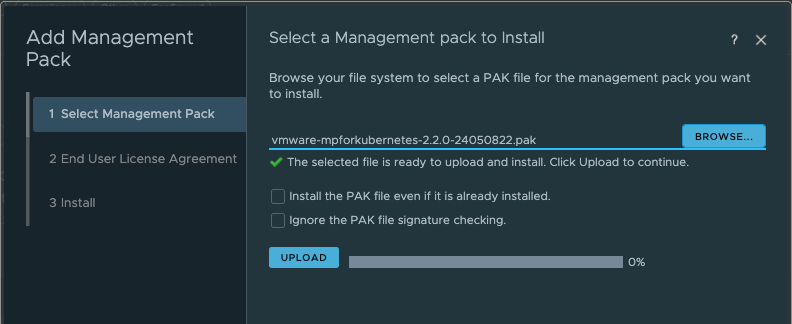
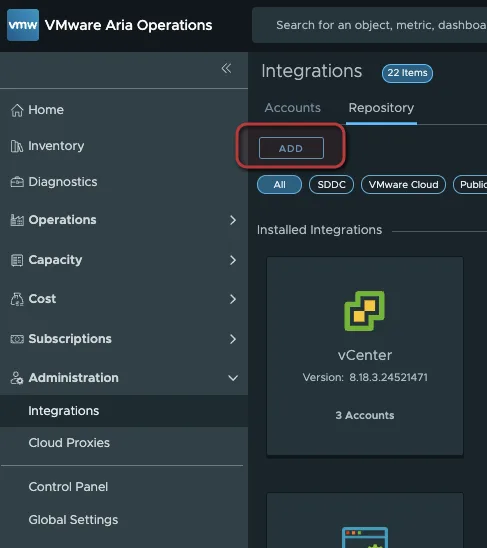
Das Kubernetes Management Pack (.pak) hinzufügen

Administration > Integrations > Repository
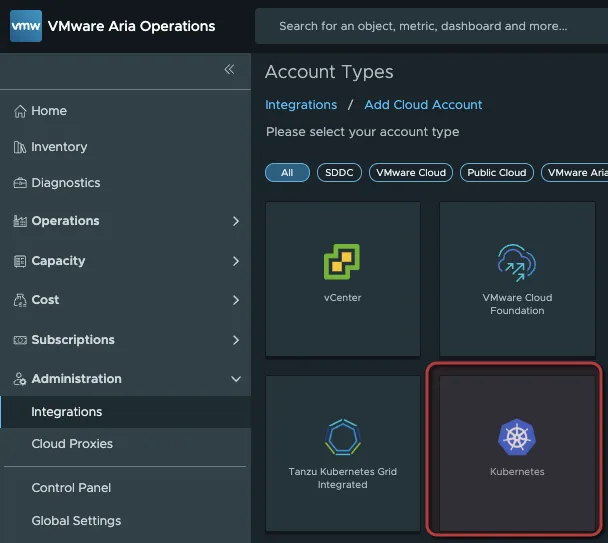
Das Supervisor Cluster hinzufügen

Administration > Integrations > Add Cloud Account > Kubernetes
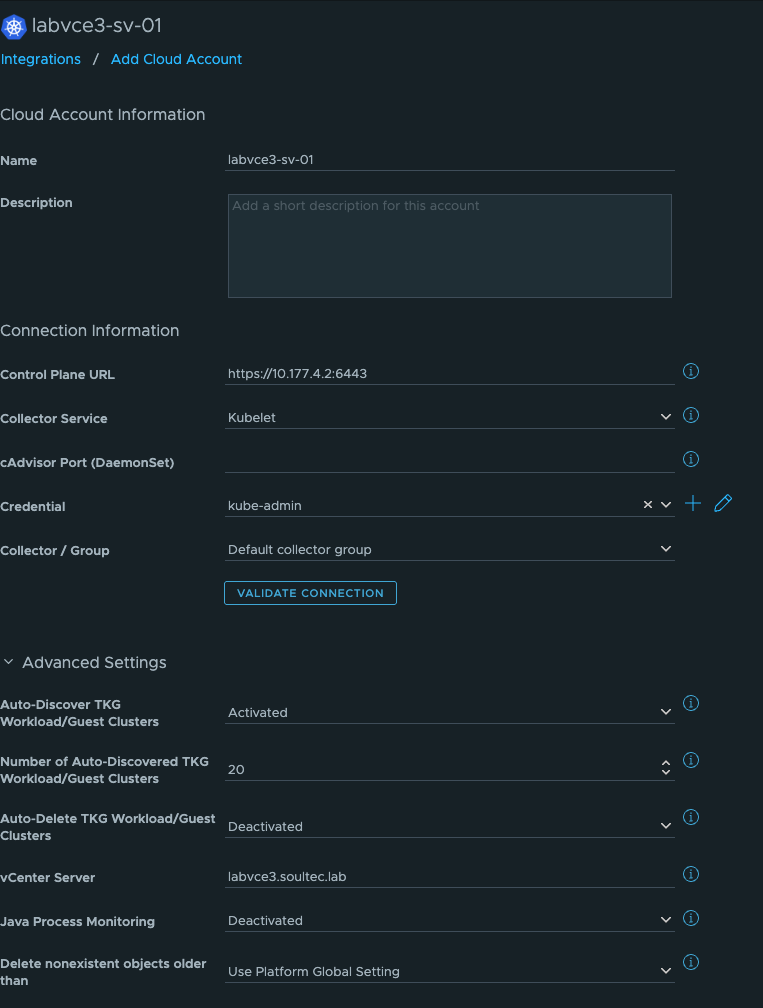
  • Control Plane URL: Supervisor VIP
  • Kubelet
  • Advanced Settings: Autodiscover TGK Guest Cluster (das vCenter muss bereits in Aria Ops sein)
Credentials:
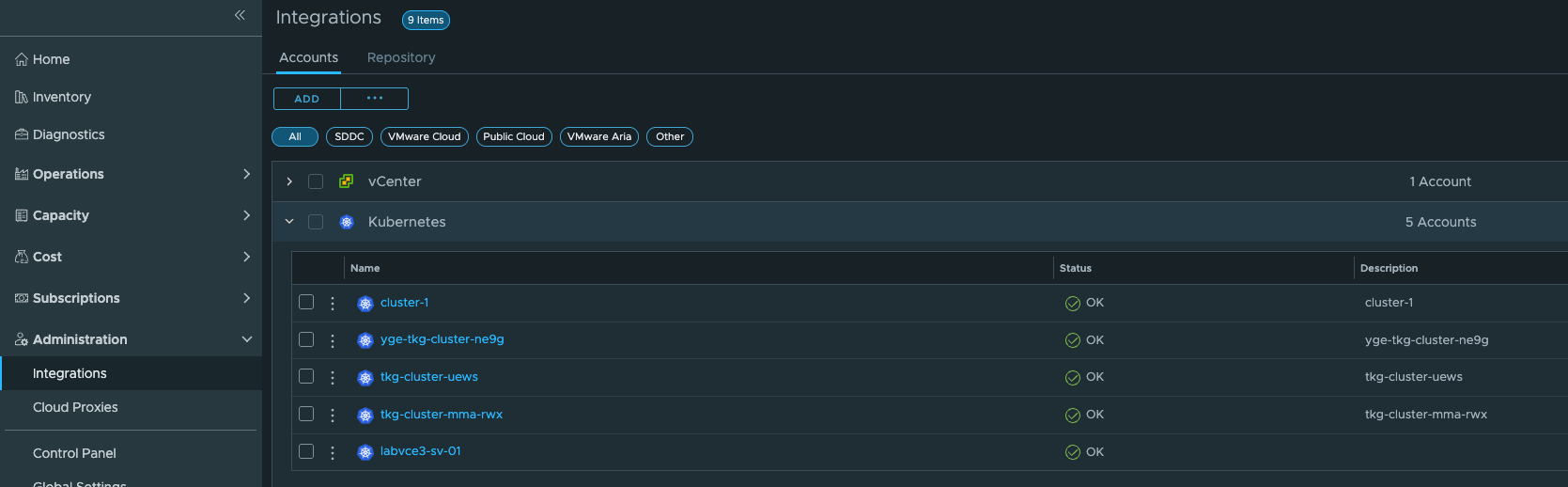
Inventory

Wenn Autodiscovery aktiviert ist, tauchen deine Kubernetes Guest Cluster nach wenigen Minuten auf.
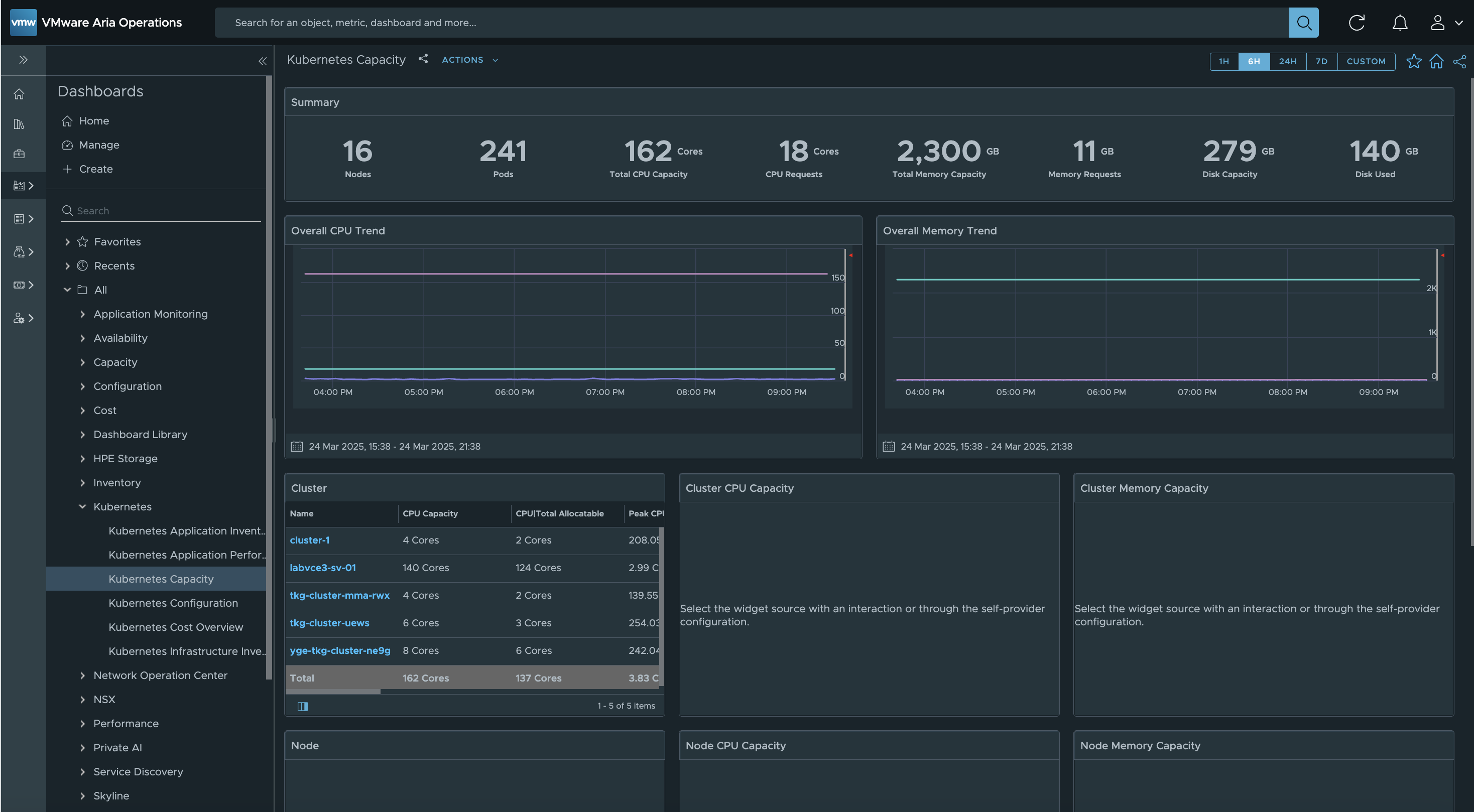
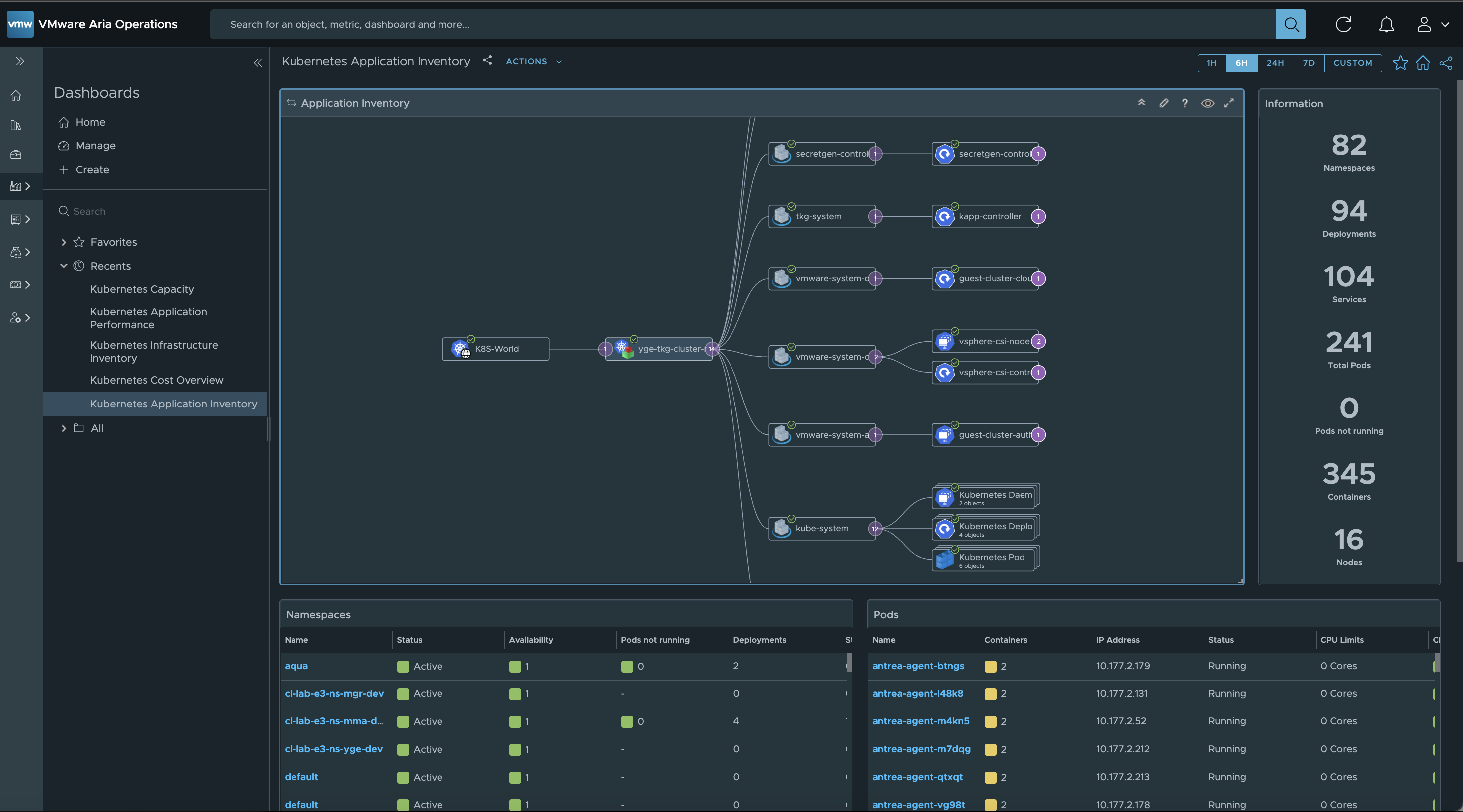
Dashboards

Das Kubernetes Management Pack bringt eine ganze Reihe nützlicher Dashboards mit.
Passt ausserdem