

build 7bbbddf7 | content blog-content@c8490fa · 338 posts | profiles 20 · corpus 267 | 0 skipped | | format
apiVersion: soultec.ch/v1kind: Postmetadata: name: how-to-fix-workspace-one-admin-assistant-parsing-failed-macos locale: en labels: author: valentina-cicmak series: how-to capability/modern-workplace: 2.11 annotations: source: blog-content/posts/en/how-to-fix-workspace-one-admin-assistant-parsing-failed-macos.md route: /en/insights/how-to-fix-workspace-one-admin-assistant-parsing-failed-macos/ schema: /nerd/schema/posts.json markdown: /en/insights/how-to-fix-workspace-one-admin-assistant-parsing-failed-macos.mdspec: title: Fix Workspace ONE Admin Assistant Parsing Failures on macOS date: 2026-08-07 author: valentina-cicmak locale: en summary: >- When using Omnissa Workspace ONE Admin Assistant on macOS, parsing can fail even if the application file itself is valid. One possible cause is a missing macOS privacy permission. capabilities: [modern-workplace] series: how-to hero: >- /blog-assets/how-to-fix-workspace-one-admin-assistant-parsing-failed-macos/hero.webp legacySlug: how-to-fix-workspace-one-admin-assistant-parsing-failed-macos migrated: 2026-08-24 draft: false sections: - body: | When using Omnissa Workspace ONE Admin Assistant on macOS, parsing can fail even if the application file itself is valid. One possible cause is a missing macOS privacy permission. The Workspace ONE Admin Assistant may not have access to the Documents folder, which can prevent it from accessing or creating the files required during the parsing process. ### The Problem Workspace ONE Admin Assistant is used to analyse macOS application installers and generate the metadata required for deployment through Workspace ONE UEM. ![](/blog-assets/how-to-fix-workspace-one-admin-assistant-parsing-failed-macos/01.webp) During the parsing process, the application may display a "Parsing failed" message. ![](/blog-assets/how-to-fix-workspace-one-admin-assistant-parsing-failed-macos/02.webp) In some cases, Workspace ONE Admin Assistant may also close unexpectedly immediately afterwards. ![](/blog-assets/how-to-fix-workspace-one-admin-assistant-parsing-failed-macos/03.webp) These errors can make it appear that the application installer itself is causing the problem. However, the issue can also be related to missing macOS permissions.macOS restricts application access to protected locations such as the Documents folder. If Workspace ONE Admin Assistant does not have permission to access this folder, the parsing process can fail and the application may terminate unexpectedly. ### The Solution Open System Settings on the Mac and navigate to: Privacy & Security → Files & Folders → Workspace ONE Admin Assistant Expand Workspace ONE Admin Assistant. The following permission should be visible: Documents Folder Enable the switch for Documents Folder. ![](/blog-assets/how-to-fix-workspace-one-admin-assistant-parsing-failed-macos/04.webp) After enabling the permission, close and reopen Workspace ONE Admin Assistant and start the parsing process again. - heading:

Next Steps

body: | If you've read this far then chances are you are still having issues. [Feel free to reach out to us](https://soultec.ch/contact-us/). We're happy to help out!status: corpus: 267 alsoLike: - {ref: posts/how-to-igel-ud-pocket-bios-uefi-settings, score: 1.00} - {ref: posts/how-to-enterprise-wipe-vs-device-wipe-vs-unenroll-vs-delete-device-in-workspace-one-uem, score: 1.00} - {ref: solutions/microsoft/microsoft-teams, score: 0.85}
{ "apiVersion": "soultec.ch/v1", "kind": "Post", "metadata": { "name": "how-to-fix-workspace-one-admin-assistant-parsing-failed-macos", "locale": "en", "labels": { "author": "valentina-cicmak", "series": "how-to", "capability/modern-workplace": "2.11" }, "annotations": { "source": "blog-content/posts/en/how-to-fix-workspace-one-admin-assistant-parsing-failed-macos.md", "route": "/en/insights/how-to-fix-workspace-one-admin-assistant-parsing-failed-macos/", "schema": "/nerd/schema/posts.json", "markdown": "/en/insights/how-to-fix-workspace-one-admin-assistant-parsing-failed-macos.md" } }, "spec": { "title": "Fix Workspace ONE Admin Assistant Parsing Failures on macOS", "date": "2026-08-07", "author": "valentina-cicmak", "locale": "en", "summary": "When using Omnissa Workspace ONE Admin Assistant on macOS, parsing can fail even if the application file itself is valid. One possible cause is a missing macOS privacy permission.", "capabilities": [ "modern-workplace" ], "series": "how-to", "hero": "/blog-assets/how-to-fix-workspace-one-admin-assistant-parsing-failed-macos/hero.webp", "legacySlug": "how-to-fix-workspace-one-admin-assistant-parsing-failed-macos", "migrated": "2026-08-24", "draft": false }, "sections": [ { "body": "When using Omnissa Workspace ONE Admin Assistant on macOS, parsing can fail even if the application file itself is valid.\n\nOne possible cause is a missing macOS privacy permission.\n\nThe Workspace ONE Admin Assistant may not have access to the Documents folder, which can prevent it from accessing or creating the files required during the parsing process.\n\n### The Problem\n\nWorkspace ONE Admin Assistant is used to analyse macOS application installers and generate the metadata required for deployment through Workspace ONE UEM.\n\n![](/blog-assets/how-to-fix-workspace-one-admin-assistant-parsing-failed-macos/01.webp)\n\nDuring the parsing process, the application may display a \"Parsing failed\" message.\n\n![](/blog-assets/how-to-fix-workspace-one-admin-assistant-parsing-failed-macos/02.webp)\n\nIn some cases, Workspace ONE Admin Assistant may also close unexpectedly immediately afterwards.\n\n![](/blog-assets/how-to-fix-workspace-one-admin-assistant-parsing-failed-macos/03.webp)\n\nThese errors can make it appear that the application installer itself is causing the problem. However, the issue can also be related to missing macOS permissions.macOS restricts application access to protected locations such as the Documents folder. If Workspace ONE Admin Assistant does not have permission to access this folder, the parsing process can fail and the application may terminate unexpectedly.\n\n### The Solution\n\nOpen System Settings on the Mac and navigate to:\n\nPrivacy & Security \n→ Files & Folders \n→ Workspace ONE Admin Assistant\n\nExpand Workspace ONE Admin Assistant.\n\nThe following permission should be visible:\n\nDocuments Folder\n\nEnable the switch for Documents Folder.\n\n![](/blog-assets/how-to-fix-workspace-one-admin-assistant-parsing-failed-macos/04.webp)\n\nAfter enabling the permission, close and reopen Workspace ONE Admin Assistant and start the parsing process again." }, { "heading": "

Next Steps

",
"body": "If you've read this far then chances are you are still having issues. [Feel free to reach out to us](https://soultec.ch/contact-us/). We're happy to help out!" } ], "status": { "corpus": 267, "alsoLike": [ { "ref": "posts/how-to-igel-ud-pocket-bios-uefi-settings", "score": "1.00" }, { "ref": "posts/how-to-enterprise-wipe-vs-device-wipe-vs-unenroll-vs-delete-device-in-workspace-one-uem", "score": "1.00" }, { "ref": "solutions/microsoft/microsoft-teams", "score": "0.85" } ] }}
apiVersion = "soultec.ch/v1"kind = "Post"[metadata]name = "how-to-fix-workspace-one-admin-assistant-parsing-failed-macos"locale = "en"[metadata.labels]author = "valentina-cicmak"series = "how-to""capability/modern-workplace" = "2.11"[metadata.annotations]source = "blog-content/posts/en/how-to-fix-workspace-one-admin-assistant-parsing-failed-macos.md"route = "/en/insights/how-to-fix-workspace-one-admin-assistant-parsing-failed-macos/"schema = "/nerd/schema/posts.json"markdown = "/en/insights/how-to-fix-workspace-one-admin-assistant-parsing-failed-macos.md"[spec]title = "Fix Workspace ONE Admin Assistant Parsing Failures on macOS"date = 2026-08-07author = "valentina-cicmak"locale = "en"summary = "When using Omnissa Workspace ONE Admin Assistant on macOS, parsing can fail even if the application file itself is valid. One possible cause is a missing macOS privacy permission."capabilities = ["modern-workplace"]series = "how-to"hero = "/blog-assets/how-to-fix-workspace-one-admin-assistant-parsing-failed-macos/hero.webp"legacySlug = "how-to-fix-workspace-one-admin-assistant-parsing-failed-macos"migrated = 2026-08-24draft = false[[sections]]body = '''When using Omnissa Workspace ONE Admin Assistant on macOS, parsing can fail even if the application file itself is valid.One possible cause is a missing macOS privacy permission.The Workspace ONE Admin Assistant may not have access to the Documents folder, which can prevent it from accessing or creating the files required during the parsing process.### The ProblemWorkspace ONE Admin Assistant is used to analyse macOS application installers and generate the metadata required for deployment through Workspace ONE UEM.![](/blog-assets/how-to-fix-workspace-one-admin-assistant-parsing-failed-macos/01.webp)During the parsing process, the application may display a "Parsing failed" message.![](/blog-assets/how-to-fix-workspace-one-admin-assistant-parsing-failed-macos/02.webp)In some cases, Workspace ONE Admin Assistant may also close unexpectedly immediately afterwards.![](/blog-assets/how-to-fix-workspace-one-admin-assistant-parsing-failed-macos/03.webp)These errors can make it appear that the application installer itself is causing the problem. However, the issue can also be related to missing macOS permissions.macOS restricts application access to protected locations such as the Documents folder. If Workspace ONE Admin Assistant does not have permission to access this folder, the parsing process can fail and the application may terminate unexpectedly.### The SolutionOpen System Settings on the Mac and navigate to:Privacy & Security → Files & Folders → Workspace ONE Admin AssistantExpand Workspace ONE Admin Assistant.The following permission should be visible:Documents FolderEnable the switch for Documents Folder.![](/blog-assets/how-to-fix-workspace-one-admin-assistant-parsing-failed-macos/04.webp)After enabling the permission, close and reopen Workspace ONE Admin Assistant and start the parsing process again.'''[[sections]]heading = "

Next Steps

"
body = "If you've read this far then chances are you are still having issues. [Feel free to reach out to us](https://soultec.ch/contact-us/). We're happy to help out!"[status]corpus = 267[[status.alsoLike]]ref = "posts/how-to-igel-ud-pocket-bios-uefi-settings"score = "1.00"[[status.alsoLike]]ref = "posts/how-to-enterprise-wipe-vs-device-wipe-vs-unenroll-vs-delete-device-in-workspace-one-uem"score = "1.00"[[status.alsoLike]]ref = "solutions/microsoft/microsoft-teams"score = "0.85"
<?xml version="1.0" encoding="UTF-8"?><manifest kind="Post"> <apiVersion>soultec.ch/v1</apiVersion> <metadata> <name>how-to-fix-workspace-one-admin-assistant-parsing-failed-macos</name> <locale>en</locale> <labels> <author>valentina-cicmak</author> <series>how-to</series> <entry key="capability/modern-workplace">2.11</entry> </labels> <annotations> <source>blog-content/posts/en/how-to-fix-workspace-one-admin-assistant-parsing-failed-macos.md</source> <route>/en/insights/how-to-fix-workspace-one-admin-assistant-parsing-failed-macos/</route> <schema>/nerd/schema/posts.json</schema> <markdown>/en/insights/how-to-fix-workspace-one-admin-assistant-parsing-failed-macos.md</markdown> </annotations> </metadata> <spec> <title>Fix Workspace ONE Admin Assistant Parsing Failures on macOS</title> <date>2026-08-07</date> <author>valentina-cicmak</author> <locale>en</locale> <summary>When using Omnissa Workspace ONE Admin Assistant on macOS, parsing can fail even if the application file itself is valid. One possible cause is a missing macOS privacy permission.</summary> <capabilities> <item>modern-workplace</item> </capabilities> <series>how-to</series> <hero>/blog-assets/how-to-fix-workspace-one-admin-assistant-parsing-failed-macos/hero.webp</hero> <legacySlug>how-to-fix-workspace-one-admin-assistant-parsing-failed-macos</legacySlug> <migrated>2026-08-24</migrated> <draft>false</draft> </spec> <sections> <section> <body>When using Omnissa Workspace ONE Admin Assistant on macOS, parsing can fail even if the application file itself is valid.One possible cause is a missing macOS privacy permission.The Workspace ONE Admin Assistant may not have access to the Documents folder, which can prevent it from accessing or creating the files required during the parsing process.### The ProblemWorkspace ONE Admin Assistant is used to analyse macOS application installers and generate the metadata required for deployment through Workspace ONE UEM.![](/blog-assets/how-to-fix-workspace-one-admin-assistant-parsing-failed-macos/01.webp)During the parsing process, the application may display a "Parsing failed" message.![](/blog-assets/how-to-fix-workspace-one-admin-assistant-parsing-failed-macos/02.webp)In some cases, Workspace ONE Admin Assistant may also close unexpectedly immediately afterwards.![](/blog-assets/how-to-fix-workspace-one-admin-assistant-parsing-failed-macos/03.webp)These errors can make it appear that the application installer itself is causing the problem. However, the issue can also be related to missing macOS permissions.macOS restricts application access to protected locations such as the Documents folder. If Workspace ONE Admin Assistant does not have permission to access this folder, the parsing process can fail and the application may terminate unexpectedly.### The SolutionOpen System Settings on the Mac and navigate to:Privacy &amp; Security → Files &amp; Folders → Workspace ONE Admin AssistantExpand Workspace ONE Admin Assistant.The following permission should be visible:Documents FolderEnable the switch for Documents Folder.![](/blog-assets/how-to-fix-workspace-one-admin-assistant-parsing-failed-macos/04.webp)After enabling the permission, close and reopen Workspace ONE Admin Assistant and start the parsing process again. </body> </section> <section> <heading>

Next Steps

</heading>
<body>If you've read this far then chances are you are still having issues. [Feel free to reach out to us](https://soultec.ch/contact-us/). We're happy to help out!</body> </section> </sections> <status> <corpus>267</corpus> <alsoLike> <item> <ref>posts/how-to-igel-ud-pocket-bios-uefi-settings</ref> <score>1.00</score> </item> <item> <ref>posts/how-to-enterprise-wipe-vs-device-wipe-vs-unenroll-vs-delete-device-in-workspace-one-uem</ref> <score>1.00</score> </item> <item> <ref>solutions/microsoft/microsoft-teams</ref> <score>0.85</score> </item> </alsoLike> </status></manifest>
How-To · 2026-08-07

Fix Workspace ONE Admin Assistant Parsing Failures on macOS

When using Omnissa Workspace ONE Admin Assistant on macOS, parsing can fail even if the application file itself is valid. One possible cause is a missing macOS privacy permission.

2026-08-07Date
Valentina CicmakAuthor
1Min read
Topics Modern Workplace 2.11

When using Omnissa Workspace ONE Admin Assistant on macOS, parsing can fail even if the application file itself is valid.

One possible cause is a missing macOS privacy permission.

The Workspace ONE Admin Assistant may not have access to the Documents folder, which can prevent it from accessing or creating the files required during the parsing process.

The Problem

Workspace ONE Admin Assistant is used to analyse macOS application installers and generate the metadata required for deployment through Workspace ONE UEM.
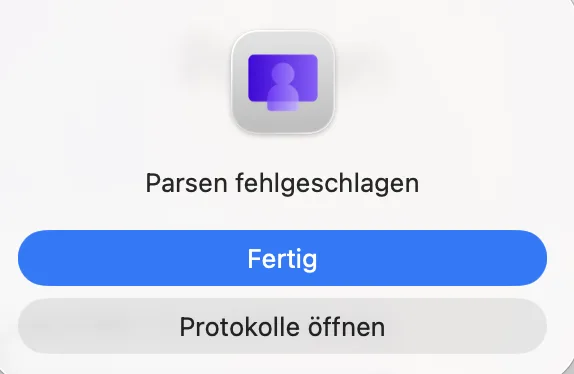
During the parsing process, the application may display a “Parsing failed” message.
In some cases, Workspace ONE Admin Assistant may also close unexpectedly immediately afterwards.
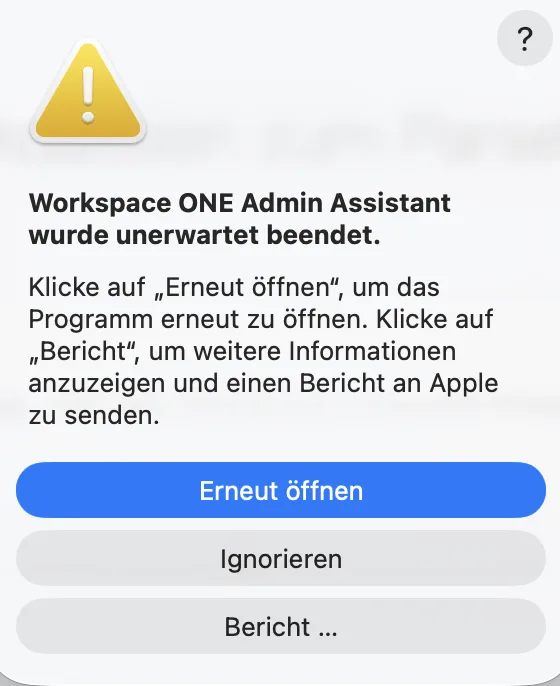
These errors can make it appear that the application installer itself is causing the problem. However, the issue can also be related to missing macOS permissions.macOS restricts application access to protected locations such as the Documents folder. If Workspace ONE Admin Assistant does not have permission to access this folder, the parsing process can fail and the application may terminate unexpectedly.

The Solution

Open System Settings on the Mac and navigate to:

Privacy & Security
→ Files & Folders
→ Workspace ONE Admin Assistant

Expand Workspace ONE Admin Assistant.

The following permission should be visible:

Documents Folder

Enable the switch for Documents Folder.

After enabling the permission, close and reopen Workspace ONE Admin Assistant and start the parsing process again.

Next Steps

If you’ve read this far then chances are you are still having issues. Feel free to reach out to us. We’re happy to help out!
You might also like