

build 7bbbddf7 | content blog-content@c8490fa · 338 posts | profiles 20 · corpus 267 | 0 skipped | | format
apiVersion: soultec.ch/v1kind: Postmetadata: name: vmware-cloud-foundation-how-to-skip-vsan-hcl-checks-for-esxi-upgrades locale: en labels: author: dario-doerflinger series: community capability/cloud: 1.94 capability/virtualization: 1.37 capability/storage: 2.62 vendor/vmware: 0.88 annotations: source: blog-content/posts/en/vmware-cloud-foundation-how-to-skip-vsan-hcl-checks-for-esxi-upgrades.md route: /en/insights/vmware-cloud-foundation-how-to-skip-vsan-hcl-checks-for-esxi-upgrades/ schema: /nerd/schema/posts.json markdown: /en/insights/vmware-cloud-foundation-how-to-skip-vsan-hcl-checks-for-esxi-upgrades.mdspec: title: How to skip vSAN HCL Checks for ESXi Upgrades date: 2021-10-08 author: dario-doerflinger locale: en summary: >- A short blog about how one can disable vSAN HCL Checks in VCF SDDC manager. capabilities: [cloud, virtualization, storage] vendors: [vmware] series: community legacySlug: vmware-cloud-foundation-how-to-skip-vsan-hcl-checks-for-esxi-upgrades migrated: 2026-08-24 comments: 1 draft: false sections: - body: | In my current role I get to play around with VMware Cloud Foundation a lot. We do have a rather large environment where I work. Because all the currently supported hardware is being used inside our VCF 3.10.1 environment I had to use our outdated hardware to build a small consolidated VCF 4 environment. As most of you know, two days ago VMware released [VMware Cloud Foundation 4.1](https://docs.vmware.com/en/VMware-Cloud-Foundation/4.1/rn/VMware-Cloud-Foundation-41-Release-Notes.html) which comes with the newly released [vSphere](https://docs.vmware.com/en/VMware-vSphere/7.0/rn/vsphere-esxi-701-release-notes.html) (and [vSAN](https://docs.vmware.com/en/VMware-vSphere/7.0/rn/vmware-vsan-701-release-notes.html)) 7.0 Update 1. So I wanted to go ahead and patch my consolidated VCF 4.0 environment to 4.1. The Update process is quite straightforward as one would expect from VCF: – Update SDDC Manager from 4.0 to 4.1 – Install "configuration drift package 4.1" for SDDC manager – Update to NSX-T 3.0.2 – Update to vCenter 7.0 Update 1 – Update to ESXi 7.0 Update 1 Because my hardware is very outdated and the array controller is not on the HCL for any current releases the update of my ESXi inevitably fails. Precheck fails of course as well and points out the HCL mismatch. There is currently no official way of ignoring those according to my contacts at VMware. However, because I also had to configure a proxy server on my sddc manager (I followed [this link](https://docs.vmware.com/en/VMware-Cloud-Foundation/3.0.1/com.vmware.vcf.admin.doc_301/GUID-BB15EADE-DCD3-4D51-824E-124C9B364D20.html) to do so) I knew about the "application-prod.properties" file already. I've decided to take a look at this file then. A quick search for "vsan" inside the /opt/vmware/vcf/lcm/lcm-app/conf/application-prod.properties file revealed three interesting lines starting at line number 103: ``` ################### VSAN CONFIGURATION ################### vsan.healthcheck.enabled=true vsan.hcl.update.enabled=true vsan.precheck.enabled=true ``` Now because this is my own lab environment I did not care if I would break sddc manager and so I changed the above lines to "false": ``` ################### VSAN CONFIGURATION ################### vsan.healthcheck.enabled=false vsan.hcl.update.enabled=false vsan.precheck.enabled=false ``` I then saved the file and restarted lcm using ``` systemctl restart lcm ``` And afterwards the Pre-Check did not even list the vSAN Pre-Checks anymore and therefore passed with flying colors: ![](/blog-assets/vmware-cloud-foundation-how-to-skip-vsan-hcl-checks-for-esxi-upgrades/01.webp) I immediately started the Update for my 4 ESXi hosts and it turned out to go through as well: ![](/blog-assets/vmware-cloud-foundation-how-to-skip-vsan-hcl-checks-for-esxi-upgrades/02.webp) The Update was successful for all my 4 Nodes. I did not see anything broken in my sddc manager due to my change except for the now missing vSAN HCL checks in the Precheck. I would not recommend you to change these settings in a productive environment but it is good to know that we can use VCF in lab environments that make use of "unsupported" hardware.status: corpus: 267 comments: 1 alsoLike: - {ref: posts/how-to-vsan-witness-9-0, score: 1.00} - {ref: solutions/vmware/vmware-cloud-foundation/vmware-vsan, score: 0.77} - {ref: solutions/vmware/vmware-cloud-foundation/addon/vsan-additional-capacity, score: 0.77}
{ "apiVersion": "soultec.ch/v1", "kind": "Post", "metadata": { "name": "vmware-cloud-foundation-how-to-skip-vsan-hcl-checks-for-esxi-upgrades", "locale": "en", "labels": { "author": "dario-doerflinger", "series": "community", "capability/cloud": "1.94", "capability/virtualization": "1.37", "capability/storage": "2.62", "vendor/vmware": "0.88" }, "annotations": { "source": "blog-content/posts/en/vmware-cloud-foundation-how-to-skip-vsan-hcl-checks-for-esxi-upgrades.md", "route": "/en/insights/vmware-cloud-foundation-how-to-skip-vsan-hcl-checks-for-esxi-upgrades/", "schema": "/nerd/schema/posts.json", "markdown": "/en/insights/vmware-cloud-foundation-how-to-skip-vsan-hcl-checks-for-esxi-upgrades.md" } }, "spec": { "title": "How to skip vSAN HCL Checks for ESXi Upgrades", "date": "2021-10-08", "author": "dario-doerflinger", "locale": "en", "summary": "A short blog about how one can disable vSAN HCL Checks in VCF SDDC manager.", "capabilities": [ "cloud", "virtualization", "storage" ], "vendors": [ "vmware" ], "series": "community", "legacySlug": "vmware-cloud-foundation-how-to-skip-vsan-hcl-checks-for-esxi-upgrades", "migrated": "2026-08-24", "comments": 1, "draft": false }, "sections": [ { "body": "In my current role I get to play around with VMware Cloud Foundation a lot. We do have a rather large environment where I work.\n\nBecause all the currently supported hardware is being used inside our VCF 3.10.1 environment I had to use our outdated hardware to build a small consolidated VCF 4 environment.\n\nAs most of you know, two days ago VMware released [VMware Cloud Foundation 4.1](https://docs.vmware.com/en/VMware-Cloud-Foundation/4.1/rn/VMware-Cloud-Foundation-41-Release-Notes.html) which comes with the newly released [vSphere](https://docs.vmware.com/en/VMware-vSphere/7.0/rn/vsphere-esxi-701-release-notes.html) (and [vSAN](https://docs.vmware.com/en/VMware-vSphere/7.0/rn/vmware-vsan-701-release-notes.html)) 7.0 Update 1. So I wanted to go ahead and patch my consolidated VCF 4.0 environment to 4.1.\n\nThe Update process is quite straightforward as one would expect from VCF: \n– Update SDDC Manager from 4.0 to 4.1 \n– Install \"configuration drift package 4.1\" for SDDC manager \n– Update to NSX-T 3.0.2 \n– Update to vCenter 7.0 Update 1 \n– Update to ESXi 7.0 Update 1\n\nBecause my hardware is very outdated and the array controller is not on the HCL for any current releases the update of my ESXi inevitably fails. Precheck fails of course as well and points out the HCL mismatch.\n\nThere is currently no official way of ignoring those according to my contacts at VMware. However, because I also had to configure a proxy server on my sddc manager (I followed [this link](https://docs.vmware.com/en/VMware-Cloud-Foundation/3.0.1/com.vmware.vcf.admin.doc_301/GUID-BB15EADE-DCD3-4D51-824E-124C9B364D20.html) to do so) I knew about the \"application-prod.properties\" file already. I've decided to take a look at this file then.\n\nA quick search for \"vsan\" inside the /opt/vmware/vcf/lcm/lcm-app/conf/application-prod.properties file revealed three interesting lines starting at line number 103:\n\n```\n################### VSAN CONFIGURATION ###################\nvsan.healthcheck.enabled=true\nvsan.hcl.update.enabled=true\nvsan.precheck.enabled=true\n```\n\nNow because this is my own lab environment I did not care if I would break sddc manager and so I changed the above lines to \"false\":\n\n```\n################### VSAN CONFIGURATION ###################\nvsan.healthcheck.enabled=false\nvsan.hcl.update.enabled=false\nvsan.precheck.enabled=false\n```\n\nI then saved the file and restarted lcm using\n\n```\nsystemctl restart lcm\n```\n\nAnd afterwards the Pre-Check did not even list the vSAN Pre-Checks anymore and therefore passed with flying colors:\n\n![](/blog-assets/vmware-cloud-foundation-how-to-skip-vsan-hcl-checks-for-esxi-upgrades/01.webp)\n\nI immediately started the Update for my 4 ESXi hosts and it turned out to go through as well:\n\n![](/blog-assets/vmware-cloud-foundation-how-to-skip-vsan-hcl-checks-for-esxi-upgrades/02.webp)\n\nThe Update was successful for all my 4 Nodes. I did not see anything broken in my sddc manager due to my change except for the now missing vSAN HCL checks in the Precheck. I would not recommend you to change these settings in a productive environment but it is good to know that we can use VCF in lab environments that make use of \"unsupported\" hardware." } ], "status": { "corpus": 267, "comments": 1, "alsoLike": [ { "ref": "posts/how-to-vsan-witness-9-0", "score": "1.00" }, { "ref": "solutions/vmware/vmware-cloud-foundation/vmware-vsan", "score": "0.77" }, { "ref": "solutions/vmware/vmware-cloud-foundation/addon/vsan-additional-capacity", "score": "0.77" } ] }}
apiVersion = "soultec.ch/v1"kind = "Post"[metadata]name = "vmware-cloud-foundation-how-to-skip-vsan-hcl-checks-for-esxi-upgrades"locale = "en"[metadata.labels]author = "dario-doerflinger"series = "community""capability/cloud" = "1.94""capability/virtualization" = "1.37""capability/storage" = "2.62""vendor/vmware" = "0.88"[metadata.annotations]source = "blog-content/posts/en/vmware-cloud-foundation-how-to-skip-vsan-hcl-checks-for-esxi-upgrades.md"route = "/en/insights/vmware-cloud-foundation-how-to-skip-vsan-hcl-checks-for-esxi-upgrades/"schema = "/nerd/schema/posts.json"markdown = "/en/insights/vmware-cloud-foundation-how-to-skip-vsan-hcl-checks-for-esxi-upgrades.md"[spec]title = "How to skip vSAN HCL Checks for ESXi Upgrades"date = 2021-10-08author = "dario-doerflinger"locale = "en"summary = "A short blog about how one can disable vSAN HCL Checks in VCF SDDC manager."capabilities = ["cloud", "virtualization", "storage"]vendors = ["vmware"]series = "community"legacySlug = "vmware-cloud-foundation-how-to-skip-vsan-hcl-checks-for-esxi-upgrades"migrated = 2026-08-24comments = 1draft = false[[sections]]body = '''In my current role I get to play around with VMware Cloud Foundation a lot. We do have a rather large environment where I work.Because all the currently supported hardware is being used inside our VCF 3.10.1 environment I had to use our outdated hardware to build a small consolidated VCF 4 environment.As most of you know, two days ago VMware released [VMware Cloud Foundation 4.1](https://docs.vmware.com/en/VMware-Cloud-Foundation/4.1/rn/VMware-Cloud-Foundation-41-Release-Notes.html) which comes with the newly released [vSphere](https://docs.vmware.com/en/VMware-vSphere/7.0/rn/vsphere-esxi-701-release-notes.html) (and [vSAN](https://docs.vmware.com/en/VMware-vSphere/7.0/rn/vmware-vsan-701-release-notes.html)) 7.0 Update 1. So I wanted to go ahead and patch my consolidated VCF 4.0 environment to 4.1.The Update process is quite straightforward as one would expect from VCF: – Update SDDC Manager from 4.0 to 4.1 – Install "configuration drift package 4.1" for SDDC manager – Update to NSX-T 3.0.2 – Update to vCenter 7.0 Update 1 – Update to ESXi 7.0 Update 1Because my hardware is very outdated and the array controller is not on the HCL for any current releases the update of my ESXi inevitably fails. Precheck fails of course as well and points out the HCL mismatch.There is currently no official way of ignoring those according to my contacts at VMware. However, because I also had to configure a proxy server on my sddc manager (I followed [this link](https://docs.vmware.com/en/VMware-Cloud-Foundation/3.0.1/com.vmware.vcf.admin.doc_301/GUID-BB15EADE-DCD3-4D51-824E-124C9B364D20.html) to do so) I knew about the "application-prod.properties" file already. I've decided to take a look at this file then.A quick search for "vsan" inside the /opt/vmware/vcf/lcm/lcm-app/conf/application-prod.properties file revealed three interesting lines starting at line number 103:```################### VSAN CONFIGURATION ###################vsan.healthcheck.enabled=truevsan.hcl.update.enabled=truevsan.precheck.enabled=true```Now because this is my own lab environment I did not care if I would break sddc manager and so I changed the above lines to "false":```################### VSAN CONFIGURATION ###################vsan.healthcheck.enabled=falsevsan.hcl.update.enabled=falsevsan.precheck.enabled=false```I then saved the file and restarted lcm using```systemctl restart lcm```And afterwards the Pre-Check did not even list the vSAN Pre-Checks anymore and therefore passed with flying colors:![](/blog-assets/vmware-cloud-foundation-how-to-skip-vsan-hcl-checks-for-esxi-upgrades/01.webp)I immediately started the Update for my 4 ESXi hosts and it turned out to go through as well:![](/blog-assets/vmware-cloud-foundation-how-to-skip-vsan-hcl-checks-for-esxi-upgrades/02.webp)The Update was successful for all my 4 Nodes. I did not see anything broken in my sddc manager due to my change except for the now missing vSAN HCL checks in the Precheck. I would not recommend you to change these settings in a productive environment but it is good to know that we can use VCF in lab environments that make use of "unsupported" hardware.'''[status]corpus = 267comments = 1[[status.alsoLike]]ref = "posts/how-to-vsan-witness-9-0"score = "1.00"[[status.alsoLike]]ref = "solutions/vmware/vmware-cloud-foundation/vmware-vsan"score = "0.77"[[status.alsoLike]]ref = "solutions/vmware/vmware-cloud-foundation/addon/vsan-additional-capacity"score = "0.77"
<?xml version="1.0" encoding="UTF-8"?><manifest kind="Post"> <apiVersion>soultec.ch/v1</apiVersion> <metadata> <name>vmware-cloud-foundation-how-to-skip-vsan-hcl-checks-for-esxi-upgrades</name> <locale>en</locale> <labels> <author>dario-doerflinger</author> <series>community</series> <entry key="capability/cloud">1.94</entry> <entry key="capability/virtualization">1.37</entry> <entry key="capability/storage">2.62</entry> <entry key="vendor/vmware">0.88</entry> </labels> <annotations> <source>blog-content/posts/en/vmware-cloud-foundation-how-to-skip-vsan-hcl-checks-for-esxi-upgrades.md</source> <route>/en/insights/vmware-cloud-foundation-how-to-skip-vsan-hcl-checks-for-esxi-upgrades/</route> <schema>/nerd/schema/posts.json</schema> <markdown>/en/insights/vmware-cloud-foundation-how-to-skip-vsan-hcl-checks-for-esxi-upgrades.md</markdown> </annotations> </metadata> <spec> <title>How to skip vSAN HCL Checks for ESXi Upgrades</title> <date>2021-10-08</date> <author>dario-doerflinger</author> <locale>en</locale> <summary>A short blog about how one can disable vSAN HCL Checks in VCF SDDC manager.</summary> <capabilities> <item>cloud</item> <item>virtualization</item> <item>storage</item> </capabilities> <vendors> <item>vmware</item> </vendors> <series>community</series> <legacySlug>vmware-cloud-foundation-how-to-skip-vsan-hcl-checks-for-esxi-upgrades</legacySlug> <migrated>2026-08-24</migrated> <comments>1</comments> <draft>false</draft> </spec> <sections> <section> <body>In my current role I get to play around with VMware Cloud Foundation a lot. We do have a rather large environment where I work.Because all the currently supported hardware is being used inside our VCF 3.10.1 environment I had to use our outdated hardware to build a small consolidated VCF 4 environment.As most of you know, two days ago VMware released [VMware Cloud Foundation 4.1](https://docs.vmware.com/en/VMware-Cloud-Foundation/4.1/rn/VMware-Cloud-Foundation-41-Release-Notes.html) which comes with the newly released [vSphere](https://docs.vmware.com/en/VMware-vSphere/7.0/rn/vsphere-esxi-701-release-notes.html) (and [vSAN](https://docs.vmware.com/en/VMware-vSphere/7.0/rn/vmware-vsan-701-release-notes.html)) 7.0 Update 1. So I wanted to go ahead and patch my consolidated VCF 4.0 environment to 4.1.The Update process is quite straightforward as one would expect from VCF: – Update SDDC Manager from 4.0 to 4.1 – Install "configuration drift package 4.1" for SDDC manager – Update to NSX-T 3.0.2 – Update to vCenter 7.0 Update 1 – Update to ESXi 7.0 Update 1Because my hardware is very outdated and the array controller is not on the HCL for any current releases the update of my ESXi inevitably fails. Precheck fails of course as well and points out the HCL mismatch.There is currently no official way of ignoring those according to my contacts at VMware. However, because I also had to configure a proxy server on my sddc manager (I followed [this link](https://docs.vmware.com/en/VMware-Cloud-Foundation/3.0.1/com.vmware.vcf.admin.doc_301/GUID-BB15EADE-DCD3-4D51-824E-124C9B364D20.html) to do so) I knew about the "application-prod.properties" file already. I've decided to take a look at this file then.A quick search for "vsan" inside the /opt/vmware/vcf/lcm/lcm-app/conf/application-prod.properties file revealed three interesting lines starting at line number 103:```################### VSAN CONFIGURATION ###################vsan.healthcheck.enabled=truevsan.hcl.update.enabled=truevsan.precheck.enabled=true```Now because this is my own lab environment I did not care if I would break sddc manager and so I changed the above lines to "false":```################### VSAN CONFIGURATION ###################vsan.healthcheck.enabled=falsevsan.hcl.update.enabled=falsevsan.precheck.enabled=false```I then saved the file and restarted lcm using```systemctl restart lcm```And afterwards the Pre-Check did not even list the vSAN Pre-Checks anymore and therefore passed with flying colors:![](/blog-assets/vmware-cloud-foundation-how-to-skip-vsan-hcl-checks-for-esxi-upgrades/01.webp)I immediately started the Update for my 4 ESXi hosts and it turned out to go through as well:![](/blog-assets/vmware-cloud-foundation-how-to-skip-vsan-hcl-checks-for-esxi-upgrades/02.webp)The Update was successful for all my 4 Nodes. I did not see anything broken in my sddc manager due to my change except for the now missing vSAN HCL checks in the Precheck. I would not recommend you to change these settings in a productive environment but it is good to know that we can use VCF in lab environments that make use of "unsupported" hardware. </body> </section> </sections> <status> <corpus>267</corpus> <comments>1</comments> <alsoLike> <item> <ref>posts/how-to-vsan-witness-9-0</ref> <score>1.00</score> </item> <item> <ref>solutions/vmware/vmware-cloud-foundation/vmware-vsan</ref> <score>0.77</score> </item> <item> <ref>solutions/vmware/vmware-cloud-foundation/addon/vsan-additional-capacity</ref> <score>0.77</score> </item> </alsoLike> </status></manifest>
Community · 2021-10-08

How to skip vSAN HCL Checks for ESXi Upgrades

A short blog about how one can disable vSAN HCL Checks in VCF SDDC manager.

2021-10-08Date
Dario DörflingerAuthor
2Min read
Topics Cloud 1.94 Virtualization 1.37 Storage 2.62
Vendors VMware 0.88

This post is from 2021. It stays online because people still look for it, but it describes the products as they were then.

In my current role I get to play around with VMware Cloud Foundation a lot. We do have a rather large environment where I work.

Because all the currently supported hardware is being used inside our VCF 3.10.1 environment I had to use our outdated hardware to build a small consolidated VCF 4 environment.

As most of you know, two days ago VMware released VMware Cloud Foundation 4.1 which comes with the newly released vSphere (and vSAN) 7.0 Update 1. So I wanted to go ahead and patch my consolidated VCF 4.0 environment to 4.1.

The Update process is quite straightforward as one would expect from VCF:
– Update SDDC Manager from 4.0 to 4.1
– Install “configuration drift package 4.1” for SDDC manager
– Update to NSX-T 3.0.2
– Update to vCenter 7.0 Update 1
– Update to ESXi 7.0 Update 1

Because my hardware is very outdated and the array controller is not on the HCL for any current releases the update of my ESXi inevitably fails. Precheck fails of course as well and points out the HCL mismatch.

There is currently no official way of ignoring those according to my contacts at VMware. However, because I also had to configure a proxy server on my sddc manager (I followed this link to do so) I knew about the “application-prod.properties” file already. I’ve decided to take a look at this file then.

A quick search for “vsan” inside the /opt/vmware/vcf/lcm/lcm-app/conf/application-prod.properties file revealed three interesting lines starting at line number 103:

################### VSAN CONFIGURATION ###################
vsan.healthcheck.enabled=true
vsan.hcl.update.enabled=true
vsan.precheck.enabled=true

Now because this is my own lab environment I did not care if I would break sddc manager and so I changed the above lines to “false”:

################### VSAN CONFIGURATION ###################
vsan.healthcheck.enabled=false
vsan.hcl.update.enabled=false
vsan.precheck.enabled=false

I then saved the file and restarted lcm using

systemctl restart lcm

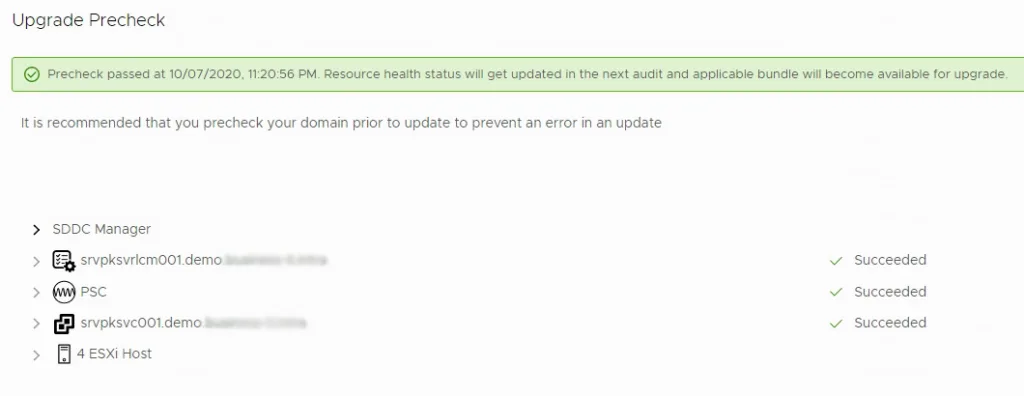
And afterwards the Pre-Check did not even list the vSAN Pre-Checks anymore and therefore passed with flying colors:
I immediately started the Update for my 4 ESXi hosts and it turned out to go through as well:
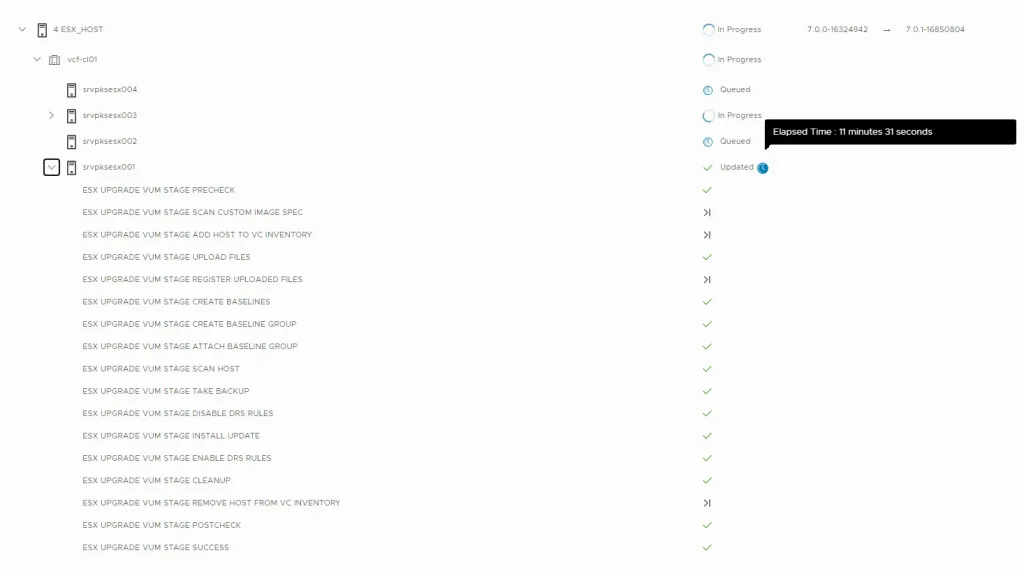
The Update was successful for all my 4 Nodes. I did not see anything broken in my sddc manager due to my change except for the now missing vSAN HCL checks in the Precheck. I would not recommend you to change these settings in a productive environment but it is good to know that we can use VCF in lab environments that make use of “unsupported” hardware.

Comments

1 comments from the previous blog. We no longer take new ones here.

prk 2021-08-31

thanks for this. facing similar issue in our prod environment and i am thinking to skip the vsan HCL check . my case is little different where i have upgrade the storage controller to newer version and now VCF is complaining about vSAN hardware incompatibility what’s your thought. I dont think it really breaks the things from VCF / SDDC perspective as such

You might also like

post 1.00

vSAN Witness Appliance 9.0

solution 0.77

VCF Storage

solution 0.77

vSAN extra capacity

Page to follow