

build 7bbbddf7 | content blog-content@c8490fa · 338 posts | profiles 20 · corpus 267 | 0 skipped | | format
apiVersion: soultec.ch/v1kind: Postmetadata: name: how-to-vsan-witness-9-0 locale: en labels: author: daniel-stadelmann series: how-to capability/storage: 2.62 capability/cloud: 1.94 capability/virtualization: 1.37 vendor/vmware: 0.88 annotations: source: blog-content/posts/en/how-to-vsan-witness-9-0.md route: /en/insights/how-to-vsan-witness-9-0/ schema: /nerd/schema/posts.json markdown: /en/insights/how-to-vsan-witness-9-0.mdspec: title: vSAN Witness Appliance 9.0 date: 2025-09-15 author: daniel-stadelmann locale: en summary: >- You have probably run into the same problem I did: a freshly deployed 9.0 Witness Appliance that ignores its configuration and reports an expired licence. capabilities: [storage, cloud, virtualization] vendors: [vmware] series: how-to hero: /blog-assets/how-to-vsan-witness-9-0/hero.webp migrated: 2026-08-24 translationReviewed: false draft: false sections: - body: | You have probably run into the same problem I did. You downloaded the VMware vSAN ESA Witness Appliance for 9.0 (VMware-vSAN-ESA-Witness-9.0.0.0.24755427.ova) and deployed it on your Witness Host. Then you found two things: the configuration parameters were not applied, and, worse, the Witness Appliance reports an expired licence (`Your license for ESXi has expired.`). ![](/blog-assets/how-to-vsan-witness-9-0/01.webp) The vSAN Witness does ship with a built-in OEM licence, but it is not picked up here. With VCF 9.0 there are no licence keys any more either, so the old workaround with a temporary key is gone as well. A short support session with Broadcom Support settled it: this is a bug. There is no fix yet, but there is a workaround. ### The workaround It sounds silly and it works. Take the vSAN ESA Witness 8.0.3 OVA (VMware-vSAN-ESA-Witness-8.0U3e-24674464.ova) and upgrade it to 9.0 through vCenter. You will also find that the configuration parameters in the OVA are applied correctly. 1. Install the Witness 2. Add the Witness to vCenter 3. Upgrade the Witness to 9.0 with vSphere Lifecycle Manager ![](/blog-assets/how-to-vsan-witness-9-0/02.webp) Running into trouble, or have a question? [Get in touch](https://soultec.ch/contact-us/).status: corpus: 267 alsoLike: - {ref: posts/vmware-cloud-foundation-how-to-skip-vsan-hcl-checks-for-esxi-upgrades, score: 1.00} - {ref: solutions/vmware/vmware-cloud-foundation/vmware-vsan, score: 0.77} - {ref: solutions/vmware/vmware-cloud-foundation/addon/vsan-additional-capacity, score: 0.77}
{ "apiVersion": "soultec.ch/v1", "kind": "Post", "metadata": { "name": "how-to-vsan-witness-9-0", "locale": "en", "labels": { "author": "daniel-stadelmann", "series": "how-to", "capability/storage": "2.62", "capability/cloud": "1.94", "capability/virtualization": "1.37", "vendor/vmware": "0.88" }, "annotations": { "source": "blog-content/posts/en/how-to-vsan-witness-9-0.md", "route": "/en/insights/how-to-vsan-witness-9-0/", "schema": "/nerd/schema/posts.json", "markdown": "/en/insights/how-to-vsan-witness-9-0.md" } }, "spec": { "title": "vSAN Witness Appliance 9.0", "date": "2025-09-15", "author": "daniel-stadelmann", "locale": "en", "summary": "You have probably run into the same problem I did: a freshly deployed 9.0 Witness Appliance that ignores its configuration and reports an expired licence.", "capabilities": [ "storage", "cloud", "virtualization" ], "vendors": [ "vmware" ], "series": "how-to", "hero": "/blog-assets/how-to-vsan-witness-9-0/hero.webp", "migrated": "2026-08-24", "translationReviewed": false, "draft": false }, "sections": [ { "body": "You have probably run into the same problem I did. You downloaded the VMware vSAN ESA Witness Appliance for 9.0 (VMware-vSAN-ESA-Witness-9.0.0.0.24755427.ova) and deployed it on your Witness Host. Then you found two things: the configuration parameters were not applied, and, worse, the Witness Appliance reports an expired licence (`Your license for ESXi has expired.`).\n\n![](/blog-assets/how-to-vsan-witness-9-0/01.webp)\n\nThe vSAN Witness does ship with a built-in OEM licence, but it is not picked up here. With VCF 9.0 there are no licence keys any more either, so the old workaround with a temporary key is gone as well.\n\nA short support session with Broadcom Support settled it: this is a bug. There is no fix yet, but there is a workaround.\n\n### The workaround\n\nIt sounds silly and it works. Take the vSAN ESA Witness 8.0.3 OVA (VMware-vSAN-ESA-Witness-8.0U3e-24674464.ova) and upgrade it to 9.0 through vCenter.\n\nYou will also find that the configuration parameters in the OVA are applied correctly.\n\n1. Install the Witness\n2. Add the Witness to vCenter\n3. Upgrade the Witness to 9.0 with vSphere Lifecycle Manager\n\n![](/blog-assets/how-to-vsan-witness-9-0/02.webp)\n\nRunning into trouble, or have a question? [Get in touch](https://soultec.ch/contact-us/)." } ], "status": { "corpus": 267, "alsoLike": [ { "ref": "posts/vmware-cloud-foundation-how-to-skip-vsan-hcl-checks-for-esxi-upgrades", "score": "1.00" }, { "ref": "solutions/vmware/vmware-cloud-foundation/vmware-vsan", "score": "0.77" }, { "ref": "solutions/vmware/vmware-cloud-foundation/addon/vsan-additional-capacity", "score": "0.77" } ] }}
apiVersion = "soultec.ch/v1"kind = "Post"[metadata]name = "how-to-vsan-witness-9-0"locale = "en"[metadata.labels]author = "daniel-stadelmann"series = "how-to""capability/storage" = "2.62""capability/cloud" = "1.94""capability/virtualization" = "1.37""vendor/vmware" = "0.88"[metadata.annotations]source = "blog-content/posts/en/how-to-vsan-witness-9-0.md"route = "/en/insights/how-to-vsan-witness-9-0/"schema = "/nerd/schema/posts.json"markdown = "/en/insights/how-to-vsan-witness-9-0.md"[spec]title = "vSAN Witness Appliance 9.0"date = 2025-09-15author = "daniel-stadelmann"locale = "en"summary = "You have probably run into the same problem I did: a freshly deployed 9.0 Witness Appliance that ignores its configuration and reports an expired licence."capabilities = ["storage", "cloud", "virtualization"]vendors = ["vmware"]series = "how-to"hero = "/blog-assets/how-to-vsan-witness-9-0/hero.webp"migrated = 2026-08-24translationReviewed = falsedraft = false[[sections]]body = '''You have probably run into the same problem I did. You downloaded the VMware vSAN ESA Witness Appliance for 9.0 (VMware-vSAN-ESA-Witness-9.0.0.0.24755427.ova) and deployed it on your Witness Host. Then you found two things: the configuration parameters were not applied, and, worse, the Witness Appliance reports an expired licence (`Your license for ESXi has expired.`).![](/blog-assets/how-to-vsan-witness-9-0/01.webp)The vSAN Witness does ship with a built-in OEM licence, but it is not picked up here. With VCF 9.0 there are no licence keys any more either, so the old workaround with a temporary key is gone as well.A short support session with Broadcom Support settled it: this is a bug. There is no fix yet, but there is a workaround.### The workaroundIt sounds silly and it works. Take the vSAN ESA Witness 8.0.3 OVA (VMware-vSAN-ESA-Witness-8.0U3e-24674464.ova) and upgrade it to 9.0 through vCenter.You will also find that the configuration parameters in the OVA are applied correctly.1. Install the Witness2. Add the Witness to vCenter3. Upgrade the Witness to 9.0 with vSphere Lifecycle Manager![](/blog-assets/how-to-vsan-witness-9-0/02.webp)Running into trouble, or have a question? [Get in touch](https://soultec.ch/contact-us/).'''[status]corpus = 267[[status.alsoLike]]ref = "posts/vmware-cloud-foundation-how-to-skip-vsan-hcl-checks-for-esxi-upgrades"score = "1.00"[[status.alsoLike]]ref = "solutions/vmware/vmware-cloud-foundation/vmware-vsan"score = "0.77"[[status.alsoLike]]ref = "solutions/vmware/vmware-cloud-foundation/addon/vsan-additional-capacity"score = "0.77"
<?xml version="1.0" encoding="UTF-8"?><manifest kind="Post"> <apiVersion>soultec.ch/v1</apiVersion> <metadata> <name>how-to-vsan-witness-9-0</name> <locale>en</locale> <labels> <author>daniel-stadelmann</author> <series>how-to</series> <entry key="capability/storage">2.62</entry> <entry key="capability/cloud">1.94</entry> <entry key="capability/virtualization">1.37</entry> <entry key="vendor/vmware">0.88</entry> </labels> <annotations> <source>blog-content/posts/en/how-to-vsan-witness-9-0.md</source> <route>/en/insights/how-to-vsan-witness-9-0/</route> <schema>/nerd/schema/posts.json</schema> <markdown>/en/insights/how-to-vsan-witness-9-0.md</markdown> </annotations> </metadata> <spec> <title>vSAN Witness Appliance 9.0</title> <date>2025-09-15</date> <author>daniel-stadelmann</author> <locale>en</locale> <summary>You have probably run into the same problem I did: a freshly deployed 9.0 Witness Appliance that ignores its configuration and reports an expired licence.</summary> <capabilities> <item>storage</item> <item>cloud</item> <item>virtualization</item> </capabilities> <vendors> <item>vmware</item> </vendors> <series>how-to</series> <hero>/blog-assets/how-to-vsan-witness-9-0/hero.webp</hero> <migrated>2026-08-24</migrated> <translationReviewed>false</translationReviewed> <draft>false</draft> </spec> <sections> <section> <body>You have probably run into the same problem I did. You downloaded the VMware vSAN ESA Witness Appliance for 9.0 (VMware-vSAN-ESA-Witness-9.0.0.0.24755427.ova) and deployed it on your Witness Host. Then you found two things: the configuration parameters were not applied, and, worse, the Witness Appliance reports an expired licence (`Your license for ESXi has expired.`).![](/blog-assets/how-to-vsan-witness-9-0/01.webp)The vSAN Witness does ship with a built-in OEM licence, but it is not picked up here. With VCF 9.0 there are no licence keys any more either, so the old workaround with a temporary key is gone as well.A short support session with Broadcom Support settled it: this is a bug. There is no fix yet, but there is a workaround.### The workaroundIt sounds silly and it works. Take the vSAN ESA Witness 8.0.3 OVA (VMware-vSAN-ESA-Witness-8.0U3e-24674464.ova) and upgrade it to 9.0 through vCenter.You will also find that the configuration parameters in the OVA are applied correctly.1. Install the Witness2. Add the Witness to vCenter3. Upgrade the Witness to 9.0 with vSphere Lifecycle Manager![](/blog-assets/how-to-vsan-witness-9-0/02.webp)Running into trouble, or have a question? [Get in touch](https://soultec.ch/contact-us/). </body> </section> </sections> <status> <corpus>267</corpus> <alsoLike> <item> <ref>posts/vmware-cloud-foundation-how-to-skip-vsan-hcl-checks-for-esxi-upgrades</ref> <score>1.00</score> </item> <item> <ref>solutions/vmware/vmware-cloud-foundation/vmware-vsan</ref> <score>0.77</score> </item> <item> <ref>solutions/vmware/vmware-cloud-foundation/addon/vsan-additional-capacity</ref> <score>0.77</score> </item> </alsoLike> </status></manifest>
How-To · 2025-09-15

vSAN Witness Appliance 9.0

You have probably run into the same problem I did: a freshly deployed 9.0 Witness Appliance that ignores its configuration and reports an expired licence.

2025-09-15Date
Daniel StadelmannAuthor
1Min read
Topics Storage 2.62 Cloud 1.94 Virtualization 1.37
Vendors VMware 0.88

You have probably run into the same problem I did. You downloaded the VMware vSAN ESA Witness Appliance for 9.0 (VMware-vSAN-ESA-Witness-9.0.0.0.24755427.ova) and deployed it on your Witness Host. Then you found two things: the configuration parameters were not applied, and, worse, the Witness Appliance reports an expired licence (Your license for ESXi has expired.).
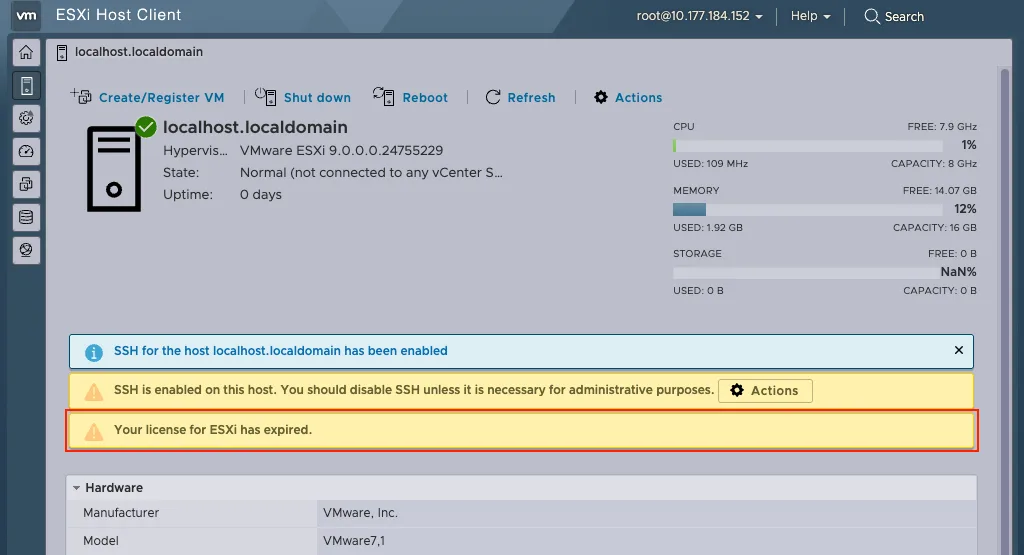
The vSAN Witness does ship with a built-in OEM licence, but it is not picked up here. With VCF 9.0 there are no licence keys any more either, so the old workaround with a temporary key is gone as well.

A short support session with Broadcom Support settled it: this is a bug. There is no fix yet, but there is a workaround.

The workaround

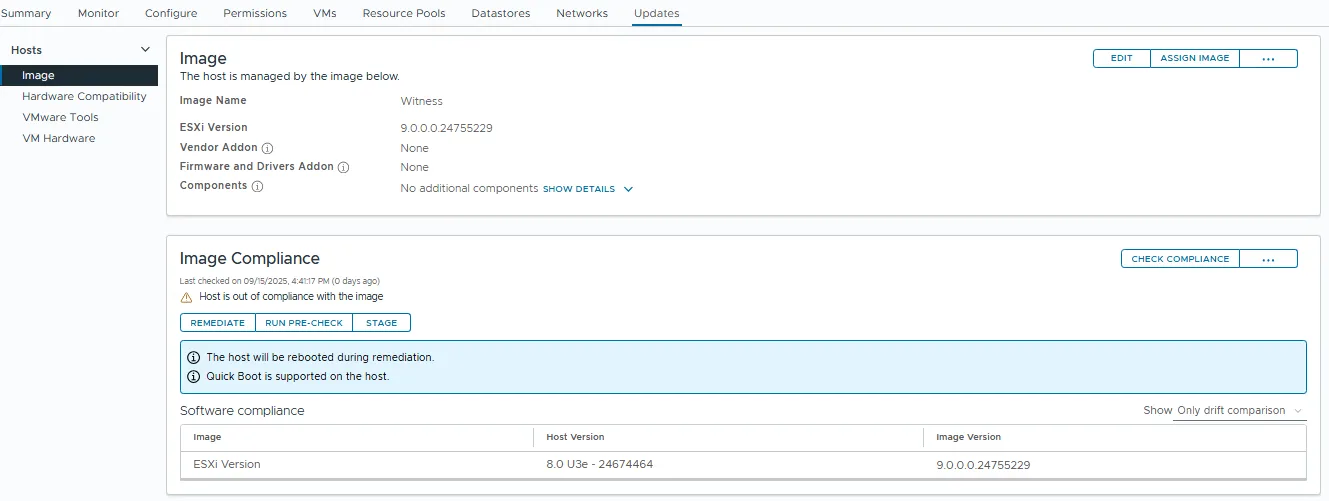
It sounds silly and it works. Take the vSAN ESA Witness 8.0.3 OVA (VMware-vSAN-ESA-Witness-8.0U3e-24674464.ova) and upgrade it to 9.0 through vCenter.

You will also find that the configuration parameters in the OVA are applied correctly.

  1. Install the Witness
  2. Add the Witness to vCenter
  3. Upgrade the Witness to 9.0 with vSphere Lifecycle Manager
Running into trouble, or have a question? Get in touch.
You might also like