

build 7bbbddf7 | content blog-content@c8490fa · 338 posts | profiles 20 · corpus 267 | 0 skipped | | format
apiVersion: soultec.ch/v1kind: Postmetadata: name: how-to-get-online-depot-working-in-vcf-9 locale: en labels: author: dario-doerflinger series: how-to capability/cloud: 1.94 capability/virtualization: 1.37 vendor/vmware: 0.88 annotations: source: blog-content/posts/en/how-to-get-online-depot-working-in-vcf-9.md route: /en/insights/how-to-get-online-depot-working-in-vcf-9/ schema: /nerd/schema/posts.json markdown: /en/insights/how-to-get-online-depot-working-in-vcf-9.mdspec: title: Get Online Depot working in VCF 9 date: 2025-09-02 author: dario-doerflinger locale: en summary: >- In VMware Cloud Foundation 9 we can configure a Online Depot to get access to the Binaries for the Management as well as the Instance Components. capabilities: [cloud, virtualization] vendors: [vmware] series: how-to hero: /blog-assets/how-to-get-online-depot-working-in-vcf-9/hero.webp legacySlug: how-to-get-online-depot-working-in-vcf-9 migrated: 2026-08-24 draft: false sections: - body: | In VMware Cloud Foundation 9 we can configure a Online Depot to get access to the Binaries for the Management as well as the Instance Components. The only thing you need is generally your own Broadcom Download Token (along with an active entitlement for VCF). However, what if you have a proxy server in place? - heading:

Getting the correct URLs whitelisted

body: | VMware by Broadcom has published [some Articles](https://knowledge.broadcom.com/external/article/327186/public-url-list-for-sddc-manager.html) about which URLs are supposed to be whitelisted in your proxy for this to work. We found that those were (at the time of writing) incomplete so we wanted to clarify this for you. | Name | URL | Purpose | | --- | --- | --- | | VMware Depot | dl.broadcom.com | Software binaries | | VVS Data | vvs.broadcom.com | vLCM compatibility data | | VVS Data (2) | storage.googleapis.com | vLCM compatibility data | | VCF Licensing | vcf.broadcom.com | Licensing connection | | VMware Metadata | auth.esp.vmware.com | Metadata (vendor add-on) | | vSAN HCL | vsanhealth.vmware.com | vSAN HCL data | | vSAN HCL (2) | eapi.broadcom.com | vSAN HCL data | - heading:

Setting the proxy within VCF 9

body: | In VCF 9.0 we need to configure our proxy at two different places. This is due to the fact how VCF used to work in 5.x and because not all things were completely changed for VCF 9. ### Setting the proxy to download Management components To download Management components like the VCF Operations, VCF Automation and VCF Identity Broker we need to configure our proxy in the Fleet Manager Appliance. Navigate to Administration – Global Settings – Network Settings and set up your proxy server. ![Proxy Settings in VCF](/blog-assets/how-to-get-online-depot-working-in-vcf-9/01.webp) ### Setting the proxy to download Instance components To download vCenter Server, ESX- and NSX Binaries we need to configure the proxy at the SDDC Manager level. Navigate to Fleet Management – Lifecycle – Click on your VCF Instance – go to proxy settings and set up your proxy server. ![VCF Proxy settings](/blog-assets/how-to-get-online-depot-working-in-vcf-9/02.webp) With those settings in place you should be able to download everything directly from Broadcom's servers. In case you need to troubleshoot the Fleet Manager you could also try to set the system variable using ssh. **export https\_proxy="proxy.soultec.lab:443"** If you still face issues in your VCF environment after following this, [feel free to reach out to us](https://soultec.ch/contact-us/). We're happy to help.status: corpus: 267 alsoLike: - {ref: posts/vcf-full-stack-ab-oktober-2027-mythos-oder-wahrheit, score: 1.00} - {ref: posts/ms-secure-boot-cert-expiry-2026, score: 1.00} - {ref: solutions/vmware/vsphere-foundation, score: 1.00}
{ "apiVersion": "soultec.ch/v1", "kind": "Post", "metadata": { "name": "how-to-get-online-depot-working-in-vcf-9", "locale": "en", "labels": { "author": "dario-doerflinger", "series": "how-to", "capability/cloud": "1.94", "capability/virtualization": "1.37", "vendor/vmware": "0.88" }, "annotations": { "source": "blog-content/posts/en/how-to-get-online-depot-working-in-vcf-9.md", "route": "/en/insights/how-to-get-online-depot-working-in-vcf-9/", "schema": "/nerd/schema/posts.json", "markdown": "/en/insights/how-to-get-online-depot-working-in-vcf-9.md" } }, "spec": { "title": "Get Online Depot working in VCF 9", "date": "2025-09-02", "author": "dario-doerflinger", "locale": "en", "summary": "In VMware Cloud Foundation 9 we can configure a Online Depot to get access to the Binaries for the Management as well as the Instance Components.", "capabilities": [ "cloud", "virtualization" ], "vendors": [ "vmware" ], "series": "how-to", "hero": "/blog-assets/how-to-get-online-depot-working-in-vcf-9/hero.webp", "legacySlug": "how-to-get-online-depot-working-in-vcf-9", "migrated": "2026-08-24", "draft": false }, "sections": [ { "body": "In VMware Cloud Foundation 9 we can configure a Online Depot to get access to the Binaries for the Management as well as the Instance Components. The only thing you need is generally your own Broadcom Download Token (along with an active entitlement for VCF). However, what if you have a proxy server in place?" }, { "heading": "

Getting the correct URLs whitelisted

",
"body": "VMware by Broadcom has published [some Articles](https://knowledge.broadcom.com/external/article/327186/public-url-list-for-sddc-manager.html) about which URLs are supposed to be whitelisted in your proxy for this to work. We found that those were (at the time of writing) incomplete so we wanted to clarify this for you.\n\n| Name | URL | Purpose |\n| --- | --- | --- |\n| VMware Depot | dl.broadcom.com | Software binaries |\n| VVS Data | vvs.broadcom.com | vLCM compatibility data |\n| VVS Data (2) | storage.googleapis.com | vLCM compatibility data |\n| VCF Licensing | vcf.broadcom.com | Licensing connection |\n| VMware Metadata | auth.esp.vmware.com | Metadata (vendor add-on) |\n| vSAN HCL | vsanhealth.vmware.com | vSAN HCL data |\n| vSAN HCL (2) | eapi.broadcom.com | vSAN HCL data |" }, { "heading": "

Setting the proxy within VCF 9

",
"body": "In VCF 9.0 we need to configure our proxy at two different places. This is due to the fact how VCF used to work in 5.x and because not all things were completely changed for VCF 9.\n\n### Setting the proxy to download Management components\n\nTo download Management components like the VCF Operations, VCF Automation and VCF Identity Broker we need to configure our proxy in the Fleet Manager Appliance.\n\nNavigate to Administration – Global Settings – Network Settings and set up your proxy server.\n\n![Proxy Settings in VCF](/blog-assets/how-to-get-online-depot-working-in-vcf-9/01.webp)\n\n### Setting the proxy to download Instance components\n\nTo download vCenter Server, ESX- and NSX Binaries we need to configure the proxy at the SDDC Manager level.\n\nNavigate to Fleet Management – Lifecycle – Click on your VCF Instance – go to proxy settings and set up your proxy server.\n\n![VCF Proxy settings](/blog-assets/how-to-get-online-depot-working-in-vcf-9/02.webp)\n\nWith those settings in place you should be able to download everything directly from Broadcom's servers.\n\nIn case you need to troubleshoot the Fleet Manager you could also try to set the system variable using ssh.\n\n**export https\\_proxy=\"proxy.soultec.lab:443\"**\n\nIf you still face issues in your VCF environment after following this, [feel free to reach out to us](https://soultec.ch/contact-us/). We're happy to help." } ], "status": { "corpus": 267, "alsoLike": [ { "ref": "posts/vcf-full-stack-ab-oktober-2027-mythos-oder-wahrheit", "score": "1.00" }, { "ref": "posts/ms-secure-boot-cert-expiry-2026", "score": "1.00" }, { "ref": "solutions/vmware/vsphere-foundation", "score": "1.00" } ] }}
apiVersion = "soultec.ch/v1"kind = "Post"[metadata]name = "how-to-get-online-depot-working-in-vcf-9"locale = "en"[metadata.labels]author = "dario-doerflinger"series = "how-to""capability/cloud" = "1.94""capability/virtualization" = "1.37""vendor/vmware" = "0.88"[metadata.annotations]source = "blog-content/posts/en/how-to-get-online-depot-working-in-vcf-9.md"route = "/en/insights/how-to-get-online-depot-working-in-vcf-9/"schema = "/nerd/schema/posts.json"markdown = "/en/insights/how-to-get-online-depot-working-in-vcf-9.md"[spec]title = "Get Online Depot working in VCF 9"date = 2025-09-02author = "dario-doerflinger"locale = "en"summary = "In VMware Cloud Foundation 9 we can configure a Online Depot to get access to the Binaries for the Management as well as the Instance Components."capabilities = ["cloud", "virtualization"]vendors = ["vmware"]series = "how-to"hero = "/blog-assets/how-to-get-online-depot-working-in-vcf-9/hero.webp"legacySlug = "how-to-get-online-depot-working-in-vcf-9"migrated = 2026-08-24draft = false[[sections]]body = "In VMware Cloud Foundation 9 we can configure a Online Depot to get access to the Binaries for the Management as well as the Instance Components. The only thing you need is generally your own Broadcom Download Token (along with an active entitlement for VCF). However, what if you have a proxy server in place?"[[sections]]heading = "

Getting the correct URLs whitelisted

"
body = '''VMware by Broadcom has published [some Articles](https://knowledge.broadcom.com/external/article/327186/public-url-list-for-sddc-manager.html) about which URLs are supposed to be whitelisted in your proxy for this to work. We found that those were (at the time of writing) incomplete so we wanted to clarify this for you.| Name | URL | Purpose || --- | --- | --- || VMware Depot | dl.broadcom.com | Software binaries || VVS Data | vvs.broadcom.com | vLCM compatibility data || VVS Data (2) | storage.googleapis.com | vLCM compatibility data || VCF Licensing | vcf.broadcom.com | Licensing connection || VMware Metadata | auth.esp.vmware.com | Metadata (vendor add-on) || vSAN HCL | vsanhealth.vmware.com | vSAN HCL data || vSAN HCL (2) | eapi.broadcom.com | vSAN HCL data |'''[[sections]]heading = "

Setting the proxy within VCF 9

"
body = '''In VCF 9.0 we need to configure our proxy at two different places. This is due to the fact how VCF used to work in 5.x and because not all things were completely changed for VCF 9.### Setting the proxy to download Management componentsTo download Management components like the VCF Operations, VCF Automation and VCF Identity Broker we need to configure our proxy in the Fleet Manager Appliance.Navigate to Administration – Global Settings – Network Settings and set up your proxy server.![Proxy Settings in VCF](/blog-assets/how-to-get-online-depot-working-in-vcf-9/01.webp)### Setting the proxy to download Instance componentsTo download vCenter Server, ESX- and NSX Binaries we need to configure the proxy at the SDDC Manager level.Navigate to Fleet Management – Lifecycle – Click on your VCF Instance – go to proxy settings and set up your proxy server.![VCF Proxy settings](/blog-assets/how-to-get-online-depot-working-in-vcf-9/02.webp)With those settings in place you should be able to download everything directly from Broadcom's servers.In case you need to troubleshoot the Fleet Manager you could also try to set the system variable using ssh.**export https\_proxy="proxy.soultec.lab:443"**If you still face issues in your VCF environment after following this, [feel free to reach out to us](https://soultec.ch/contact-us/). We're happy to help.'''[status]corpus = 267[[status.alsoLike]]ref = "posts/vcf-full-stack-ab-oktober-2027-mythos-oder-wahrheit"score = "1.00"[[status.alsoLike]]ref = "posts/ms-secure-boot-cert-expiry-2026"score = "1.00"[[status.alsoLike]]ref = "solutions/vmware/vsphere-foundation"score = "1.00"
<?xml version="1.0" encoding="UTF-8"?><manifest kind="Post"> <apiVersion>soultec.ch/v1</apiVersion> <metadata> <name>how-to-get-online-depot-working-in-vcf-9</name> <locale>en</locale> <labels> <author>dario-doerflinger</author> <series>how-to</series> <entry key="capability/cloud">1.94</entry> <entry key="capability/virtualization">1.37</entry> <entry key="vendor/vmware">0.88</entry> </labels> <annotations> <source>blog-content/posts/en/how-to-get-online-depot-working-in-vcf-9.md</source> <route>/en/insights/how-to-get-online-depot-working-in-vcf-9/</route> <schema>/nerd/schema/posts.json</schema> <markdown>/en/insights/how-to-get-online-depot-working-in-vcf-9.md</markdown> </annotations> </metadata> <spec> <title>Get Online Depot working in VCF 9</title> <date>2025-09-02</date> <author>dario-doerflinger</author> <locale>en</locale> <summary>In VMware Cloud Foundation 9 we can configure a Online Depot to get access to the Binaries for the Management as well as the Instance Components.</summary> <capabilities> <item>cloud</item> <item>virtualization</item> </capabilities> <vendors> <item>vmware</item> </vendors> <series>how-to</series> <hero>/blog-assets/how-to-get-online-depot-working-in-vcf-9/hero.webp</hero> <legacySlug>how-to-get-online-depot-working-in-vcf-9</legacySlug> <migrated>2026-08-24</migrated> <draft>false</draft> </spec> <sections> <section> <body>In VMware Cloud Foundation 9 we can configure a Online Depot to get access to the Binaries for the Management as well as the Instance Components. The only thing you need is generally your own Broadcom Download Token (along with an active entitlement for VCF). However, what if you have a proxy server in place?</body> </section> <section> <heading>

Getting the correct URLs whitelisted

</heading>
<body>VMware by Broadcom has published [some Articles](https://knowledge.broadcom.com/external/article/327186/public-url-list-for-sddc-manager.html) about which URLs are supposed to be whitelisted in your proxy for this to work. We found that those were (at the time of writing) incomplete so we wanted to clarify this for you.| Name | URL | Purpose || --- | --- | --- || VMware Depot | dl.broadcom.com | Software binaries || VVS Data | vvs.broadcom.com | vLCM compatibility data || VVS Data (2) | storage.googleapis.com | vLCM compatibility data || VCF Licensing | vcf.broadcom.com | Licensing connection || VMware Metadata | auth.esp.vmware.com | Metadata (vendor add-on) || vSAN HCL | vsanhealth.vmware.com | vSAN HCL data || vSAN HCL (2) | eapi.broadcom.com | vSAN HCL data | </body> </section> <section> <heading>

Setting the proxy within VCF 9

</heading>
<body>In VCF 9.0 we need to configure our proxy at two different places. This is due to the fact how VCF used to work in 5.x and because not all things were completely changed for VCF 9.### Setting the proxy to download Management componentsTo download Management components like the VCF Operations, VCF Automation and VCF Identity Broker we need to configure our proxy in the Fleet Manager Appliance.Navigate to Administration – Global Settings – Network Settings and set up your proxy server.![Proxy Settings in VCF](/blog-assets/how-to-get-online-depot-working-in-vcf-9/01.webp)### Setting the proxy to download Instance componentsTo download vCenter Server, ESX- and NSX Binaries we need to configure the proxy at the SDDC Manager level.Navigate to Fleet Management – Lifecycle – Click on your VCF Instance – go to proxy settings and set up your proxy server.![VCF Proxy settings](/blog-assets/how-to-get-online-depot-working-in-vcf-9/02.webp)With those settings in place you should be able to download everything directly from Broadcom's servers.In case you need to troubleshoot the Fleet Manager you could also try to set the system variable using ssh.**export https\_proxy="proxy.soultec.lab:443"**If you still face issues in your VCF environment after following this, [feel free to reach out to us](https://soultec.ch/contact-us/). We're happy to help. </body> </section> </sections> <status> <corpus>267</corpus> <alsoLike> <item> <ref>posts/vcf-full-stack-ab-oktober-2027-mythos-oder-wahrheit</ref> <score>1.00</score> </item> <item> <ref>posts/ms-secure-boot-cert-expiry-2026</ref> <score>1.00</score> </item> <item> <ref>solutions/vmware/vsphere-foundation</ref> <score>1.00</score> </item> </alsoLike> </status></manifest>
How-To · 2025-09-02

Get Online Depot working in VCF 9

In VMware Cloud Foundation 9 we can configure a Online Depot to get access to the Binaries for the Management as well as the Instance Components.

2025-09-02Date
Dario DörflingerAuthor
2Min read
Topics Cloud 1.94 Virtualization 1.37
Vendors VMware 0.88

In VMware Cloud Foundation 9 we can configure a Online Depot to get access to the Binaries for the Management as well as the Instance Components. The only thing you need is generally your own Broadcom Download Token (along with an active entitlement for VCF). However, what if you have a proxy server in place?

Getting the correct URLs whitelisted

VMware by Broadcom has published some Articles about which URLs are supposed to be whitelisted in your proxy for this to work. We found that those were (at the time of writing) incomplete so we wanted to clarify this for you.

NameURLPurpose
VMware Depotdl.broadcom.comSoftware binaries
VVS Datavvs.broadcom.comvLCM compatibility data
VVS Data (2)storage.googleapis.comvLCM compatibility data
VCF Licensingvcf.broadcom.comLicensing connection
VMware Metadataauth.esp.vmware.comMetadata (vendor add-on)
vSAN HCLvsanhealth.vmware.comvSAN HCL data
vSAN HCL (2)eapi.broadcom.comvSAN HCL data

Setting the proxy within VCF 9

In VCF 9.0 we need to configure our proxy at two different places. This is due to the fact how VCF used to work in 5.x and because not all things were completely changed for VCF 9.

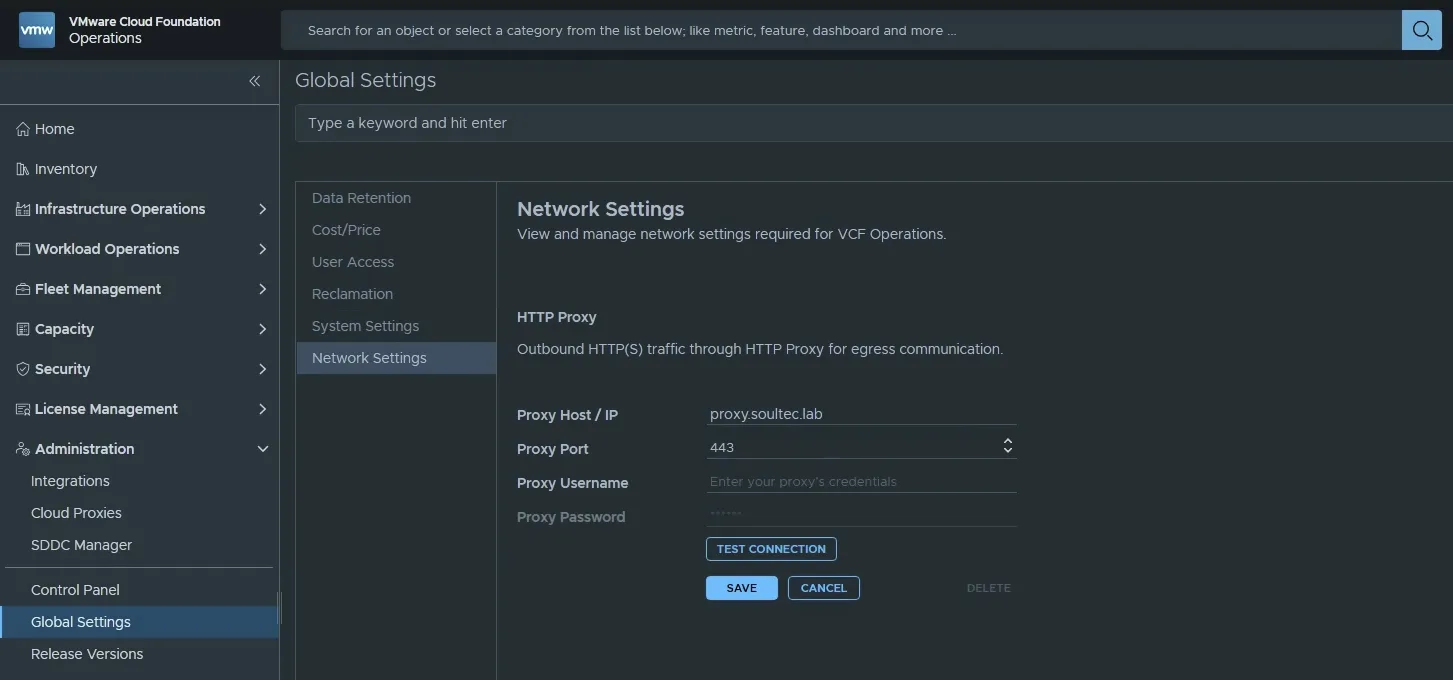
Setting the proxy to download Management components

To download Management components like the VCF Operations, VCF Automation and VCF Identity Broker we need to configure our proxy in the Fleet Manager Appliance.

Navigate to Administration – Global Settings – Network Settings and set up your proxy server.

Proxy Settings in VCF

Setting the proxy to download Instance components

To download vCenter Server, ESX- and NSX Binaries we need to configure the proxy at the SDDC Manager level.

Navigate to Fleet Management – Lifecycle – Click on your VCF Instance – go to proxy settings and set up your proxy server.
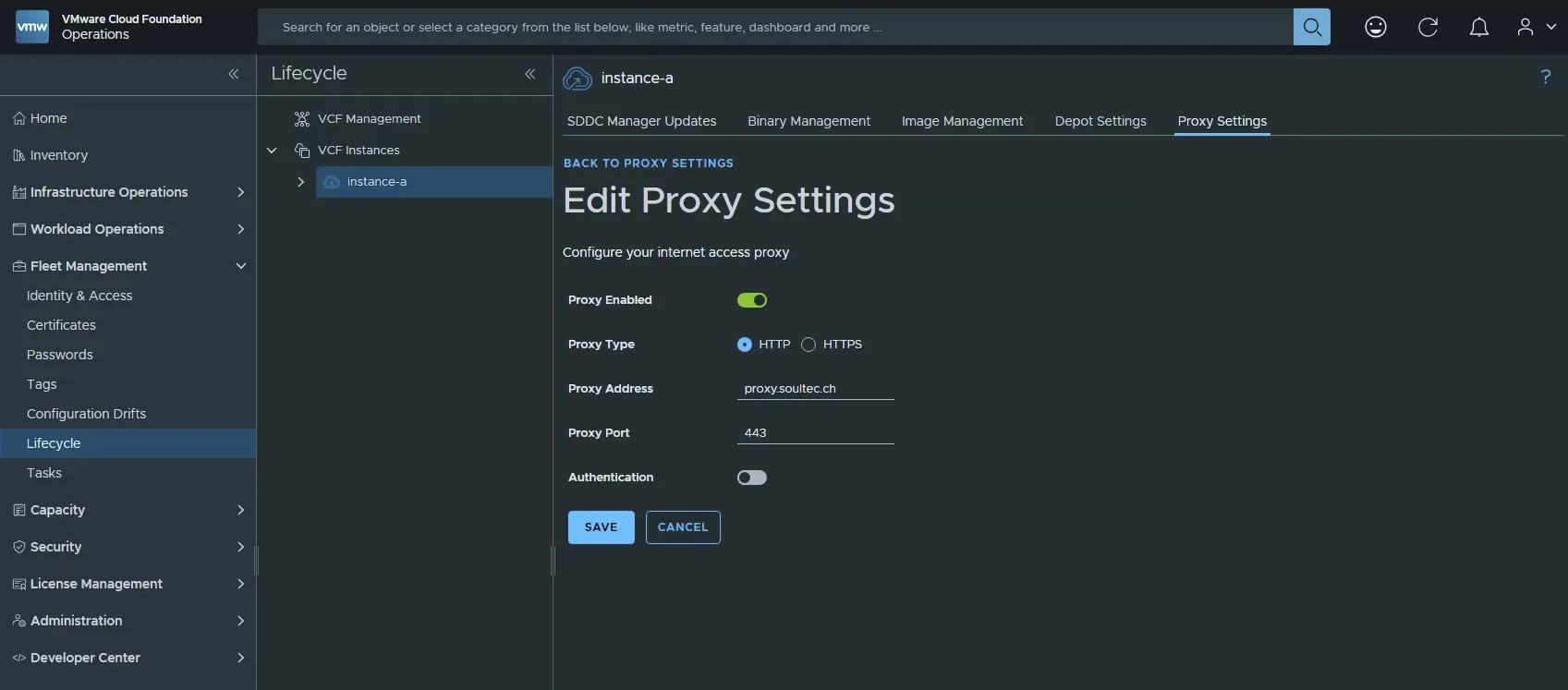
VCF Proxy settings

With those settings in place you should be able to download everything directly from Broadcom’s servers.

In case you need to troubleshoot the Fleet Manager you could also try to set the system variable using ssh.

export https_proxy=“proxy.soultec.lab:443”

If you still face issues in your VCF environment after following this, feel free to reach out to us. We’re happy to help.
You might also like