

build 7bbbddf7 | content blog-content@c8490fa · 338 posts | profiles 20 · corpus 267 | 0 skipped | | format
apiVersion: soultec.ch/v1kind: Postmetadata: name: vsan-data-protection locale: en labels: author: daniel-stadelmann series: how-to capability/storage: 2.62 capability/backup-recovery: 2.18 capability/security: 2.16 vendor/vmware: 0.88 annotations: source: blog-content/posts/en/vsan-data-protection.md route: /en/insights/vsan-data-protection/ schema: /nerd/schema/posts.json markdown: /en/insights/vsan-data-protection.mdspec: title: vSAN Data Protection date: 2025-03-13 author: daniel-stadelmann locale: en summary: >- vSAN 8 Update 3 brought the Data Protection feature, which closes the last gap against conventional block storage. You can now snapshot workloads on production storage directly. capabilities: [storage, backup-recovery, security] vendors: [vmware] series: how-to hero: /blog-assets/vsan-data-protection/hero.webp migrated: 2026-08-24 translationReviewed: false draft: false sections: - body: | With [vSAN](https://soultec.ch/solutions/vmware/vmware-cloud-foundation/vmware-vsan/) 8 Update 3, VMware released the Data Protection feature. It closes the last missing piece in the feature battle against conventional block storage. From now on you can snapshot your workloads directly on production storage, so in a disaster you restore the VM with a very short RTO and a far shorter RPO than a backup would give you. [vSAN Data Protection](https://blogs.vmware.com/cloud-foundation/2024/08/02/superior-snapshots-using-vmware-vsan-data-protection/) is also much more granular. You decide per VM how often a snapshot is taken and how long it is kept. Restoring from a snapshot brings no overhead of deleting, moving and cleaning up VMs either. Thanks to the new vSAN ESA snapshot engine, snapshots no longer affect your VM's performance. So there is no reason left not to use this. Do you have vSAN ESA but not Data Protection yet? [Get in touch](https://soultec.ch/contact-us/). ![](/blog-assets/vsan-data-protection/01.webp) Beyond classic recovery, vSAN Data Protection covers ransomware recovery, recovering VMs from accidental deletion and, of course, cloning a VM from a point in time. The whole thing is fully integrated into vCenter and driven from there. It shows at a glance what percentage of VMs is protected. There is a "Protection Groups" tab where the actual protection groups are created, and a "VMs" tab listing every VM on the vSAN with its protection status. ![](/blog-assets/vsan-data-protection/02.webp) Protection groups allow dynamic membership, explicit selection or a combination of both. You can also define whether the vSAN snapshot for a group should be immutable. ![](/blog-assets/vsan-data-protection/03.webp) The schedule can be set to whatever your IT service continuity management calls for. Anyone who knows VLCR (formerly VCDR) will see some parallels. ![](/blog-assets/vsan-data-protection/04.webp) Interested? [Get in touch](https://soultec.ch/contact-us/) and we will happily do a demo or a PoC.status: corpus: 267 alsoLike: - {ref: posts/how-to-deploy-vsan-snapshot-service-appliance, score: 0.78} - {ref: posts/exagrid, score: 0.59} - {ref: solutions/vmware/vmware-cloud-foundation/vmware-vsan, score: 0.52}
{ "apiVersion": "soultec.ch/v1", "kind": "Post", "metadata": { "name": "vsan-data-protection", "locale": "en", "labels": { "author": "daniel-stadelmann", "series": "how-to", "capability/storage": "2.62", "capability/backup-recovery": "2.18", "capability/security": "2.16", "vendor/vmware": "0.88" }, "annotations": { "source": "blog-content/posts/en/vsan-data-protection.md", "route": "/en/insights/vsan-data-protection/", "schema": "/nerd/schema/posts.json", "markdown": "/en/insights/vsan-data-protection.md" } }, "spec": { "title": "vSAN Data Protection", "date": "2025-03-13", "author": "daniel-stadelmann", "locale": "en", "summary": "vSAN 8 Update 3 brought the Data Protection feature, which closes the last gap against conventional block storage. You can now snapshot workloads on production storage directly.", "capabilities": [ "storage", "backup-recovery", "security" ], "vendors": [ "vmware" ], "series": "how-to", "hero": "/blog-assets/vsan-data-protection/hero.webp", "migrated": "2026-08-24", "translationReviewed": false, "draft": false }, "sections": [ { "body": "With [vSAN](https://soultec.ch/solutions/vmware/vmware-cloud-foundation/vmware-vsan/) 8 Update 3, VMware released the Data Protection feature. It closes the last missing piece in the feature battle against conventional block storage. From now on you can snapshot your workloads directly on production storage, so in a disaster you restore the VM with a very short RTO and a far shorter RPO than a backup would give you.\n\n[vSAN Data Protection](https://blogs.vmware.com/cloud-foundation/2024/08/02/superior-snapshots-using-vmware-vsan-data-protection/) is also much more granular. You decide per VM how often a snapshot is taken and how long it is kept. Restoring from a snapshot brings no overhead of deleting, moving and cleaning up VMs either.\n\nThanks to the new vSAN ESA snapshot engine, snapshots no longer affect your VM's performance. So there is no reason left not to use this. Do you have vSAN ESA but not Data Protection yet? [Get in touch](https://soultec.ch/contact-us/).\n\n![](/blog-assets/vsan-data-protection/01.webp)\n\nBeyond classic recovery, vSAN Data Protection covers ransomware recovery, recovering VMs from accidental deletion and, of course, cloning a VM from a point in time.\n\nThe whole thing is fully integrated into vCenter and driven from there. It shows at a glance what percentage of VMs is protected. There is a \"Protection Groups\" tab where the actual protection groups are created, and a \"VMs\" tab listing every VM on the vSAN with its protection status.\n\n![](/blog-assets/vsan-data-protection/02.webp)\n\nProtection groups allow dynamic membership, explicit selection or a combination of both. You can also define whether the vSAN snapshot for a group should be immutable.\n\n![](/blog-assets/vsan-data-protection/03.webp)\n\nThe schedule can be set to whatever your IT service continuity management calls for. Anyone who knows VLCR (formerly VCDR) will see some parallels.\n\n![](/blog-assets/vsan-data-protection/04.webp)\n\nInterested? [Get in touch](https://soultec.ch/contact-us/) and we will happily do a demo or a PoC." } ], "status": { "corpus": 267, "alsoLike": [ { "ref": "posts/how-to-deploy-vsan-snapshot-service-appliance", "score": "0.78" }, { "ref": "posts/exagrid", "score": "0.59" }, { "ref": "solutions/vmware/vmware-cloud-foundation/vmware-vsan", "score": "0.52" } ] }}
apiVersion = "soultec.ch/v1"kind = "Post"[metadata]name = "vsan-data-protection"locale = "en"[metadata.labels]author = "daniel-stadelmann"series = "how-to""capability/storage" = "2.62""capability/backup-recovery" = "2.18""capability/security" = "2.16""vendor/vmware" = "0.88"[metadata.annotations]source = "blog-content/posts/en/vsan-data-protection.md"route = "/en/insights/vsan-data-protection/"schema = "/nerd/schema/posts.json"markdown = "/en/insights/vsan-data-protection.md"[spec]title = "vSAN Data Protection"date = 2025-03-13author = "daniel-stadelmann"locale = "en"summary = "vSAN 8 Update 3 brought the Data Protection feature, which closes the last gap against conventional block storage. You can now snapshot workloads on production storage directly."capabilities = ["storage", "backup-recovery", "security"]vendors = ["vmware"]series = "how-to"hero = "/blog-assets/vsan-data-protection/hero.webp"migrated = 2026-08-24translationReviewed = falsedraft = false[[sections]]body = '''With [vSAN](https://soultec.ch/solutions/vmware/vmware-cloud-foundation/vmware-vsan/) 8 Update 3, VMware released the Data Protection feature. It closes the last missing piece in the feature battle against conventional block storage. From now on you can snapshot your workloads directly on production storage, so in a disaster you restore the VM with a very short RTO and a far shorter RPO than a backup would give you.[vSAN Data Protection](https://blogs.vmware.com/cloud-foundation/2024/08/02/superior-snapshots-using-vmware-vsan-data-protection/) is also much more granular. You decide per VM how often a snapshot is taken and how long it is kept. Restoring from a snapshot brings no overhead of deleting, moving and cleaning up VMs either.Thanks to the new vSAN ESA snapshot engine, snapshots no longer affect your VM's performance. So there is no reason left not to use this. Do you have vSAN ESA but not Data Protection yet? [Get in touch](https://soultec.ch/contact-us/).![](/blog-assets/vsan-data-protection/01.webp)Beyond classic recovery, vSAN Data Protection covers ransomware recovery, recovering VMs from accidental deletion and, of course, cloning a VM from a point in time.The whole thing is fully integrated into vCenter and driven from there. It shows at a glance what percentage of VMs is protected. There is a "Protection Groups" tab where the actual protection groups are created, and a "VMs" tab listing every VM on the vSAN with its protection status.![](/blog-assets/vsan-data-protection/02.webp)Protection groups allow dynamic membership, explicit selection or a combination of both. You can also define whether the vSAN snapshot for a group should be immutable.![](/blog-assets/vsan-data-protection/03.webp)The schedule can be set to whatever your IT service continuity management calls for. Anyone who knows VLCR (formerly VCDR) will see some parallels.![](/blog-assets/vsan-data-protection/04.webp)Interested? [Get in touch](https://soultec.ch/contact-us/) and we will happily do a demo or a PoC.'''[status]corpus = 267[[status.alsoLike]]ref = "posts/how-to-deploy-vsan-snapshot-service-appliance"score = "0.78"[[status.alsoLike]]ref = "posts/exagrid"score = "0.59"[[status.alsoLike]]ref = "solutions/vmware/vmware-cloud-foundation/vmware-vsan"score = "0.52"
<?xml version="1.0" encoding="UTF-8"?><manifest kind="Post"> <apiVersion>soultec.ch/v1</apiVersion> <metadata> <name>vsan-data-protection</name> <locale>en</locale> <labels> <author>daniel-stadelmann</author> <series>how-to</series> <entry key="capability/storage">2.62</entry> <entry key="capability/backup-recovery">2.18</entry> <entry key="capability/security">2.16</entry> <entry key="vendor/vmware">0.88</entry> </labels> <annotations> <source>blog-content/posts/en/vsan-data-protection.md</source> <route>/en/insights/vsan-data-protection/</route> <schema>/nerd/schema/posts.json</schema> <markdown>/en/insights/vsan-data-protection.md</markdown> </annotations> </metadata> <spec> <title>vSAN Data Protection</title> <date>2025-03-13</date> <author>daniel-stadelmann</author> <locale>en</locale> <summary>vSAN 8 Update 3 brought the Data Protection feature, which closes the last gap against conventional block storage. You can now snapshot workloads on production storage directly.</summary> <capabilities> <item>storage</item> <item>backup-recovery</item> <item>security</item> </capabilities> <vendors> <item>vmware</item> </vendors> <series>how-to</series> <hero>/blog-assets/vsan-data-protection/hero.webp</hero> <migrated>2026-08-24</migrated> <translationReviewed>false</translationReviewed> <draft>false</draft> </spec> <sections> <section> <body>With [vSAN](https://soultec.ch/solutions/vmware/vmware-cloud-foundation/vmware-vsan/) 8 Update 3, VMware released the Data Protection feature. It closes the last missing piece in the feature battle against conventional block storage. From now on you can snapshot your workloads directly on production storage, so in a disaster you restore the VM with a very short RTO and a far shorter RPO than a backup would give you.[vSAN Data Protection](https://blogs.vmware.com/cloud-foundation/2024/08/02/superior-snapshots-using-vmware-vsan-data-protection/) is also much more granular. You decide per VM how often a snapshot is taken and how long it is kept. Restoring from a snapshot brings no overhead of deleting, moving and cleaning up VMs either.Thanks to the new vSAN ESA snapshot engine, snapshots no longer affect your VM's performance. So there is no reason left not to use this. Do you have vSAN ESA but not Data Protection yet? [Get in touch](https://soultec.ch/contact-us/).![](/blog-assets/vsan-data-protection/01.webp)Beyond classic recovery, vSAN Data Protection covers ransomware recovery, recovering VMs from accidental deletion and, of course, cloning a VM from a point in time.The whole thing is fully integrated into vCenter and driven from there. It shows at a glance what percentage of VMs is protected. There is a "Protection Groups" tab where the actual protection groups are created, and a "VMs" tab listing every VM on the vSAN with its protection status.![](/blog-assets/vsan-data-protection/02.webp)Protection groups allow dynamic membership, explicit selection or a combination of both. You can also define whether the vSAN snapshot for a group should be immutable.![](/blog-assets/vsan-data-protection/03.webp)The schedule can be set to whatever your IT service continuity management calls for. Anyone who knows VLCR (formerly VCDR) will see some parallels.![](/blog-assets/vsan-data-protection/04.webp)Interested? [Get in touch](https://soultec.ch/contact-us/) and we will happily do a demo or a PoC. </body> </section> </sections> <status> <corpus>267</corpus> <alsoLike> <item> <ref>posts/how-to-deploy-vsan-snapshot-service-appliance</ref> <score>0.78</score> </item> <item> <ref>posts/exagrid</ref> <score>0.59</score> </item> <item> <ref>solutions/vmware/vmware-cloud-foundation/vmware-vsan</ref> <score>0.52</score> </item> </alsoLike> </status></manifest>
How-To · 2025-03-13

vSAN Data Protection

vSAN 8 Update 3 brought the Data Protection feature, which closes the last gap against conventional block storage. You can now snapshot workloads on production storage directly.

2025-03-13Date
Daniel StadelmannAuthor
1Min read
Topics Storage 2.62 Backup and Recovery 2.18 Security 2.16
Vendors VMware 0.88

With vSAN 8 Update 3, VMware released the Data Protection feature. It closes the last missing piece in the feature battle against conventional block storage. From now on you can snapshot your workloads directly on production storage, so in a disaster you restore the VM with a very short RTO and a far shorter RPO than a backup would give you.

vSAN Data Protection is also much more granular. You decide per VM how often a snapshot is taken and how long it is kept. Restoring from a snapshot brings no overhead of deleting, moving and cleaning up VMs either.

Thanks to the new vSAN ESA snapshot engine, snapshots no longer affect your VM’s performance. So there is no reason left not to use this. Do you have vSAN ESA but not Data Protection yet? Get in touch.
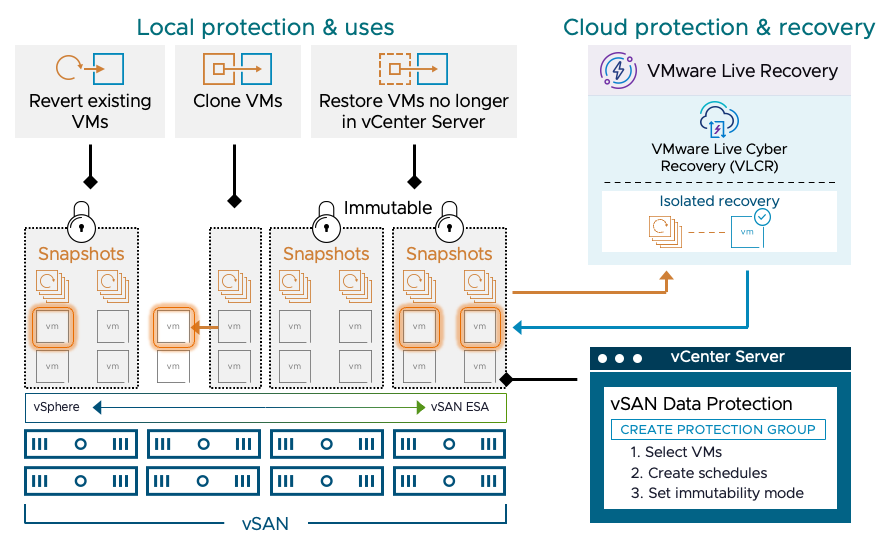
Beyond classic recovery, vSAN Data Protection covers ransomware recovery, recovering VMs from accidental deletion and, of course, cloning a VM from a point in time.

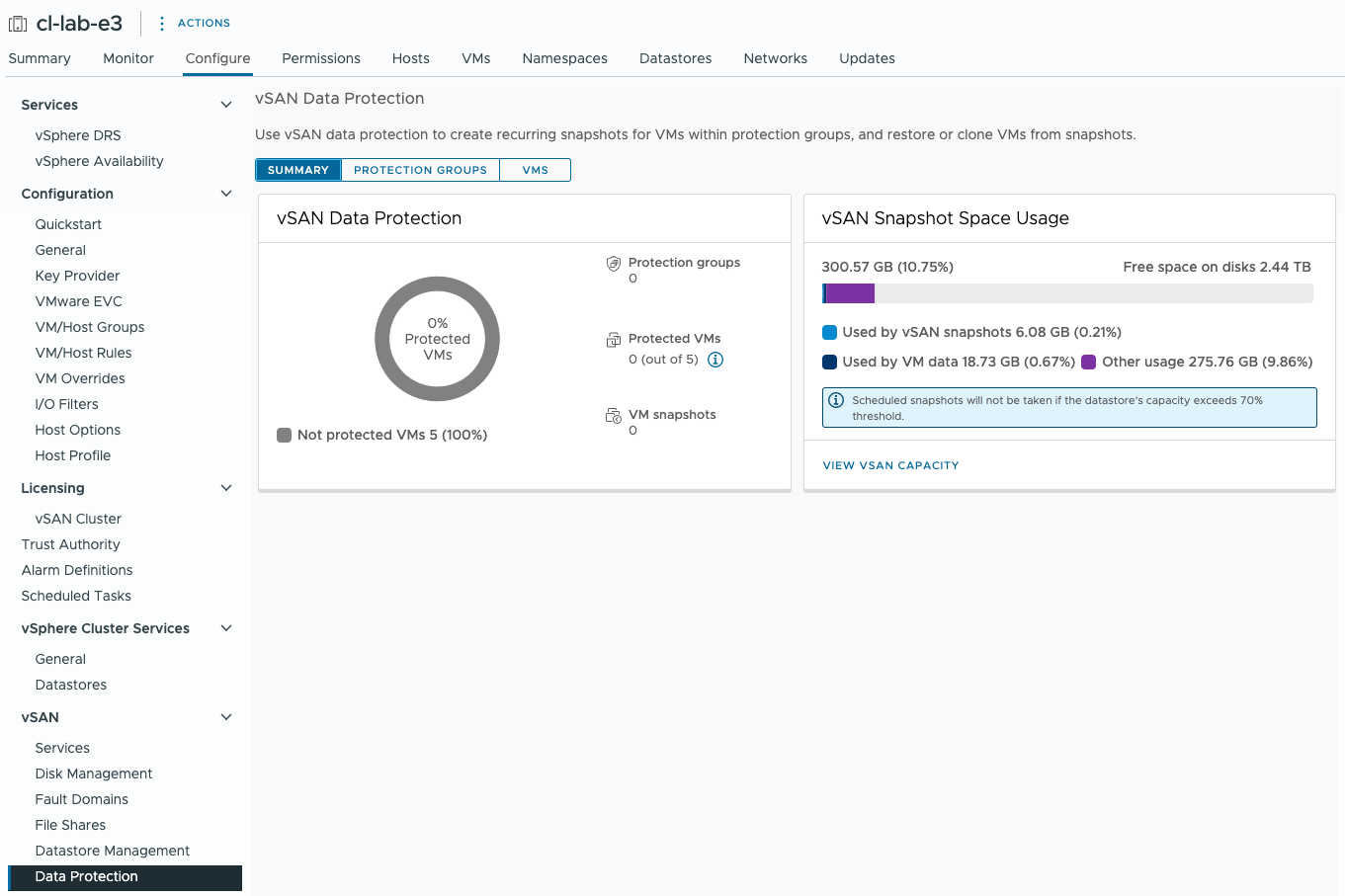
The whole thing is fully integrated into vCenter and driven from there. It shows at a glance what percentage of VMs is protected. There is a “Protection Groups” tab where the actual protection groups are created, and a “VMs” tab listing every VM on the vSAN with its protection status.
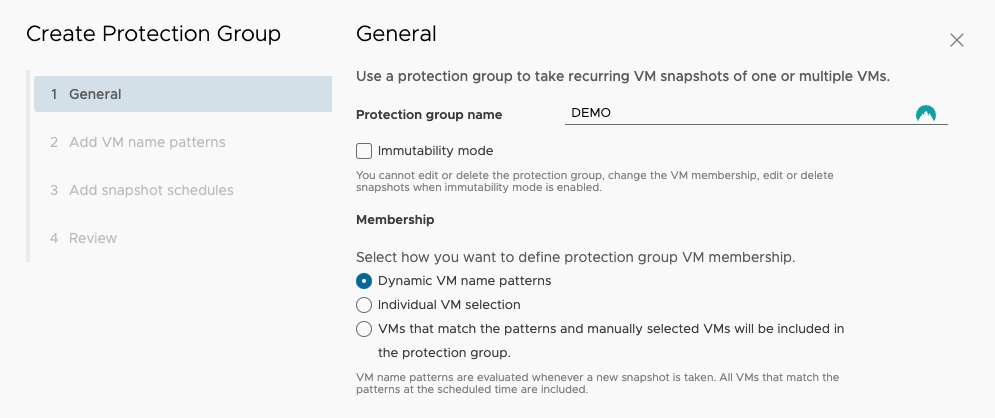
Protection groups allow dynamic membership, explicit selection or a combination of both. You can also define whether the vSAN snapshot for a group should be immutable.
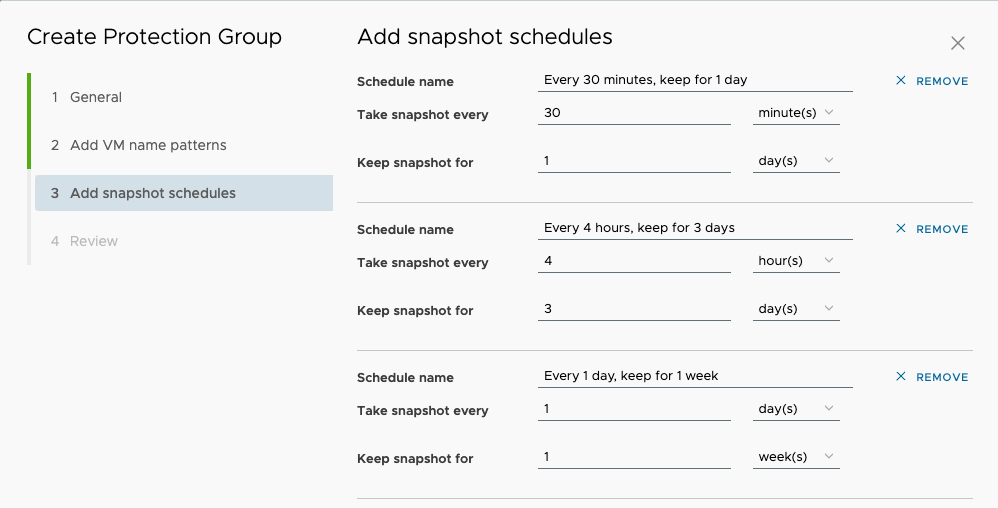
The schedule can be set to whatever your IT service continuity management calls for. Anyone who knows VLCR (formerly VCDR) will see some parallels.
Interested? Get in touch and we will happily do a demo or a PoC.
You might also like