build 7bbbddf7 | content blog-content@c8490fa · 338 posts | profiles 20 · corpus 267 | 0 skipped | | format
apiVersion: soultec.ch/v1kind: Postmetadata: name: tips-and-tricks-for-vsan-troubleshooting locale: en labels: author: dario-doerflinger series: lessons-learned capability/storage: 2.62 vendor/vmware: 0.88 annotations: source: blog-content/posts/en/tips-and-tricks-for-vsan-troubleshooting.md route: /en/insights/tips-and-tricks-for-vsan-troubleshooting/ schema: /nerd/schema/posts.json markdown: /en/insights/tips-and-tricks-for-vsan-troubleshooting.mdspec: title: Tips and Tricks for vSAN troubleshooting date: 2017-07-27 author: dario-doerflinger locale: en summary: >- Today I attended a Web-Session from VMware with the topic vSAN troubleshooting tips and tricks and I wanted to share those tips and tricks with you. capabilities: [storage] vendors: [vmware] series: lessons-learned legacySlug: tips-and-tricks-for-vsan-troubleshooting migrated: 2026-08-24 draft: false sections: - body: | Today I attended a Web-Session from VMware with the topic vSAN troubleshooting tips and tricks and I wanted to share those tips and tricks with you. - heading:

Common sense

body: | Ensure that your hardware is on the VMware HCL – Disks / Controllers / Firmare / Drivers Ensure that you have up-to-date backups (and test the restore process fully) - heading:

vSAN Overview

body: | Cluster: 2-64 physical hosts Host: 1-5 disk groups Disk Group: 1 flash for cache, 1-7 flash or HDD devices for capacity vSAN Objects: – VM Home, VM Swap, VMDK, Delta Disk, Memory Delta Storage Policies: – Applied at per VM level or VMDK level – Define protection level & performance Each object is made up of one or more components (depending on your storage policy) ![Screen Shot 2017-07-27 at 13.12.56](/blog-assets/tips-and-tricks-for-vsan-troubleshooting/01.webp) C1 & C2 = Components, W = Witness Component states: - Active – component accessible - Absent – Inaccessible, but no explicit error codes sensed - host outage or maint mode with "ensure accessibility" - rebuild begins after 60 minute timeout - Degraded – Inaccessible with error codes sensed - device failure - rebuild begins immediately - Active – stale - In queue of objects to rebuild - heading:
vSAN Tools

body: | - vRealize Ops / Log Insight - ESXCLI - RVC - Health Check - [vSAN Observer](https://kb.vmware.com/kb/2064240) (for performance issues) ### ESXCLI **esxcli vsan** – gives the available namespaces *New in 6.6: debug & health* **esxcli vsan helath cluster list** – Gives you an overview with the traffic light system (green, yellow, red) where you see all tests **esxcli vsan health cluster get -t "vSAN Disk Balance"** – get results of a test from above command **esxcli vsan health cluster get -t "vSAN object health"** – vSAN object health could mean serious problems if status is red. (Get UUID of object to track the problem with those objects) **esxcli vsan debug** – gives available namespaces **esxcli vsan debug resync summary** – give information of current resync process **esxcli vsan debug object health summary get** – gives you an overview of your health **esxcli vsan debug object list |more** – Gives back all objects back including component states **esxcli vsan debug disk list** – gives you information about your disk and if they can keep up **esxcli vsan debug controller list** – gives information about your disk controllers (HCL information, Queue depth) ### RVC (Ruby vSphere Console) The RVC is preinstalled on all vCenter Server variants. vsan.check\_state 0 ![Screen Shot 2017-07-27 at 13.28.44](/blog-assets/tips-and-tricks-for-vsan-troubleshooting/02.webp) vsan.disks\_stats 0 ![Screen Shot 2017-07-27 at 13.29.08.png](/blog-assets/tips-and-tricks-for-vsan-troubleshooting/03.webp) vsan.cluster\_info 0 ![Screen Shot 2017-07-27 at 13.29.53](/blog-assets/tips-and-tricks-for-vsan-troubleshooting/04.webp) ### Health UI ![Screen Shot 2017-07-27 at 13.30.33](/blog-assets/tips-and-tricks-for-vsan-troubleshooting/05.webp) vSAN Disk balance ![Screen Shot 2017-07-27 at 13.32.00](/blog-assets/tips-and-tricks-for-vsan-troubleshooting/06.webp) - heading:

vSAN Health

body: | **python /usr/lib/vmware-vpx/vsan-health/vsan-vc-health-status.py > /tmp/vsan\_status.txt** ![Screen Shot 2017-07-27 at 13.34.56](/blog-assets/tips-and-tricks-for-vsan-troubleshooting/07.webp) Running this on a individual node: Location: /usr/lib/vmware/vsan/bin/vsan-health-status.pyc > python /usr/lib/vmware/vsan/bin/vsan-health-status.pyc [KB 2107705](http://kb.vmware.com/kb/2107705) has more information on that. When to use those: Health Service on vCenter not available - heading:

Use Cases

body: | Cluster with 6 hosts. Three nodes were added. No capacity added after adding the hosts. > esxcli vsan storage list ![Screen Shot 2017-07-27 at 13.40.13](/blog-assets/tips-and-tricks-for-vsan-troubleshooting/08.webp)**In CMMDS: false – take note of the naa… ID** - Check vobd.log (search for naa… ID) - Check boot.gz (use zcat; search for naa… ID) - Disk naa… ID detected to be a snapshot Resolution: – Disk cannot be added because it already has a filesystem on it – Disk was given UUID, it was in a cluster and used at some point – Verified to delete data – Used partedutil to kill partitions – Delete disk groups and recreate disk groups ### Useful Logs: > vobd.log Search for "problem" and "permanent"status: corpus: 267 alsoLike: - {ref: posts/iscsi-datastore-not-consumed, score: 1.00} - {ref: posts/setting-up-a-greenfield-vsan-cluster-on-6-5-update-1, score: 1.00} - {ref: solutions/vmware/vmware-cloud-foundation/vmware-vsan, score: 0.76}
{ "apiVersion": "soultec.ch/v1", "kind": "Post", "metadata": { "name": "tips-and-tricks-for-vsan-troubleshooting", "locale": "en", "labels": { "author": "dario-doerflinger", "series": "lessons-learned", "capability/storage": "2.62", "vendor/vmware": "0.88" }, "annotations": { "source": "blog-content/posts/en/tips-and-tricks-for-vsan-troubleshooting.md", "route": "/en/insights/tips-and-tricks-for-vsan-troubleshooting/", "schema": "/nerd/schema/posts.json", "markdown": "/en/insights/tips-and-tricks-for-vsan-troubleshooting.md" } }, "spec": { "title": "Tips and Tricks for vSAN troubleshooting", "date": "2017-07-27", "author": "dario-doerflinger", "locale": "en", "summary": "Today I attended a Web-Session from VMware with the topic vSAN troubleshooting tips and tricks and I wanted to share those tips and tricks with you.", "capabilities": [ "storage" ], "vendors": [ "vmware" ], "series": "lessons-learned", "legacySlug": "tips-and-tricks-for-vsan-troubleshooting", "migrated": "2026-08-24", "draft": false }, "sections": [ { "body": "Today I attended a Web-Session from VMware with the topic vSAN troubleshooting tips and tricks and I wanted to share those tips and tricks with you." }, { "heading": "

Common sense

",
"body": "Ensure that your hardware is on the VMware HCL \n– Disks / Controllers / Firmare / Drivers\n\nEnsure that you have up-to-date backups (and test the restore process fully)" }, { "heading": "

vSAN Overview

",
"body": "Cluster: 2-64 physical hosts \nHost: 1-5 disk groups \nDisk Group: 1 flash for cache, 1-7 flash or HDD devices for capacity\n\nvSAN Objects: \n– VM Home, VM Swap, VMDK, Delta Disk, Memory Delta\n\nStorage Policies: \n– Applied at per VM level or VMDK level \n– Define protection level & performance\n\nEach object is made up of one or more components (depending on your storage policy)\n\n![Screen Shot 2017-07-27 at 13.12.56](/blog-assets/tips-and-tricks-for-vsan-troubleshooting/01.webp)\n\nC1 & C2 = Components, W = Witness\n\nComponent states:\n\n- Active – component accessible\n- Absent – Inaccessible, but no explicit error codes sensed\n - host outage or maint mode with \"ensure accessibility\"\n - rebuild begins after 60 minute timeout\n- Degraded – Inaccessible with error codes sensed\n - device failure\n - rebuild begins immediately\n- Active – stale\n - In queue of objects to rebuild" }, { "heading": "

vSAN Tools

",
"body": "- vRealize Ops / Log Insight\n- ESXCLI\n- RVC\n- Health Check\n- [vSAN Observer](https://kb.vmware.com/kb/2064240) (for performance issues)\n\n### ESXCLI\n\n**esxcli vsan** – gives the available namespaces \n*New in 6.6: debug & health*\n\n**esxcli vsan helath cluster list** – Gives you an overview with the traffic light system (green, yellow, red) where you see all tests \n**esxcli vsan health cluster get -t \"vSAN Disk Balance\"** – get results of a test from above command \n**esxcli vsan health cluster get -t \"vSAN object health\"** – vSAN object health could mean serious problems if status is red. (Get UUID of object to track the problem with those objects)\n\n**esxcli vsan debug** – gives available namespaces \n**esxcli vsan debug resync summary** – give information of current resync process \n**esxcli vsan debug object health summary get** – gives you an overview of your health \n**esxcli vsan debug object list |more** – Gives back all objects back including component states \n**esxcli vsan debug disk list** – gives you information about your disk and if they can keep up \n**esxcli vsan debug controller list** – gives information about your disk controllers (HCL information, Queue depth)\n\n### RVC (Ruby vSphere Console)\n\nThe RVC is preinstalled on all vCenter Server variants.\n\nvsan.check\\_state 0 \n![Screen Shot 2017-07-27 at 13.28.44](/blog-assets/tips-and-tricks-for-vsan-troubleshooting/02.webp)\n\nvsan.disks\\_stats 0 \n![Screen Shot 2017-07-27 at 13.29.08.png](/blog-assets/tips-and-tricks-for-vsan-troubleshooting/03.webp)\n\nvsan.cluster\\_info 0 \n![Screen Shot 2017-07-27 at 13.29.53](/blog-assets/tips-and-tricks-for-vsan-troubleshooting/04.webp)\n\n### Health UI\n\n![Screen Shot 2017-07-27 at 13.30.33](/blog-assets/tips-and-tricks-for-vsan-troubleshooting/05.webp)\n\nvSAN Disk balance \n![Screen Shot 2017-07-27 at 13.32.00](/blog-assets/tips-and-tricks-for-vsan-troubleshooting/06.webp)" }, { "heading": "

vSAN Health

",
"body": "**python /usr/lib/vmware-vpx/vsan-health/vsan-vc-health-status.py > /tmp/vsan\\_status.txt**\n\n![Screen Shot 2017-07-27 at 13.34.56](/blog-assets/tips-and-tricks-for-vsan-troubleshooting/07.webp)\n\nRunning this on a individual node: \nLocation: /usr/lib/vmware/vsan/bin/vsan-health-status.pyc\n\n> python /usr/lib/vmware/vsan/bin/vsan-health-status.pyc\n\n[KB 2107705](http://kb.vmware.com/kb/2107705) has more information on that.\n\nWhen to use those: Health Service on vCenter not available" }, { "heading": "

Use Cases

",
"body": "Cluster with 6 hosts. Three nodes were added. No capacity added after adding the hosts.\n\n> esxcli vsan storage list\n\n![Screen Shot 2017-07-27 at 13.40.13](/blog-assets/tips-and-tricks-for-vsan-troubleshooting/08.webp)**In CMMDS: false – take note of the naa… ID**\n\n- Check vobd.log (search for naa… ID)\n- Check boot.gz (use zcat; search for naa… ID)\n - Disk naa… ID detected to be a snapshot\n\nResolution: \n– Disk cannot be added because it already has a filesystem on it \n– Disk was given UUID, it was in a cluster and used at some point \n– Verified to delete data \n– Used partedutil to kill partitions \n– Delete disk groups and recreate disk groups\n\n### Useful Logs:\n\n> vobd.log\n\nSearch for \"problem\" and \"permanent\"" } ], "status": { "corpus": 267, "alsoLike": [ { "ref": "posts/iscsi-datastore-not-consumed", "score": "1.00" }, { "ref": "posts/setting-up-a-greenfield-vsan-cluster-on-6-5-update-1", "score": "1.00" }, { "ref": "solutions/vmware/vmware-cloud-foundation/vmware-vsan", "score": "0.76" } ] }}
apiVersion = "soultec.ch/v1"kind = "Post"[metadata]name = "tips-and-tricks-for-vsan-troubleshooting"locale = "en"[metadata.labels]author = "dario-doerflinger"series = "lessons-learned""capability/storage" = "2.62""vendor/vmware" = "0.88"[metadata.annotations]source = "blog-content/posts/en/tips-and-tricks-for-vsan-troubleshooting.md"route = "/en/insights/tips-and-tricks-for-vsan-troubleshooting/"schema = "/nerd/schema/posts.json"markdown = "/en/insights/tips-and-tricks-for-vsan-troubleshooting.md"[spec]title = "Tips and Tricks for vSAN troubleshooting"date = 2017-07-27author = "dario-doerflinger"locale = "en"summary = "Today I attended a Web-Session from VMware with the topic vSAN troubleshooting tips and tricks and I wanted to share those tips and tricks with you."capabilities = ["storage"]vendors = ["vmware"]series = "lessons-learned"legacySlug = "tips-and-tricks-for-vsan-troubleshooting"migrated = 2026-08-24draft = false[[sections]]body = "Today I attended a Web-Session from VMware with the topic vSAN troubleshooting tips and tricks and I wanted to share those tips and tricks with you."[[sections]]heading = "

Common sense

"
body = '''Ensure that your hardware is on the VMware HCL – Disks / Controllers / Firmare / DriversEnsure that you have up-to-date backups (and test the restore process fully)'''[[sections]]heading = "

vSAN Overview

"
body = '''Cluster: 2-64 physical hosts Host: 1-5 disk groups Disk Group: 1 flash for cache, 1-7 flash or HDD devices for capacityvSAN Objects: – VM Home, VM Swap, VMDK, Delta Disk, Memory DeltaStorage Policies: – Applied at per VM level or VMDK level – Define protection level & performanceEach object is made up of one or more components (depending on your storage policy)![Screen Shot 2017-07-27 at 13.12.56](/blog-assets/tips-and-tricks-for-vsan-troubleshooting/01.webp)C1 & C2 = Components, W = WitnessComponent states:- Active – component accessible- Absent – Inaccessible, but no explicit error codes sensed - host outage or maint mode with "ensure accessibility" - rebuild begins after 60 minute timeout- Degraded – Inaccessible with error codes sensed - device failure - rebuild begins immediately- Active – stale - In queue of objects to rebuild'''[[sections]]heading = "

vSAN Tools

"
body = '''- vRealize Ops / Log Insight- ESXCLI- RVC- Health Check- [vSAN Observer](https://kb.vmware.com/kb/2064240) (for performance issues)### ESXCLI**esxcli vsan** – gives the available namespaces *New in 6.6: debug & health***esxcli vsan helath cluster list** – Gives you an overview with the traffic light system (green, yellow, red) where you see all tests **esxcli vsan health cluster get -t "vSAN Disk Balance"** – get results of a test from above command **esxcli vsan health cluster get -t "vSAN object health"** – vSAN object health could mean serious problems if status is red. (Get UUID of object to track the problem with those objects)**esxcli vsan debug** – gives available namespaces **esxcli vsan debug resync summary** – give information of current resync process **esxcli vsan debug object health summary get** – gives you an overview of your health **esxcli vsan debug object list |more** – Gives back all objects back including component states **esxcli vsan debug disk list** – gives you information about your disk and if they can keep up **esxcli vsan debug controller list** – gives information about your disk controllers (HCL information, Queue depth)### RVC (Ruby vSphere Console)The RVC is preinstalled on all vCenter Server variants.vsan.check\_state 0 ![Screen Shot 2017-07-27 at 13.28.44](/blog-assets/tips-and-tricks-for-vsan-troubleshooting/02.webp)vsan.disks\_stats 0 ![Screen Shot 2017-07-27 at 13.29.08.png](/blog-assets/tips-and-tricks-for-vsan-troubleshooting/03.webp)vsan.cluster\_info 0 ![Screen Shot 2017-07-27 at 13.29.53](/blog-assets/tips-and-tricks-for-vsan-troubleshooting/04.webp)### Health UI![Screen Shot 2017-07-27 at 13.30.33](/blog-assets/tips-and-tricks-for-vsan-troubleshooting/05.webp)vSAN Disk balance ![Screen Shot 2017-07-27 at 13.32.00](/blog-assets/tips-and-tricks-for-vsan-troubleshooting/06.webp)'''[[sections]]heading = "

vSAN Health

"
body = '''**python /usr/lib/vmware-vpx/vsan-health/vsan-vc-health-status.py > /tmp/vsan\_status.txt**![Screen Shot 2017-07-27 at 13.34.56](/blog-assets/tips-and-tricks-for-vsan-troubleshooting/07.webp)Running this on a individual node: Location: /usr/lib/vmware/vsan/bin/vsan-health-status.pyc> python /usr/lib/vmware/vsan/bin/vsan-health-status.pyc[KB 2107705](http://kb.vmware.com/kb/2107705) has more information on that.When to use those: Health Service on vCenter not available'''[[sections]]heading = "

Use Cases

"
body = '''Cluster with 6 hosts. Three nodes were added. No capacity added after adding the hosts.> esxcli vsan storage list![Screen Shot 2017-07-27 at 13.40.13](/blog-assets/tips-and-tricks-for-vsan-troubleshooting/08.webp)**In CMMDS: false – take note of the naa… ID**- Check vobd.log (search for naa… ID)- Check boot.gz (use zcat; search for naa… ID) - Disk naa… ID detected to be a snapshotResolution: – Disk cannot be added because it already has a filesystem on it – Disk was given UUID, it was in a cluster and used at some point – Verified to delete data – Used partedutil to kill partitions – Delete disk groups and recreate disk groups### Useful Logs:> vobd.logSearch for "problem" and "permanent"'''[status]corpus = 267[[status.alsoLike]]ref = "posts/iscsi-datastore-not-consumed"score = "1.00"[[status.alsoLike]]ref = "posts/setting-up-a-greenfield-vsan-cluster-on-6-5-update-1"score = "1.00"[[status.alsoLike]]ref = "solutions/vmware/vmware-cloud-foundation/vmware-vsan"score = "0.76"
<?xml version="1.0" encoding="UTF-8"?><manifest kind="Post"> <apiVersion>soultec.ch/v1</apiVersion> <metadata> <name>tips-and-tricks-for-vsan-troubleshooting</name> <locale>en</locale> <labels> <author>dario-doerflinger</author> <series>lessons-learned</series> <entry key="capability/storage">2.62</entry> <entry key="vendor/vmware">0.88</entry> </labels> <annotations> <source>blog-content/posts/en/tips-and-tricks-for-vsan-troubleshooting.md</source> <route>/en/insights/tips-and-tricks-for-vsan-troubleshooting/</route> <schema>/nerd/schema/posts.json</schema> <markdown>/en/insights/tips-and-tricks-for-vsan-troubleshooting.md</markdown> </annotations> </metadata> <spec> <title>Tips and Tricks for vSAN troubleshooting</title> <date>2017-07-27</date> <author>dario-doerflinger</author> <locale>en</locale> <summary>Today I attended a Web-Session from VMware with the topic vSAN troubleshooting tips and tricks and I wanted to share those tips and tricks with you.</summary> <capabilities> <item>storage</item> </capabilities> <vendors> <item>vmware</item> </vendors> <series>lessons-learned</series> <legacySlug>tips-and-tricks-for-vsan-troubleshooting</legacySlug> <migrated>2026-08-24</migrated> <draft>false</draft> </spec> <sections> <section> <body>Today I attended a Web-Session from VMware with the topic vSAN troubleshooting tips and tricks and I wanted to share those tips and tricks with you.</body> </section> <section> <heading>

Common sense

</heading>
<body>Ensure that your hardware is on the VMware HCL – Disks / Controllers / Firmare / DriversEnsure that you have up-to-date backups (and test the restore process fully) </body> </section> <section> <heading>

vSAN Overview

</heading>
<body>Cluster: 2-64 physical hosts Host: 1-5 disk groups Disk Group: 1 flash for cache, 1-7 flash or HDD devices for capacityvSAN Objects: – VM Home, VM Swap, VMDK, Delta Disk, Memory DeltaStorage Policies: – Applied at per VM level or VMDK level – Define protection level &amp; performanceEach object is made up of one or more components (depending on your storage policy)![Screen Shot 2017-07-27 at 13.12.56](/blog-assets/tips-and-tricks-for-vsan-troubleshooting/01.webp)C1 &amp; C2 = Components, W = WitnessComponent states:- Active – component accessible- Absent – Inaccessible, but no explicit error codes sensed - host outage or maint mode with "ensure accessibility" - rebuild begins after 60 minute timeout- Degraded – Inaccessible with error codes sensed - device failure - rebuild begins immediately- Active – stale - In queue of objects to rebuild </body> </section> <section> <heading>

vSAN Tools

</heading>
<body>- vRealize Ops / Log Insight- ESXCLI- RVC- Health Check- [vSAN Observer](https://kb.vmware.com/kb/2064240) (for performance issues)### ESXCLI**esxcli vsan** – gives the available namespaces *New in 6.6: debug &amp; health***esxcli vsan helath cluster list** – Gives you an overview with the traffic light system (green, yellow, red) where you see all tests **esxcli vsan health cluster get -t "vSAN Disk Balance"** – get results of a test from above command **esxcli vsan health cluster get -t "vSAN object health"** – vSAN object health could mean serious problems if status is red. (Get UUID of object to track the problem with those objects)**esxcli vsan debug** – gives available namespaces **esxcli vsan debug resync summary** – give information of current resync process **esxcli vsan debug object health summary get** – gives you an overview of your health **esxcli vsan debug object list |more** – Gives back all objects back including component states **esxcli vsan debug disk list** – gives you information about your disk and if they can keep up **esxcli vsan debug controller list** – gives information about your disk controllers (HCL information, Queue depth)### RVC (Ruby vSphere Console)The RVC is preinstalled on all vCenter Server variants.vsan.check\_state 0 ![Screen Shot 2017-07-27 at 13.28.44](/blog-assets/tips-and-tricks-for-vsan-troubleshooting/02.webp)vsan.disks\_stats 0 ![Screen Shot 2017-07-27 at 13.29.08.png](/blog-assets/tips-and-tricks-for-vsan-troubleshooting/03.webp)vsan.cluster\_info 0 ![Screen Shot 2017-07-27 at 13.29.53](/blog-assets/tips-and-tricks-for-vsan-troubleshooting/04.webp)### Health UI![Screen Shot 2017-07-27 at 13.30.33](/blog-assets/tips-and-tricks-for-vsan-troubleshooting/05.webp)vSAN Disk balance ![Screen Shot 2017-07-27 at 13.32.00](/blog-assets/tips-and-tricks-for-vsan-troubleshooting/06.webp) </body> </section> <section> <heading>

vSAN Health

</heading>
<body>**python /usr/lib/vmware-vpx/vsan-health/vsan-vc-health-status.py &gt; /tmp/vsan\_status.txt**![Screen Shot 2017-07-27 at 13.34.56](/blog-assets/tips-and-tricks-for-vsan-troubleshooting/07.webp)Running this on a individual node: Location: /usr/lib/vmware/vsan/bin/vsan-health-status.pyc&gt; python /usr/lib/vmware/vsan/bin/vsan-health-status.pyc[KB 2107705](http://kb.vmware.com/kb/2107705) has more information on that.When to use those: Health Service on vCenter not available </body> </section> <section> <heading>

Use Cases

</heading>
<body>Cluster with 6 hosts. Three nodes were added. No capacity added after adding the hosts.&gt; esxcli vsan storage list![Screen Shot 2017-07-27 at 13.40.13](/blog-assets/tips-and-tricks-for-vsan-troubleshooting/08.webp)**In CMMDS: false – take note of the naa… ID**- Check vobd.log (search for naa… ID)- Check boot.gz (use zcat; search for naa… ID) - Disk naa… ID detected to be a snapshotResolution: – Disk cannot be added because it already has a filesystem on it – Disk was given UUID, it was in a cluster and used at some point – Verified to delete data – Used partedutil to kill partitions – Delete disk groups and recreate disk groups### Useful Logs:&gt; vobd.logSearch for "problem" and "permanent" </body> </section> </sections> <status> <corpus>267</corpus> <alsoLike> <item> <ref>posts/iscsi-datastore-not-consumed</ref> <score>1.00</score> </item> <item> <ref>posts/setting-up-a-greenfield-vsan-cluster-on-6-5-update-1</ref> <score>1.00</score> </item> <item> <ref>solutions/vmware/vmware-cloud-foundation/vmware-vsan</ref> <score>0.76</score> </item> </alsoLike> </status></manifest>
Lessons learned · 2017-07-27

Tips and Tricks for vSAN troubleshooting

Today I attended a Web-Session from VMware with the topic vSAN troubleshooting tips and tricks and I wanted to share those tips and tricks with you.

2017-07-27Date
Dario DörflingerAuthor
3Min read
Topics Storage 2.62
Vendors VMware 0.88

This post is from 2017. It stays online because people still look for it, but it describes the products as they were then.

Today I attended a Web-Session from VMware with the topic vSAN troubleshooting tips and tricks and I wanted to share those tips and tricks with you.

Common sense

Ensure that your hardware is on the VMware HCL
– Disks / Controllers / Firmare / Drivers

Ensure that you have up-to-date backups (and test the restore process fully)

vSAN Overview

Cluster: 2-64 physical hosts
Host: 1-5 disk groups
Disk Group: 1 flash for cache, 1-7 flash or HDD devices for capacity

vSAN Objects:
– VM Home, VM Swap, VMDK, Delta Disk, Memory Delta

Storage Policies:
– Applied at per VM level or VMDK level
– Define protection level & performance

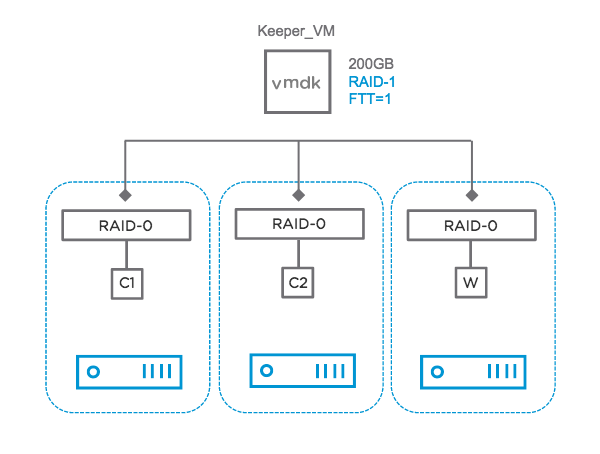
Each object is made up of one or more components (depending on your storage policy)

Screen Shot 2017-07-27 at 13.12.56

C1 & C2 = Components, W = Witness

Component states:

  • Active – component accessible
  • Absent – Inaccessible, but no explicit error codes sensed
    • host outage or maint mode with “ensure accessibility”
    • rebuild begins after 60 minute timeout
  • Degraded – Inaccessible with error codes sensed
    • device failure
    • rebuild begins immediately
  • Active – stale
    • In queue of objects to rebuild

vSAN Tools

  • vRealize Ops / Log Insight
  • ESXCLI
  • RVC
  • Health Check
  • vSAN Observer (for performance issues)

ESXCLI

esxcli vsan – gives the available namespaces
New in 6.6: debug & health

esxcli vsan helath cluster list – Gives you an overview with the traffic light system (green, yellow, red) where you see all tests
esxcli vsan health cluster get -t “vSAN Disk Balance” – get results of a test from above command
esxcli vsan health cluster get -t “vSAN object health” – vSAN object health could mean serious problems if status is red. (Get UUID of object to track the problem with those objects)

esxcli vsan debug – gives available namespaces
esxcli vsan debug resync summary – give information of current resync process
esxcli vsan debug object health summary get – gives you an overview of your health
esxcli vsan debug object list |more – Gives back all objects back including component states
esxcli vsan debug disk list – gives you information about your disk and if they can keep up
esxcli vsan debug controller list – gives information about your disk controllers (HCL information, Queue depth)

RVC (Ruby vSphere Console)

The RVC is preinstalled on all vCenter Server variants.

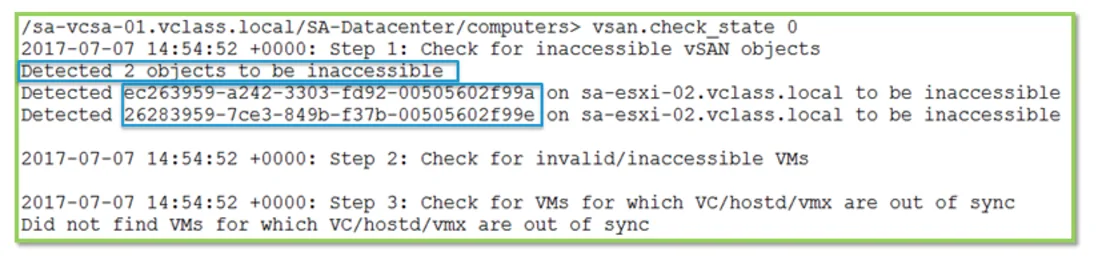
vsan.check_state 0
Screen Shot 2017-07-27 at 13.28.44

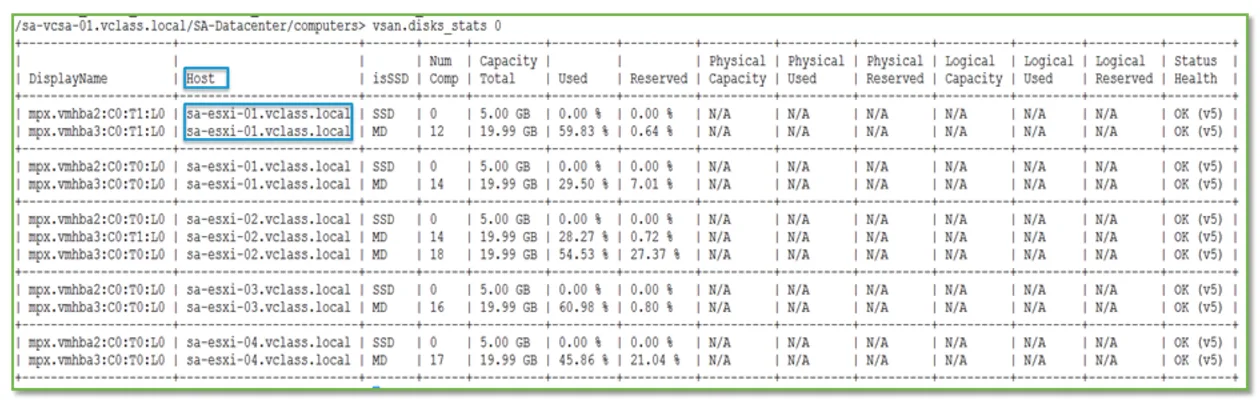
vsan.disks_stats 0
Screen Shot 2017-07-27 at 13.29.08.png

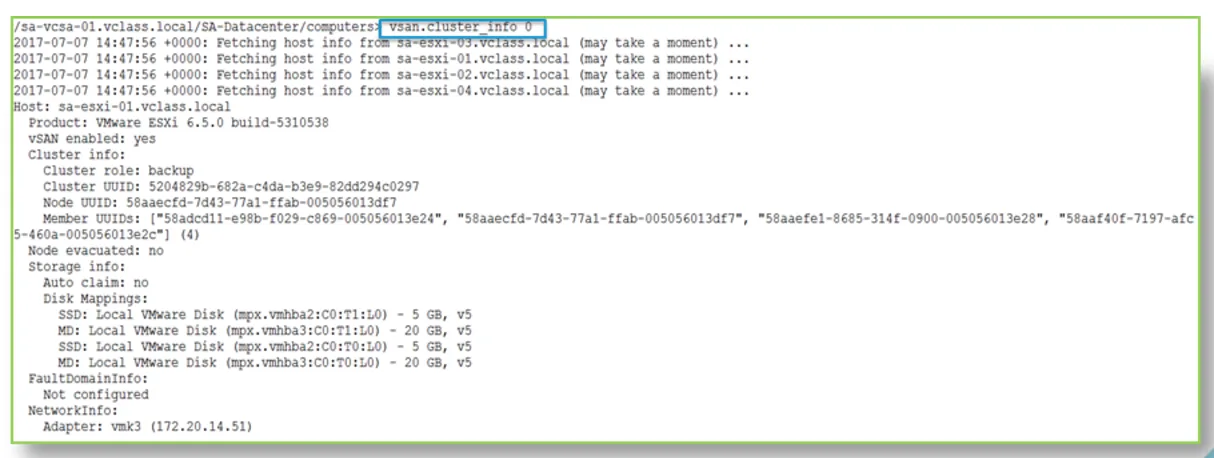
vsan.cluster_info 0
Screen Shot 2017-07-27 at 13.29.53

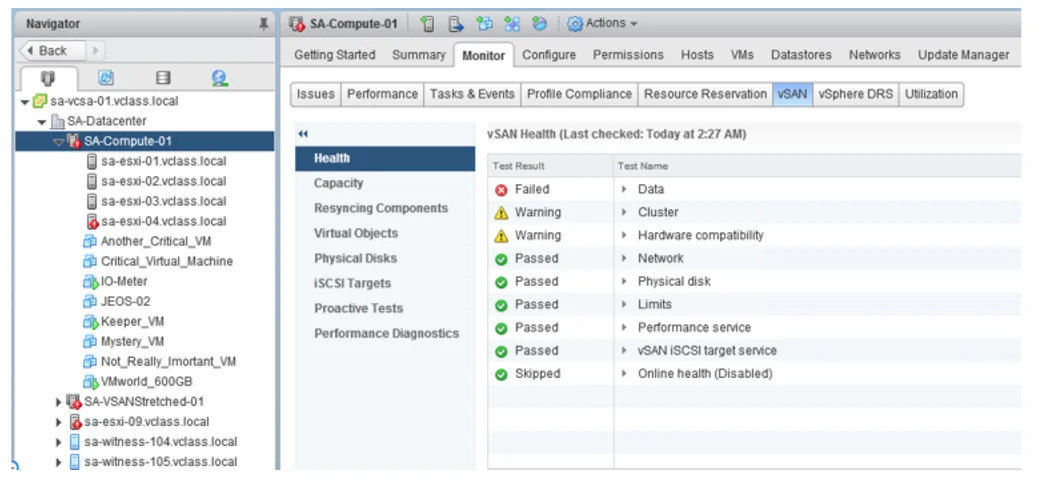
Health UI

Screen Shot 2017-07-27 at 13.30.33

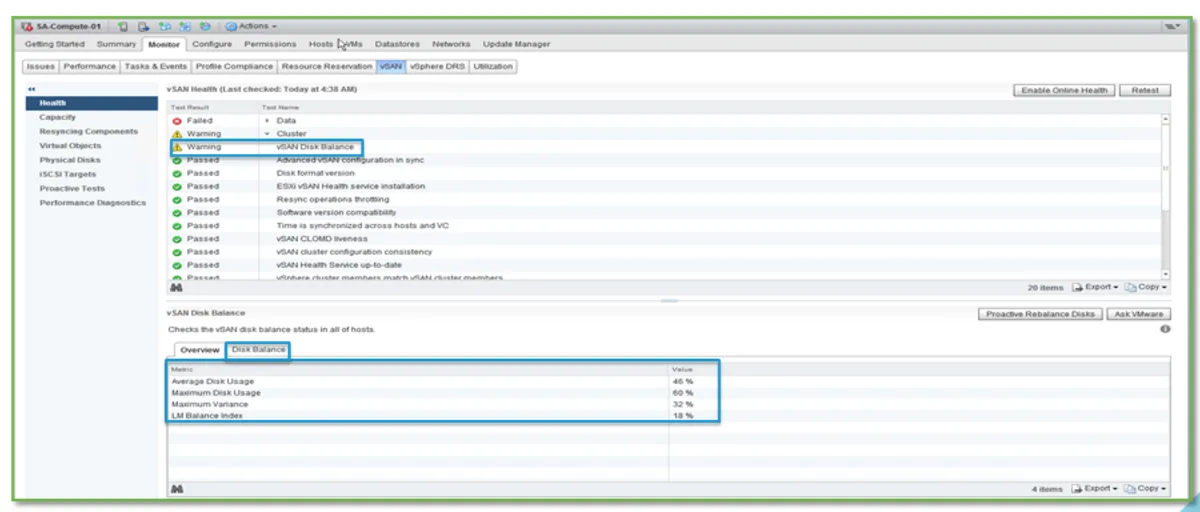
vSAN Disk balance
Screen Shot 2017-07-27 at 13.32.00

vSAN Health

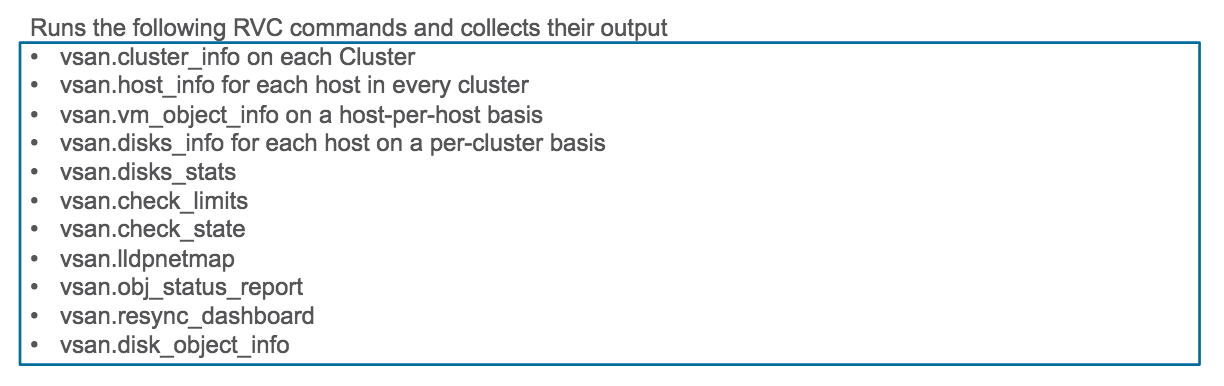
python /usr/lib/vmware-vpx/vsan-health/vsan-vc-health-status.py > /tmp/vsan_status.txt
Screen Shot 2017-07-27 at 13.34.56

Running this on a individual node:
Location: /usr/lib/vmware/vsan/bin/vsan-health-status.pyc

python /usr/lib/vmware/vsan/bin/vsan-health-status.pyc

KB 2107705 has more information on that.

When to use those: Health Service on vCenter not available

Use Cases

Cluster with 6 hosts. Three nodes were added. No capacity added after adding the hosts.

esxcli vsan storage list
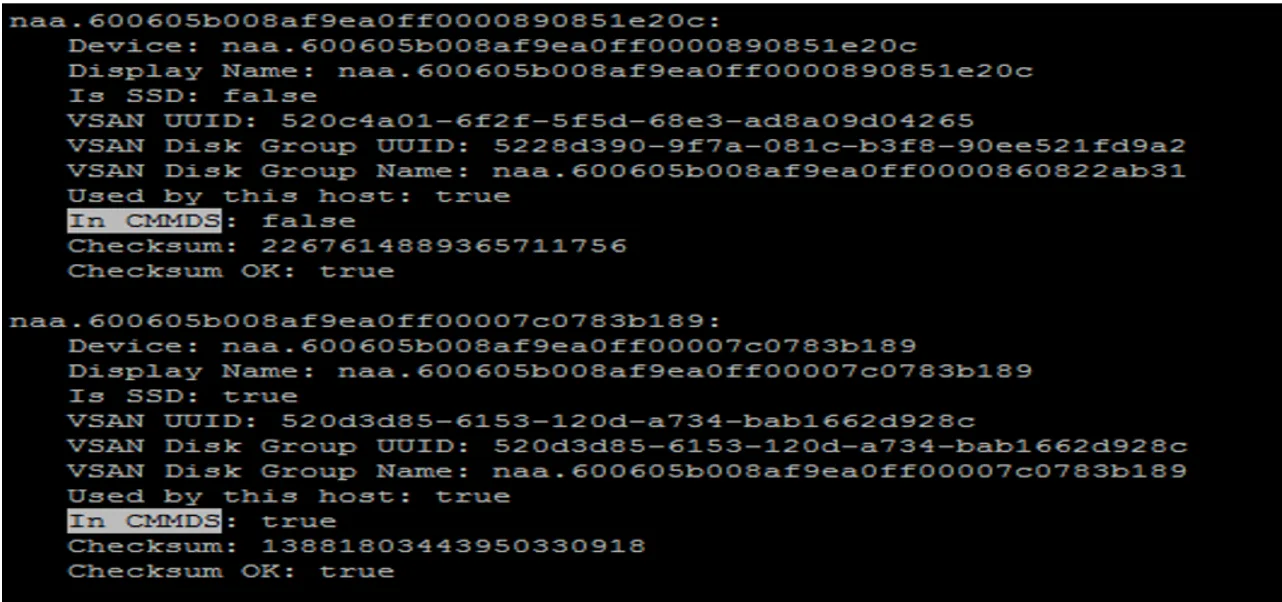
Screen Shot 2017-07-27 at 13.40.13In CMMDS: false – take note of the naa… ID

  • Check vobd.log (search for naa… ID)
  • Check boot.gz (use zcat; search for naa… ID)
    • Disk naa… ID detected to be a snapshot

Resolution:
– Disk cannot be added because it already has a filesystem on it
– Disk was given UUID, it was in a cluster and used at some point
– Verified to delete data
– Used partedutil to kill partitions
– Delete disk groups and recreate disk groups

Useful Logs:

vobd.log

Search for “problem” and “permanent”

You might also like