

build 7bbbddf7 | content blog-content@c8490fa · 338 posts | profiles 20 · corpus 267 | 0 skipped | | format
apiVersion: soultec.ch/v1kind: Postmetadata: name: tanzu-default-storage-class locale: en labels: author: marco-mattei series: lessons-learned capability/containers: 2.39 vendor/vmware: 0.88 annotations: source: blog-content/posts/en/tanzu-default-storage-class.md route: /en/insights/tanzu-default-storage-class/ schema: /nerd/schema/posts.json markdown: /en/insights/tanzu-default-storage-class.mdspec: title: Tanzu default storage class date: 2023-07-17 author: marco-mattei locale: en summary: >- I was recently playing with Helm charts on Tanzu Kubernetes clusters and ran into a few problems. Here is a quick tip if you hit something similar. capabilities: [containers] vendors: [vmware] series: lessons-learned hero: /blog-assets/tanzu-default-storage-class/hero.webp migrated: 2026-08-24 translationReviewed: false draft: false sections: - body: | I was recently playing with Helm charts on Tanzu Kubernetes clusters and ran into a few problems. Here is a quick tip if you hit something similar. While deploying a Helm chart I ran into pods going into a crash loop. Digging into it, I found that the persistent volumes had not been created. The chart created some PVCs but could not create the matching PVs. Describing the PVC gave me this error: `no persistent volumes available for this claim and no storage class is set` Although TKG clusters have the vSphere CSI as their PV provisioner, the PVC needs a storage class assigned so it knows where to create the volumes. With Helm charts you cannot specify which storage class to use when installing a chart, the way you would in a deployment. - heading:

Setting a default storage class

body: | Setting a default storage class means every PVC created without one uses that class. And in theory setting a storage class as the default in Kubernetes is straightforward: Find out which storage classes you have with `kubectl get sc`: ```text kubectl get sc NAME PROVISIONER RECLAIMPOLICY VOLUMEBINDINGMODE ALLOWVOLUMEEXPANSION AGE sp-tanzu-global csi.vsphere.vmware.com Delete Immediate true 9d sp-tanzu-global-latebinding csi.vsphere.vmware.com Delete WaitForFirstConsumer true 9d ``` As you can see there are two storage classes, but since the second is the same as the first with a different binding mode, neither is set as the default, which would show up here as (default). Now you can make one the default by patching the class: ```bash kubectl patch storageclass sp-tanzu-global -p '{"metadata": {"annotations":{"storageclass.kubernetes.io/is-default-class":"true"}}}' ``` Replace `sp-tanzu-global` with the name of your storage class. Run `kubectl get sc` again and you should see: ```text kubectl get sc NAME PROVISIONER RECLAIMPOLICY VOLUMEBINDINGMODE ALLOWVOLUMEEXPANSION AGE sp-tanzu-global (default) csi.vsphere.vmware.com Delete Immediate true 9d sp-tanzu-global-latebinding csi.vsphere.vmware.com Delete WaitForFirstConsumer true 9d ``` So far so good. Run your Helm chart straight away now and it should work. But I saw another problem: after about a minute the storage class is reset to not-default, which means Helm charts installed afterwards throw the same error about no storage class being set for the PVC. That is specific to Tanzu clusters. Because the cluster is provisioned from a YAML file, changing the default storage class inside the cluster itself does not change the cluster's configuration. Every so often Tanzu compares the actual cluster configuration against the YAML cluster configuration and reconciles the differences, with the YAML winning. Which means we have to set the default storage class there: Change your context to the vSphere namespace and list your clusters (`kubectl config use-context <namespace-name>`). Depending on which API version was used to provision the cluster, this differs: If you see: ```text kubectl get tkc No resources found in cl-lab-core-ns-mma-tkg2 namespace. ``` then you provisioned your cluster with v1beta1. If you do see your cluster here, it was provisioned with v1alpha3 or older. Take the matching section below. ### The default storage class in v1beta1 Run `kubectl edit cluster <cluster name>`. The configuration is probably fairly long. What you are looking for is the `spec.topology.variables` block. With a lot elided it should look roughly like this: ![](/blog-assets/tanzu-default-storage-class/01.webp)Look for `storageClass` and `defaultStorageClass`. That is most likely missing, so add it somewhere at that level. After that you should have a default storage class, so check in your cluster with `kubectl get sc`. ### The default storage class in v1alpha3 If your cluster is of type TKC, as established above, you cannot edit it with `kubectl edit cluster` and have to use `kubectl edit tkc` instead. What you want here is the `spec.settings.storage` level, and in the end it should look roughly like this (shortened): ![](/blog-assets/tanzu-default-storage-class/02.webp)You were probably missing the `defaultClass` value, so add it with your storage class. After that you should see your storage class when you go back to the cluster and run `kubectl get sc` again. - heading:

Volumes still are not created

body: | Even after all that, some of my PVCs had volumes assigned and some did not. If you still hit the problem of no PVs being created for your deployment, look at the age of your PVCs with `kubectl get PVC -A`. If the problematic PVCs are still there even after deleting and redeploying the Helm chart, they may not have been created by a manifest-based persistentVolumeClaim in the chart but by a job. Which is why uninstalling the Helm chart does not delete them. Delete them manually and try again. That solved it for me.status: corpus: 267 alsoLike: - {ref: posts/how-to-authenticate-with-the-vsphere-supervisor-api, score: 1.00} - {ref: posts/vvf-9-0-supervisor-mit-foundation-load-balancer, score: 1.00} - {ref: services/virtualization-container, score: 0.74}
{ "apiVersion": "soultec.ch/v1", "kind": "Post", "metadata": { "name": "tanzu-default-storage-class", "locale": "en", "labels": { "author": "marco-mattei", "series": "lessons-learned", "capability/containers": "2.39", "vendor/vmware": "0.88" }, "annotations": { "source": "blog-content/posts/en/tanzu-default-storage-class.md", "route": "/en/insights/tanzu-default-storage-class/", "schema": "/nerd/schema/posts.json", "markdown": "/en/insights/tanzu-default-storage-class.md" } }, "spec": { "title": "Tanzu default storage class", "date": "2023-07-17", "author": "marco-mattei", "locale": "en", "summary": "I was recently playing with Helm charts on Tanzu Kubernetes clusters and ran into a few problems. Here is a quick tip if you hit something similar.", "capabilities": [ "containers" ], "vendors": [ "vmware" ], "series": "lessons-learned", "hero": "/blog-assets/tanzu-default-storage-class/hero.webp", "migrated": "2026-08-24", "translationReviewed": false, "draft": false }, "sections": [ { "body": "I was recently playing with Helm charts on Tanzu Kubernetes clusters and ran into a few problems. Here is a quick tip if you hit something similar.\n\nWhile deploying a Helm chart I ran into pods going into a crash loop. Digging into it, I found that the persistent volumes had not been created. The chart created some PVCs but could not create the matching PVs. Describing the PVC gave me this error:\n\n`no persistent volumes available for this claim and no storage class is set`\n\nAlthough TKG clusters have the vSphere CSI as their PV provisioner, the PVC needs a storage class assigned so it knows where to create the volumes. With Helm charts you cannot specify which storage class to use when installing a chart, the way you would in a deployment." }, { "heading": "

Setting a default storage class

",
"body": "Setting a default storage class means every PVC created without one uses that class. And in theory setting a storage class as the default in Kubernetes is straightforward:\n\nFind out which storage classes you have with `kubectl get sc`:\n\n```text\nkubectl get sc\nNAME PROVISIONER RECLAIMPOLICY VOLUMEBINDINGMODE ALLOWVOLUMEEXPANSION AGE\nsp-tanzu-global csi.vsphere.vmware.com Delete Immediate true 9d\nsp-tanzu-global-latebinding csi.vsphere.vmware.com Delete WaitForFirstConsumer true 9d\n```\n\nAs you can see there are two storage classes, but since the second is the same as the first with a different binding mode, neither is set as the default, which would show up here as (default).\n\nNow you can make one the default by patching the class:\n\n```bash\nkubectl patch storageclass sp-tanzu-global -p '{\"metadata\": {\"annotations\":{\"storageclass.kubernetes.io/is-default-class\":\"true\"}}}'\n```\n\nReplace `sp-tanzu-global` with the name of your storage class. Run `kubectl get sc` again and you should see:\n\n```text\nkubectl get sc\nNAME PROVISIONER RECLAIMPOLICY VOLUMEBINDINGMODE ALLOWVOLUMEEXPANSION AGE\nsp-tanzu-global (default) csi.vsphere.vmware.com Delete Immediate true 9d\nsp-tanzu-global-latebinding csi.vsphere.vmware.com Delete WaitForFirstConsumer true 9d\n```\n\nSo far so good. Run your Helm chart straight away now and it should work. But I saw another problem: after about a minute the storage class is reset to not-default, which means Helm charts installed afterwards throw the same error about no storage class being set for the PVC.\n\nThat is specific to Tanzu clusters. Because the cluster is provisioned from a YAML file, changing the default storage class inside the cluster itself does not change the cluster's configuration. Every so often Tanzu compares the actual cluster configuration against the YAML cluster configuration and reconciles the differences, with the YAML winning. Which means we have to set the default storage class there:\n\nChange your context to the vSphere namespace and list your clusters (`kubectl config use-context <namespace-name>`). Depending on which API version was used to provision the cluster, this differs:\n\nIf you see:\n\n```text\nkubectl get tkc\nNo resources found in cl-lab-core-ns-mma-tkg2 namespace.\n```\n\nthen you provisioned your cluster with v1beta1. If you do see your cluster here, it was provisioned with v1alpha3 or older. Take the matching section below.\n\n### The default storage class in v1beta1\n\nRun `kubectl edit cluster <cluster name>`. The configuration is probably fairly long. What you are looking for is the `spec.topology.variables` block. With a lot elided it should look roughly like this:\n\n![](/blog-assets/tanzu-default-storage-class/01.webp)Look for `storageClass` and `defaultStorageClass`. That is most likely missing, so add it somewhere at that level. After that you should have a default storage class, so check in your cluster with `kubectl get sc`.\n\n### The default storage class in v1alpha3\n\nIf your cluster is of type TKC, as established above, you cannot edit it with `kubectl edit cluster` and have to use `kubectl edit tkc` instead.\n\nWhat you want here is the `spec.settings.storage` level, and in the end it should look roughly like this (shortened):\n\n![](/blog-assets/tanzu-default-storage-class/02.webp)You were probably missing the `defaultClass` value, so add it with your storage class. After that you should see your storage class when you go back to the cluster and run `kubectl get sc` again." }, { "heading": "

Volumes still are not created

",
"body": "Even after all that, some of my PVCs had volumes assigned and some did not. If you still hit the problem of no PVs being created for your deployment, look at the age of your PVCs with `kubectl get PVC -A`. If the problematic PVCs are still there even after deleting and redeploying the Helm chart, they may not have been created by a manifest-based persistentVolumeClaim in the chart but by a job. Which is why uninstalling the Helm chart does not delete them. Delete them manually and try again. That solved it for me." } ], "status": { "corpus": 267, "alsoLike": [ { "ref": "posts/how-to-authenticate-with-the-vsphere-supervisor-api", "score": "1.00" }, { "ref": "posts/vvf-9-0-supervisor-mit-foundation-load-balancer", "score": "1.00" }, { "ref": "services/virtualization-container", "score": "0.74" } ] }}
apiVersion = "soultec.ch/v1"kind = "Post"[metadata]name = "tanzu-default-storage-class"locale = "en"[metadata.labels]author = "marco-mattei"series = "lessons-learned""capability/containers" = "2.39""vendor/vmware" = "0.88"[metadata.annotations]source = "blog-content/posts/en/tanzu-default-storage-class.md"route = "/en/insights/tanzu-default-storage-class/"schema = "/nerd/schema/posts.json"markdown = "/en/insights/tanzu-default-storage-class.md"[spec]title = "Tanzu default storage class"date = 2023-07-17author = "marco-mattei"locale = "en"summary = "I was recently playing with Helm charts on Tanzu Kubernetes clusters and ran into a few problems. Here is a quick tip if you hit something similar."capabilities = ["containers"]vendors = ["vmware"]series = "lessons-learned"hero = "/blog-assets/tanzu-default-storage-class/hero.webp"migrated = 2026-08-24translationReviewed = falsedraft = false[[sections]]body = '''I was recently playing with Helm charts on Tanzu Kubernetes clusters and ran into a few problems. Here is a quick tip if you hit something similar.While deploying a Helm chart I ran into pods going into a crash loop. Digging into it, I found that the persistent volumes had not been created. The chart created some PVCs but could not create the matching PVs. Describing the PVC gave me this error:`no persistent volumes available for this claim and no storage class is set`Although TKG clusters have the vSphere CSI as their PV provisioner, the PVC needs a storage class assigned so it knows where to create the volumes. With Helm charts you cannot specify which storage class to use when installing a chart, the way you would in a deployment.'''[[sections]]heading = "

Setting a default storage class

"
body = '''Setting a default storage class means every PVC created without one uses that class. And in theory setting a storage class as the default in Kubernetes is straightforward:Find out which storage classes you have with `kubectl get sc`:```textkubectl get scNAME PROVISIONER RECLAIMPOLICY VOLUMEBINDINGMODE ALLOWVOLUMEEXPANSION AGEsp-tanzu-global csi.vsphere.vmware.com Delete Immediate true 9dsp-tanzu-global-latebinding csi.vsphere.vmware.com Delete WaitForFirstConsumer true 9d```As you can see there are two storage classes, but since the second is the same as the first with a different binding mode, neither is set as the default, which would show up here as (default).Now you can make one the default by patching the class:```bashkubectl patch storageclass sp-tanzu-global -p '{"metadata": {"annotations":{"storageclass.kubernetes.io/is-default-class":"true"}}}'```Replace `sp-tanzu-global` with the name of your storage class. Run `kubectl get sc` again and you should see:```textkubectl get scNAME PROVISIONER RECLAIMPOLICY VOLUMEBINDINGMODE ALLOWVOLUMEEXPANSION AGEsp-tanzu-global (default) csi.vsphere.vmware.com Delete Immediate true 9dsp-tanzu-global-latebinding csi.vsphere.vmware.com Delete WaitForFirstConsumer true 9d```So far so good. Run your Helm chart straight away now and it should work. But I saw another problem: after about a minute the storage class is reset to not-default, which means Helm charts installed afterwards throw the same error about no storage class being set for the PVC.That is specific to Tanzu clusters. Because the cluster is provisioned from a YAML file, changing the default storage class inside the cluster itself does not change the cluster's configuration. Every so often Tanzu compares the actual cluster configuration against the YAML cluster configuration and reconciles the differences, with the YAML winning. Which means we have to set the default storage class there:Change your context to the vSphere namespace and list your clusters (`kubectl config use-context <namespace-name>`). Depending on which API version was used to provision the cluster, this differs:If you see:```textkubectl get tkcNo resources found in cl-lab-core-ns-mma-tkg2 namespace.```then you provisioned your cluster with v1beta1. If you do see your cluster here, it was provisioned with v1alpha3 or older. Take the matching section below.### The default storage class in v1beta1Run `kubectl edit cluster <cluster name>`. The configuration is probably fairly long. What you are looking for is the `spec.topology.variables` block. With a lot elided it should look roughly like this:![](/blog-assets/tanzu-default-storage-class/01.webp)Look for `storageClass` and `defaultStorageClass`. That is most likely missing, so add it somewhere at that level. After that you should have a default storage class, so check in your cluster with `kubectl get sc`.### The default storage class in v1alpha3If your cluster is of type TKC, as established above, you cannot edit it with `kubectl edit cluster` and have to use `kubectl edit tkc` instead.What you want here is the `spec.settings.storage` level, and in the end it should look roughly like this (shortened):![](/blog-assets/tanzu-default-storage-class/02.webp)You were probably missing the `defaultClass` value, so add it with your storage class. After that you should see your storage class when you go back to the cluster and run `kubectl get sc` again.'''[[sections]]heading = "

Volumes still are not created

"
body = "Even after all that, some of my PVCs had volumes assigned and some did not. If you still hit the problem of no PVs being created for your deployment, look at the age of your PVCs with `kubectl get PVC -A`. If the problematic PVCs are still there even after deleting and redeploying the Helm chart, they may not have been created by a manifest-based persistentVolumeClaim in the chart but by a job. Which is why uninstalling the Helm chart does not delete them. Delete them manually and try again. That solved it for me."[status]corpus = 267[[status.alsoLike]]ref = "posts/how-to-authenticate-with-the-vsphere-supervisor-api"score = "1.00"[[status.alsoLike]]ref = "posts/vvf-9-0-supervisor-mit-foundation-load-balancer"score = "1.00"[[status.alsoLike]]ref = "services/virtualization-container"score = "0.74"
<?xml version="1.0" encoding="UTF-8"?><manifest kind="Post"> <apiVersion>soultec.ch/v1</apiVersion> <metadata> <name>tanzu-default-storage-class</name> <locale>en</locale> <labels> <author>marco-mattei</author> <series>lessons-learned</series> <entry key="capability/containers">2.39</entry> <entry key="vendor/vmware">0.88</entry> </labels> <annotations> <source>blog-content/posts/en/tanzu-default-storage-class.md</source> <route>/en/insights/tanzu-default-storage-class/</route> <schema>/nerd/schema/posts.json</schema> <markdown>/en/insights/tanzu-default-storage-class.md</markdown> </annotations> </metadata> <spec> <title>Tanzu default storage class</title> <date>2023-07-17</date> <author>marco-mattei</author> <locale>en</locale> <summary>I was recently playing with Helm charts on Tanzu Kubernetes clusters and ran into a few problems. Here is a quick tip if you hit something similar.</summary> <capabilities> <item>containers</item> </capabilities> <vendors> <item>vmware</item> </vendors> <series>lessons-learned</series> <hero>/blog-assets/tanzu-default-storage-class/hero.webp</hero> <migrated>2026-08-24</migrated> <translationReviewed>false</translationReviewed> <draft>false</draft> </spec> <sections> <section> <body>I was recently playing with Helm charts on Tanzu Kubernetes clusters and ran into a few problems. Here is a quick tip if you hit something similar.While deploying a Helm chart I ran into pods going into a crash loop. Digging into it, I found that the persistent volumes had not been created. The chart created some PVCs but could not create the matching PVs. Describing the PVC gave me this error:`no persistent volumes available for this claim and no storage class is set`Although TKG clusters have the vSphere CSI as their PV provisioner, the PVC needs a storage class assigned so it knows where to create the volumes. With Helm charts you cannot specify which storage class to use when installing a chart, the way you would in a deployment. </body> </section> <section> <heading>

Setting a default storage class

</heading>
<body>Setting a default storage class means every PVC created without one uses that class. And in theory setting a storage class as the default in Kubernetes is straightforward:Find out which storage classes you have with `kubectl get sc`:```textkubectl get scNAME PROVISIONER RECLAIMPOLICY VOLUMEBINDINGMODE ALLOWVOLUMEEXPANSION AGEsp-tanzu-global csi.vsphere.vmware.com Delete Immediate true 9dsp-tanzu-global-latebinding csi.vsphere.vmware.com Delete WaitForFirstConsumer true 9d```As you can see there are two storage classes, but since the second is the same as the first with a different binding mode, neither is set as the default, which would show up here as (default).Now you can make one the default by patching the class:```bashkubectl patch storageclass sp-tanzu-global -p '{"metadata": {"annotations":{"storageclass.kubernetes.io/is-default-class":"true"}}}'```Replace `sp-tanzu-global` with the name of your storage class. Run `kubectl get sc` again and you should see:```textkubectl get scNAME PROVISIONER RECLAIMPOLICY VOLUMEBINDINGMODE ALLOWVOLUMEEXPANSION AGEsp-tanzu-global (default) csi.vsphere.vmware.com Delete Immediate true 9dsp-tanzu-global-latebinding csi.vsphere.vmware.com Delete WaitForFirstConsumer true 9d```So far so good. Run your Helm chart straight away now and it should work. But I saw another problem: after about a minute the storage class is reset to not-default, which means Helm charts installed afterwards throw the same error about no storage class being set for the PVC.That is specific to Tanzu clusters. Because the cluster is provisioned from a YAML file, changing the default storage class inside the cluster itself does not change the cluster's configuration. Every so often Tanzu compares the actual cluster configuration against the YAML cluster configuration and reconciles the differences, with the YAML winning. Which means we have to set the default storage class there:Change your context to the vSphere namespace and list your clusters (`kubectl config use-context &lt;namespace-name&gt;`). Depending on which API version was used to provision the cluster, this differs:If you see:```textkubectl get tkcNo resources found in cl-lab-core-ns-mma-tkg2 namespace.```then you provisioned your cluster with v1beta1. If you do see your cluster here, it was provisioned with v1alpha3 or older. Take the matching section below.### The default storage class in v1beta1Run `kubectl edit cluster &lt;cluster name&gt;`. The configuration is probably fairly long. What you are looking for is the `spec.topology.variables` block. With a lot elided it should look roughly like this:![](/blog-assets/tanzu-default-storage-class/01.webp)Look for `storageClass` and `defaultStorageClass`. That is most likely missing, so add it somewhere at that level. After that you should have a default storage class, so check in your cluster with `kubectl get sc`.### The default storage class in v1alpha3If your cluster is of type TKC, as established above, you cannot edit it with `kubectl edit cluster` and have to use `kubectl edit tkc` instead.What you want here is the `spec.settings.storage` level, and in the end it should look roughly like this (shortened):![](/blog-assets/tanzu-default-storage-class/02.webp)You were probably missing the `defaultClass` value, so add it with your storage class. After that you should see your storage class when you go back to the cluster and run `kubectl get sc` again. </body> </section> <section> <heading>

Volumes still are not created

</heading>
<body>Even after all that, some of my PVCs had volumes assigned and some did not. If you still hit the problem of no PVs being created for your deployment, look at the age of your PVCs with `kubectl get PVC -A`. If the problematic PVCs are still there even after deleting and redeploying the Helm chart, they may not have been created by a manifest-based persistentVolumeClaim in the chart but by a job. Which is why uninstalling the Helm chart does not delete them. Delete them manually and try again. That solved it for me.</body> </section> </sections> <status> <corpus>267</corpus> <alsoLike> <item> <ref>posts/how-to-authenticate-with-the-vsphere-supervisor-api</ref> <score>1.00</score> </item> <item> <ref>posts/vvf-9-0-supervisor-mit-foundation-load-balancer</ref> <score>1.00</score> </item> <item> <ref>services/virtualization-container</ref> <score>0.74</score> </item> </alsoLike> </status></manifest>
Lessons learned · 2023-07-17

Tanzu default storage class

I was recently playing with Helm charts on Tanzu Kubernetes clusters and ran into a few problems. Here is a quick tip if you hit something similar.

2023-07-17Date
Marco MatteiAuthor
4Min read
Topics Containers 2.39
Vendors VMware 0.88

I was recently playing with Helm charts on Tanzu Kubernetes clusters and ran into a few problems. Here is a quick tip if you hit something similar.

While deploying a Helm chart I ran into pods going into a crash loop. Digging into it, I found that the persistent volumes had not been created. The chart created some PVCs but could not create the matching PVs. Describing the PVC gave me this error:

no persistent volumes available for this claim and no storage class is set

Although TKG clusters have the vSphere CSI as their PV provisioner, the PVC needs a storage class assigned so it knows where to create the volumes. With Helm charts you cannot specify which storage class to use when installing a chart, the way you would in a deployment.

Setting a default storage class

Setting a default storage class means every PVC created without one uses that class. And in theory setting a storage class as the default in Kubernetes is straightforward:

Find out which storage classes you have with kubectl get sc:

kubectl get sc
NAME PROVISIONER RECLAIMPOLICY VOLUMEBINDINGMODE ALLOWVOLUMEEXPANSION AGE
sp-tanzu-global csi.vsphere.vmware.com Delete Immediate true 9d
sp-tanzu-global-latebinding csi.vsphere.vmware.com Delete WaitForFirstConsumer true 9d

As you can see there are two storage classes, but since the second is the same as the first with a different binding mode, neither is set as the default, which would show up here as (default).

Now you can make one the default by patching the class:

kubectl patch storageclass sp-tanzu-global -p '{"metadata": {"annotations":{"storageclass.kubernetes.io/is-default-class":"true"}}}'

Replace sp-tanzu-global with the name of your storage class. Run kubectl get sc again and you should see:

kubectl get sc
NAME PROVISIONER RECLAIMPOLICY VOLUMEBINDINGMODE ALLOWVOLUMEEXPANSION AGE
sp-tanzu-global (default) csi.vsphere.vmware.com Delete Immediate true 9d
sp-tanzu-global-latebinding csi.vsphere.vmware.com Delete WaitForFirstConsumer true 9d

So far so good. Run your Helm chart straight away now and it should work. But I saw another problem: after about a minute the storage class is reset to not-default, which means Helm charts installed afterwards throw the same error about no storage class being set for the PVC.

That is specific to Tanzu clusters. Because the cluster is provisioned from a YAML file, changing the default storage class inside the cluster itself does not change the cluster’s configuration. Every so often Tanzu compares the actual cluster configuration against the YAML cluster configuration and reconciles the differences, with the YAML winning. Which means we have to set the default storage class there:

Change your context to the vSphere namespace and list your clusters (kubectl config use-context <namespace-name>). Depending on which API version was used to provision the cluster, this differs:

If you see:

kubectl get tkc
No resources found in cl-lab-core-ns-mma-tkg2 namespace.

then you provisioned your cluster with v1beta1. If you do see your cluster here, it was provisioned with v1alpha3 or older. Take the matching section below.

The default storage class in v1beta1

Run kubectl edit cluster <cluster name>. The configuration is probably fairly long. What you are looking for is the spec.topology.variables block. With a lot elided it should look roughly like this:
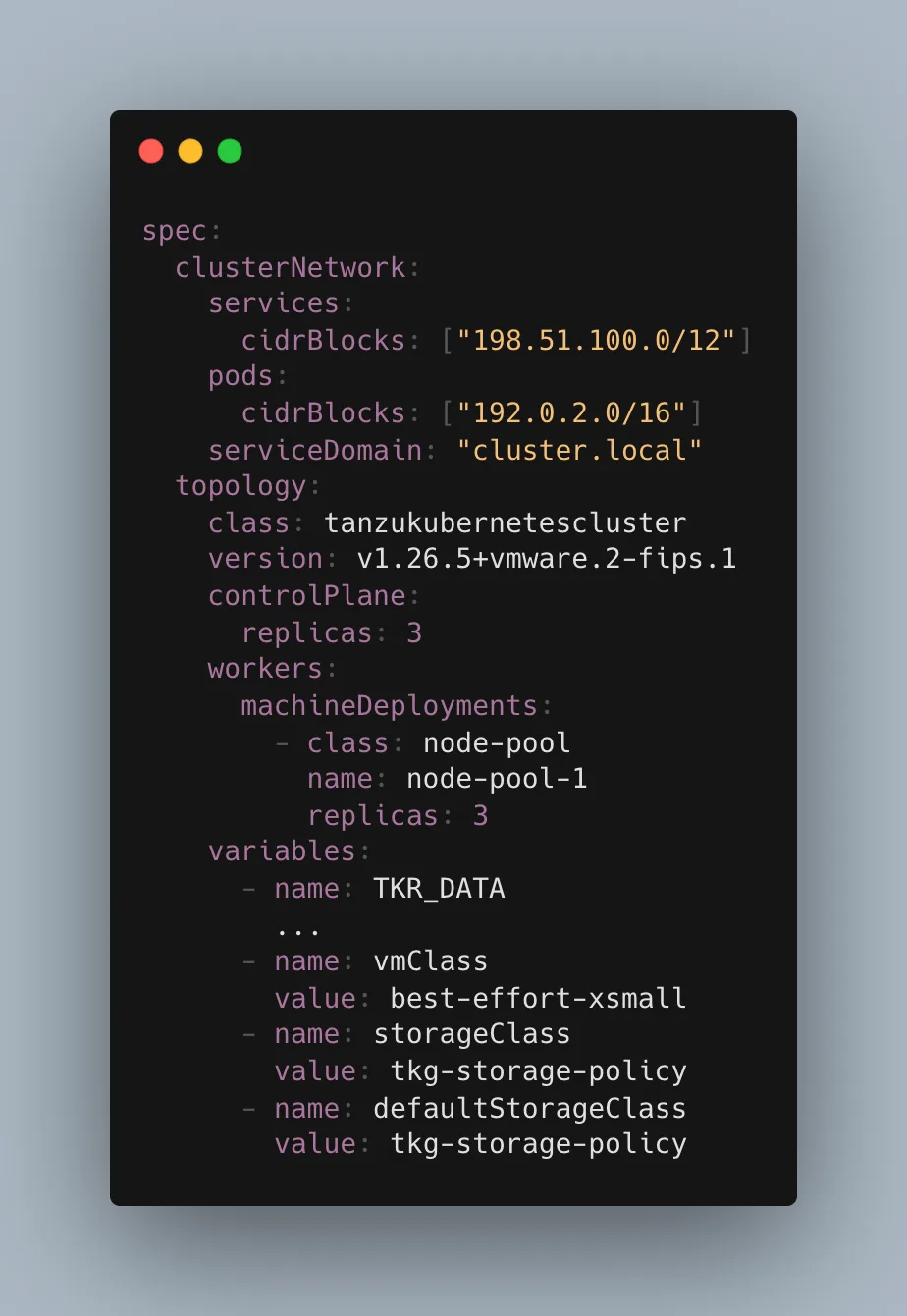
Look for storageClass and defaultStorageClass. That is most likely missing, so add it somewhere at that level. After that you should have a default storage class, so check in your cluster with kubectl get sc.

The default storage class in v1alpha3

If your cluster is of type TKC, as established above, you cannot edit it with kubectl edit cluster and have to use kubectl edit tkc instead.

What you want here is the spec.settings.storage level, and in the end it should look roughly like this (shortened):
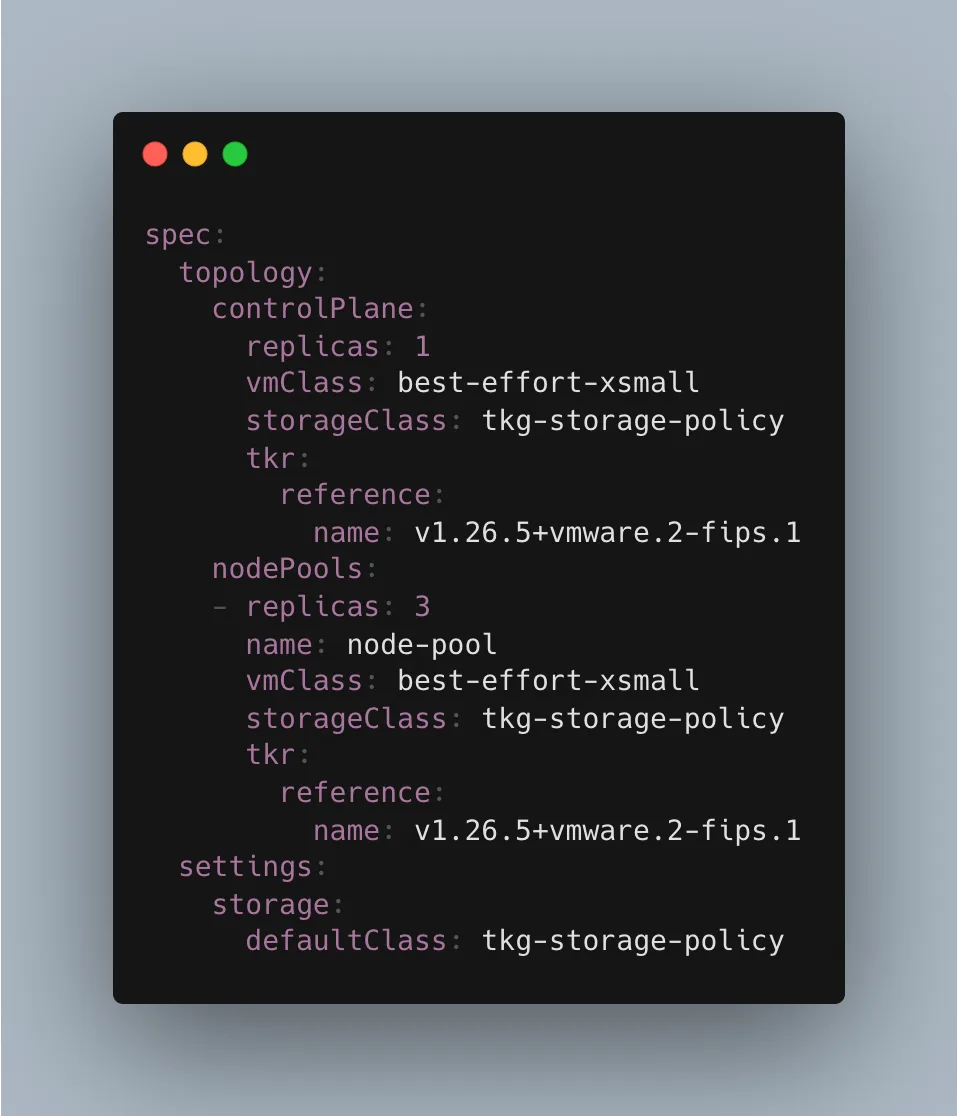
You were probably missing the defaultClass value, so add it with your storage class. After that you should see your storage class when you go back to the cluster and run kubectl get sc again.

Volumes still are not created

Even after all that, some of my PVCs had volumes assigned and some did not. If you still hit the problem of no PVs being created for your deployment, look at the age of your PVCs with kubectl get PVC -A. If the problematic PVCs are still there even after deleting and redeploying the Helm chart, they may not have been created by a manifest-based persistentVolumeClaim in the chart but by a job. Which is why uninstalling the Helm chart does not delete them. Delete them manually and try again. That solved it for me.

You might also like