

build 7bbbddf7 | content blog-content@c8490fa · 338 posts | profiles 20 · corpus 267 | 0 skipped | | format
apiVersion: soultec.ch/v1kind: Postmetadata: name: powercli-setting-resource-pools-right locale: en labels: author: dario-doerflinger series: scripting capability/automation: 1.78 vendor/vmware: 0.88 annotations: source: blog-content/posts/en/powercli-setting-resource-pools-right.md route: /en/insights/powercli-setting-resource-pools-right/ schema: /nerd/schema/posts.json markdown: /en/insights/powercli-setting-resource-pools-right.mdspec: title: Setting Resource Pools right date: 2019-01-09 author: dario-doerflinger locale: en summary: I wrote a script to set resource pools right. capabilities: [automation] vendors: [vmware] series: scripting legacySlug: powercli-setting-resource-pools-right migrated: 2026-08-24 draft: false sections: - body: | Much has been written about resources and resource pools. Especially in the recent deep dive books from Duncan Epping, Niels Hagoort and Frank Denneman as well as in many blogs from chris wahl and elasic sky. I want to dedicate this post to resource pools because I still find them everywhere and they are not configured right. **Do not use resource pools as folders** There are perfectly good folders in the "VMs and Templates" view for you to use. If you use resource pools as folders you can get hurt when a contention arises. **Do not use default share values "low", "normal" and "high"** Why? Because they do not account for the number of VMs or resources residing within. A resource pool is dynamic and so should the share number of that resource pool be. Chris Wahl has posted a very nice picture about why not to do this back in 2012 and it sill holds true today: [https://wahlnetwork.com/2012/02/01/understanding-resource-pools-in-vmware-vsphere/](https://wahlnetwork.com/2012/02/01/understanding-resource-pools-in-vmware-vsphere/) **If you do use resource pools, place every VM in them** Do not place VMs outside the resource pool (aka. the "resources" resource pool). What happens if you do? You make that VM a sibling to the other resource pools. So in a contention scenario this VM would get as much resources as a resource pool where potentially many more VMs reside. **What is the right way?** PowerCLI to the rescue! This task screams to be automated and regularly run to always have your resource pools optimised. That is the only way to guarantee they will behave as expected in a contention scenario. I have written a script before, but thanks to inspiration from this post ([https://www.elasticsky.de/en/2017/08/rebalance-your-resource-pools/](https://www.elasticsky.de/en/2017/08/rebalance-your-resource-pools/)) I have taken another look at my script and expanded it. The script must be edited at lines 66 to 69. This is where you put your resource pools in and decide the factor by which their resources differ from each other: ![screenshot 2019-01-09 at 11.31.03](/blog-assets/powercli-setting-resource-pools-right/01.webp) Other than that you do not need to edit anything. I have taken care to include a synopsis for easy consumption but I have one dependency (aside from PowerCLI): PSLogging. That is a module from the Powershell Gallery that makes log files easier (at least for me). Here is the link to that module: [https://www.powershellgallery.com/packages/PSLogging](https://www.powershellgallery.com/packages/PSLogging) And last but not least, my script can be found in my GitHub. [Directlink to the script](https://github.com/virtualFrog/PowerCLI-Scripts/blob/master/Set-ResourcePoolGranular.ps1). Please use at your own risk. And you can test the script by using the "Set-ResourcePool" command with the -WhatIf parameter (read the comments in the script). And please feel free to improve upon it. Come to think of it, I should add a disconnect-vi server command at the end.status: corpus: 267 alsoLike: - {ref: posts/vmware-explore-las-vegas-hackathon-2025, score: 1.00} - {ref: posts/vmware-hackathon-2024-project, score: 1.00} - {ref: solutions/vmware/vmware-cloud-foundation/addon/application-services, score: 0.60}
{ "apiVersion": "soultec.ch/v1", "kind": "Post", "metadata": { "name": "powercli-setting-resource-pools-right", "locale": "en", "labels": { "author": "dario-doerflinger", "series": "scripting", "capability/automation": "1.78", "vendor/vmware": "0.88" }, "annotations": { "source": "blog-content/posts/en/powercli-setting-resource-pools-right.md", "route": "/en/insights/powercli-setting-resource-pools-right/", "schema": "/nerd/schema/posts.json", "markdown": "/en/insights/powercli-setting-resource-pools-right.md" } }, "spec": { "title": "Setting Resource Pools right", "date": "2019-01-09", "author": "dario-doerflinger", "locale": "en", "summary": "I wrote a script to set resource pools right.", "capabilities": [ "automation" ], "vendors": [ "vmware" ], "series": "scripting", "legacySlug": "powercli-setting-resource-pools-right", "migrated": "2026-08-24", "draft": false }, "sections": [ { "body": "Much has been written about resources and resource pools. Especially in the recent deep dive books from Duncan Epping, Niels Hagoort and Frank Denneman as well as in many blogs from chris wahl and elasic sky.\n\nI want to dedicate this post to resource pools because I still find them everywhere and they are not configured right.\n\n**Do not use resource pools as folders**\n\nThere are perfectly good folders in the \"VMs and Templates\" view for you to use. If you use resource pools as folders you can get hurt when a contention arises.\n\n**Do not use default share values \"low\", \"normal\" and \"high\"**\n\nWhy? Because they do not account for the number of VMs or resources residing within. A resource pool is dynamic and so should the share number of that resource pool be.\n\nChris Wahl has posted a very nice picture about why not to do this back in 2012 and it sill holds true today: [https://wahlnetwork.com/2012/02/01/understanding-resource-pools-in-vmware-vsphere/](https://wahlnetwork.com/2012/02/01/understanding-resource-pools-in-vmware-vsphere/)\n\n**If you do use resource pools, place every VM in them**\n\nDo not place VMs outside the resource pool (aka. the \"resources\" resource pool). What happens if you do? You make that VM a sibling to the other resource pools. So in a contention scenario this VM would get as much resources as a resource pool where potentially many more VMs reside.\n\n**What is the right way?**\n\nPowerCLI to the rescue! This task screams to be automated and regularly run to always have your resource pools optimised. That is the only way to guarantee they will behave as expected in a contention scenario.\n\nI have written a script before, but thanks to inspiration from this post ([https://www.elasticsky.de/en/2017/08/rebalance-your-resource-pools/](https://www.elasticsky.de/en/2017/08/rebalance-your-resource-pools/)) I have taken another look at my script and expanded it.\n\nThe script must be edited at lines 66 to 69. This is where you put your resource pools in and decide the factor by which their resources differ from each other:\n\n![screenshot 2019-01-09 at 11.31.03](/blog-assets/powercli-setting-resource-pools-right/01.webp)\n\nOther than that you do not need to edit anything. I have taken care to include a synopsis for easy consumption but I have one dependency (aside from PowerCLI): PSLogging. That is a module from the Powershell Gallery that makes log files easier (at least for me). Here is the link to that module: [https://www.powershellgallery.com/packages/PSLogging](https://www.powershellgallery.com/packages/PSLogging)\n\nAnd last but not least, my script can be found in my GitHub. [Directlink to the script](https://github.com/virtualFrog/PowerCLI-Scripts/blob/master/Set-ResourcePoolGranular.ps1). Please use at your own risk. And you can test the script by using the \"Set-ResourcePool\" command with the -WhatIf parameter (read the comments in the script).\n\nAnd please feel free to improve upon it. Come to think of it, I should add a disconnect-vi server command at the end." } ], "status": { "corpus": 267, "alsoLike": [ { "ref": "posts/vmware-explore-las-vegas-hackathon-2025", "score": "1.00" }, { "ref": "posts/vmware-hackathon-2024-project", "score": "1.00" }, { "ref": "solutions/vmware/vmware-cloud-foundation/addon/application-services", "score": "0.60" } ] }}
apiVersion = "soultec.ch/v1"kind = "Post"[metadata]name = "powercli-setting-resource-pools-right"locale = "en"[metadata.labels]author = "dario-doerflinger"series = "scripting""capability/automation" = "1.78""vendor/vmware" = "0.88"[metadata.annotations]source = "blog-content/posts/en/powercli-setting-resource-pools-right.md"route = "/en/insights/powercli-setting-resource-pools-right/"schema = "/nerd/schema/posts.json"markdown = "/en/insights/powercli-setting-resource-pools-right.md"[spec]title = "Setting Resource Pools right"date = 2019-01-09author = "dario-doerflinger"locale = "en"summary = "I wrote a script to set resource pools right."capabilities = ["automation"]vendors = ["vmware"]series = "scripting"legacySlug = "powercli-setting-resource-pools-right"migrated = 2026-08-24draft = false[[sections]]body = '''Much has been written about resources and resource pools. Especially in the recent deep dive books from Duncan Epping, Niels Hagoort and Frank Denneman as well as in many blogs from chris wahl and elasic sky.I want to dedicate this post to resource pools because I still find them everywhere and they are not configured right.**Do not use resource pools as folders**There are perfectly good folders in the "VMs and Templates" view for you to use. If you use resource pools as folders you can get hurt when a contention arises.**Do not use default share values "low", "normal" and "high"**Why? Because they do not account for the number of VMs or resources residing within. A resource pool is dynamic and so should the share number of that resource pool be.Chris Wahl has posted a very nice picture about why not to do this back in 2012 and it sill holds true today: [https://wahlnetwork.com/2012/02/01/understanding-resource-pools-in-vmware-vsphere/](https://wahlnetwork.com/2012/02/01/understanding-resource-pools-in-vmware-vsphere/)**If you do use resource pools, place every VM in them**Do not place VMs outside the resource pool (aka. the "resources" resource pool). What happens if you do? You make that VM a sibling to the other resource pools. So in a contention scenario this VM would get as much resources as a resource pool where potentially many more VMs reside.**What is the right way?**PowerCLI to the rescue! This task screams to be automated and regularly run to always have your resource pools optimised. That is the only way to guarantee they will behave as expected in a contention scenario.I have written a script before, but thanks to inspiration from this post ([https://www.elasticsky.de/en/2017/08/rebalance-your-resource-pools/](https://www.elasticsky.de/en/2017/08/rebalance-your-resource-pools/)) I have taken another look at my script and expanded it.The script must be edited at lines 66 to 69. This is where you put your resource pools in and decide the factor by which their resources differ from each other:![screenshot 2019-01-09 at 11.31.03](/blog-assets/powercli-setting-resource-pools-right/01.webp)Other than that you do not need to edit anything. I have taken care to include a synopsis for easy consumption but I have one dependency (aside from PowerCLI): PSLogging. That is a module from the Powershell Gallery that makes log files easier (at least for me). Here is the link to that module: [https://www.powershellgallery.com/packages/PSLogging](https://www.powershellgallery.com/packages/PSLogging)And last but not least, my script can be found in my GitHub. [Directlink to the script](https://github.com/virtualFrog/PowerCLI-Scripts/blob/master/Set-ResourcePoolGranular.ps1). Please use at your own risk. And you can test the script by using the "Set-ResourcePool" command with the -WhatIf parameter (read the comments in the script).And please feel free to improve upon it. Come to think of it, I should add a disconnect-vi server command at the end.'''[status]corpus = 267[[status.alsoLike]]ref = "posts/vmware-explore-las-vegas-hackathon-2025"score = "1.00"[[status.alsoLike]]ref = "posts/vmware-hackathon-2024-project"score = "1.00"[[status.alsoLike]]ref = "solutions/vmware/vmware-cloud-foundation/addon/application-services"score = "0.60"
<?xml version="1.0" encoding="UTF-8"?><manifest kind="Post"> <apiVersion>soultec.ch/v1</apiVersion> <metadata> <name>powercli-setting-resource-pools-right</name> <locale>en</locale> <labels> <author>dario-doerflinger</author> <series>scripting</series> <entry key="capability/automation">1.78</entry> <entry key="vendor/vmware">0.88</entry> </labels> <annotations> <source>blog-content/posts/en/powercli-setting-resource-pools-right.md</source> <route>/en/insights/powercli-setting-resource-pools-right/</route> <schema>/nerd/schema/posts.json</schema> <markdown>/en/insights/powercli-setting-resource-pools-right.md</markdown> </annotations> </metadata> <spec> <title>Setting Resource Pools right</title> <date>2019-01-09</date> <author>dario-doerflinger</author> <locale>en</locale> <summary>I wrote a script to set resource pools right.</summary> <capabilities> <item>automation</item> </capabilities> <vendors> <item>vmware</item> </vendors> <series>scripting</series> <legacySlug>powercli-setting-resource-pools-right</legacySlug> <migrated>2026-08-24</migrated> <draft>false</draft> </spec> <sections> <section> <body>Much has been written about resources and resource pools. Especially in the recent deep dive books from Duncan Epping, Niels Hagoort and Frank Denneman as well as in many blogs from chris wahl and elasic sky.I want to dedicate this post to resource pools because I still find them everywhere and they are not configured right.**Do not use resource pools as folders**There are perfectly good folders in the "VMs and Templates" view for you to use. If you use resource pools as folders you can get hurt when a contention arises.**Do not use default share values "low", "normal" and "high"**Why? Because they do not account for the number of VMs or resources residing within. A resource pool is dynamic and so should the share number of that resource pool be.Chris Wahl has posted a very nice picture about why not to do this back in 2012 and it sill holds true today: [https://wahlnetwork.com/2012/02/01/understanding-resource-pools-in-vmware-vsphere/](https://wahlnetwork.com/2012/02/01/understanding-resource-pools-in-vmware-vsphere/)**If you do use resource pools, place every VM in them**Do not place VMs outside the resource pool (aka. the "resources" resource pool). What happens if you do? You make that VM a sibling to the other resource pools. So in a contention scenario this VM would get as much resources as a resource pool where potentially many more VMs reside.**What is the right way?**PowerCLI to the rescue! This task screams to be automated and regularly run to always have your resource pools optimised. That is the only way to guarantee they will behave as expected in a contention scenario.I have written a script before, but thanks to inspiration from this post ([https://www.elasticsky.de/en/2017/08/rebalance-your-resource-pools/](https://www.elasticsky.de/en/2017/08/rebalance-your-resource-pools/)) I have taken another look at my script and expanded it.The script must be edited at lines 66 to 69. This is where you put your resource pools in and decide the factor by which their resources differ from each other:![screenshot 2019-01-09 at 11.31.03](/blog-assets/powercli-setting-resource-pools-right/01.webp)Other than that you do not need to edit anything. I have taken care to include a synopsis for easy consumption but I have one dependency (aside from PowerCLI): PSLogging. That is a module from the Powershell Gallery that makes log files easier (at least for me). Here is the link to that module: [https://www.powershellgallery.com/packages/PSLogging](https://www.powershellgallery.com/packages/PSLogging)And last but not least, my script can be found in my GitHub. [Directlink to the script](https://github.com/virtualFrog/PowerCLI-Scripts/blob/master/Set-ResourcePoolGranular.ps1). Please use at your own risk. And you can test the script by using the "Set-ResourcePool" command with the -WhatIf parameter (read the comments in the script).And please feel free to improve upon it. Come to think of it, I should add a disconnect-vi server command at the end. </body> </section> </sections> <status> <corpus>267</corpus> <alsoLike> <item> <ref>posts/vmware-explore-las-vegas-hackathon-2025</ref> <score>1.00</score> </item> <item> <ref>posts/vmware-hackathon-2024-project</ref> <score>1.00</score> </item> <item> <ref>solutions/vmware/vmware-cloud-foundation/addon/application-services</ref> <score>0.60</score> </item> </alsoLike> </status></manifest>
Scripting · 2019-01-09

Setting Resource Pools right

I wrote a script to set resource pools right.

2019-01-09Date
Dario DörflingerAuthor
2Min read
Topics Automation 1.78
Vendors VMware 0.88

This post is from 2019. It stays online because people still look for it, but it describes the products as they were then.

Much has been written about resources and resource pools. Especially in the recent deep dive books from Duncan Epping, Niels Hagoort and Frank Denneman as well as in many blogs from chris wahl and elasic sky.

I want to dedicate this post to resource pools because I still find them everywhere and they are not configured right.

Do not use resource pools as folders

There are perfectly good folders in the “VMs and Templates” view for you to use. If you use resource pools as folders you can get hurt when a contention arises.

Do not use default share values “low”, “normal” and “high”

Why? Because they do not account for the number of VMs or resources residing within. A resource pool is dynamic and so should the share number of that resource pool be.

Chris Wahl has posted a very nice picture about why not to do this back in 2012 and it sill holds true today: https://wahlnetwork.com/2012/02/01/understanding-resource-pools-in-vmware-vsphere/

If you do use resource pools, place every VM in them

Do not place VMs outside the resource pool (aka. the “resources” resource pool). What happens if you do? You make that VM a sibling to the other resource pools. So in a contention scenario this VM would get as much resources as a resource pool where potentially many more VMs reside.

What is the right way?

PowerCLI to the rescue! This task screams to be automated and regularly run to always have your resource pools optimised. That is the only way to guarantee they will behave as expected in a contention scenario.

I have written a script before, but thanks to inspiration from this post (https://www.elasticsky.de/en/2017/08/rebalance-your-resource-pools/) I have taken another look at my script and expanded it.

The script must be edited at lines 66 to 69. This is where you put your resource pools in and decide the factor by which their resources differ from each other:
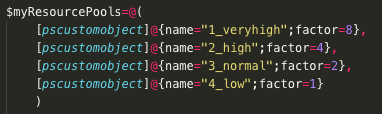
screenshot 2019-01-09 at 11.31.03

Other than that you do not need to edit anything. I have taken care to include a synopsis for easy consumption but I have one dependency (aside from PowerCLI): PSLogging. That is a module from the Powershell Gallery that makes log files easier (at least for me). Here is the link to that module: https://www.powershellgallery.com/packages/PSLogging

And last but not least, my script can be found in my GitHub. Directlink to the script. Please use at your own risk. And you can test the script by using the “Set-ResourcePool” command with the -WhatIf parameter (read the comments in the script).

And please feel free to improve upon it. Come to think of it, I should add a disconnect-vi server command at the end.

You might also like