

build 7bbbddf7 | content blog-content@c8490fa · 338 posts | profiles 20 · corpus 267 | 0 skipped | | format
apiVersion: soultec.ch/v1kind: Postmetadata: name: how-to-vlr-9-0-4-bugfix locale: en labels: author: daniel-stadelmann series: how-to capability/cloud: 1.94 capability/virtualization: 1.37 vendor/vmware: 0.88 annotations: source: blog-content/posts/en/how-to-vlr-9-0-4-bugfix.md route: /en/insights/how-to-vlr-9-0-4-bugfix/ schema: /nerd/schema/posts.json markdown: /en/insights/how-to-vlr-9-0-4-bugfix.mdspec: title: VLR Appliance 9.0.4 – HBR-Agent can't be installed date: 2025-12-12 author: daniel-stadelmann locale: en summary: >- You installed VLR Appliance 9.0.4 and it will not install the Host Based Replication Agent for ESX. If you run a vSAN stretched cluster, there is a workaround. capabilities: [cloud, virtualization] vendors: [vmware] series: how-to hero: /blog-assets/how-to-vlr-9-0-4-bugfix/hero.webp migrated: 2026-08-24 translationReviewed: false draft: false sections: - body: | Have you just installed VLR Appliance 9.0.4 and are you stuck on "The Host Based Replication Agent for ESX can't be installed on 'domain-cxx'. The vLCM image has deltas that need to be applied"? Then I have good news. If you run a vSAN stretched cluster, there is a workaround. ![](/blog-assets/how-to-vlr-9-0-4-bugfix/01.webp) VMware confirmed to me this morning that the fix arrives with VLR 9.1. ### **The cause** It sits in vLCM. After the auto-install of the HBR agents on every host in the cluster, the appliance waits for a compliance message. It never comes, because the Witness Host, which is part of the logical construct, does not report compliant. There is no way to override that manually. VMware's official statement: *"The issue is because vLCM is considering witness host as part of the cluster.* *VLR is checking if hbr-agent is installed on the witness host or not.* *There is some delta reported by the vLCM cluster which is why we are not pushing the hbr-agent."* ### **The fix** With 9.1 the HBR agent becomes part of the ESX image, which makes the VLR appliance's auto-install unnecessary. On top of that the handling of the Witness Appliance is being reworked in code, so the error should not come back. ### **The workaround** To stop the constant compliance checking for now, disable the auto-install on the VLR appliance. Connect to the appliance with Putty, then > vi /opt/vmware/etc/hms/hms-configuration.xml search for the following value with / > <hms-auto-install-hbragent-vib>true</hms-auto-install-hbragent-vib> set it to "false" and restart the service > service hms restart Trouble or questions? [Get in touch](https://soultec.ch/contact-us/).status: corpus: 267 alsoLike: - {ref: posts/vcf-full-stack-ab-oktober-2027-mythos-oder-wahrheit, score: 1.00} - {ref: posts/ms-secure-boot-cert-expiry-2026, score: 1.00} - {ref: solutions/vmware/vsphere-foundation, score: 1.00}
{ "apiVersion": "soultec.ch/v1", "kind": "Post", "metadata": { "name": "how-to-vlr-9-0-4-bugfix", "locale": "en", "labels": { "author": "daniel-stadelmann", "series": "how-to", "capability/cloud": "1.94", "capability/virtualization": "1.37", "vendor/vmware": "0.88" }, "annotations": { "source": "blog-content/posts/en/how-to-vlr-9-0-4-bugfix.md", "route": "/en/insights/how-to-vlr-9-0-4-bugfix/", "schema": "/nerd/schema/posts.json", "markdown": "/en/insights/how-to-vlr-9-0-4-bugfix.md" } }, "spec": { "title": "VLR Appliance 9.0.4 – HBR-Agent can't be installed", "date": "2025-12-12", "author": "daniel-stadelmann", "locale": "en", "summary": "You installed VLR Appliance 9.0.4 and it will not install the Host Based Replication Agent for ESX. If you run a vSAN stretched cluster, there is a workaround.", "capabilities": [ "cloud", "virtualization" ], "vendors": [ "vmware" ], "series": "how-to", "hero": "/blog-assets/how-to-vlr-9-0-4-bugfix/hero.webp", "migrated": "2026-08-24", "translationReviewed": false, "draft": false }, "sections": [ { "body": "Have you just installed VLR Appliance 9.0.4 and are you stuck on \"The Host Based Replication Agent for ESX can't be installed on 'domain-cxx'. The vLCM image has deltas that need to be applied\"?\n\nThen I have good news. If you run a vSAN stretched cluster, there is a workaround.\n\n![](/blog-assets/how-to-vlr-9-0-4-bugfix/01.webp)\n\nVMware confirmed to me this morning that the fix arrives with VLR 9.1.\n\n### **The cause**\n\nIt sits in vLCM. After the auto-install of the HBR agents on every host in the cluster, the appliance waits for a compliance message. It never comes, because the Witness Host, which is part of the logical construct, does not report compliant. There is no way to override that manually.\n\nVMware's official statement: *\"The issue is because vLCM is considering witness host as part of the cluster.* \n*VLR is checking if hbr-agent is installed on the witness host or not.* *There is some delta reported by the vLCM cluster which is why we are not pushing the hbr-agent.\"*\n\n### **The fix**\n\nWith 9.1 the HBR agent becomes part of the ESX image, which makes the VLR appliance's auto-install unnecessary. On top of that the handling of the Witness Appliance is being reworked in code, so the error should not come back.\n\n### **The workaround**\n\nTo stop the constant compliance checking for now, disable the auto-install on the VLR appliance.\n\nConnect to the appliance with Putty, then\n\n> vi /opt/vmware/etc/hms/hms-configuration.xml\n\nsearch for the following value with /\n\n> <hms-auto-install-hbragent-vib>true</hms-auto-install-hbragent-vib>\n\nset it to \"false\" and restart the service\n\n> service hms restart\n\nTrouble or questions? [Get in touch](https://soultec.ch/contact-us/)." } ], "status": { "corpus": 267, "alsoLike": [ { "ref": "posts/vcf-full-stack-ab-oktober-2027-mythos-oder-wahrheit", "score": "1.00" }, { "ref": "posts/ms-secure-boot-cert-expiry-2026", "score": "1.00" }, { "ref": "solutions/vmware/vsphere-foundation", "score": "1.00" } ] }}
apiVersion = "soultec.ch/v1"kind = "Post"[metadata]name = "how-to-vlr-9-0-4-bugfix"locale = "en"[metadata.labels]author = "daniel-stadelmann"series = "how-to""capability/cloud" = "1.94""capability/virtualization" = "1.37""vendor/vmware" = "0.88"[metadata.annotations]source = "blog-content/posts/en/how-to-vlr-9-0-4-bugfix.md"route = "/en/insights/how-to-vlr-9-0-4-bugfix/"schema = "/nerd/schema/posts.json"markdown = "/en/insights/how-to-vlr-9-0-4-bugfix.md"[spec]title = "VLR Appliance 9.0.4 – HBR-Agent can't be installed"date = 2025-12-12author = "daniel-stadelmann"locale = "en"summary = "You installed VLR Appliance 9.0.4 and it will not install the Host Based Replication Agent for ESX. If you run a vSAN stretched cluster, there is a workaround."capabilities = ["cloud", "virtualization"]vendors = ["vmware"]series = "how-to"hero = "/blog-assets/how-to-vlr-9-0-4-bugfix/hero.webp"migrated = 2026-08-24translationReviewed = falsedraft = false[[sections]]body = '''Have you just installed VLR Appliance 9.0.4 and are you stuck on "The Host Based Replication Agent for ESX can't be installed on 'domain-cxx'. The vLCM image has deltas that need to be applied"?Then I have good news. If you run a vSAN stretched cluster, there is a workaround.![](/blog-assets/how-to-vlr-9-0-4-bugfix/01.webp)VMware confirmed to me this morning that the fix arrives with VLR 9.1.### **The cause**It sits in vLCM. After the auto-install of the HBR agents on every host in the cluster, the appliance waits for a compliance message. It never comes, because the Witness Host, which is part of the logical construct, does not report compliant. There is no way to override that manually.VMware's official statement: *"The issue is because vLCM is considering witness host as part of the cluster.* *VLR is checking if hbr-agent is installed on the witness host or not.* *There is some delta reported by the vLCM cluster which is why we are not pushing the hbr-agent."*### **The fix**With 9.1 the HBR agent becomes part of the ESX image, which makes the VLR appliance's auto-install unnecessary. On top of that the handling of the Witness Appliance is being reworked in code, so the error should not come back.### **The workaround**To stop the constant compliance checking for now, disable the auto-install on the VLR appliance.Connect to the appliance with Putty, then> vi /opt/vmware/etc/hms/hms-configuration.xmlsearch for the following value with /> <hms-auto-install-hbragent-vib>true</hms-auto-install-hbragent-vib>set it to "false" and restart the service> service hms restartTrouble or questions? [Get in touch](https://soultec.ch/contact-us/).'''[status]corpus = 267[[status.alsoLike]]ref = "posts/vcf-full-stack-ab-oktober-2027-mythos-oder-wahrheit"score = "1.00"[[status.alsoLike]]ref = "posts/ms-secure-boot-cert-expiry-2026"score = "1.00"[[status.alsoLike]]ref = "solutions/vmware/vsphere-foundation"score = "1.00"
<?xml version="1.0" encoding="UTF-8"?><manifest kind="Post"> <apiVersion>soultec.ch/v1</apiVersion> <metadata> <name>how-to-vlr-9-0-4-bugfix</name> <locale>en</locale> <labels> <author>daniel-stadelmann</author> <series>how-to</series> <entry key="capability/cloud">1.94</entry> <entry key="capability/virtualization">1.37</entry> <entry key="vendor/vmware">0.88</entry> </labels> <annotations> <source>blog-content/posts/en/how-to-vlr-9-0-4-bugfix.md</source> <route>/en/insights/how-to-vlr-9-0-4-bugfix/</route> <schema>/nerd/schema/posts.json</schema> <markdown>/en/insights/how-to-vlr-9-0-4-bugfix.md</markdown> </annotations> </metadata> <spec> <title>VLR Appliance 9.0.4 – HBR-Agent can't be installed</title> <date>2025-12-12</date> <author>daniel-stadelmann</author> <locale>en</locale> <summary>You installed VLR Appliance 9.0.4 and it will not install the Host Based Replication Agent for ESX. If you run a vSAN stretched cluster, there is a workaround.</summary> <capabilities> <item>cloud</item> <item>virtualization</item> </capabilities> <vendors> <item>vmware</item> </vendors> <series>how-to</series> <hero>/blog-assets/how-to-vlr-9-0-4-bugfix/hero.webp</hero> <migrated>2026-08-24</migrated> <translationReviewed>false</translationReviewed> <draft>false</draft> </spec> <sections> <section> <body>Have you just installed VLR Appliance 9.0.4 and are you stuck on "The Host Based Replication Agent for ESX can't be installed on 'domain-cxx'. The vLCM image has deltas that need to be applied"?Then I have good news. If you run a vSAN stretched cluster, there is a workaround.![](/blog-assets/how-to-vlr-9-0-4-bugfix/01.webp)VMware confirmed to me this morning that the fix arrives with VLR 9.1.### **The cause**It sits in vLCM. After the auto-install of the HBR agents on every host in the cluster, the appliance waits for a compliance message. It never comes, because the Witness Host, which is part of the logical construct, does not report compliant. There is no way to override that manually.VMware's official statement: *"The issue is because vLCM is considering witness host as part of the cluster.* *VLR is checking if hbr-agent is installed on the witness host or not.* *There is some delta reported by the vLCM cluster which is why we are not pushing the hbr-agent."*### **The fix**With 9.1 the HBR agent becomes part of the ESX image, which makes the VLR appliance's auto-install unnecessary. On top of that the handling of the Witness Appliance is being reworked in code, so the error should not come back.### **The workaround**To stop the constant compliance checking for now, disable the auto-install on the VLR appliance.Connect to the appliance with Putty, then&gt; vi /opt/vmware/etc/hms/hms-configuration.xmlsearch for the following value with /&gt; &lt;hms-auto-install-hbragent-vib&gt;true&lt;/hms-auto-install-hbragent-vib&gt;set it to "false" and restart the service&gt; service hms restartTrouble or questions? [Get in touch](https://soultec.ch/contact-us/). </body> </section> </sections> <status> <corpus>267</corpus> <alsoLike> <item> <ref>posts/vcf-full-stack-ab-oktober-2027-mythos-oder-wahrheit</ref> <score>1.00</score> </item> <item> <ref>posts/ms-secure-boot-cert-expiry-2026</ref> <score>1.00</score> </item> <item> <ref>solutions/vmware/vsphere-foundation</ref> <score>1.00</score> </item> </alsoLike> </status></manifest>
How-To · 2025-12-12

VLR Appliance 9.0.4 – HBR-Agent can't be installed

You installed VLR Appliance 9.0.4 and it will not install the Host Based Replication Agent for ESX. If you run a vSAN stretched cluster, there is a workaround.

2025-12-12Date
Daniel StadelmannAuthor
1Min read
Topics Cloud 1.94 Virtualization 1.37
Vendors VMware 0.88

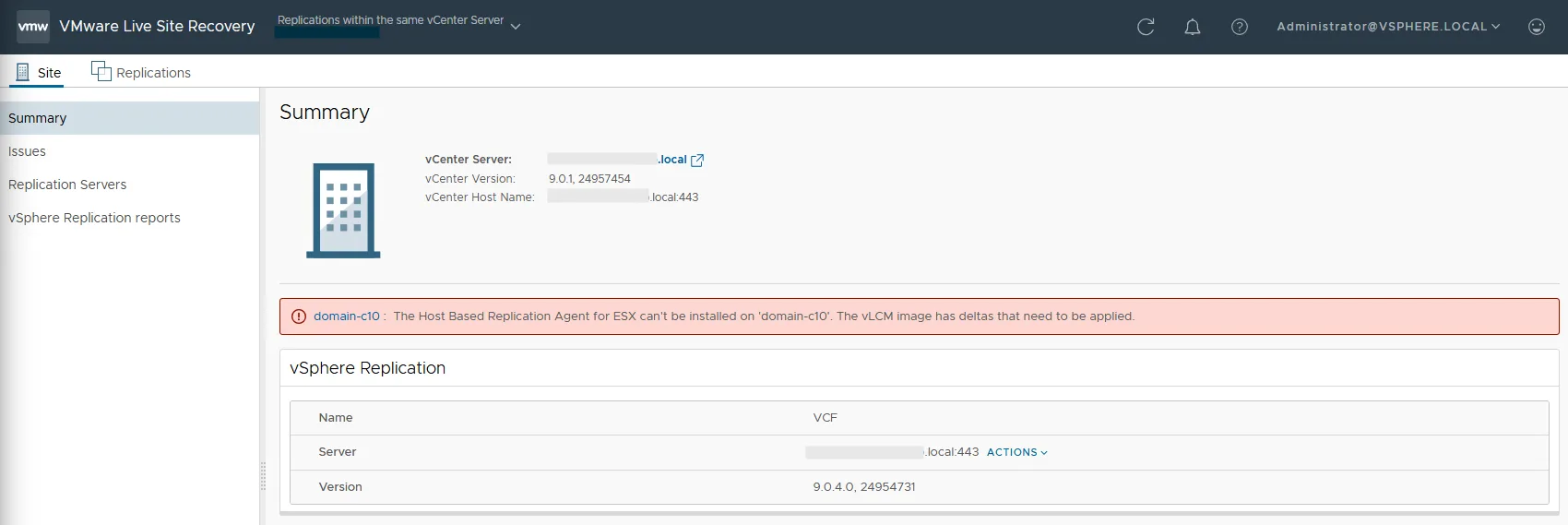
Have you just installed VLR Appliance 9.0.4 and are you stuck on “The Host Based Replication Agent for ESX can’t be installed on ‘domain-cxx’. The vLCM image has deltas that need to be applied”?

Then I have good news. If you run a vSAN stretched cluster, there is a workaround.
VMware confirmed to me this morning that the fix arrives with VLR 9.1.

The cause

It sits in vLCM. After the auto-install of the HBR agents on every host in the cluster, the appliance waits for a compliance message. It never comes, because the Witness Host, which is part of the logical construct, does not report compliant. There is no way to override that manually.

VMware’s official statement: “The issue is because vLCM is considering witness host as part of the cluster.
VLR is checking if hbr-agent is installed on the witness host or not. There is some delta reported by the vLCM cluster which is why we are not pushing the hbr-agent.”

The fix

With 9.1 the HBR agent becomes part of the ESX image, which makes the VLR appliance’s auto-install unnecessary. On top of that the handling of the Witness Appliance is being reworked in code, so the error should not come back.

The workaround

To stop the constant compliance checking for now, disable the auto-install on the VLR appliance.

Connect to the appliance with Putty, then

vi /opt/vmware/etc/hms/hms-configuration.xml

search for the following value with /

true

set it to “false” and restart the service

service hms restart

Trouble or questions? Get in touch.
You might also like