

build 7bbbddf7 | content blog-content@c8490fa · 338 posts | profiles 20 · corpus 267 | 0 skipped | | format
apiVersion: soultec.ch/v1kind: Postmetadata: name: how-to-get-around-your-connection-is-not-private locale: en labels: author: dario-doerflinger series: announcement annotations: source: blog-content/posts/en/how-to-get-around-your-connection-is-not-private.md route: /en/insights/how-to-get-around-your-connection-is-not-private/ schema: /nerd/schema/posts.json markdown: /en/insights/how-to-get-around-your-connection-is-not-private.mdspec: title: How to get around “your connection is not private” date: 2021-12-10 author: dario-doerflinger locale: en summary: >- This little post is about how to get around the “Your connection is not private” message. series: announcement legacySlug: how-to-get-around-your-connection-is-not-private migrated: 2026-08-24 draft: false sections: - body: | This little post is about how to get around the "Your connection is not private" message. While we were in the process of setting up our new lab environment, we ran into the problem of "invalid" certificates on our hypervisors. This is completely normal for a lab environment, especially one that is being built. Our favorite browser, Google Chrome, enforces secure certificates and won't let us continue if it detects that the SSL certificate is invalid. However, there is a simple trick to get around this blockade. ![showing the error message "Your connection is not private" in google chrome](/blog-assets/how-to-get-around-your-connection-is-not-private/01.webp) If this is the case and you are sure that the website you want to visit is ok, just type "thisisunsafe" while having the Chrome app in focus. Don't write it in the URL bar or anywhere else. Just type "thisisunsafe" while you are on the page, and Chrome will take you to the website you want right away. There is no installation required. And this also works with the Chromium-based Microsoft Edge browser. Of course, this is not recommended if you encounter this problem on the web. In our case, it was in our own lab environment before we were able to set up a CA system and use trusted certificates. If your browser is not Google Chrome but Firefox, working around the problem is a bit more involved and not as elegant, as the feature is completely disabled. 1. In the Mozilla Firefox address bar, type `about:config` 2. Search for `network.stricttransportsecurity.preloadlist` 3. Set the last field Value to `false` 4. Restart the browser. If you have any questions, feel free to message us in the comments or connect with us on our social media platforms.status: corpus: 267
{ "apiVersion": "soultec.ch/v1", "kind": "Post", "metadata": { "name": "how-to-get-around-your-connection-is-not-private", "locale": "en", "labels": { "author": "dario-doerflinger", "series": "announcement" }, "annotations": { "source": "blog-content/posts/en/how-to-get-around-your-connection-is-not-private.md", "route": "/en/insights/how-to-get-around-your-connection-is-not-private/", "schema": "/nerd/schema/posts.json", "markdown": "/en/insights/how-to-get-around-your-connection-is-not-private.md" } }, "spec": { "title": "How to get around “your connection is not private”", "date": "2021-12-10", "author": "dario-doerflinger", "locale": "en", "summary": "This little post is about how to get around the “Your connection is not private” message.", "series": "announcement", "legacySlug": "how-to-get-around-your-connection-is-not-private", "migrated": "2026-08-24", "draft": false }, "sections": [ { "body": "This little post is about how to get around the \"Your connection is not private\" message.\n\nWhile we were in the process of setting up our new lab environment, we ran into the problem of \"invalid\" certificates on our hypervisors. This is completely normal for a lab environment, especially one that is being built. Our favorite browser, Google Chrome, enforces secure certificates and won't let us continue if it detects that the SSL certificate is invalid. However, there is a simple trick to get around this blockade.\n\n![showing the error message \"Your connection is not private\" in google chrome](/blog-assets/how-to-get-around-your-connection-is-not-private/01.webp)\n\nIf this is the case and you are sure that the website you want to visit is ok, just type \"thisisunsafe\" while having the Chrome app in focus. Don't write it in the URL bar or anywhere else. Just type \"thisisunsafe\" while you are on the page, and Chrome will take you to the website you want right away. There is no installation required. And this also works with the Chromium-based Microsoft Edge browser.\n\nOf course, this is not recommended if you encounter this problem on the web. In our case, it was in our own lab environment before we were able to set up a CA system and use trusted certificates.\n\nIf your browser is not Google Chrome but Firefox, working around the problem is a bit more involved and not as elegant, as the feature is completely disabled.\n\n1. In the Mozilla Firefox address bar, type `about:config`\n2. Search for `network.stricttransportsecurity.preloadlist`\n3. Set the last field Value to `false`\n4. Restart the browser.\n\nIf you have any questions, feel free to message us in the comments or connect with us on our social media platforms." } ], "status": { "corpus": 267 }}
apiVersion = "soultec.ch/v1"kind = "Post"[metadata]name = "how-to-get-around-your-connection-is-not-private"locale = "en"[metadata.labels]author = "dario-doerflinger"series = "announcement"[metadata.annotations]source = "blog-content/posts/en/how-to-get-around-your-connection-is-not-private.md"route = "/en/insights/how-to-get-around-your-connection-is-not-private/"schema = "/nerd/schema/posts.json"markdown = "/en/insights/how-to-get-around-your-connection-is-not-private.md"[spec]title = "How to get around “your connection is not private”"date = 2021-12-10author = "dario-doerflinger"locale = "en"summary = "This little post is about how to get around the “Your connection is not private” message."series = "announcement"legacySlug = "how-to-get-around-your-connection-is-not-private"migrated = 2026-08-24draft = false[[sections]]body = '''This little post is about how to get around the "Your connection is not private" message.While we were in the process of setting up our new lab environment, we ran into the problem of "invalid" certificates on our hypervisors. This is completely normal for a lab environment, especially one that is being built. Our favorite browser, Google Chrome, enforces secure certificates and won't let us continue if it detects that the SSL certificate is invalid. However, there is a simple trick to get around this blockade.![showing the error message "Your connection is not private" in google chrome](/blog-assets/how-to-get-around-your-connection-is-not-private/01.webp)If this is the case and you are sure that the website you want to visit is ok, just type "thisisunsafe" while having the Chrome app in focus. Don't write it in the URL bar or anywhere else. Just type "thisisunsafe" while you are on the page, and Chrome will take you to the website you want right away. There is no installation required. And this also works with the Chromium-based Microsoft Edge browser.Of course, this is not recommended if you encounter this problem on the web. In our case, it was in our own lab environment before we were able to set up a CA system and use trusted certificates.If your browser is not Google Chrome but Firefox, working around the problem is a bit more involved and not as elegant, as the feature is completely disabled.1. In the Mozilla Firefox address bar, type `about:config`2. Search for `network.stricttransportsecurity.preloadlist`3. Set the last field Value to `false`4. Restart the browser.If you have any questions, feel free to message us in the comments or connect with us on our social media platforms.'''[status]corpus = 267
<?xml version="1.0" encoding="UTF-8"?><manifest kind="Post"> <apiVersion>soultec.ch/v1</apiVersion> <metadata> <name>how-to-get-around-your-connection-is-not-private</name> <locale>en</locale> <labels> <author>dario-doerflinger</author> <series>announcement</series> </labels> <annotations> <source>blog-content/posts/en/how-to-get-around-your-connection-is-not-private.md</source> <route>/en/insights/how-to-get-around-your-connection-is-not-private/</route> <schema>/nerd/schema/posts.json</schema> <markdown>/en/insights/how-to-get-around-your-connection-is-not-private.md</markdown> </annotations> </metadata> <spec> <title>How to get around “your connection is not private”</title> <date>2021-12-10</date> <author>dario-doerflinger</author> <locale>en</locale> <summary>This little post is about how to get around the “Your connection is not private” message.</summary> <series>announcement</series> <legacySlug>how-to-get-around-your-connection-is-not-private</legacySlug> <migrated>2026-08-24</migrated> <draft>false</draft> </spec> <sections> <section> <body>This little post is about how to get around the "Your connection is not private" message.While we were in the process of setting up our new lab environment, we ran into the problem of "invalid" certificates on our hypervisors. This is completely normal for a lab environment, especially one that is being built. Our favorite browser, Google Chrome, enforces secure certificates and won't let us continue if it detects that the SSL certificate is invalid. However, there is a simple trick to get around this blockade.![showing the error message "Your connection is not private" in google chrome](/blog-assets/how-to-get-around-your-connection-is-not-private/01.webp)If this is the case and you are sure that the website you want to visit is ok, just type "thisisunsafe" while having the Chrome app in focus. Don't write it in the URL bar or anywhere else. Just type "thisisunsafe" while you are on the page, and Chrome will take you to the website you want right away. There is no installation required. And this also works with the Chromium-based Microsoft Edge browser.Of course, this is not recommended if you encounter this problem on the web. In our case, it was in our own lab environment before we were able to set up a CA system and use trusted certificates.If your browser is not Google Chrome but Firefox, working around the problem is a bit more involved and not as elegant, as the feature is completely disabled.1. In the Mozilla Firefox address bar, type `about:config`2. Search for `network.stricttransportsecurity.preloadlist`3. Set the last field Value to `false`4. Restart the browser.If you have any questions, feel free to message us in the comments or connect with us on our social media platforms. </body> </section> </sections> <status> <corpus>267</corpus> </status></manifest>
News · 2021-12-10

How to get around “your connection is not private”

This little post is about how to get around the “Your connection is not private” message.

2021-12-10Date
Dario DörflingerAuthor
1Min read
Topics

This post is from 2021. It stays online because people still look for it, but it describes the products as they were then.

This little post is about how to get around the “Your connection is not private” message.

While we were in the process of setting up our new lab environment, we ran into the problem of “invalid” certificates on our hypervisors. This is completely normal for a lab environment, especially one that is being built. Our favorite browser, Google Chrome, enforces secure certificates and won’t let us continue if it detects that the SSL certificate is invalid. However, there is a simple trick to get around this blockade.
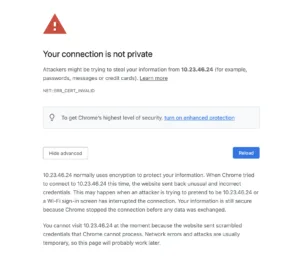
showing the error message "Your connection is not private" in google chrome

If this is the case and you are sure that the website you want to visit is ok, just type “thisisunsafe” while having the Chrome app in focus. Don’t write it in the URL bar or anywhere else. Just type “thisisunsafe” while you are on the page, and Chrome will take you to the website you want right away. There is no installation required. And this also works with the Chromium-based Microsoft Edge browser.

Of course, this is not recommended if you encounter this problem on the web. In our case, it was in our own lab environment before we were able to set up a CA system and use trusted certificates.

If your browser is not Google Chrome but Firefox, working around the problem is a bit more involved and not as elegant, as the feature is completely disabled.

  1. In the Mozilla Firefox address bar, type about:config
  2. Search for network.stricttransportsecurity.preloadlist
  3. Set the last field Value to false
  4. Restart the browser.

If you have any questions, feel free to message us in the comments or connect with us on our social media platforms.

You might also like

Too few qualifying matches. The block stays empty rather than showing one lonely card.