

build 7bbbddf7 | content blog-content@c8490fa · 338 posts | profiles 20 · corpus 267 | 0 skipped | | format
apiVersion: soultec.ch/v1kind: Postmetadata: name: how-to-fix-nsx-to-re-import-esx-into-vcf locale: en labels: author: dario-doerflinger series: how-to capability/cloud: 1.94 capability/virtualization: 1.37 vendor/vmware: 0.88 annotations: source: blog-content/posts/en/how-to-fix-nsx-to-re-import-esx-into-vcf.md route: /en/insights/how-to-fix-nsx-to-re-import-esx-into-vcf/ schema: /nerd/schema/posts.json markdown: /en/insights/how-to-fix-nsx-to-re-import-esx-into-vcf.mdspec: title: Fix NSX to Re-Import ESX into VCF date: 2025-10-11 author: dario-doerflinger locale: en summary: >- If you stumble upon this blog chances are you are working on VMware Cloud Foundation 9.x. capabilities: [cloud, virtualization] vendors: [vmware] series: how-to hero: /blog-assets/how-to-fix-nsx-to-re-import-esx-into-vcf/hero.webp legacySlug: how-to-fix-nsx-to-re-import-esx-into-vcf migrated: 2026-08-24 draft: false sections: - body: | If you stumble upon this blog chances are you are working on VMware Cloud Foundation 9.x. The new standard platform for Virtualization in the Enterprise introduces quite a lot of changes if you come from basic vSphere. We've played around with the brownfield import mechanism for quite some time and stumbled upon some caveats. - heading: "

The issue: NSX fails for Brownfield Import

"
body: | We're trying to import/onboard/brownfield an existing vCenter server into VCF 9.0.x. This fails at the NSX Part. In our use-case we selected to not have an existing NSX installation in place. The brownfield import will therefore build up a new NSX instance for us. If your are importing vSphere 8.x then you will have to deploy three NSX Manager (plus its VIP). If you are importing vSphere 9.x you can choose to go with a simple deployment of one NSX Manager (plus its VIP). In our use-case we had previously imported the vCenter and ESX hosts already. We changed some things and wanted to do it again and see if it still worked. It didn't. The ESX Hosts were unable to connect to the new NSX Manager(s). ### Solution A: vSphere 8.x Hosts If you are on vSphere 8.x the solution is quite simple. We simply need to "delete" nsx from the ESX hosts. To do this we connect to the host using SSH. On the ESX host go into the nsxcli by issuing "nsxcli". Here just type the command "del nsx" and hit enter. Answer yes a couple of times and afterwards wait for a couple of minutes while the NSX VIBs are removed. Then reboot the host. ![fix option A commands](/blog-assets/how-to-fix-nsx-to-re-import-esx-into-vcf/01.webp) ### Solution B: vSphere 9.x Hosts After playing around some more we decided to also fully test out the brownfield import using a 9.x version of vSphere. Even though we followed Solution A prior to trying to import we still failed at the NSX part (again). With vSphere 9.x the NSX VIBs on the hosts come pre-installed. Therefore the "del nsx" command actually did not even remove those vibs. So we had to dig some more to get this working again. This time we need to do a bunch of things on the ESX host in order for him to recognize the nsx manager again. SSH to the Host. Now, move this xml as a backup: "mv /etc/vmware/nsx/appliance-info.xml /tmp/old\_info.xml". Then we null out two certificate files by issuing first "cat /dev/null > /etc/vmware/nsx/host-cert.pem" and then "cat /dev/null > /etc/vmware/nsx/host-privkey.pem". Afterwards we just need to restart some services: "/etc/init.d/nsx-proxy restart", "/etc/init.d/nsx-opsagent restart", "/etc/init.d/nsx\_cfgagent restart" and "/etc/init.d/nsx-nestdb restart". ![command to fix for solution b](/blog-assets/how-to-fix-nsx-to-re-import-esx-into-vcf/02.webp) ### Last step for both solutions: fix NSX If you think that after fixing this, the "Restart Task" in VCF would automatically trigger the NSX Manager to try and redeploy the Nodes then you are mistaken. You need to login to the NSX Manager go to System – Fabric – Nodes and trigger the reinstall on the Hosts manually. Only trigger a "Restart Task" in VCF after you have green checkmarks on all of your ESX hosts. There are actually two tasks triggered in VCF when brownfielding a WLD. However you only need to restart the one with multiple subtasks in order for the brownfield to succeed. Following this will surely fix NSX Brownfield Import for you. At least this specific issue. - heading:

Next Steps

body: | If you've read this far then chances are you are still having issues. [Feel free to reach out to us](https://soultec.ch/contact-us/). We're happy to help out!status: corpus: 267 alsoLike: - {ref: posts/vcf-full-stack-ab-oktober-2027-mythos-oder-wahrheit, score: 1.00} - {ref: posts/ms-secure-boot-cert-expiry-2026, score: 1.00} - {ref: solutions/vmware/vsphere-foundation, score: 1.00}
{ "apiVersion": "soultec.ch/v1", "kind": "Post", "metadata": { "name": "how-to-fix-nsx-to-re-import-esx-into-vcf", "locale": "en", "labels": { "author": "dario-doerflinger", "series": "how-to", "capability/cloud": "1.94", "capability/virtualization": "1.37", "vendor/vmware": "0.88" }, "annotations": { "source": "blog-content/posts/en/how-to-fix-nsx-to-re-import-esx-into-vcf.md", "route": "/en/insights/how-to-fix-nsx-to-re-import-esx-into-vcf/", "schema": "/nerd/schema/posts.json", "markdown": "/en/insights/how-to-fix-nsx-to-re-import-esx-into-vcf.md" } }, "spec": { "title": "Fix NSX to Re-Import ESX into VCF", "date": "2025-10-11", "author": "dario-doerflinger", "locale": "en", "summary": "If you stumble upon this blog chances are you are working on VMware Cloud Foundation 9.x.", "capabilities": [ "cloud", "virtualization" ], "vendors": [ "vmware" ], "series": "how-to", "hero": "/blog-assets/how-to-fix-nsx-to-re-import-esx-into-vcf/hero.webp", "legacySlug": "how-to-fix-nsx-to-re-import-esx-into-vcf", "migrated": "2026-08-24", "draft": false }, "sections": [ { "body": "If you stumble upon this blog chances are you are working on VMware Cloud Foundation 9.x. The new standard platform for Virtualization in the Enterprise introduces quite a lot of changes if you come from basic vSphere. We've played around with the brownfield import mechanism for quite some time and stumbled upon some caveats." }, { "heading": "

The issue: NSX fails for Brownfield Import

",
"body": "We're trying to import/onboard/brownfield an existing vCenter server into VCF 9.0.x. This fails at the NSX Part. In our use-case we selected to not have an existing NSX installation in place. The brownfield import will therefore build up a new NSX instance for us.\n\nIf your are importing vSphere 8.x then you will have to deploy three NSX Manager (plus its VIP). If you are importing vSphere 9.x you can choose to go with a simple deployment of one NSX Manager (plus its VIP).\n\nIn our use-case we had previously imported the vCenter and ESX hosts already. We changed some things and wanted to do it again and see if it still worked. It didn't.\n\nThe ESX Hosts were unable to connect to the new NSX Manager(s).\n\n### Solution A: vSphere 8.x Hosts\n\nIf you are on vSphere 8.x the solution is quite simple. We simply need to \"delete\" nsx from the ESX hosts. To do this we connect to the host using SSH.\n\nOn the ESX host go into the nsxcli by issuing \"nsxcli\". Here just type the command \"del nsx\" and hit enter. Answer yes a couple of times and afterwards wait for a couple of minutes while the NSX VIBs are removed. Then reboot the host.\n\n![fix option A commands](/blog-assets/how-to-fix-nsx-to-re-import-esx-into-vcf/01.webp)\n\n### Solution B: vSphere 9.x Hosts\n\nAfter playing around some more we decided to also fully test out the brownfield import using a 9.x version of vSphere.\n\nEven though we followed Solution A prior to trying to import we still failed at the NSX part (again). With vSphere 9.x the NSX VIBs on the hosts come pre-installed. Therefore the \"del nsx\" command actually did not even remove those vibs. So we had to dig some more to get this working again.\n\nThis time we need to do a bunch of things on the ESX host in order for him to recognize the nsx manager again.\n\nSSH to the Host. Now, move this xml as a backup: \"mv /etc/vmware/nsx/appliance-info.xml /tmp/old\\_info.xml\". Then we null out two certificate files by issuing first \"cat /dev/null > /etc/vmware/nsx/host-cert.pem\" and then \"cat /dev/null > /etc/vmware/nsx/host-privkey.pem\". Afterwards we just need to restart some services: \"/etc/init.d/nsx-proxy restart\", \"/etc/init.d/nsx-opsagent restart\", \"/etc/init.d/nsx\\_cfgagent restart\" and \"/etc/init.d/nsx-nestdb restart\".\n\n![command to fix for solution b](/blog-assets/how-to-fix-nsx-to-re-import-esx-into-vcf/02.webp)\n\n### Last step for both solutions: fix NSX\n\nIf you think that after fixing this, the \"Restart Task\" in VCF would automatically trigger the NSX Manager to try and redeploy the Nodes then you are mistaken. You need to login to the NSX Manager go to System – Fabric – Nodes and trigger the reinstall on the Hosts manually. Only trigger a \"Restart Task\" in VCF after you have green checkmarks on all of your ESX hosts.\n\nThere are actually two tasks triggered in VCF when brownfielding a WLD. However you only need to restart the one with multiple subtasks in order for the brownfield to succeed.\n\nFollowing this will surely fix NSX Brownfield Import for you. At least this specific issue." }, { "heading": "

Next Steps

",
"body": "If you've read this far then chances are you are still having issues. [Feel free to reach out to us](https://soultec.ch/contact-us/). We're happy to help out!" } ], "status": { "corpus": 267, "alsoLike": [ { "ref": "posts/vcf-full-stack-ab-oktober-2027-mythos-oder-wahrheit", "score": "1.00" }, { "ref": "posts/ms-secure-boot-cert-expiry-2026", "score": "1.00" }, { "ref": "solutions/vmware/vsphere-foundation", "score": "1.00" } ] }}
apiVersion = "soultec.ch/v1"kind = "Post"[metadata]name = "how-to-fix-nsx-to-re-import-esx-into-vcf"locale = "en"[metadata.labels]author = "dario-doerflinger"series = "how-to""capability/cloud" = "1.94""capability/virtualization" = "1.37""vendor/vmware" = "0.88"[metadata.annotations]source = "blog-content/posts/en/how-to-fix-nsx-to-re-import-esx-into-vcf.md"route = "/en/insights/how-to-fix-nsx-to-re-import-esx-into-vcf/"schema = "/nerd/schema/posts.json"markdown = "/en/insights/how-to-fix-nsx-to-re-import-esx-into-vcf.md"[spec]title = "Fix NSX to Re-Import ESX into VCF"date = 2025-10-11author = "dario-doerflinger"locale = "en"summary = "If you stumble upon this blog chances are you are working on VMware Cloud Foundation 9.x."capabilities = ["cloud", "virtualization"]vendors = ["vmware"]series = "how-to"hero = "/blog-assets/how-to-fix-nsx-to-re-import-esx-into-vcf/hero.webp"legacySlug = "how-to-fix-nsx-to-re-import-esx-into-vcf"migrated = 2026-08-24draft = false[[sections]]body = "If you stumble upon this blog chances are you are working on VMware Cloud Foundation 9.x. The new standard platform for Virtualization in the Enterprise introduces quite a lot of changes if you come from basic vSphere. We've played around with the brownfield import mechanism for quite some time and stumbled upon some caveats."[[sections]]heading = "

The issue: NSX fails for Brownfield Import

"
body = '''We're trying to import/onboard/brownfield an existing vCenter server into VCF 9.0.x. This fails at the NSX Part. In our use-case we selected to not have an existing NSX installation in place. The brownfield import will therefore build up a new NSX instance for us.If your are importing vSphere 8.x then you will have to deploy three NSX Manager (plus its VIP). If you are importing vSphere 9.x you can choose to go with a simple deployment of one NSX Manager (plus its VIP).In our use-case we had previously imported the vCenter and ESX hosts already. We changed some things and wanted to do it again and see if it still worked. It didn't.The ESX Hosts were unable to connect to the new NSX Manager(s).### Solution A: vSphere 8.x HostsIf you are on vSphere 8.x the solution is quite simple. We simply need to "delete" nsx from the ESX hosts. To do this we connect to the host using SSH.On the ESX host go into the nsxcli by issuing "nsxcli". Here just type the command "del nsx" and hit enter. Answer yes a couple of times and afterwards wait for a couple of minutes while the NSX VIBs are removed. Then reboot the host.![fix option A commands](/blog-assets/how-to-fix-nsx-to-re-import-esx-into-vcf/01.webp)### Solution B: vSphere 9.x HostsAfter playing around some more we decided to also fully test out the brownfield import using a 9.x version of vSphere.Even though we followed Solution A prior to trying to import we still failed at the NSX part (again). With vSphere 9.x the NSX VIBs on the hosts come pre-installed. Therefore the "del nsx" command actually did not even remove those vibs. So we had to dig some more to get this working again.This time we need to do a bunch of things on the ESX host in order for him to recognize the nsx manager again.SSH to the Host. Now, move this xml as a backup: "mv /etc/vmware/nsx/appliance-info.xml /tmp/old\_info.xml". Then we null out two certificate files by issuing first "cat /dev/null > /etc/vmware/nsx/host-cert.pem" and then "cat /dev/null > /etc/vmware/nsx/host-privkey.pem". Afterwards we just need to restart some services: "/etc/init.d/nsx-proxy restart", "/etc/init.d/nsx-opsagent restart", "/etc/init.d/nsx\_cfgagent restart" and "/etc/init.d/nsx-nestdb restart".![command to fix for solution b](/blog-assets/how-to-fix-nsx-to-re-import-esx-into-vcf/02.webp)### Last step for both solutions: fix NSXIf you think that after fixing this, the "Restart Task" in VCF would automatically trigger the NSX Manager to try and redeploy the Nodes then you are mistaken. You need to login to the NSX Manager go to System – Fabric – Nodes and trigger the reinstall on the Hosts manually. Only trigger a "Restart Task" in VCF after you have green checkmarks on all of your ESX hosts.There are actually two tasks triggered in VCF when brownfielding a WLD. However you only need to restart the one with multiple subtasks in order for the brownfield to succeed.Following this will surely fix NSX Brownfield Import for you. At least this specific issue.'''[[sections]]heading = "

Next Steps

"
body = "If you've read this far then chances are you are still having issues. [Feel free to reach out to us](https://soultec.ch/contact-us/). We're happy to help out!"[status]corpus = 267[[status.alsoLike]]ref = "posts/vcf-full-stack-ab-oktober-2027-mythos-oder-wahrheit"score = "1.00"[[status.alsoLike]]ref = "posts/ms-secure-boot-cert-expiry-2026"score = "1.00"[[status.alsoLike]]ref = "solutions/vmware/vsphere-foundation"score = "1.00"
<?xml version="1.0" encoding="UTF-8"?><manifest kind="Post"> <apiVersion>soultec.ch/v1</apiVersion> <metadata> <name>how-to-fix-nsx-to-re-import-esx-into-vcf</name> <locale>en</locale> <labels> <author>dario-doerflinger</author> <series>how-to</series> <entry key="capability/cloud">1.94</entry> <entry key="capability/virtualization">1.37</entry> <entry key="vendor/vmware">0.88</entry> </labels> <annotations> <source>blog-content/posts/en/how-to-fix-nsx-to-re-import-esx-into-vcf.md</source> <route>/en/insights/how-to-fix-nsx-to-re-import-esx-into-vcf/</route> <schema>/nerd/schema/posts.json</schema> <markdown>/en/insights/how-to-fix-nsx-to-re-import-esx-into-vcf.md</markdown> </annotations> </metadata> <spec> <title>Fix NSX to Re-Import ESX into VCF</title> <date>2025-10-11</date> <author>dario-doerflinger</author> <locale>en</locale> <summary>If you stumble upon this blog chances are you are working on VMware Cloud Foundation 9.x.</summary> <capabilities> <item>cloud</item> <item>virtualization</item> </capabilities> <vendors> <item>vmware</item> </vendors> <series>how-to</series> <hero>/blog-assets/how-to-fix-nsx-to-re-import-esx-into-vcf/hero.webp</hero> <legacySlug>how-to-fix-nsx-to-re-import-esx-into-vcf</legacySlug> <migrated>2026-08-24</migrated> <draft>false</draft> </spec> <sections> <section> <body>If you stumble upon this blog chances are you are working on VMware Cloud Foundation 9.x. The new standard platform for Virtualization in the Enterprise introduces quite a lot of changes if you come from basic vSphere. We've played around with the brownfield import mechanism for quite some time and stumbled upon some caveats.</body> </section> <section> <heading>

The issue: NSX fails for Brownfield Import

</heading>
<body>We're trying to import/onboard/brownfield an existing vCenter server into VCF 9.0.x. This fails at the NSX Part. In our use-case we selected to not have an existing NSX installation in place. The brownfield import will therefore build up a new NSX instance for us.If your are importing vSphere 8.x then you will have to deploy three NSX Manager (plus its VIP). If you are importing vSphere 9.x you can choose to go with a simple deployment of one NSX Manager (plus its VIP).In our use-case we had previously imported the vCenter and ESX hosts already. We changed some things and wanted to do it again and see if it still worked. It didn't.The ESX Hosts were unable to connect to the new NSX Manager(s).### Solution A: vSphere 8.x HostsIf you are on vSphere 8.x the solution is quite simple. We simply need to "delete" nsx from the ESX hosts. To do this we connect to the host using SSH.On the ESX host go into the nsxcli by issuing "nsxcli". Here just type the command "del nsx" and hit enter. Answer yes a couple of times and afterwards wait for a couple of minutes while the NSX VIBs are removed. Then reboot the host.![fix option A commands](/blog-assets/how-to-fix-nsx-to-re-import-esx-into-vcf/01.webp)### Solution B: vSphere 9.x HostsAfter playing around some more we decided to also fully test out the brownfield import using a 9.x version of vSphere.Even though we followed Solution A prior to trying to import we still failed at the NSX part (again). With vSphere 9.x the NSX VIBs on the hosts come pre-installed. Therefore the "del nsx" command actually did not even remove those vibs. So we had to dig some more to get this working again.This time we need to do a bunch of things on the ESX host in order for him to recognize the nsx manager again.SSH to the Host. Now, move this xml as a backup: "mv /etc/vmware/nsx/appliance-info.xml /tmp/old\_info.xml". Then we null out two certificate files by issuing first "cat /dev/null &gt; /etc/vmware/nsx/host-cert.pem" and then "cat /dev/null &gt; /etc/vmware/nsx/host-privkey.pem". Afterwards we just need to restart some services: "/etc/init.d/nsx-proxy restart", "/etc/init.d/nsx-opsagent restart", "/etc/init.d/nsx\_cfgagent restart" and "/etc/init.d/nsx-nestdb restart".![command to fix for solution b](/blog-assets/how-to-fix-nsx-to-re-import-esx-into-vcf/02.webp)### Last step for both solutions: fix NSXIf you think that after fixing this, the "Restart Task" in VCF would automatically trigger the NSX Manager to try and redeploy the Nodes then you are mistaken. You need to login to the NSX Manager go to System – Fabric – Nodes and trigger the reinstall on the Hosts manually. Only trigger a "Restart Task" in VCF after you have green checkmarks on all of your ESX hosts.There are actually two tasks triggered in VCF when brownfielding a WLD. However you only need to restart the one with multiple subtasks in order for the brownfield to succeed.Following this will surely fix NSX Brownfield Import for you. At least this specific issue. </body> </section> <section> <heading>

Next Steps

</heading>
<body>If you've read this far then chances are you are still having issues. [Feel free to reach out to us](https://soultec.ch/contact-us/). We're happy to help out!</body> </section> </sections> <status> <corpus>267</corpus> <alsoLike> <item> <ref>posts/vcf-full-stack-ab-oktober-2027-mythos-oder-wahrheit</ref> <score>1.00</score> </item> <item> <ref>posts/ms-secure-boot-cert-expiry-2026</ref> <score>1.00</score> </item> <item> <ref>solutions/vmware/vsphere-foundation</ref> <score>1.00</score> </item> </alsoLike> </status></manifest>
How-To · 2025-10-11

Fix NSX to Re-Import ESX into VCF

If you stumble upon this blog chances are you are working on VMware Cloud Foundation 9.x.

2025-10-11Date
Dario DörflingerAuthor
3Min read
Topics Cloud 1.94 Virtualization 1.37
Vendors VMware 0.88

If you stumble upon this blog chances are you are working on VMware Cloud Foundation 9.x. The new standard platform for Virtualization in the Enterprise introduces quite a lot of changes if you come from basic vSphere. We’ve played around with the brownfield import mechanism for quite some time and stumbled upon some caveats.

The issue: NSX fails for Brownfield Import

We’re trying to import/onboard/brownfield an existing vCenter server into VCF 9.0.x. This fails at the NSX Part. In our use-case we selected to not have an existing NSX installation in place. The brownfield import will therefore build up a new NSX instance for us.

If your are importing vSphere 8.x then you will have to deploy three NSX Manager (plus its VIP). If you are importing vSphere 9.x you can choose to go with a simple deployment of one NSX Manager (plus its VIP).

In our use-case we had previously imported the vCenter and ESX hosts already. We changed some things and wanted to do it again and see if it still worked. It didn’t.

The ESX Hosts were unable to connect to the new NSX Manager(s).

Solution A: vSphere 8.x Hosts

If you are on vSphere 8.x the solution is quite simple. We simply need to “delete” nsx from the ESX hosts. To do this we connect to the host using SSH.

On the ESX host go into the nsxcli by issuing “nsxcli”. Here just type the command “del nsx” and hit enter. Answer yes a couple of times and afterwards wait for a couple of minutes while the NSX VIBs are removed. Then reboot the host.
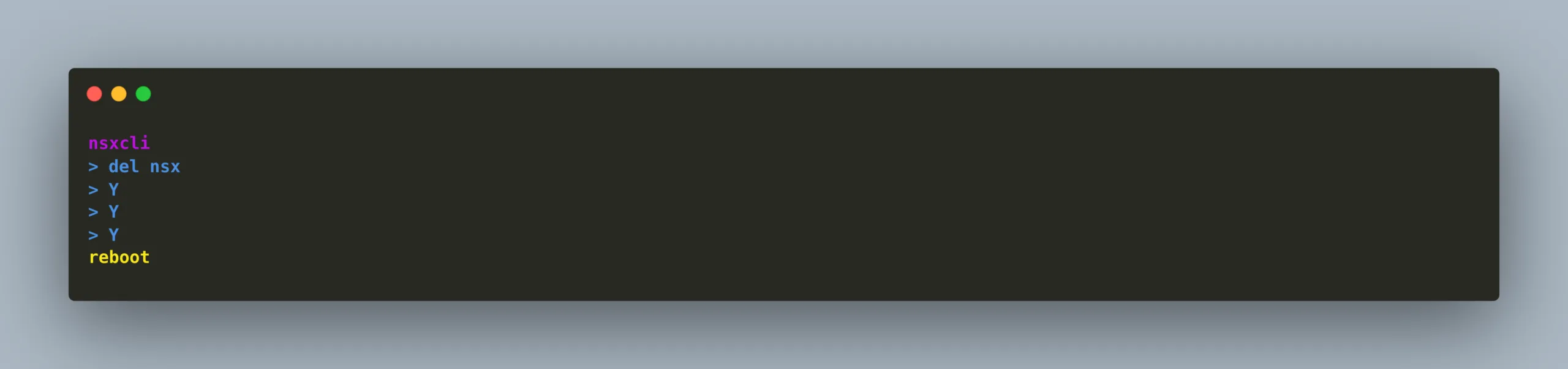
fix option A commands

Solution B: vSphere 9.x Hosts

After playing around some more we decided to also fully test out the brownfield import using a 9.x version of vSphere.

Even though we followed Solution A prior to trying to import we still failed at the NSX part (again). With vSphere 9.x the NSX VIBs on the hosts come pre-installed. Therefore the “del nsx” command actually did not even remove those vibs. So we had to dig some more to get this working again.

This time we need to do a bunch of things on the ESX host in order for him to recognize the nsx manager again.

SSH to the Host. Now, move this xml as a backup: “mv /etc/vmware/nsx/appliance-info.xml /tmp/old_info.xml”. Then we null out two certificate files by issuing first “cat /dev/null > /etc/vmware/nsx/host-cert.pem” and then “cat /dev/null > /etc/vmware/nsx/host-privkey.pem”. Afterwards we just need to restart some services: “/etc/init.d/nsx-proxy restart”, “/etc/init.d/nsx-opsagent restart”, “/etc/init.d/nsx_cfgagent restart” and “/etc/init.d/nsx-nestdb restart”.
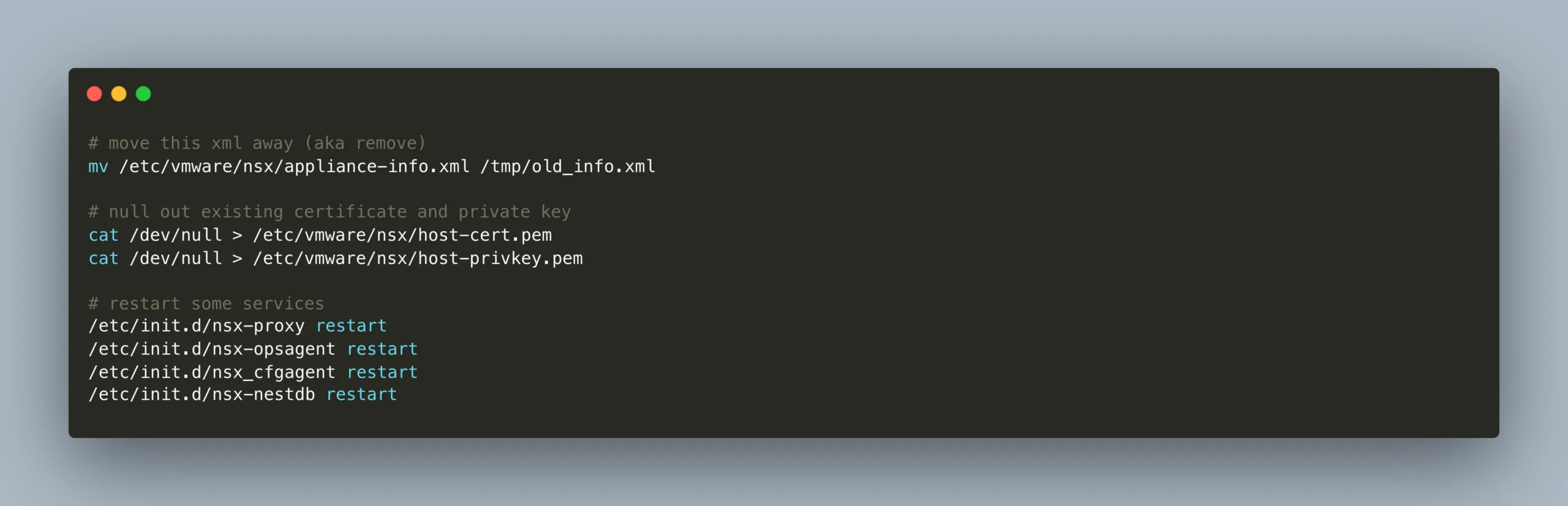
command to fix for solution b

Last step for both solutions: fix NSX

If you think that after fixing this, the “Restart Task” in VCF would automatically trigger the NSX Manager to try and redeploy the Nodes then you are mistaken. You need to login to the NSX Manager go to System – Fabric – Nodes and trigger the reinstall on the Hosts manually. Only trigger a “Restart Task” in VCF after you have green checkmarks on all of your ESX hosts.

There are actually two tasks triggered in VCF when brownfielding a WLD. However you only need to restart the one with multiple subtasks in order for the brownfield to succeed.

Following this will surely fix NSX Brownfield Import for you. At least this specific issue.

Next Steps

If you’ve read this far then chances are you are still having issues. Feel free to reach out to us. We’re happy to help out!

You might also like