

build 7bbbddf7 | content blog-content@c8490fa · 338 posts | profiles 20 · corpus 267 | 0 skipped | | format
apiVersion: soultec.ch/v1kind: Postmetadata: name: how-to-create-a-password-hash-for-vsphere-configuration-profile locale: en labels: author: dario-doerflinger series: how-to capability/cloud: 1.94 capability/virtualization: 1.37 vendor/vmware: 0.88 annotations: source: blog-content/posts/en/how-to-create-a-password-hash-for-vsphere-configuration-profile.md route: /en/insights/how-to-create-a-password-hash-for-vsphere-configuration-profile/ schema: /nerd/schema/posts.json markdown: /en/insights/how-to-create-a-password-hash-for-vsphere-configuration-profile.mdspec: title: Create a password hash for vSphere Configuration Profile date: 2025-05-22 author: dario-doerflinger locale: en summary: >- Configuration Profiles have emerged as the modern successor to VMware's legacy Host Profiles, bringing enhanced automation and streamlined management to your vSphere environment. capabilities: [cloud, virtualization] vendors: [vmware] series: how-to hero: >- /blog-assets/how-to-create-a-password-hash-for-vsphere-configuration-profile/hero.webp legacySlug: how-to-create-a-password-hash-for-vsphere-configuration-profile migrated: 2026-08-24 draft: false sections: - body: | Configuration Profiles have emerged as the modern successor to VMware's legacy Host Profiles, bringing enhanced automation and streamlined management to your vSphere environment. With Host Profiles scheduled for deprecation in the upcoming vSphere release and eventual removal, now is the perfect time to explore how Configuration Profiles can maintain consistent host configurations across your infrastructure - heading:

Managing local Account Password with Configuration Profiles

body: | One powerful feature of Configuration Profiles is the ability to manage passwords for local accounts. To implement this correctly, passwords must be stored in SHA-512 hash format. Fortunately, generating these hashes is straightforward using OpenSSL, which is available on most systems. Here's how to do it: 1. Access any system with OpenSSL installed 2. Use the "passwd" parameter with the "-6" option to generate a SHA-512 hash ![openssl command screenshot](/blog-assets/how-to-create-a-password-hash-for-vsphere-configuration-profile/01.webp) It will then ask you for the password twice and output the string that you can then use in the configuration profile. ### Managing a Cluster with multiple root Password using Configuration Profile If you have a Configuration Profile for a cluster where you need different passwords for root in the same cluster you can do that. You need to specify a "host-override" for the hosts that deviate from the standard profile's password. This would look like the following screenshot. ![Configuration Profile](/blog-assets/how-to-create-a-password-hash-for-vsphere-configuration-profile/02.webp) - heading:

Next Steps

body: | If you're interested in more of the advanced Features of vSphere, VCF or any other VMware product feel free to [reach out to us at any time](https://soultec.ch/contact-us/). We will be at VMware Explore 2025 in Las Vegas, hit us up on [LinkedIn](https://www.linkedin.com/company/76981260/) to meetup for a chat.status: corpus: 267 alsoLike: - {ref: posts/vcf-full-stack-ab-oktober-2027-mythos-oder-wahrheit, score: 1.00} - {ref: posts/ms-secure-boot-cert-expiry-2026, score: 1.00} - {ref: solutions/vmware/vsphere-foundation, score: 1.00}
{ "apiVersion": "soultec.ch/v1", "kind": "Post", "metadata": { "name": "how-to-create-a-password-hash-for-vsphere-configuration-profile", "locale": "en", "labels": { "author": "dario-doerflinger", "series": "how-to", "capability/cloud": "1.94", "capability/virtualization": "1.37", "vendor/vmware": "0.88" }, "annotations": { "source": "blog-content/posts/en/how-to-create-a-password-hash-for-vsphere-configuration-profile.md", "route": "/en/insights/how-to-create-a-password-hash-for-vsphere-configuration-profile/", "schema": "/nerd/schema/posts.json", "markdown": "/en/insights/how-to-create-a-password-hash-for-vsphere-configuration-profile.md" } }, "spec": { "title": "Create a password hash for vSphere Configuration Profile", "date": "2025-05-22", "author": "dario-doerflinger", "locale": "en", "summary": "Configuration Profiles have emerged as the modern successor to VMware's legacy Host Profiles, bringing enhanced automation and streamlined management to your vSphere environment.", "capabilities": [ "cloud", "virtualization" ], "vendors": [ "vmware" ], "series": "how-to", "hero": "/blog-assets/how-to-create-a-password-hash-for-vsphere-configuration-profile/hero.webp", "legacySlug": "how-to-create-a-password-hash-for-vsphere-configuration-profile", "migrated": "2026-08-24", "draft": false }, "sections": [ { "body": "Configuration Profiles have emerged as the modern successor to VMware's legacy Host Profiles, bringing enhanced automation and streamlined management to your vSphere environment. With Host Profiles scheduled for deprecation in the upcoming vSphere release and eventual removal, now is the perfect time to explore how Configuration Profiles can maintain consistent host configurations across your infrastructure" }, { "heading": "

Managing local Account Password with Configuration Profiles

",
"body": "One powerful feature of Configuration Profiles is the ability to manage passwords for local accounts. To implement this correctly, passwords must be stored in SHA-512 hash format.\n\nFortunately, generating these hashes is straightforward using OpenSSL, which is available on most systems. Here's how to do it:\n\n1. Access any system with OpenSSL installed\n2. Use the \"passwd\" parameter with the \"-6\" option to generate a SHA-512 hash\n\n![openssl command screenshot](/blog-assets/how-to-create-a-password-hash-for-vsphere-configuration-profile/01.webp)\n\nIt will then ask you for the password twice and output the string that you can then use in the configuration profile.\n\n### Managing a Cluster with multiple root Password using Configuration Profile\n\nIf you have a Configuration Profile for a cluster where you need different passwords for root in the same cluster you can do that. You need to specify a \"host-override\" for the hosts that deviate from the standard profile's password. This would look like the following screenshot.\n\n![Configuration Profile](/blog-assets/how-to-create-a-password-hash-for-vsphere-configuration-profile/02.webp)" }, { "heading": "

Next Steps

",
"body": "If you're interested in more of the advanced Features of vSphere, VCF or any other VMware product feel free to [reach out to us at any time](https://soultec.ch/contact-us/). We will be at VMware Explore 2025 in Las Vegas, hit us up on [LinkedIn](https://www.linkedin.com/company/76981260/) to meetup for a chat." } ], "status": { "corpus": 267, "alsoLike": [ { "ref": "posts/vcf-full-stack-ab-oktober-2027-mythos-oder-wahrheit", "score": "1.00" }, { "ref": "posts/ms-secure-boot-cert-expiry-2026", "score": "1.00" }, { "ref": "solutions/vmware/vsphere-foundation", "score": "1.00" } ] }}
apiVersion = "soultec.ch/v1"kind = "Post"[metadata]name = "how-to-create-a-password-hash-for-vsphere-configuration-profile"locale = "en"[metadata.labels]author = "dario-doerflinger"series = "how-to""capability/cloud" = "1.94""capability/virtualization" = "1.37""vendor/vmware" = "0.88"[metadata.annotations]source = "blog-content/posts/en/how-to-create-a-password-hash-for-vsphere-configuration-profile.md"route = "/en/insights/how-to-create-a-password-hash-for-vsphere-configuration-profile/"schema = "/nerd/schema/posts.json"markdown = "/en/insights/how-to-create-a-password-hash-for-vsphere-configuration-profile.md"[spec]title = "Create a password hash for vSphere Configuration Profile"date = 2025-05-22author = "dario-doerflinger"locale = "en"summary = "Configuration Profiles have emerged as the modern successor to VMware's legacy Host Profiles, bringing enhanced automation and streamlined management to your vSphere environment."capabilities = ["cloud", "virtualization"]vendors = ["vmware"]series = "how-to"hero = "/blog-assets/how-to-create-a-password-hash-for-vsphere-configuration-profile/hero.webp"legacySlug = "how-to-create-a-password-hash-for-vsphere-configuration-profile"migrated = 2026-08-24draft = false[[sections]]body = "Configuration Profiles have emerged as the modern successor to VMware's legacy Host Profiles, bringing enhanced automation and streamlined management to your vSphere environment. With Host Profiles scheduled for deprecation in the upcoming vSphere release and eventual removal, now is the perfect time to explore how Configuration Profiles can maintain consistent host configurations across your infrastructure"[[sections]]heading = "

Managing local Account Password with Configuration Profiles

"
body = '''One powerful feature of Configuration Profiles is the ability to manage passwords for local accounts. To implement this correctly, passwords must be stored in SHA-512 hash format.Fortunately, generating these hashes is straightforward using OpenSSL, which is available on most systems. Here's how to do it:1. Access any system with OpenSSL installed2. Use the "passwd" parameter with the "-6" option to generate a SHA-512 hash![openssl command screenshot](/blog-assets/how-to-create-a-password-hash-for-vsphere-configuration-profile/01.webp)It will then ask you for the password twice and output the string that you can then use in the configuration profile.### Managing a Cluster with multiple root Password using Configuration ProfileIf you have a Configuration Profile for a cluster where you need different passwords for root in the same cluster you can do that. You need to specify a "host-override" for the hosts that deviate from the standard profile's password. This would look like the following screenshot.![Configuration Profile](/blog-assets/how-to-create-a-password-hash-for-vsphere-configuration-profile/02.webp)'''[[sections]]heading = "

Next Steps

"
body = "If you're interested in more of the advanced Features of vSphere, VCF or any other VMware product feel free to [reach out to us at any time](https://soultec.ch/contact-us/). We will be at VMware Explore 2025 in Las Vegas, hit us up on [LinkedIn](https://www.linkedin.com/company/76981260/) to meetup for a chat."[status]corpus = 267[[status.alsoLike]]ref = "posts/vcf-full-stack-ab-oktober-2027-mythos-oder-wahrheit"score = "1.00"[[status.alsoLike]]ref = "posts/ms-secure-boot-cert-expiry-2026"score = "1.00"[[status.alsoLike]]ref = "solutions/vmware/vsphere-foundation"score = "1.00"
<?xml version="1.0" encoding="UTF-8"?><manifest kind="Post"> <apiVersion>soultec.ch/v1</apiVersion> <metadata> <name>how-to-create-a-password-hash-for-vsphere-configuration-profile</name> <locale>en</locale> <labels> <author>dario-doerflinger</author> <series>how-to</series> <entry key="capability/cloud">1.94</entry> <entry key="capability/virtualization">1.37</entry> <entry key="vendor/vmware">0.88</entry> </labels> <annotations> <source>blog-content/posts/en/how-to-create-a-password-hash-for-vsphere-configuration-profile.md</source> <route>/en/insights/how-to-create-a-password-hash-for-vsphere-configuration-profile/</route> <schema>/nerd/schema/posts.json</schema> <markdown>/en/insights/how-to-create-a-password-hash-for-vsphere-configuration-profile.md</markdown> </annotations> </metadata> <spec> <title>Create a password hash for vSphere Configuration Profile</title> <date>2025-05-22</date> <author>dario-doerflinger</author> <locale>en</locale> <summary>Configuration Profiles have emerged as the modern successor to VMware's legacy Host Profiles, bringing enhanced automation and streamlined management to your vSphere environment.</summary> <capabilities> <item>cloud</item> <item>virtualization</item> </capabilities> <vendors> <item>vmware</item> </vendors> <series>how-to</series> <hero>/blog-assets/how-to-create-a-password-hash-for-vsphere-configuration-profile/hero.webp</hero> <legacySlug>how-to-create-a-password-hash-for-vsphere-configuration-profile</legacySlug> <migrated>2026-08-24</migrated> <draft>false</draft> </spec> <sections> <section> <body>Configuration Profiles have emerged as the modern successor to VMware's legacy Host Profiles, bringing enhanced automation and streamlined management to your vSphere environment. With Host Profiles scheduled for deprecation in the upcoming vSphere release and eventual removal, now is the perfect time to explore how Configuration Profiles can maintain consistent host configurations across your infrastructure</body> </section> <section> <heading>

Managing local Account Password with Configuration Profiles

</heading>
<body>One powerful feature of Configuration Profiles is the ability to manage passwords for local accounts. To implement this correctly, passwords must be stored in SHA-512 hash format.Fortunately, generating these hashes is straightforward using OpenSSL, which is available on most systems. Here's how to do it:1. Access any system with OpenSSL installed2. Use the "passwd" parameter with the "-6" option to generate a SHA-512 hash![openssl command screenshot](/blog-assets/how-to-create-a-password-hash-for-vsphere-configuration-profile/01.webp)It will then ask you for the password twice and output the string that you can then use in the configuration profile.### Managing a Cluster with multiple root Password using Configuration ProfileIf you have a Configuration Profile for a cluster where you need different passwords for root in the same cluster you can do that. You need to specify a "host-override" for the hosts that deviate from the standard profile's password. This would look like the following screenshot.![Configuration Profile](/blog-assets/how-to-create-a-password-hash-for-vsphere-configuration-profile/02.webp) </body> </section> <section> <heading>

Next Steps

</heading>
<body>If you're interested in more of the advanced Features of vSphere, VCF or any other VMware product feel free to [reach out to us at any time](https://soultec.ch/contact-us/). We will be at VMware Explore 2025 in Las Vegas, hit us up on [LinkedIn](https://www.linkedin.com/company/76981260/) to meetup for a chat.</body> </section> </sections> <status> <corpus>267</corpus> <alsoLike> <item> <ref>posts/vcf-full-stack-ab-oktober-2027-mythos-oder-wahrheit</ref> <score>1.00</score> </item> <item> <ref>posts/ms-secure-boot-cert-expiry-2026</ref> <score>1.00</score> </item> <item> <ref>solutions/vmware/vsphere-foundation</ref> <score>1.00</score> </item> </alsoLike> </status></manifest>
How-To · 2025-05-22

Create a password hash for vSphere Configuration Profile

Configuration Profiles have emerged as the modern successor to VMware's legacy Host Profiles, bringing enhanced automation and streamlined management to your vSphere environment.

2025-05-22Date
Dario DörflingerAuthor
1Min read
Topics Cloud 1.94 Virtualization 1.37
Vendors VMware 0.88

Configuration Profiles have emerged as the modern successor to VMware’s legacy Host Profiles, bringing enhanced automation and streamlined management to your vSphere environment. With Host Profiles scheduled for deprecation in the upcoming vSphere release and eventual removal, now is the perfect time to explore how Configuration Profiles can maintain consistent host configurations across your infrastructure

Managing local Account Password with Configuration Profiles

One powerful feature of Configuration Profiles is the ability to manage passwords for local accounts. To implement this correctly, passwords must be stored in SHA-512 hash format.

Fortunately, generating these hashes is straightforward using OpenSSL, which is available on most systems. Here’s how to do it:

  1. Access any system with OpenSSL installed
  2. Use the “passwd” parameter with the “-6” option to generate a SHA-512 hash
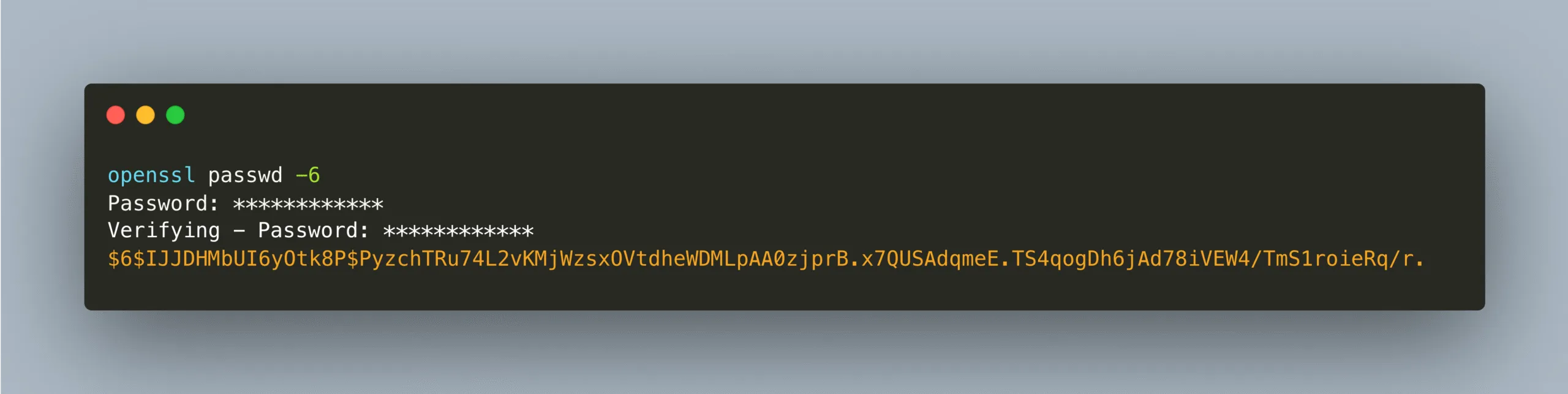
openssl command screenshot

It will then ask you for the password twice and output the string that you can then use in the configuration profile.

Managing a Cluster with multiple root Password using Configuration Profile

If you have a Configuration Profile for a cluster where you need different passwords for root in the same cluster you can do that. You need to specify a “host-override” for the hosts that deviate from the standard profile’s password. This would look like the following screenshot.
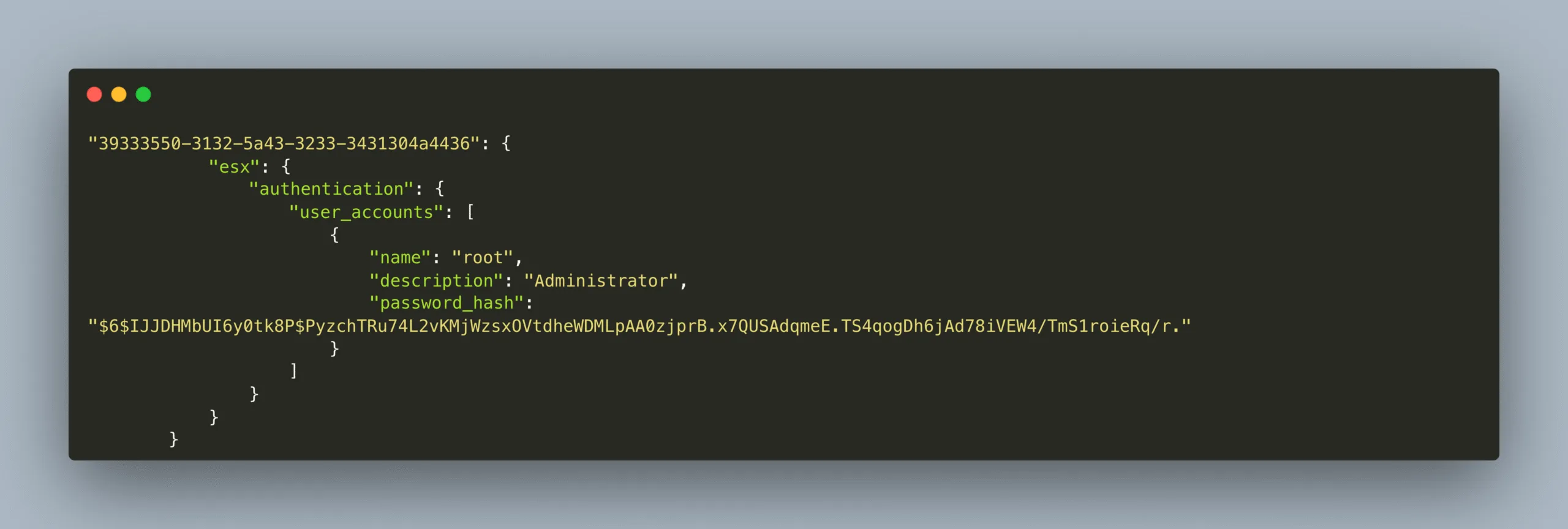
Configuration Profile

Next Steps

If you’re interested in more of the advanced Features of vSphere, VCF or any other VMware product feel free to reach out to us at any time. We will be at VMware Explore 2025 in Las Vegas, hit us up on LinkedIn to meetup for a chat.
You might also like