

build 7bbbddf7 | content blog-content@c8490fa · 338 posts | profiles 20 · corpus 267 | 0 skipped | | format
apiVersion: soultec.ch/v1kind: Postmetadata: name: how-to-broadcom-download-token locale: en labels: author: daniel-stadelmann series: how-to capability/virtualization: 1.37 capability/security: 2.16 vendor/vmware: 0.88 annotations: source: blog-content/posts/en/how-to-broadcom-download-token.md route: /en/insights/how-to-broadcom-download-token/ schema: /nerd/schema/posts.json markdown: /en/insights/how-to-broadcom-download-token.mdspec: title: Broadcom Download Token date: 2025-04-14 author: daniel-stadelmann locale: en summary: >- From now on your vCenter or SDDC Manager needs a unique token. Without it, from the end of April 2025, no patches for VMware software will download any more. capabilities: [virtualization, security] vendors: [vmware] series: how-to hero: /blog-assets/how-to-broadcom-download-token/hero.webp migrated: 2026-08-24 comments: 1 translationReviewed: false draft: false sections: - body: | From now on your vCenter or SDDC Manager needs a unique token. Without it, from the end of April 2025, no patches for VMware software will download any more. Switching to the token configuration is straightforward and can be done with a script. VMware describes the procedure [here](https://blogs.vmware.com/cloud-foundation/2025/03/24/download-changes-vmware-software-binaries/). What we are seeing a lot of, though, are people telling us that token generation is not available to them. That is because it needs the "Product Administrator" role in the Broadcom Support Portal. Getting that permission is fairly simple. If "My Tools" is available on the left, it takes seconds. ![](/blog-assets/how-to-broadcom-download-token/01.webp) Pick the user you want, edit, and set the toggle to green. ![](/blog-assets/how-to-broadcom-download-token/02.webp) That is all. Refresh the page and the [quick link](https://support.broadcom.com/group/ecx/generate-download-token) "Generate Download Token" appears on the right. If you do not have My Tools, the process differs slightly. Click your name at the top right, then "Request Access". ![](/blog-assets/how-to-broadcom-download-token/03.webp) Then set the toggle under "Product Administrator" to green. ![](/blog-assets/how-to-broadcom-download-token/04.webp) Refresh the page and the [quick link](https://support.broadcom.com/group/ecx/generate-download-token) "Generate Download Token" appears on the right.status: corpus: 267 alsoLike: - {ref: posts/how-to-renew-the-sts-signing-root-certificate-in-vcenter, score: 1.00} - {ref: posts/how-to-broadcom-support-portal-quick-links, score: 1.00} - {ref: solutions/vmware/vmware-cloud-foundation/addon/advanced-cyber-compliance, score: 1.00}
{ "apiVersion": "soultec.ch/v1", "kind": "Post", "metadata": { "name": "how-to-broadcom-download-token", "locale": "en", "labels": { "author": "daniel-stadelmann", "series": "how-to", "capability/virtualization": "1.37", "capability/security": "2.16", "vendor/vmware": "0.88" }, "annotations": { "source": "blog-content/posts/en/how-to-broadcom-download-token.md", "route": "/en/insights/how-to-broadcom-download-token/", "schema": "/nerd/schema/posts.json", "markdown": "/en/insights/how-to-broadcom-download-token.md" } }, "spec": { "title": "Broadcom Download Token", "date": "2025-04-14", "author": "daniel-stadelmann", "locale": "en", "summary": "From now on your vCenter or SDDC Manager needs a unique token. Without it, from the end of April 2025, no patches for VMware software will download any more.", "capabilities": [ "virtualization", "security" ], "vendors": [ "vmware" ], "series": "how-to", "hero": "/blog-assets/how-to-broadcom-download-token/hero.webp", "migrated": "2026-08-24", "comments": 1, "translationReviewed": false, "draft": false }, "sections": [ { "body": "From now on your vCenter or SDDC Manager needs a unique token. Without it, from the end of April 2025, no patches for VMware software will download any more. Switching to the token configuration is straightforward and can be done with a script.\n\nVMware describes the procedure [here](https://blogs.vmware.com/cloud-foundation/2025/03/24/download-changes-vmware-software-binaries/).\n\nWhat we are seeing a lot of, though, are people telling us that token generation is not available to them. That is because it needs the \"Product Administrator\" role in the Broadcom Support Portal.\n\nGetting that permission is fairly simple. If \"My Tools\" is available on the left, it takes seconds.\n\n![](/blog-assets/how-to-broadcom-download-token/01.webp)\n\nPick the user you want, edit, and set the toggle to green.\n\n![](/blog-assets/how-to-broadcom-download-token/02.webp)\n\nThat is all. Refresh the page and the [quick link](https://support.broadcom.com/group/ecx/generate-download-token) \"Generate Download Token\" appears on the right.\n\nIf you do not have My Tools, the process differs slightly. Click your name at the top right, then \"Request Access\".\n\n![](/blog-assets/how-to-broadcom-download-token/03.webp)\n\nThen set the toggle under \"Product Administrator\" to green.\n\n![](/blog-assets/how-to-broadcom-download-token/04.webp)\n\nRefresh the page and the [quick link](https://support.broadcom.com/group/ecx/generate-download-token) \"Generate Download Token\" appears on the right." } ], "status": { "corpus": 267, "alsoLike": [ { "ref": "posts/how-to-renew-the-sts-signing-root-certificate-in-vcenter", "score": "1.00" }, { "ref": "posts/how-to-broadcom-support-portal-quick-links", "score": "1.00" }, { "ref": "solutions/vmware/vmware-cloud-foundation/addon/advanced-cyber-compliance", "score": "1.00" } ] }}
apiVersion = "soultec.ch/v1"kind = "Post"[metadata]name = "how-to-broadcom-download-token"locale = "en"[metadata.labels]author = "daniel-stadelmann"series = "how-to""capability/virtualization" = "1.37""capability/security" = "2.16""vendor/vmware" = "0.88"[metadata.annotations]source = "blog-content/posts/en/how-to-broadcom-download-token.md"route = "/en/insights/how-to-broadcom-download-token/"schema = "/nerd/schema/posts.json"markdown = "/en/insights/how-to-broadcom-download-token.md"[spec]title = "Broadcom Download Token"date = 2025-04-14author = "daniel-stadelmann"locale = "en"summary = "From now on your vCenter or SDDC Manager needs a unique token. Without it, from the end of April 2025, no patches for VMware software will download any more."capabilities = ["virtualization", "security"]vendors = ["vmware"]series = "how-to"hero = "/blog-assets/how-to-broadcom-download-token/hero.webp"migrated = 2026-08-24comments = 1translationReviewed = falsedraft = false[[sections]]body = '''From now on your vCenter or SDDC Manager needs a unique token. Without it, from the end of April 2025, no patches for VMware software will download any more. Switching to the token configuration is straightforward and can be done with a script.VMware describes the procedure [here](https://blogs.vmware.com/cloud-foundation/2025/03/24/download-changes-vmware-software-binaries/).What we are seeing a lot of, though, are people telling us that token generation is not available to them. That is because it needs the "Product Administrator" role in the Broadcom Support Portal.Getting that permission is fairly simple. If "My Tools" is available on the left, it takes seconds.![](/blog-assets/how-to-broadcom-download-token/01.webp)Pick the user you want, edit, and set the toggle to green.![](/blog-assets/how-to-broadcom-download-token/02.webp)That is all. Refresh the page and the [quick link](https://support.broadcom.com/group/ecx/generate-download-token) "Generate Download Token" appears on the right.If you do not have My Tools, the process differs slightly. Click your name at the top right, then "Request Access".![](/blog-assets/how-to-broadcom-download-token/03.webp)Then set the toggle under "Product Administrator" to green.![](/blog-assets/how-to-broadcom-download-token/04.webp)Refresh the page and the [quick link](https://support.broadcom.com/group/ecx/generate-download-token) "Generate Download Token" appears on the right.'''[status]corpus = 267[[status.alsoLike]]ref = "posts/how-to-renew-the-sts-signing-root-certificate-in-vcenter"score = "1.00"[[status.alsoLike]]ref = "posts/how-to-broadcom-support-portal-quick-links"score = "1.00"[[status.alsoLike]]ref = "solutions/vmware/vmware-cloud-foundation/addon/advanced-cyber-compliance"score = "1.00"
<?xml version="1.0" encoding="UTF-8"?><manifest kind="Post"> <apiVersion>soultec.ch/v1</apiVersion> <metadata> <name>how-to-broadcom-download-token</name> <locale>en</locale> <labels> <author>daniel-stadelmann</author> <series>how-to</series> <entry key="capability/virtualization">1.37</entry> <entry key="capability/security">2.16</entry> <entry key="vendor/vmware">0.88</entry> </labels> <annotations> <source>blog-content/posts/en/how-to-broadcom-download-token.md</source> <route>/en/insights/how-to-broadcom-download-token/</route> <schema>/nerd/schema/posts.json</schema> <markdown>/en/insights/how-to-broadcom-download-token.md</markdown> </annotations> </metadata> <spec> <title>Broadcom Download Token</title> <date>2025-04-14</date> <author>daniel-stadelmann</author> <locale>en</locale> <summary>From now on your vCenter or SDDC Manager needs a unique token. Without it, from the end of April 2025, no patches for VMware software will download any more.</summary> <capabilities> <item>virtualization</item> <item>security</item> </capabilities> <vendors> <item>vmware</item> </vendors> <series>how-to</series> <hero>/blog-assets/how-to-broadcom-download-token/hero.webp</hero> <migrated>2026-08-24</migrated> <comments>1</comments> <translationReviewed>false</translationReviewed> <draft>false</draft> </spec> <sections> <section> <body>From now on your vCenter or SDDC Manager needs a unique token. Without it, from the end of April 2025, no patches for VMware software will download any more. Switching to the token configuration is straightforward and can be done with a script.VMware describes the procedure [here](https://blogs.vmware.com/cloud-foundation/2025/03/24/download-changes-vmware-software-binaries/).What we are seeing a lot of, though, are people telling us that token generation is not available to them. That is because it needs the "Product Administrator" role in the Broadcom Support Portal.Getting that permission is fairly simple. If "My Tools" is available on the left, it takes seconds.![](/blog-assets/how-to-broadcom-download-token/01.webp)Pick the user you want, edit, and set the toggle to green.![](/blog-assets/how-to-broadcom-download-token/02.webp)That is all. Refresh the page and the [quick link](https://support.broadcom.com/group/ecx/generate-download-token) "Generate Download Token" appears on the right.If you do not have My Tools, the process differs slightly. Click your name at the top right, then "Request Access".![](/blog-assets/how-to-broadcom-download-token/03.webp)Then set the toggle under "Product Administrator" to green.![](/blog-assets/how-to-broadcom-download-token/04.webp)Refresh the page and the [quick link](https://support.broadcom.com/group/ecx/generate-download-token) "Generate Download Token" appears on the right. </body> </section> </sections> <status> <corpus>267</corpus> <alsoLike> <item> <ref>posts/how-to-renew-the-sts-signing-root-certificate-in-vcenter</ref> <score>1.00</score> </item> <item> <ref>posts/how-to-broadcom-support-portal-quick-links</ref> <score>1.00</score> </item> <item> <ref>solutions/vmware/vmware-cloud-foundation/addon/advanced-cyber-compliance</ref> <score>1.00</score> </item> </alsoLike> </status></manifest>
How-To · 2025-04-14

Broadcom Download Token

From now on your vCenter or SDDC Manager needs a unique token. Without it, from the end of April 2025, no patches for VMware software will download any more.

2025-04-14Date
Daniel StadelmannAuthor
1Min read
Topics Virtualization 1.37 Security 2.16
Vendors VMware 0.88

From now on your vCenter or SDDC Manager needs a unique token. Without it, from the end of April 2025, no patches for VMware software will download any more. Switching to the token configuration is straightforward and can be done with a script.

VMware describes the procedure here.

What we are seeing a lot of, though, are people telling us that token generation is not available to them. That is because it needs the “Product Administrator” role in the Broadcom Support Portal.

Getting that permission is fairly simple. If “My Tools” is available on the left, it takes seconds.
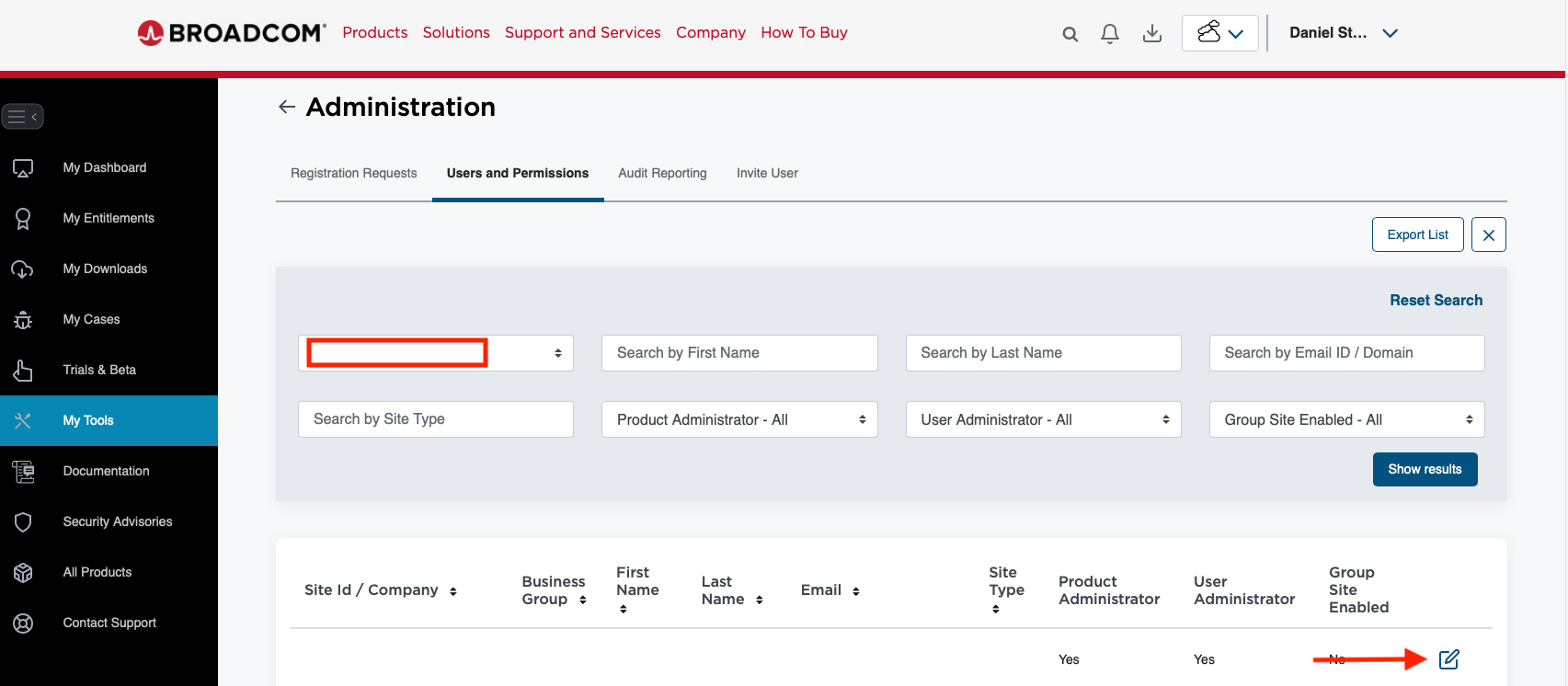
Pick the user you want, edit, and set the toggle to green.
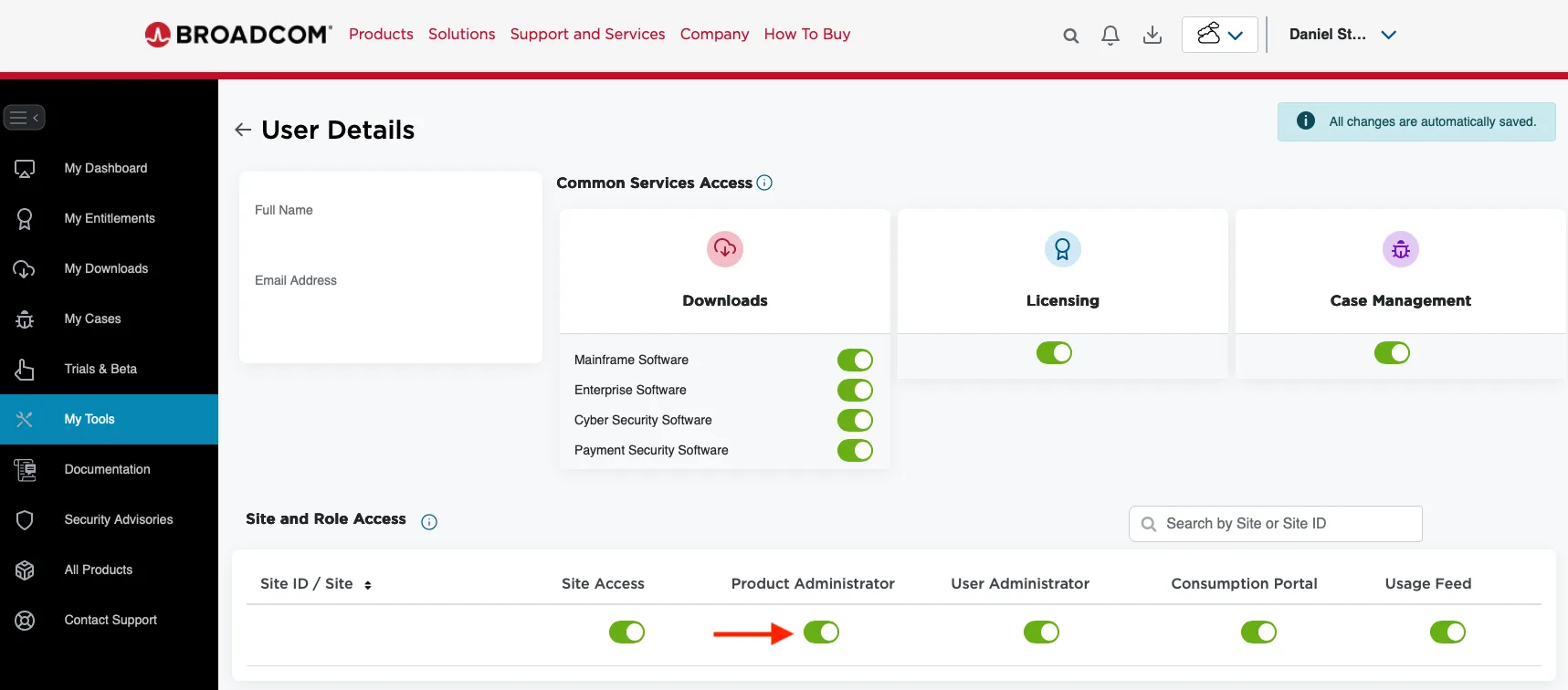
That is all. Refresh the page and the quick link “Generate Download Token” appears on the right.

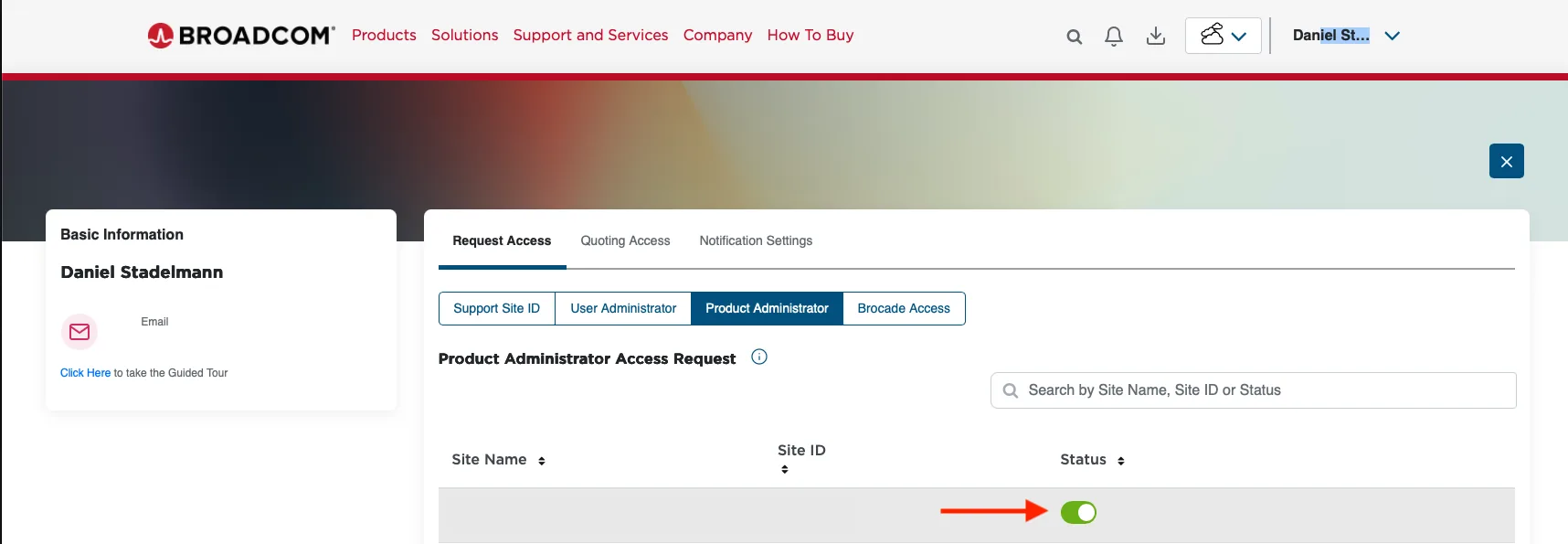
If you do not have My Tools, the process differs slightly. Click your name at the top right, then “Request Access”.

Then set the toggle under “Product Administrator” to green.
Refresh the page and the quick link “Generate Download Token” appears on the right.
You might also like