build 7bbbddf7 | content blog-content@c8490fa · 338 posts | profiles 20 · corpus 267 | 0 skipped | | format
apiVersion: soultec.ch/v1kind: Postmetadata: name: hci-mit-stormagic locale: en labels: author: patrick-pletscher series: product-overview capability/storage: 2.62 annotations: source: blog-content/posts/en/hci-mit-stormagic.md route: /en/insights/hci-mit-stormagic/ schema: /nerd/schema/posts.json markdown: /en/insights/hci-mit-stormagic.mdspec: title: HCI with StorMagic date: 2022-08-18 author: patrick-pletscher locale: en summary: >- StorMagic SvSAN is a software-defined storage solution that suits small virtualisation environments with two nodes, turning the SSDs, disks and memory of two servers into a virtual SAN. capabilities: [storage] series: product-overview hero: /blog-assets/hci-mit-stormagic/hero.webp migrated: 2026-08-24 translationReviewed: false draft: false sections: - body: | HCI with StorMagic SvSAN is a software-defined storage solution that suits small virtualisation environments with two nodes. It turns the SSDs, disks and memory of two servers into a virtual SAN. - heading:

The advantages at a glance

body: | SvSAN makes virtual SANs simple for remote and edge computing. These points are central to that. - *No single point of failure* – high availability with just two nodes - *Synchronous mirroring* – an exact copy of the data on both nodes - *High resilience* – a cluster can be local or spread over hundreds of kilometres - *A small remote witness* – one VM manages up to 1,000 sites - *\[optional\] a three-node configuration* – keeps HA through a single node failure and through maintenance windows - Support for VMs, containers, or both - heading:

HCI with StorMagic

body: | SvSAN was built specifically to simplify storage at remote and edge sites. StorMagic's virtual SAN creates a highly available virtual environment with only two nodes. It runs on any x86 server listed in the VMware vSphere ESXi hardware compatibility list (HCL). ### Architecture A typical two-node SvSAN configuration, with central management and a witness, looks like this. ![HCI with StorMagic architecture](/blog-assets/hci-mit-stormagic/01.webp) ### Building HCI with StorMagic StorMagic SvSAN combines two nodes into a highly available storage system. For it to work smoothly, both servers should have the same CPU and RAM configuration. The number and type of internal disks have to be identical. Unlike many SDS vendors, StorMagic still uses a conventional RAID level for the local datastore. That leaves you free to choose whether performance or availability comes first, and it also gives local failover safety within the nodes. Once you know which disks and which RAID level the HA datastore will use, the StorMagic Virtual Storage Appliance (VSA) is quick to deploy in the virtual environment thanks to a prepared image. The detailed configuration then happens through the management interface. The SvSAN witness prevents split-brain in two-node SvSAN clusters by checking the state of each node in the cluster regularly. The only data passing between the witness and the SvSAN nodes is heartbeat information. The witness itself is not in the data path, so it places no great demands on network connectivity. It tolerates considerable latency and low bandwidth. Alternatively, the witness is available as a cloud subscription service bought on top of an SvSAN licence. That product is called Witness-as-a-Service (WaaS) and is part of a set of features that make up StorMagic Cloud Services. Rather than installing the witness on hardware, you simply connect your SvSAN clusters to the WaaS function StorMagic provides and manage everything from one place. #### Requirements HCI with StorMagic needs the following. StorMagic SvSAN system requirements - **Servers** - 2 servers - optionally 3 servers, for HA during upgrades, maintenance and so on - **CPU** - 1 vCPU (2 vCPU with encryption enabled) - 2 GHz or more - **Memory** - 1 GB - **Disk** - 2 virtual storage devices used by the VSA - 1x 512 MB as the boot device - 1x 20 GB as the journal disk - **Network** - 1x 1 Gbps (10 Gbps and jumbo frames are supported) SvSAN witness requirements - **CPU** - 1 vCPU (1 GHz) - **Memory** - 512 MB (reserved) - **Disk** - 512 MB - **Network** - 1x 1 Gbps (latency 3000 ms, 9 Kb/s throughput) - **Operating system** - Windows Hyper-V - VMware ESXi #### Licensing StorMagic SvSAN is licensed on the usable VSA storage capacity. The licence tiers are 2 TB, 6 TB, 12 TB and unlimited. SvSAN is available as a perpetual or a subscription licence. After a one-off payment, perpetual SvSAN licences can be used indefinitely, with ongoing cost only for support renewals. SvSAN subscription licences are paid in advance for a defined period, a year for example, and renewed as needed. Licensing is based on the number of nodes in the cluster. ### Configuration HCI with StorMagic is configured through a vCenter plugin. ![HCI with StorMagic SvSAN configuration](/blog-assets/hci-mit-stormagic/02.webp) ![HCI with StorMagic SvSAN configuration](/blog-assets/hci-mit-stormagic/03.webp) - heading:
Next step

body: | Would you like to test [StorMagic SvSAN](https://stormagic.com/)? We are happy to organise the test licences for you and [go through the test phase or your proof of concept with you](https://soultec.ch/contact-us/).status: corpus: 267 alsoLike: - {ref: posts/how-to-storage-performance-test-mit-vdbench, score: 1.00} - {ref: posts/storage-performance-test-mit-iometer, score: 1.00} - {ref: solutions/hpe/hpe-dhci, score: 0.61}
{ "apiVersion": "soultec.ch/v1", "kind": "Post", "metadata": { "name": "hci-mit-stormagic", "locale": "en", "labels": { "author": "patrick-pletscher", "series": "product-overview", "capability/storage": "2.62" }, "annotations": { "source": "blog-content/posts/en/hci-mit-stormagic.md", "route": "/en/insights/hci-mit-stormagic/", "schema": "/nerd/schema/posts.json", "markdown": "/en/insights/hci-mit-stormagic.md" } }, "spec": { "title": "HCI with StorMagic", "date": "2022-08-18", "author": "patrick-pletscher", "locale": "en", "summary": "StorMagic SvSAN is a software-defined storage solution that suits small virtualisation environments with two nodes, turning the SSDs, disks and memory of two servers into a virtual SAN.", "capabilities": [ "storage" ], "series": "product-overview", "hero": "/blog-assets/hci-mit-stormagic/hero.webp", "migrated": "2026-08-24", "translationReviewed": false, "draft": false }, "sections": [ { "body": "HCI with StorMagic SvSAN is a software-defined storage solution that suits small virtualisation environments with two nodes. It turns the SSDs, disks and memory of two servers into a virtual SAN." }, { "heading": "

The advantages at a glance

",
"body": "SvSAN makes virtual SANs simple for remote and edge computing. These points are central to that.\n\n- *No single point of failure* – high availability with just two nodes\n- *Synchronous mirroring* – an exact copy of the data on both nodes\n- *High resilience* – a cluster can be local or spread over hundreds of kilometres\n- *A small remote witness* – one VM manages up to 1,000 sites\n- *\\[optional\\] a three-node configuration* – keeps HA through a single node failure and through maintenance windows\n- Support for VMs, containers, or both" }, { "heading": "

HCI with StorMagic

",
"body": "SvSAN was built specifically to simplify storage at remote and edge sites. StorMagic's virtual SAN creates a highly available virtual environment with only two nodes.\n\nIt runs on any x86 server listed in the VMware vSphere ESXi hardware compatibility list (HCL).\n\n### Architecture\n\nA typical two-node SvSAN configuration, with central management and a witness, looks like this.\n\n![HCI with StorMagic architecture](/blog-assets/hci-mit-stormagic/01.webp)\n\n### Building HCI with StorMagic\n\nStorMagic SvSAN combines two nodes into a highly available storage system. For it to work smoothly, both servers should have the same CPU and RAM configuration.\n\nThe number and type of internal disks have to be identical.\n\nUnlike many SDS vendors, StorMagic still uses a conventional RAID level for the local datastore. That leaves you free to choose whether performance or availability comes first, and it also gives local failover safety within the nodes.\n\nOnce you know which disks and which RAID level the HA datastore will use, the StorMagic Virtual Storage Appliance (VSA) is quick to deploy in the virtual environment thanks to a prepared image. The detailed configuration then happens through the management interface.\n\nThe SvSAN witness prevents split-brain in two-node SvSAN clusters by checking the state of each node in the cluster regularly. The only data passing between the witness and the SvSAN nodes is heartbeat information.\n\nThe witness itself is not in the data path, so it places no great demands on network connectivity. It tolerates considerable latency and low bandwidth.\n\nAlternatively, the witness is available as a cloud subscription service bought on top of an SvSAN licence.\n\nThat product is called Witness-as-a-Service (WaaS) and is part of a set of features that make up StorMagic Cloud Services. Rather than installing the witness on hardware, you simply connect your SvSAN clusters to the WaaS function StorMagic provides and manage everything from one place.\n\n#### Requirements\n\nHCI with StorMagic needs the following.\n\nStorMagic SvSAN system requirements\n\n- **Servers**\n - 2 servers\n - optionally 3 servers, for HA during upgrades, maintenance and so on\n- **CPU**\n - 1 vCPU (2 vCPU with encryption enabled)\n - 2 GHz or more\n- **Memory**\n - 1 GB\n- **Disk**\n - 2 virtual storage devices used by the VSA\n - 1x 512 MB as the boot device\n - 1x 20 GB as the journal disk\n- **Network**\n - 1x 1 Gbps (10 Gbps and jumbo frames are supported)\n\nSvSAN witness requirements\n\n- **CPU**\n - 1 vCPU (1 GHz)\n- **Memory**\n - 512 MB (reserved)\n- **Disk**\n - 512 MB\n- **Network**\n - 1x 1 Gbps (latency 3000 ms, 9 Kb/s throughput)\n- **Operating system**\n - Windows Hyper-V\n - VMware ESXi\n\n#### Licensing\n\nStorMagic SvSAN is licensed on the usable VSA storage capacity.\n\nThe licence tiers are 2 TB, 6 TB, 12 TB and unlimited.\n\nSvSAN is available as a perpetual or a subscription licence.\n\nAfter a one-off payment, perpetual SvSAN licences can be used indefinitely, with ongoing cost only for support renewals. SvSAN subscription licences are paid in advance for a defined period, a year for example, and renewed as needed.\n\nLicensing is based on the number of nodes in the cluster.\n\n### Configuration\n\nHCI with StorMagic is configured through a vCenter plugin.\n\n![HCI with StorMagic SvSAN configuration](/blog-assets/hci-mit-stormagic/02.webp) ![HCI with StorMagic SvSAN configuration](/blog-assets/hci-mit-stormagic/03.webp)" }, { "heading": "

Next step

",
"body": "Would you like to test [StorMagic SvSAN](https://stormagic.com/)?\n\nWe are happy to organise the test licences for you and [go through the test phase or your proof of concept with you](https://soultec.ch/contact-us/)." } ], "status": { "corpus": 267, "alsoLike": [ { "ref": "posts/how-to-storage-performance-test-mit-vdbench", "score": "1.00" }, { "ref": "posts/storage-performance-test-mit-iometer", "score": "1.00" }, { "ref": "solutions/hpe/hpe-dhci", "score": "0.61" } ] }}
apiVersion = "soultec.ch/v1"kind = "Post"[metadata]name = "hci-mit-stormagic"locale = "en"[metadata.labels]author = "patrick-pletscher"series = "product-overview""capability/storage" = "2.62"[metadata.annotations]source = "blog-content/posts/en/hci-mit-stormagic.md"route = "/en/insights/hci-mit-stormagic/"schema = "/nerd/schema/posts.json"markdown = "/en/insights/hci-mit-stormagic.md"[spec]title = "HCI with StorMagic"date = 2022-08-18author = "patrick-pletscher"locale = "en"summary = "StorMagic SvSAN is a software-defined storage solution that suits small virtualisation environments with two nodes, turning the SSDs, disks and memory of two servers into a virtual SAN."capabilities = ["storage"]series = "product-overview"hero = "/blog-assets/hci-mit-stormagic/hero.webp"migrated = 2026-08-24translationReviewed = falsedraft = false[[sections]]body = "HCI with StorMagic SvSAN is a software-defined storage solution that suits small virtualisation environments with two nodes. It turns the SSDs, disks and memory of two servers into a virtual SAN."[[sections]]heading = "

The advantages at a glance

"
body = '''SvSAN makes virtual SANs simple for remote and edge computing. These points are central to that.- *No single point of failure* – high availability with just two nodes- *Synchronous mirroring* – an exact copy of the data on both nodes- *High resilience* – a cluster can be local or spread over hundreds of kilometres- *A small remote witness* – one VM manages up to 1,000 sites- *\[optional\] a three-node configuration* – keeps HA through a single node failure and through maintenance windows- Support for VMs, containers, or both'''[[sections]]heading = "

HCI with StorMagic

"
body = '''SvSAN was built specifically to simplify storage at remote and edge sites. StorMagic's virtual SAN creates a highly available virtual environment with only two nodes.It runs on any x86 server listed in the VMware vSphere ESXi hardware compatibility list (HCL).### ArchitectureA typical two-node SvSAN configuration, with central management and a witness, looks like this.![HCI with StorMagic architecture](/blog-assets/hci-mit-stormagic/01.webp)### Building HCI with StorMagicStorMagic SvSAN combines two nodes into a highly available storage system. For it to work smoothly, both servers should have the same CPU and RAM configuration.The number and type of internal disks have to be identical.Unlike many SDS vendors, StorMagic still uses a conventional RAID level for the local datastore. That leaves you free to choose whether performance or availability comes first, and it also gives local failover safety within the nodes.Once you know which disks and which RAID level the HA datastore will use, the StorMagic Virtual Storage Appliance (VSA) is quick to deploy in the virtual environment thanks to a prepared image. The detailed configuration then happens through the management interface.The SvSAN witness prevents split-brain in two-node SvSAN clusters by checking the state of each node in the cluster regularly. The only data passing between the witness and the SvSAN nodes is heartbeat information.The witness itself is not in the data path, so it places no great demands on network connectivity. It tolerates considerable latency and low bandwidth.Alternatively, the witness is available as a cloud subscription service bought on top of an SvSAN licence.That product is called Witness-as-a-Service (WaaS) and is part of a set of features that make up StorMagic Cloud Services. Rather than installing the witness on hardware, you simply connect your SvSAN clusters to the WaaS function StorMagic provides and manage everything from one place.#### RequirementsHCI with StorMagic needs the following.StorMagic SvSAN system requirements- **Servers** - 2 servers - optionally 3 servers, for HA during upgrades, maintenance and so on- **CPU** - 1 vCPU (2 vCPU with encryption enabled) - 2 GHz or more- **Memory** - 1 GB- **Disk** - 2 virtual storage devices used by the VSA - 1x 512 MB as the boot device - 1x 20 GB as the journal disk- **Network** - 1x 1 Gbps (10 Gbps and jumbo frames are supported)SvSAN witness requirements- **CPU** - 1 vCPU (1 GHz)- **Memory** - 512 MB (reserved)- **Disk** - 512 MB- **Network** - 1x 1 Gbps (latency 3000 ms, 9 Kb/s throughput)- **Operating system** - Windows Hyper-V - VMware ESXi#### LicensingStorMagic SvSAN is licensed on the usable VSA storage capacity.The licence tiers are 2 TB, 6 TB, 12 TB and unlimited.SvSAN is available as a perpetual or a subscription licence.After a one-off payment, perpetual SvSAN licences can be used indefinitely, with ongoing cost only for support renewals. SvSAN subscription licences are paid in advance for a defined period, a year for example, and renewed as needed.Licensing is based on the number of nodes in the cluster.### ConfigurationHCI with StorMagic is configured through a vCenter plugin.![HCI with StorMagic SvSAN configuration](/blog-assets/hci-mit-stormagic/02.webp) ![HCI with StorMagic SvSAN configuration](/blog-assets/hci-mit-stormagic/03.webp)'''[[sections]]heading = "

Next step

"
body = '''Would you like to test [StorMagic SvSAN](https://stormagic.com/)?We are happy to organise the test licences for you and [go through the test phase or your proof of concept with you](https://soultec.ch/contact-us/).'''[status]corpus = 267[[status.alsoLike]]ref = "posts/how-to-storage-performance-test-mit-vdbench"score = "1.00"[[status.alsoLike]]ref = "posts/storage-performance-test-mit-iometer"score = "1.00"[[status.alsoLike]]ref = "solutions/hpe/hpe-dhci"score = "0.61"
<?xml version="1.0" encoding="UTF-8"?><manifest kind="Post"> <apiVersion>soultec.ch/v1</apiVersion> <metadata> <name>hci-mit-stormagic</name> <locale>en</locale> <labels> <author>patrick-pletscher</author> <series>product-overview</series> <entry key="capability/storage">2.62</entry> </labels> <annotations> <source>blog-content/posts/en/hci-mit-stormagic.md</source> <route>/en/insights/hci-mit-stormagic/</route> <schema>/nerd/schema/posts.json</schema> <markdown>/en/insights/hci-mit-stormagic.md</markdown> </annotations> </metadata> <spec> <title>HCI with StorMagic</title> <date>2022-08-18</date> <author>patrick-pletscher</author> <locale>en</locale> <summary>StorMagic SvSAN is a software-defined storage solution that suits small virtualisation environments with two nodes, turning the SSDs, disks and memory of two servers into a virtual SAN.</summary> <capabilities> <item>storage</item> </capabilities> <series>product-overview</series> <hero>/blog-assets/hci-mit-stormagic/hero.webp</hero> <migrated>2026-08-24</migrated> <translationReviewed>false</translationReviewed> <draft>false</draft> </spec> <sections> <section> <body>HCI with StorMagic SvSAN is a software-defined storage solution that suits small virtualisation environments with two nodes. It turns the SSDs, disks and memory of two servers into a virtual SAN.</body> </section> <section> <heading>

The advantages at a glance

</heading>
<body>SvSAN makes virtual SANs simple for remote and edge computing. These points are central to that.- *No single point of failure* – high availability with just two nodes- *Synchronous mirroring* – an exact copy of the data on both nodes- *High resilience* – a cluster can be local or spread over hundreds of kilometres- *A small remote witness* – one VM manages up to 1,000 sites- *\[optional\] a three-node configuration* – keeps HA through a single node failure and through maintenance windows- Support for VMs, containers, or both </body> </section> <section> <heading>

HCI with StorMagic

</heading>
<body>SvSAN was built specifically to simplify storage at remote and edge sites. StorMagic's virtual SAN creates a highly available virtual environment with only two nodes.It runs on any x86 server listed in the VMware vSphere ESXi hardware compatibility list (HCL).### ArchitectureA typical two-node SvSAN configuration, with central management and a witness, looks like this.![HCI with StorMagic architecture](/blog-assets/hci-mit-stormagic/01.webp)### Building HCI with StorMagicStorMagic SvSAN combines two nodes into a highly available storage system. For it to work smoothly, both servers should have the same CPU and RAM configuration.The number and type of internal disks have to be identical.Unlike many SDS vendors, StorMagic still uses a conventional RAID level for the local datastore. That leaves you free to choose whether performance or availability comes first, and it also gives local failover safety within the nodes.Once you know which disks and which RAID level the HA datastore will use, the StorMagic Virtual Storage Appliance (VSA) is quick to deploy in the virtual environment thanks to a prepared image. The detailed configuration then happens through the management interface.The SvSAN witness prevents split-brain in two-node SvSAN clusters by checking the state of each node in the cluster regularly. The only data passing between the witness and the SvSAN nodes is heartbeat information.The witness itself is not in the data path, so it places no great demands on network connectivity. It tolerates considerable latency and low bandwidth.Alternatively, the witness is available as a cloud subscription service bought on top of an SvSAN licence.That product is called Witness-as-a-Service (WaaS) and is part of a set of features that make up StorMagic Cloud Services. Rather than installing the witness on hardware, you simply connect your SvSAN clusters to the WaaS function StorMagic provides and manage everything from one place.#### RequirementsHCI with StorMagic needs the following.StorMagic SvSAN system requirements- **Servers** - 2 servers - optionally 3 servers, for HA during upgrades, maintenance and so on- **CPU** - 1 vCPU (2 vCPU with encryption enabled) - 2 GHz or more- **Memory** - 1 GB- **Disk** - 2 virtual storage devices used by the VSA - 1x 512 MB as the boot device - 1x 20 GB as the journal disk- **Network** - 1x 1 Gbps (10 Gbps and jumbo frames are supported)SvSAN witness requirements- **CPU** - 1 vCPU (1 GHz)- **Memory** - 512 MB (reserved)- **Disk** - 512 MB- **Network** - 1x 1 Gbps (latency 3000 ms, 9 Kb/s throughput)- **Operating system** - Windows Hyper-V - VMware ESXi#### LicensingStorMagic SvSAN is licensed on the usable VSA storage capacity.The licence tiers are 2 TB, 6 TB, 12 TB and unlimited.SvSAN is available as a perpetual or a subscription licence.After a one-off payment, perpetual SvSAN licences can be used indefinitely, with ongoing cost only for support renewals. SvSAN subscription licences are paid in advance for a defined period, a year for example, and renewed as needed.Licensing is based on the number of nodes in the cluster.### ConfigurationHCI with StorMagic is configured through a vCenter plugin.![HCI with StorMagic SvSAN configuration](/blog-assets/hci-mit-stormagic/02.webp) ![HCI with StorMagic SvSAN configuration](/blog-assets/hci-mit-stormagic/03.webp) </body> </section> <section> <heading>

Next step

</heading>
<body>Would you like to test [StorMagic SvSAN](https://stormagic.com/)?We are happy to organise the test licences for you and [go through the test phase or your proof of concept with you](https://soultec.ch/contact-us/). </body> </section> </sections> <status> <corpus>267</corpus> <alsoLike> <item> <ref>posts/how-to-storage-performance-test-mit-vdbench</ref> <score>1.00</score> </item> <item> <ref>posts/storage-performance-test-mit-iometer</ref> <score>1.00</score> </item> <item> <ref>solutions/hpe/hpe-dhci</ref> <score>0.61</score> </item> </alsoLike> </status></manifest>
Product overview · 2022-08-18

HCI with StorMagic

StorMagic SvSAN is a software-defined storage solution that suits small virtualisation environments with two nodes, turning the SSDs, disks and memory of two servers into a virtual SAN.

2022-08-18Date
Patrick PletscherAuthor
4Min read
Topics Storage 2.62

This post is from 2022. It stays online because people still look for it, but it describes the products as they were then.

HCI with StorMagic SvSAN is a software-defined storage solution that suits small virtualisation environments with two nodes. It turns the SSDs, disks and memory of two servers into a virtual SAN.

The advantages at a glance

SvSAN makes virtual SANs simple for remote and edge computing. These points are central to that.

  • No single point of failure – high availability with just two nodes
  • Synchronous mirroring – an exact copy of the data on both nodes
  • High resilience – a cluster can be local or spread over hundreds of kilometres
  • A small remote witness – one VM manages up to 1,000 sites
  • [optional] a three-node configuration – keeps HA through a single node failure and through maintenance windows
  • Support for VMs, containers, or both

HCI with StorMagic

SvSAN was built specifically to simplify storage at remote and edge sites. StorMagic’s virtual SAN creates a highly available virtual environment with only two nodes.

It runs on any x86 server listed in the VMware vSphere ESXi hardware compatibility list (HCL).

Architecture

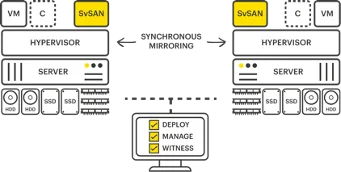
A typical two-node SvSAN configuration, with central management and a witness, looks like this.

HCI with StorMagic architecture

Building HCI with StorMagic

StorMagic SvSAN combines two nodes into a highly available storage system. For it to work smoothly, both servers should have the same CPU and RAM configuration.

The number and type of internal disks have to be identical.

Unlike many SDS vendors, StorMagic still uses a conventional RAID level for the local datastore. That leaves you free to choose whether performance or availability comes first, and it also gives local failover safety within the nodes.

Once you know which disks and which RAID level the HA datastore will use, the StorMagic Virtual Storage Appliance (VSA) is quick to deploy in the virtual environment thanks to a prepared image. The detailed configuration then happens through the management interface.

The SvSAN witness prevents split-brain in two-node SvSAN clusters by checking the state of each node in the cluster regularly. The only data passing between the witness and the SvSAN nodes is heartbeat information.

The witness itself is not in the data path, so it places no great demands on network connectivity. It tolerates considerable latency and low bandwidth.

Alternatively, the witness is available as a cloud subscription service bought on top of an SvSAN licence.

That product is called Witness-as-a-Service (WaaS) and is part of a set of features that make up StorMagic Cloud Services. Rather than installing the witness on hardware, you simply connect your SvSAN clusters to the WaaS function StorMagic provides and manage everything from one place.

Requirements

HCI with StorMagic needs the following.

StorMagic SvSAN system requirements

  • Servers
    • 2 servers
    • optionally 3 servers, for HA during upgrades, maintenance and so on
  • CPU
    • 1 vCPU (2 vCPU with encryption enabled)
    • 2 GHz or more
  • Memory
    • 1 GB
  • Disk
    • 2 virtual storage devices used by the VSA
    • 1x 512 MB as the boot device
    • 1x 20 GB as the journal disk
  • Network
    • 1x 1 Gbps (10 Gbps and jumbo frames are supported)

SvSAN witness requirements

  • CPU
    • 1 vCPU (1 GHz)
  • Memory
    • 512 MB (reserved)
  • Disk
    • 512 MB
  • Network
    • 1x 1 Gbps (latency 3000 ms, 9 Kb/s throughput)
  • Operating system
    • Windows Hyper-V
    • VMware ESXi

Licensing

StorMagic SvSAN is licensed on the usable VSA storage capacity.

The licence tiers are 2 TB, 6 TB, 12 TB and unlimited.

SvSAN is available as a perpetual or a subscription licence.

After a one-off payment, perpetual SvSAN licences can be used indefinitely, with ongoing cost only for support renewals. SvSAN subscription licences are paid in advance for a defined period, a year for example, and renewed as needed.

Licensing is based on the number of nodes in the cluster.

Configuration

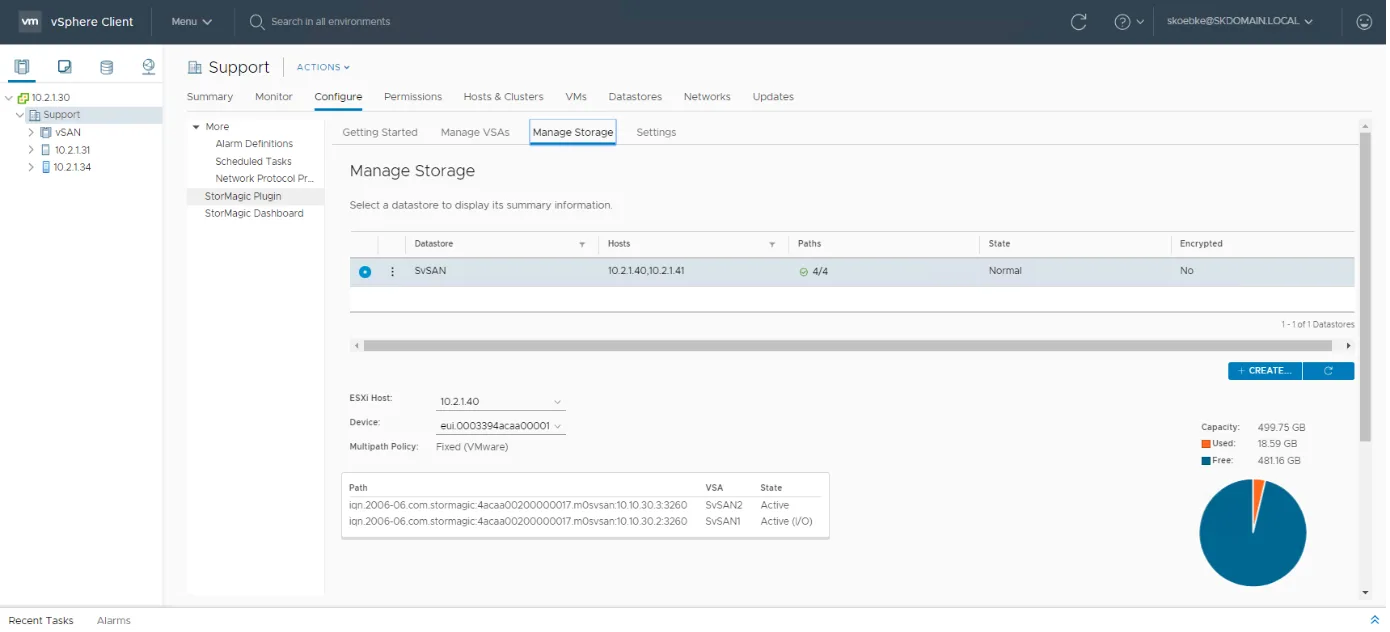
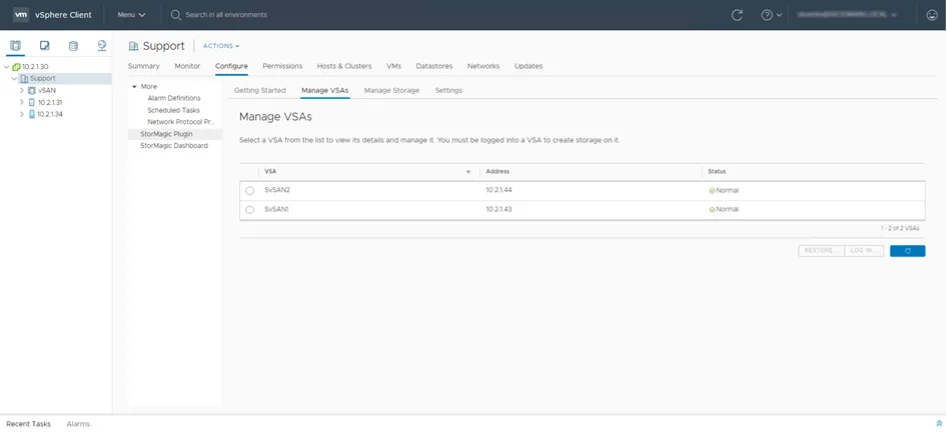
HCI with StorMagic is configured through a vCenter plugin.
HCI with StorMagic SvSAN configuration HCI with StorMagic SvSAN configuration

Next step

Would you like to test StorMagic SvSAN?

We are happy to organise the test licences for you and go through the test phase or your proof of concept with you.
You might also like