build 7bbbddf7 | content blog-content@c8490fa · 338 posts | profiles 20 · corpus 267 | 0 skipped | | format
apiVersion: soultec.ch/v1kind: Postmetadata: name: dsm-9-0-mssql-support locale: en labels: author: yannick-gerber capability/cloud: 1.94 capability/virtualization: 1.37 vendor/vmware: 0.88 annotations: source: blog-content/posts/en/dsm-9-0-mssql-support.md route: /en/insights/dsm-9-0-mssql-support/ schema: /nerd/schema/posts.json markdown: /en/insights/dsm-9-0-mssql-support.mdspec: title: DSM 9.0 – MS SQL as a Service date: 2025-06-26 author: yannick-gerber locale: en summary: >- VMware Cloud Foundation 9.0 brought VMware Data Services Manager (DSM) 9.0 with it. Alongside many improvements, the largest new feature is support for Microsoft SQL Server (tech preview). capabilities: [cloud, virtualization] vendors: [vmware] hero: /blog-assets/dsm-9-0-mssql-support/hero.webp migrated: 2026-08-24 translationReviewed: false draft: false sections: - body: | The release of VMware Cloud Foundation 9.0 brought VMware Data Services Manager (DSM) 9.0 with it. Alongside a lot of improvements, the biggest new feature is support for Microsoft SQL Server (tech preview). - heading:

DSM in brief

body: | Data Services Manager provisions databases such as MySQL, PostgreSQL and now MS SQL on a vSphere cluster. Installing DSM is straightforward; all it needs is a vSphere cluster. We covered the DSM installation in an earlier post: [https://soultec.ch/vmware-data-services-manager/](https://soultec.ch/vmware-data-services-manager/) What DSM gives you, in short: - **Database deployment**, highly available with an HA setup and across several vSphere clusters (a 3-node PostgreSQL cluster across two vSphere clusters, for example) - **Database monitoring**, alerting included - **Database lifecycle** (version upgrades) - **Support for PostgreSQL and MySQL specific problems**: VMware is there not only for provisioning issues but for database-specific errors too - **LDAPS integration** - **Certificate management** - **Simple database cloning** (cloning a production database, for example) - **Database encryption** through storage policies or VM encryption - **Integration into VCF Operations and Automation** - **A Kubernetes operator** - **Terraform support** through the Kubernetes Terraform provider - heading:

MS SQL as a service

body: | DSM 9.0 provisions MS SQL instances as well as individual databases. DSM MS SQL is based on SQL Server for Linux with Ubuntu container images. - heading:

Installation

body: | First, the official MS SQL Server Docker image has to be added to DSM, by connecting a Microsoft image (container) registry. ![](/blog-assets/dsm-9-0-mssql-support/01.webp) - Name: mssql - Endpoint: mcr.microsoft.com - Repository: mssql - Auth type: none - Data services: SQL Server ![](/blog-assets/dsm-9-0-mssql-support/02.webp) Check the connection status to confirm the registry is reachable. ![](/blog-assets/dsm-9-0-mssql-support/03.webp) Now the SQL Server data service can be enabled. ![](/blog-assets/dsm-9-0-mssql-support/04.webp) The container image, based on 2022-CU16-ubuntu-22.04, is shown here. ![](/blog-assets/dsm-9-0-mssql-support/05.webp) - heading:

Provisioning MS SQL from the DSM UI

body: | Besides the DSM UI there is also a Kubernetes operator and VCF Automation. ![](/blog-assets/dsm-9-0-mssql-support/06.webp) Below, an MS SQL instance (standard) is provisioned. ![](/blog-assets/dsm-9-0-mssql-support/07.webp) In the tech preview only single server is supported. AlwaysOn cluster support is planned. ![](/blog-assets/dsm-9-0-mssql-support/08.webp) Next you pick the infrastructure policy and storage policy. Depending on how MS SQL is licensed, you can define an infrastructure policy so that MS SQL workloads only run on a particular vSphere cluster, which matters for MS SQL licensing. ![](/blog-assets/dsm-9-0-mssql-support/09.webp) Once provisioning succeeds, the instance can be reached with SSMS or another tool. Copy the admin password or the connection string. Careful: choosing "copy connection string" gives you escaped characters. For access with SSMS you need the unescaped special characters, or the admin password. ![](/blog-assets/dsm-9-0-mssql-support/10.webp) Access with SSMS: ![](/blog-assets/dsm-9-0-mssql-support/11.webp) - heading:

Optional configuration

body: | The MS SQL instance can optionally be integrated with Active Directory. - heading:

Further reading

body: | - [https://www.vmware.com/products/cloud-infrastructure/data-services-manager](https://www.vmware.com/products/cloud-infrastructure/data-services-manager) - [https://labs.hol.vmware.com/HOL/catalog/lab/13929](https://labs.hol.vmware.com/HOL/catalog/lab/13929)status: corpus: 267 alsoLike: - {ref: posts/vcf-full-stack-ab-oktober-2027-mythos-oder-wahrheit, score: 1.00} - {ref: posts/ms-secure-boot-cert-expiry-2026, score: 1.00} - {ref: solutions/vmware/vsphere-foundation, score: 1.00}
{ "apiVersion": "soultec.ch/v1", "kind": "Post", "metadata": { "name": "dsm-9-0-mssql-support", "locale": "en", "labels": { "author": "yannick-gerber", "capability/cloud": "1.94", "capability/virtualization": "1.37", "vendor/vmware": "0.88" }, "annotations": { "source": "blog-content/posts/en/dsm-9-0-mssql-support.md", "route": "/en/insights/dsm-9-0-mssql-support/", "schema": "/nerd/schema/posts.json", "markdown": "/en/insights/dsm-9-0-mssql-support.md" } }, "spec": { "title": "DSM 9.0 – MS SQL as a Service", "date": "2025-06-26", "author": "yannick-gerber", "locale": "en", "summary": "VMware Cloud Foundation 9.0 brought VMware Data Services Manager (DSM) 9.0 with it. Alongside many improvements, the largest new feature is support for Microsoft SQL Server (tech preview).", "capabilities": [ "cloud", "virtualization" ], "vendors": [ "vmware" ], "hero": "/blog-assets/dsm-9-0-mssql-support/hero.webp", "migrated": "2026-08-24", "translationReviewed": false, "draft": false }, "sections": [ { "body": "The release of VMware Cloud Foundation 9.0 brought VMware Data Services Manager (DSM) 9.0 with it. Alongside a lot of improvements, the biggest new feature is support for Microsoft SQL Server (tech preview)." }, { "heading": "

DSM in brief

",
"body": "Data Services Manager provisions databases such as MySQL, PostgreSQL and now MS SQL on a vSphere cluster. Installing DSM is straightforward; all it needs is a vSphere cluster.\n\nWe covered the DSM installation in an earlier post: [https://soultec.ch/vmware-data-services-manager/](https://soultec.ch/vmware-data-services-manager/)\n\nWhat DSM gives you, in short:\n\n- **Database deployment**, highly available with an HA setup and across several vSphere clusters (a 3-node PostgreSQL cluster across two vSphere clusters, for example)\n- **Database monitoring**, alerting included\n- **Database lifecycle** (version upgrades)\n- **Support for PostgreSQL and MySQL specific problems**: VMware is there not only for provisioning issues but for database-specific errors too\n- **LDAPS integration**\n- **Certificate management**\n- **Simple database cloning** (cloning a production database, for example)\n- **Database encryption** through storage policies or VM encryption\n- **Integration into VCF Operations and Automation**\n- **A Kubernetes operator**\n- **Terraform support** through the Kubernetes Terraform provider" }, { "heading": "

MS SQL as a service

",
"body": "DSM 9.0 provisions MS SQL instances as well as individual databases. DSM MS SQL is based on SQL Server for Linux with Ubuntu container images." }, { "heading": "

Installation

",
"body": "First, the official MS SQL Server Docker image has to be added to DSM, by connecting a Microsoft image (container) registry.\n\n![](/blog-assets/dsm-9-0-mssql-support/01.webp)\n\n- Name: mssql\n- Endpoint: mcr.microsoft.com\n- Repository: mssql\n- Auth type: none\n- Data services: SQL Server\n\n![](/blog-assets/dsm-9-0-mssql-support/02.webp)\n\nCheck the connection status to confirm the registry is reachable. \n![](/blog-assets/dsm-9-0-mssql-support/03.webp)\n\nNow the SQL Server data service can be enabled.\n\n![](/blog-assets/dsm-9-0-mssql-support/04.webp)\n\nThe container image, based on 2022-CU16-ubuntu-22.04, is shown here.\n\n![](/blog-assets/dsm-9-0-mssql-support/05.webp)" }, { "heading": "

Provisioning MS SQL from the DSM UI

",
"body": "Besides the DSM UI there is also a Kubernetes operator and VCF Automation.\n\n![](/blog-assets/dsm-9-0-mssql-support/06.webp)\n\nBelow, an MS SQL instance (standard) is provisioned. \n![](/blog-assets/dsm-9-0-mssql-support/07.webp)\n\nIn the tech preview only single server is supported. AlwaysOn cluster support is planned.\n\n![](/blog-assets/dsm-9-0-mssql-support/08.webp)\n\nNext you pick the infrastructure policy and storage policy. Depending on how MS SQL is licensed, you can define an infrastructure policy so that MS SQL workloads only run on a particular vSphere cluster, which matters for MS SQL licensing.\n\n![](/blog-assets/dsm-9-0-mssql-support/09.webp)\n\nOnce provisioning succeeds, the instance can be reached with SSMS or another tool. Copy the admin password or the connection string. Careful: choosing \"copy connection string\" gives you escaped characters. For access with SSMS you need the unescaped special characters, or the admin password.\n\n![](/blog-assets/dsm-9-0-mssql-support/10.webp)\n\nAccess with SSMS:\n\n![](/blog-assets/dsm-9-0-mssql-support/11.webp)" }, { "heading": "

Optional configuration

",
"body": "The MS SQL instance can optionally be integrated with Active Directory." }, { "heading": "

Further reading

",
"body": "- [https://www.vmware.com/products/cloud-infrastructure/data-services-manager](https://www.vmware.com/products/cloud-infrastructure/data-services-manager)\n- [https://labs.hol.vmware.com/HOL/catalog/lab/13929](https://labs.hol.vmware.com/HOL/catalog/lab/13929)" } ], "status": { "corpus": 267, "alsoLike": [ { "ref": "posts/vcf-full-stack-ab-oktober-2027-mythos-oder-wahrheit", "score": "1.00" }, { "ref": "posts/ms-secure-boot-cert-expiry-2026", "score": "1.00" }, { "ref": "solutions/vmware/vsphere-foundation", "score": "1.00" } ] }}
apiVersion = "soultec.ch/v1"kind = "Post"[metadata]name = "dsm-9-0-mssql-support"locale = "en"[metadata.labels]author = "yannick-gerber""capability/cloud" = "1.94""capability/virtualization" = "1.37""vendor/vmware" = "0.88"[metadata.annotations]source = "blog-content/posts/en/dsm-9-0-mssql-support.md"route = "/en/insights/dsm-9-0-mssql-support/"schema = "/nerd/schema/posts.json"markdown = "/en/insights/dsm-9-0-mssql-support.md"[spec]title = "DSM 9.0 – MS SQL as a Service"date = 2025-06-26author = "yannick-gerber"locale = "en"summary = "VMware Cloud Foundation 9.0 brought VMware Data Services Manager (DSM) 9.0 with it. Alongside many improvements, the largest new feature is support for Microsoft SQL Server (tech preview)."capabilities = ["cloud", "virtualization"]vendors = ["vmware"]hero = "/blog-assets/dsm-9-0-mssql-support/hero.webp"migrated = 2026-08-24translationReviewed = falsedraft = false[[sections]]body = "The release of VMware Cloud Foundation 9.0 brought VMware Data Services Manager (DSM) 9.0 with it. Alongside a lot of improvements, the biggest new feature is support for Microsoft SQL Server (tech preview)."[[sections]]heading = "

DSM in brief

"
body = '''Data Services Manager provisions databases such as MySQL, PostgreSQL and now MS SQL on a vSphere cluster. Installing DSM is straightforward; all it needs is a vSphere cluster.We covered the DSM installation in an earlier post: [https://soultec.ch/vmware-data-services-manager/](https://soultec.ch/vmware-data-services-manager/)What DSM gives you, in short:- **Database deployment**, highly available with an HA setup and across several vSphere clusters (a 3-node PostgreSQL cluster across two vSphere clusters, for example)- **Database monitoring**, alerting included- **Database lifecycle** (version upgrades)- **Support for PostgreSQL and MySQL specific problems**: VMware is there not only for provisioning issues but for database-specific errors too- **LDAPS integration**- **Certificate management**- **Simple database cloning** (cloning a production database, for example)- **Database encryption** through storage policies or VM encryption- **Integration into VCF Operations and Automation**- **A Kubernetes operator**- **Terraform support** through the Kubernetes Terraform provider'''[[sections]]heading = "

MS SQL as a service

"
body = "DSM 9.0 provisions MS SQL instances as well as individual databases. DSM MS SQL is based on SQL Server for Linux with Ubuntu container images."[[sections]]heading = "

Installation

"
body = '''First, the official MS SQL Server Docker image has to be added to DSM, by connecting a Microsoft image (container) registry.![](/blog-assets/dsm-9-0-mssql-support/01.webp)- Name: mssql- Endpoint: mcr.microsoft.com- Repository: mssql- Auth type: none- Data services: SQL Server![](/blog-assets/dsm-9-0-mssql-support/02.webp)Check the connection status to confirm the registry is reachable. ![](/blog-assets/dsm-9-0-mssql-support/03.webp)Now the SQL Server data service can be enabled.![](/blog-assets/dsm-9-0-mssql-support/04.webp)The container image, based on 2022-CU16-ubuntu-22.04, is shown here.![](/blog-assets/dsm-9-0-mssql-support/05.webp)'''[[sections]]heading = "

Provisioning MS SQL from the DSM UI

"
body = '''Besides the DSM UI there is also a Kubernetes operator and VCF Automation.![](/blog-assets/dsm-9-0-mssql-support/06.webp)Below, an MS SQL instance (standard) is provisioned. ![](/blog-assets/dsm-9-0-mssql-support/07.webp)In the tech preview only single server is supported. AlwaysOn cluster support is planned.![](/blog-assets/dsm-9-0-mssql-support/08.webp)Next you pick the infrastructure policy and storage policy. Depending on how MS SQL is licensed, you can define an infrastructure policy so that MS SQL workloads only run on a particular vSphere cluster, which matters for MS SQL licensing.![](/blog-assets/dsm-9-0-mssql-support/09.webp)Once provisioning succeeds, the instance can be reached with SSMS or another tool. Copy the admin password or the connection string. Careful: choosing "copy connection string" gives you escaped characters. For access with SSMS you need the unescaped special characters, or the admin password.![](/blog-assets/dsm-9-0-mssql-support/10.webp)Access with SSMS:![](/blog-assets/dsm-9-0-mssql-support/11.webp)'''[[sections]]heading = "

Optional configuration

"
body = "The MS SQL instance can optionally be integrated with Active Directory."[[sections]]heading = "

Further reading

"
body = '''- [https://www.vmware.com/products/cloud-infrastructure/data-services-manager](https://www.vmware.com/products/cloud-infrastructure/data-services-manager)- [https://labs.hol.vmware.com/HOL/catalog/lab/13929](https://labs.hol.vmware.com/HOL/catalog/lab/13929)'''[status]corpus = 267[[status.alsoLike]]ref = "posts/vcf-full-stack-ab-oktober-2027-mythos-oder-wahrheit"score = "1.00"[[status.alsoLike]]ref = "posts/ms-secure-boot-cert-expiry-2026"score = "1.00"[[status.alsoLike]]ref = "solutions/vmware/vsphere-foundation"score = "1.00"
<?xml version="1.0" encoding="UTF-8"?><manifest kind="Post"> <apiVersion>soultec.ch/v1</apiVersion> <metadata> <name>dsm-9-0-mssql-support</name> <locale>en</locale> <labels> <author>yannick-gerber</author> <entry key="capability/cloud">1.94</entry> <entry key="capability/virtualization">1.37</entry> <entry key="vendor/vmware">0.88</entry> </labels> <annotations> <source>blog-content/posts/en/dsm-9-0-mssql-support.md</source> <route>/en/insights/dsm-9-0-mssql-support/</route> <schema>/nerd/schema/posts.json</schema> <markdown>/en/insights/dsm-9-0-mssql-support.md</markdown> </annotations> </metadata> <spec> <title>DSM 9.0 – MS SQL as a Service</title> <date>2025-06-26</date> <author>yannick-gerber</author> <locale>en</locale> <summary>VMware Cloud Foundation 9.0 brought VMware Data Services Manager (DSM) 9.0 with it. Alongside many improvements, the largest new feature is support for Microsoft SQL Server (tech preview).</summary> <capabilities> <item>cloud</item> <item>virtualization</item> </capabilities> <vendors> <item>vmware</item> </vendors> <hero>/blog-assets/dsm-9-0-mssql-support/hero.webp</hero> <migrated>2026-08-24</migrated> <translationReviewed>false</translationReviewed> <draft>false</draft> </spec> <sections> <section> <body>The release of VMware Cloud Foundation 9.0 brought VMware Data Services Manager (DSM) 9.0 with it. Alongside a lot of improvements, the biggest new feature is support for Microsoft SQL Server (tech preview).</body> </section> <section> <heading>

DSM in brief

</heading>
<body>Data Services Manager provisions databases such as MySQL, PostgreSQL and now MS SQL on a vSphere cluster. Installing DSM is straightforward; all it needs is a vSphere cluster.We covered the DSM installation in an earlier post: [https://soultec.ch/vmware-data-services-manager/](https://soultec.ch/vmware-data-services-manager/)What DSM gives you, in short:- **Database deployment**, highly available with an HA setup and across several vSphere clusters (a 3-node PostgreSQL cluster across two vSphere clusters, for example)- **Database monitoring**, alerting included- **Database lifecycle** (version upgrades)- **Support for PostgreSQL and MySQL specific problems**: VMware is there not only for provisioning issues but for database-specific errors too- **LDAPS integration**- **Certificate management**- **Simple database cloning** (cloning a production database, for example)- **Database encryption** through storage policies or VM encryption- **Integration into VCF Operations and Automation**- **A Kubernetes operator**- **Terraform support** through the Kubernetes Terraform provider </body> </section> <section> <heading>

MS SQL as a service

</heading>
<body>DSM 9.0 provisions MS SQL instances as well as individual databases. DSM MS SQL is based on SQL Server for Linux with Ubuntu container images.</body> </section> <section> <heading>

Installation

</heading>
<body>First, the official MS SQL Server Docker image has to be added to DSM, by connecting a Microsoft image (container) registry.![](/blog-assets/dsm-9-0-mssql-support/01.webp)- Name: mssql- Endpoint: mcr.microsoft.com- Repository: mssql- Auth type: none- Data services: SQL Server![](/blog-assets/dsm-9-0-mssql-support/02.webp)Check the connection status to confirm the registry is reachable. ![](/blog-assets/dsm-9-0-mssql-support/03.webp)Now the SQL Server data service can be enabled.![](/blog-assets/dsm-9-0-mssql-support/04.webp)The container image, based on 2022-CU16-ubuntu-22.04, is shown here.![](/blog-assets/dsm-9-0-mssql-support/05.webp) </body> </section> <section> <heading>

Provisioning MS SQL from the DSM UI

</heading>
<body>Besides the DSM UI there is also a Kubernetes operator and VCF Automation.![](/blog-assets/dsm-9-0-mssql-support/06.webp)Below, an MS SQL instance (standard) is provisioned. ![](/blog-assets/dsm-9-0-mssql-support/07.webp)In the tech preview only single server is supported. AlwaysOn cluster support is planned.![](/blog-assets/dsm-9-0-mssql-support/08.webp)Next you pick the infrastructure policy and storage policy. Depending on how MS SQL is licensed, you can define an infrastructure policy so that MS SQL workloads only run on a particular vSphere cluster, which matters for MS SQL licensing.![](/blog-assets/dsm-9-0-mssql-support/09.webp)Once provisioning succeeds, the instance can be reached with SSMS or another tool. Copy the admin password or the connection string. Careful: choosing "copy connection string" gives you escaped characters. For access with SSMS you need the unescaped special characters, or the admin password.![](/blog-assets/dsm-9-0-mssql-support/10.webp)Access with SSMS:![](/blog-assets/dsm-9-0-mssql-support/11.webp) </body> </section> <section> <heading>

Optional configuration

</heading>
<body>The MS SQL instance can optionally be integrated with Active Directory.</body> </section> <section> <heading>

Further reading

</heading>
<body>- [https://www.vmware.com/products/cloud-infrastructure/data-services-manager](https://www.vmware.com/products/cloud-infrastructure/data-services-manager)- [https://labs.hol.vmware.com/HOL/catalog/lab/13929](https://labs.hol.vmware.com/HOL/catalog/lab/13929) </body> </section> </sections> <status> <corpus>267</corpus> <alsoLike> <item> <ref>posts/vcf-full-stack-ab-oktober-2027-mythos-oder-wahrheit</ref> <score>1.00</score> </item> <item> <ref>posts/ms-secure-boot-cert-expiry-2026</ref> <score>1.00</score> </item> <item> <ref>solutions/vmware/vsphere-foundation</ref> <score>1.00</score> </item> </alsoLike> </status></manifest>
Post · 2025-06-26

DSM 9.0 – MS SQL as a Service

VMware Cloud Foundation 9.0 brought VMware Data Services Manager (DSM) 9.0 with it. Alongside many improvements, the largest new feature is support for Microsoft SQL Server (tech preview).

2025-06-26Date
Yannick GerberAuthor
2Min read
Topics Cloud 1.94 Virtualization 1.37
Vendors VMware 0.88

The release of VMware Cloud Foundation 9.0 brought VMware Data Services Manager (DSM) 9.0 with it. Alongside a lot of improvements, the biggest new feature is support for Microsoft SQL Server (tech preview).

DSM in brief

Data Services Manager provisions databases such as MySQL, PostgreSQL and now MS SQL on a vSphere cluster. Installing DSM is straightforward; all it needs is a vSphere cluster.

We covered the DSM installation in an earlier post: https://soultec.ch/vmware-data-services-manager/

What DSM gives you, in short:

  • Database deployment, highly available with an HA setup and across several vSphere clusters (a 3-node PostgreSQL cluster across two vSphere clusters, for example)
  • Database monitoring, alerting included
  • Database lifecycle (version upgrades)
  • Support for PostgreSQL and MySQL specific problems: VMware is there not only for provisioning issues but for database-specific errors too
  • LDAPS integration
  • Certificate management
  • Simple database cloning (cloning a production database, for example)
  • Database encryption through storage policies or VM encryption
  • Integration into VCF Operations and Automation
  • A Kubernetes operator
  • Terraform support through the Kubernetes Terraform provider

MS SQL as a service

DSM 9.0 provisions MS SQL instances as well as individual databases. DSM MS SQL is based on SQL Server for Linux with Ubuntu container images.

Installation

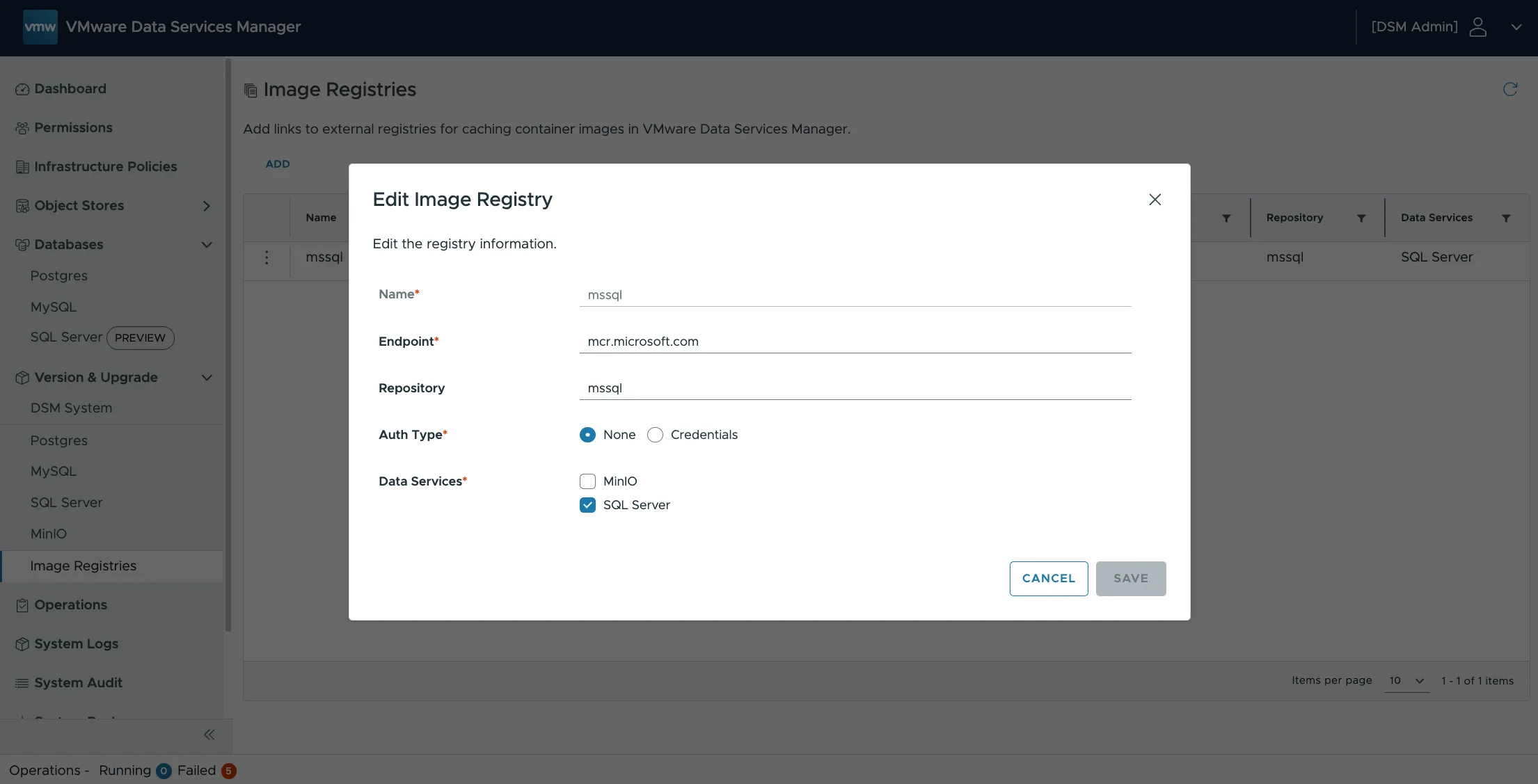
First, the official MS SQL Server Docker image has to be added to DSM, by connecting a Microsoft image (container) registry.
  • Name: mssql
  • Endpoint: mcr.microsoft.com
  • Repository: mssql
  • Auth type: none
  • Data services: SQL Server

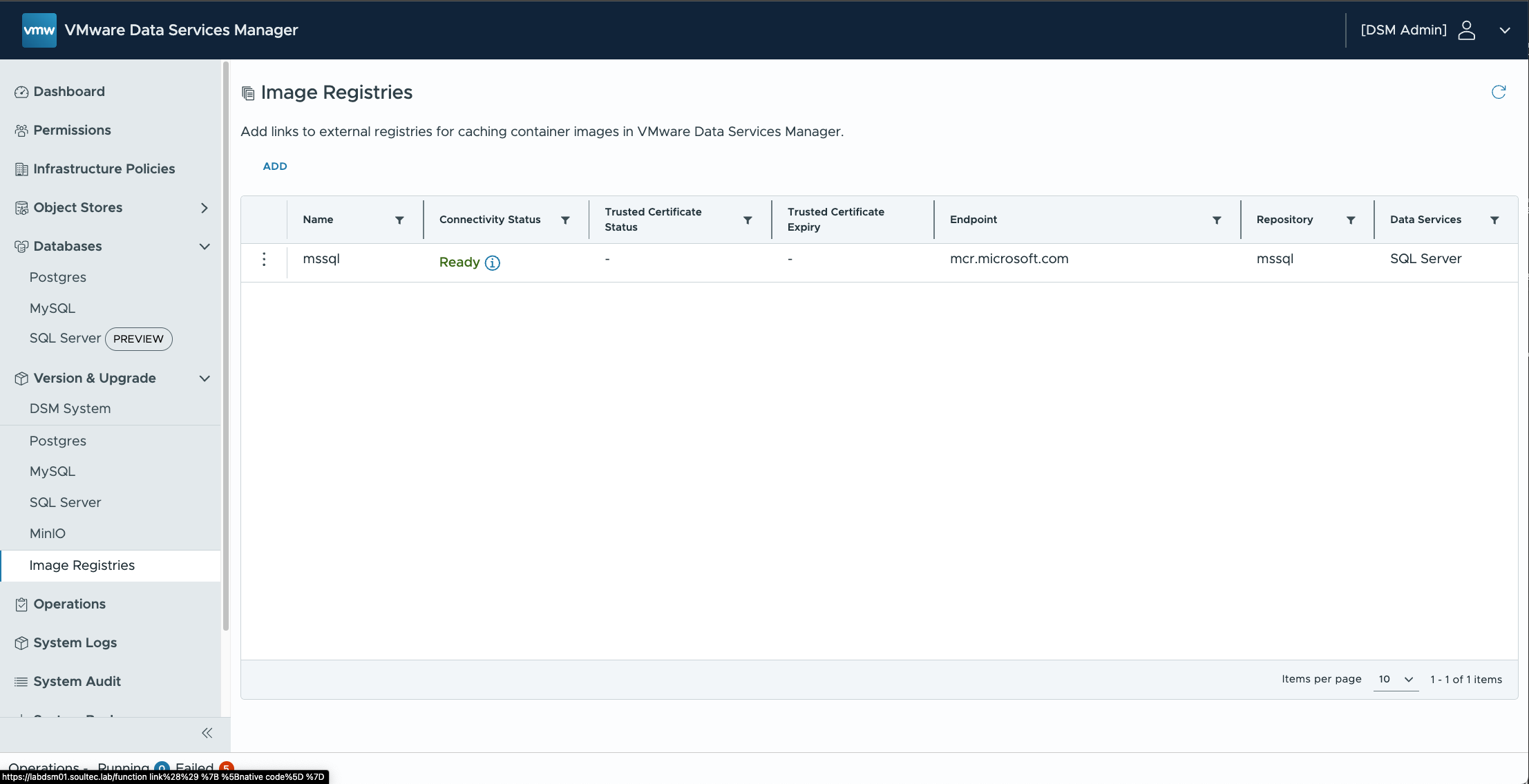
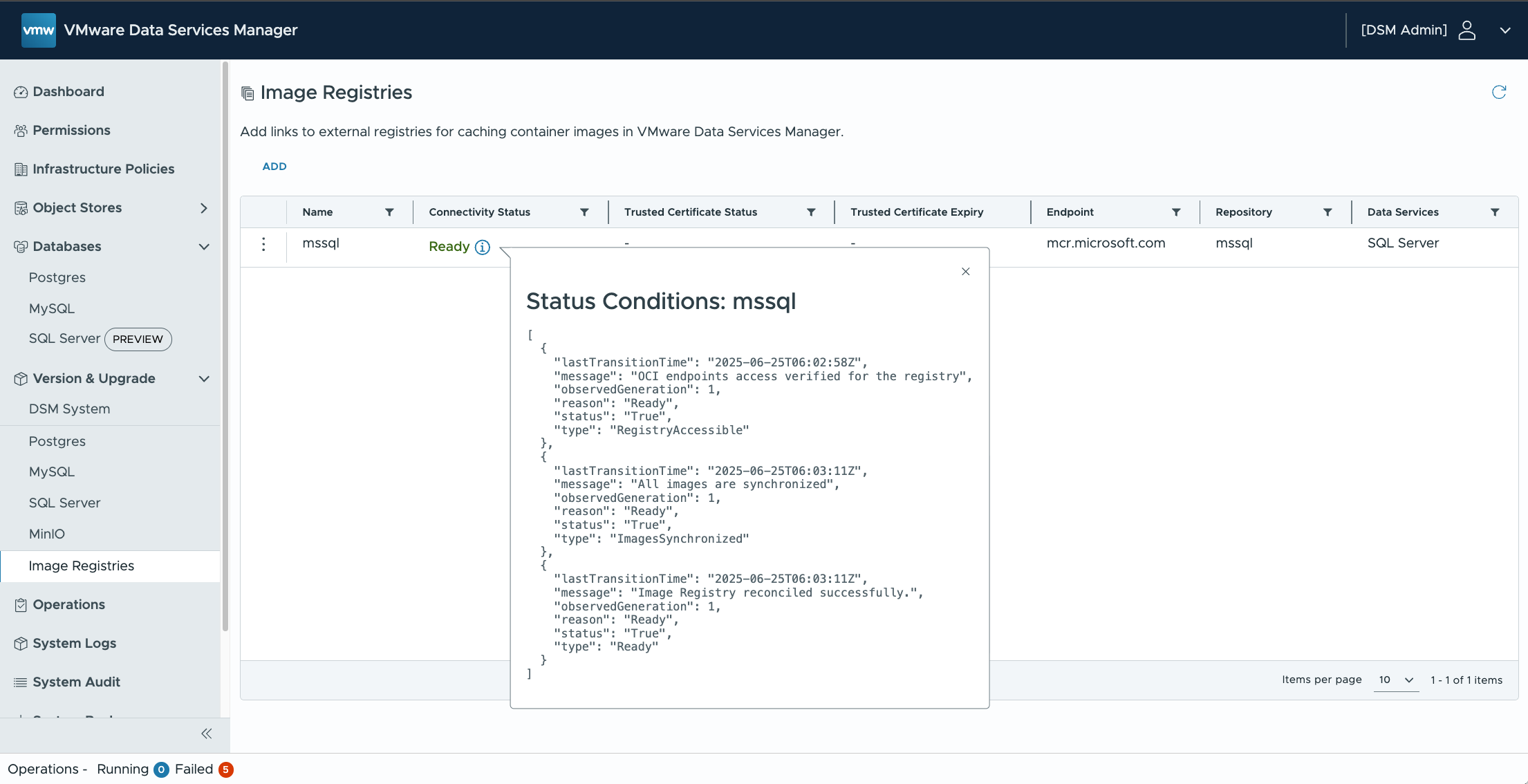
Check the connection status to confirm the registry is reachable.
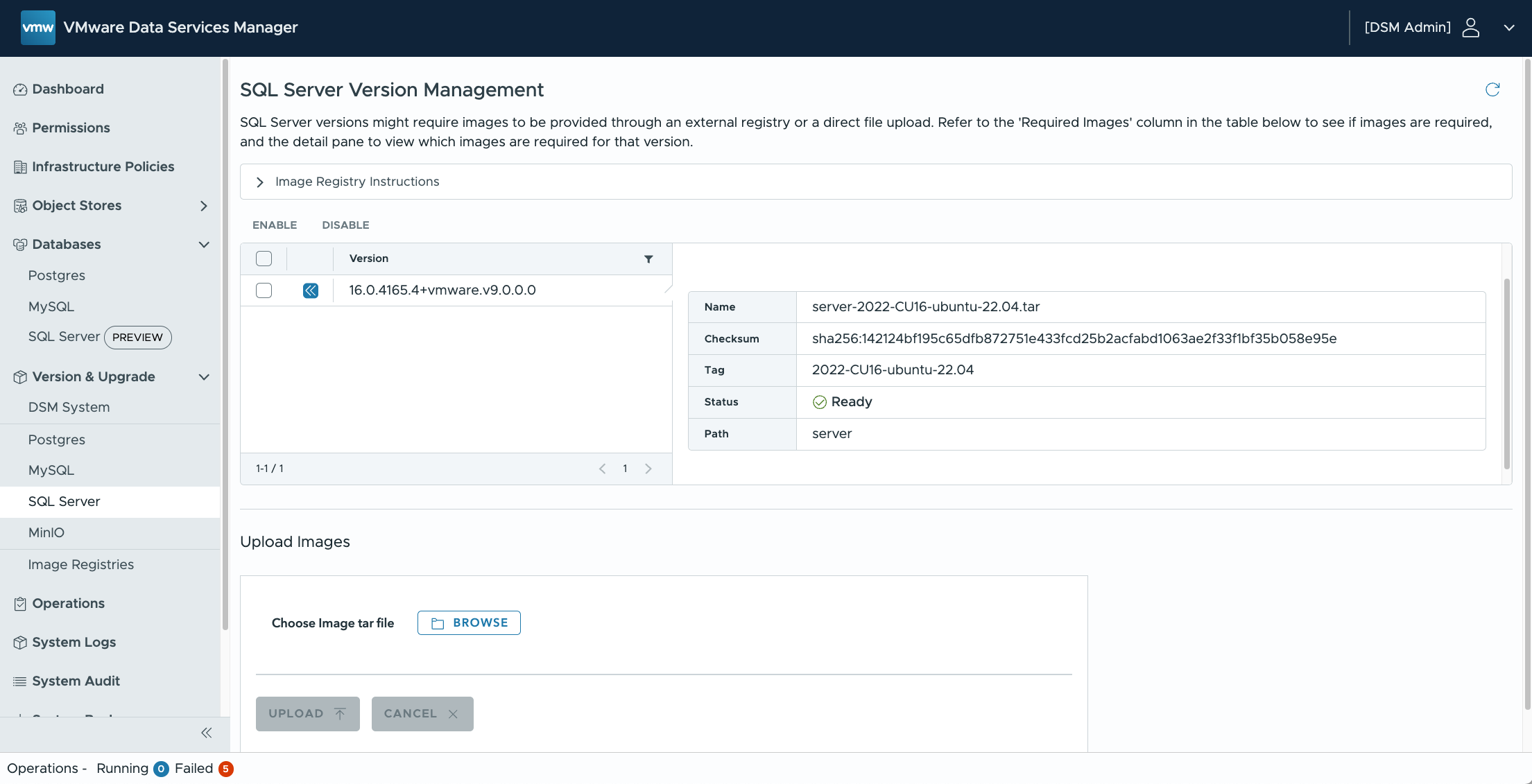
Now the SQL Server data service can be enabled.
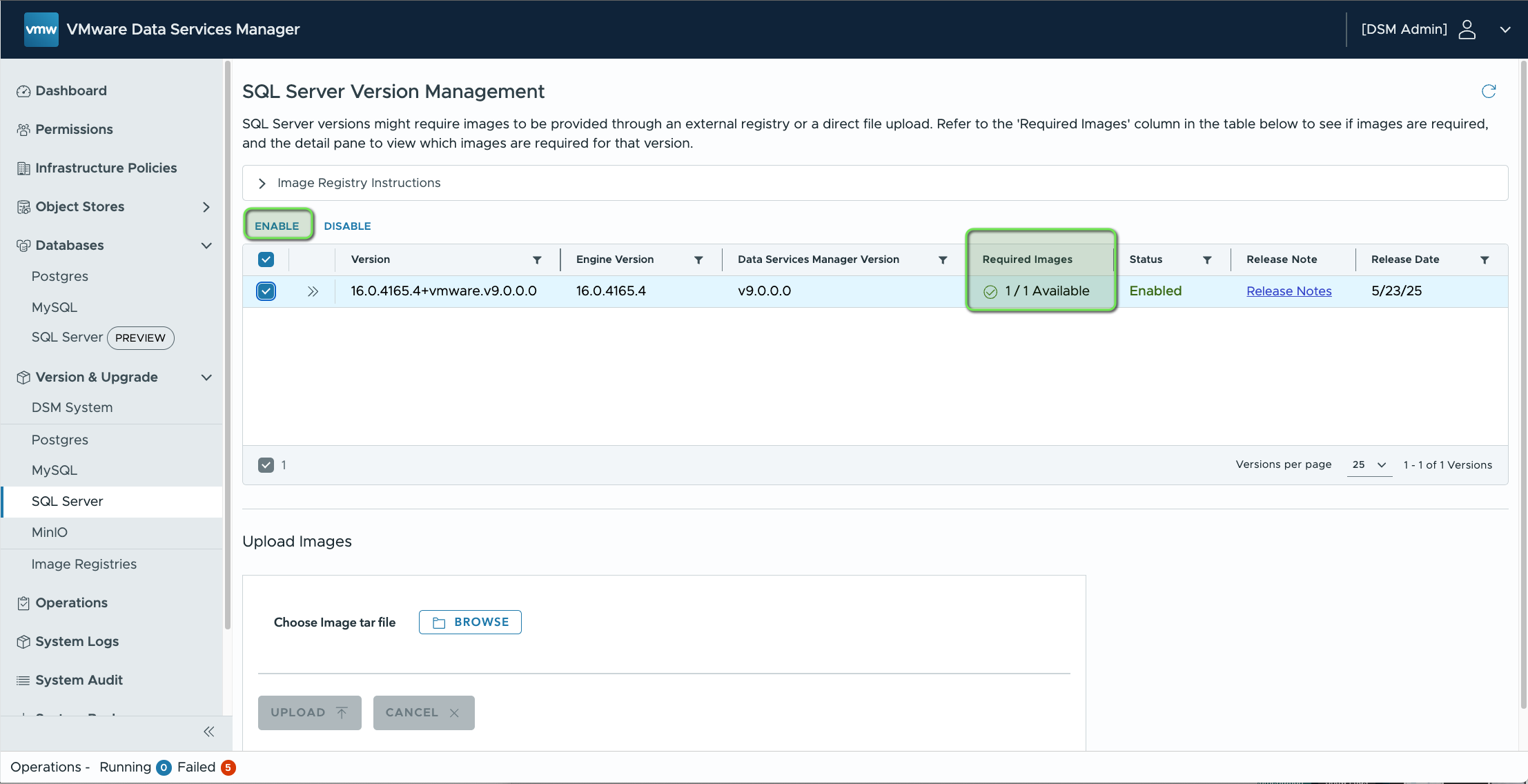
The container image, based on 2022-CU16-ubuntu-22.04, is shown here.
Provisioning MS SQL from the DSM UI

Besides the DSM UI there is also a Kubernetes operator and VCF Automation.
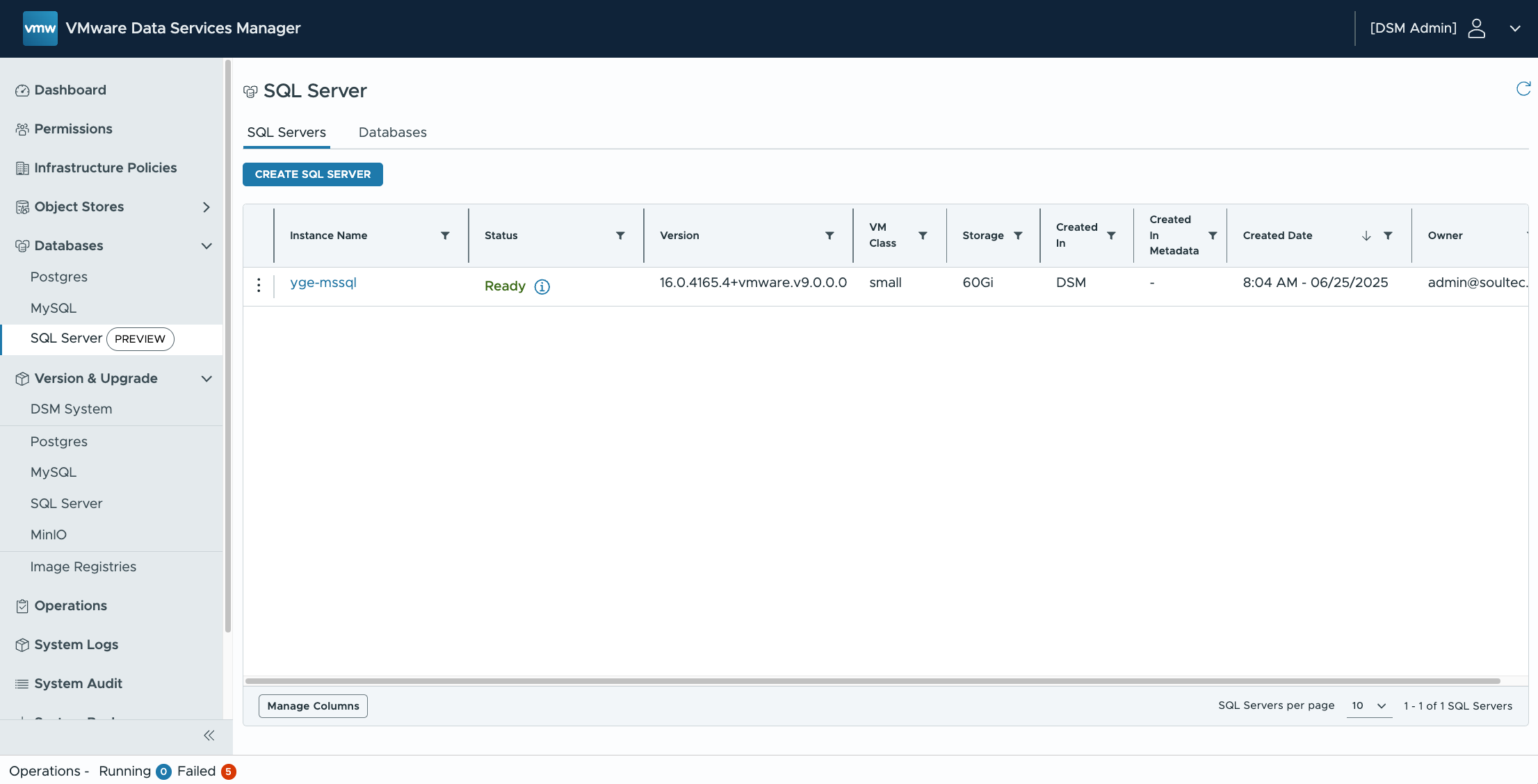
Below, an MS SQL instance (standard) is provisioned.
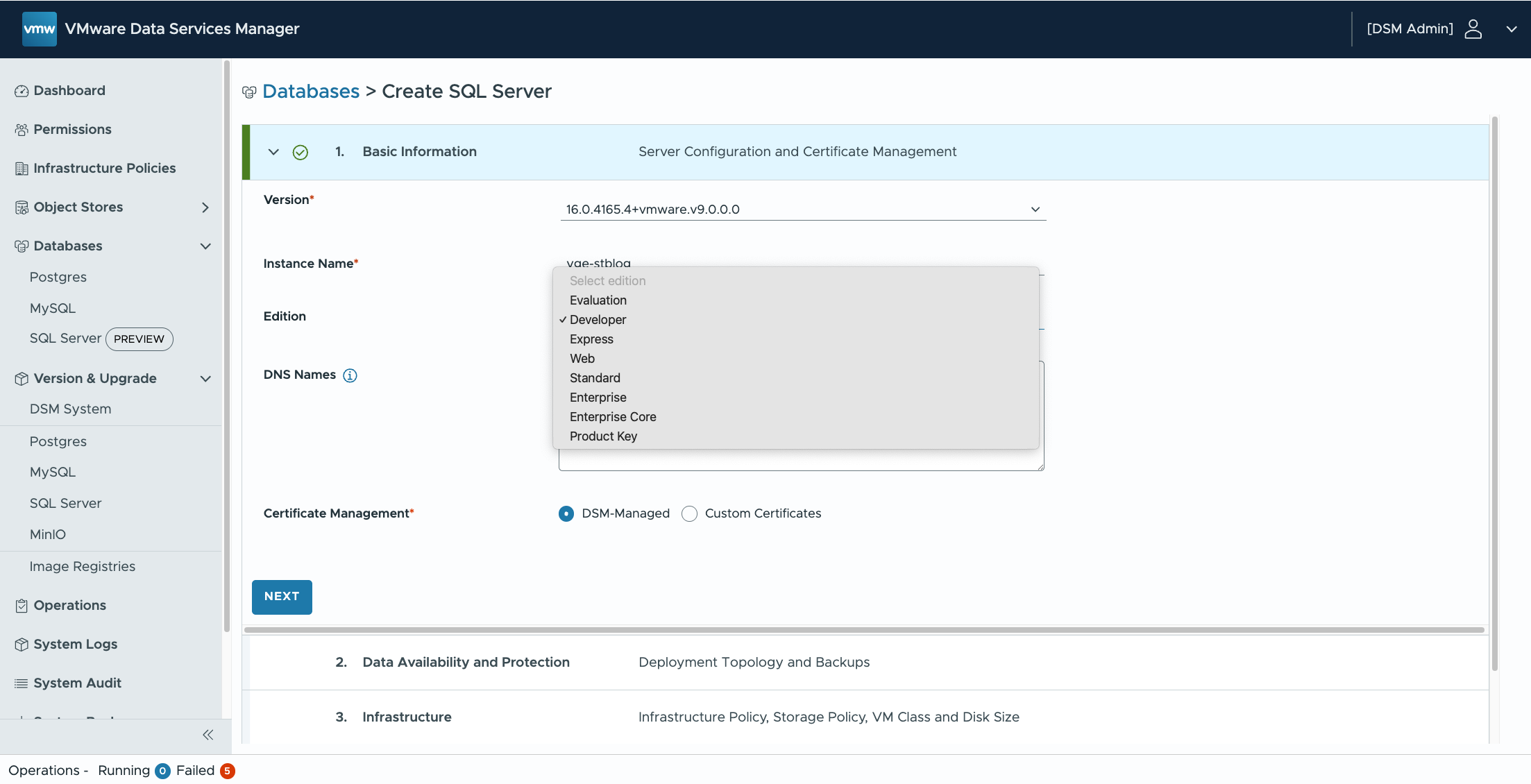
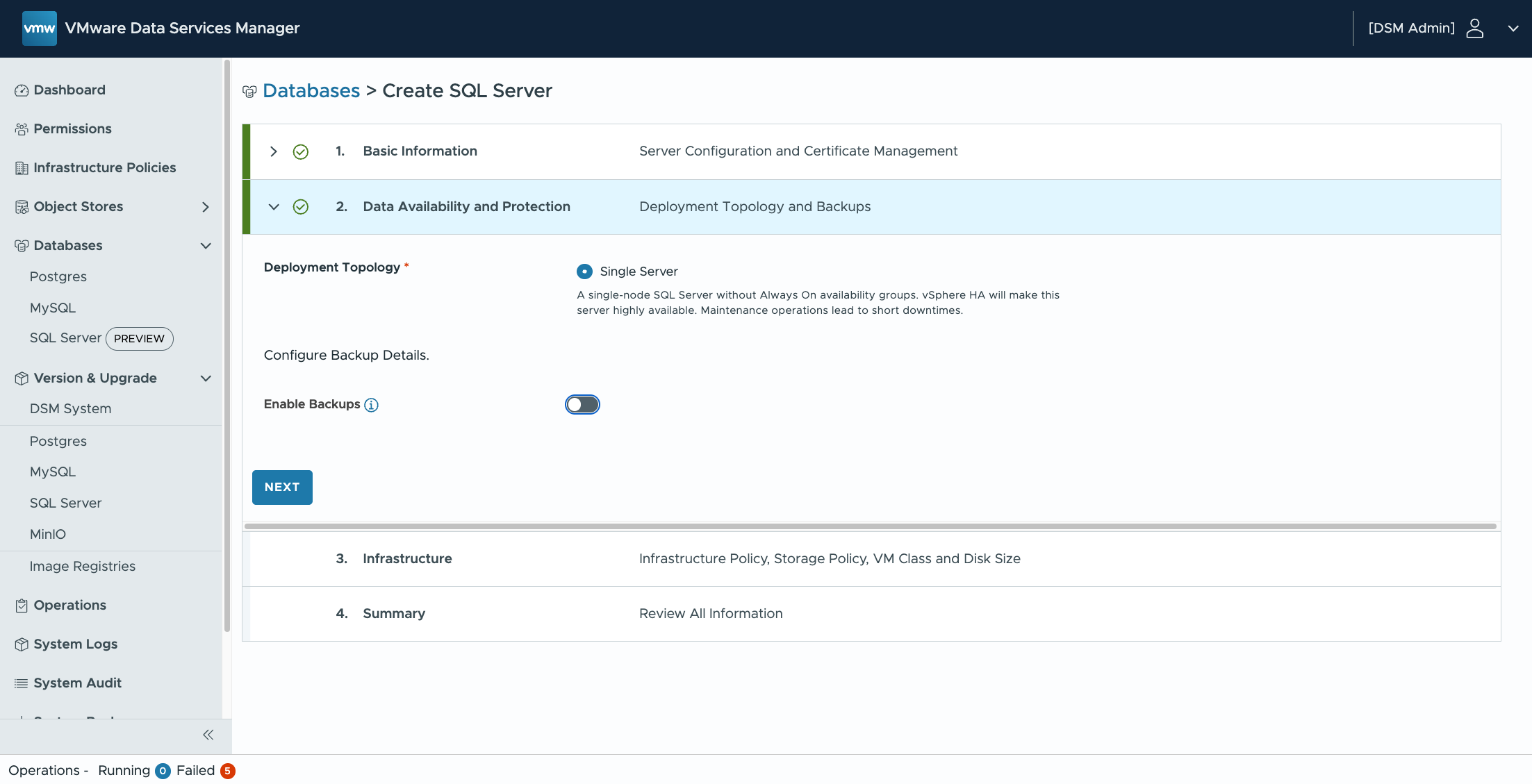
In the tech preview only single server is supported. AlwaysOn cluster support is planned.
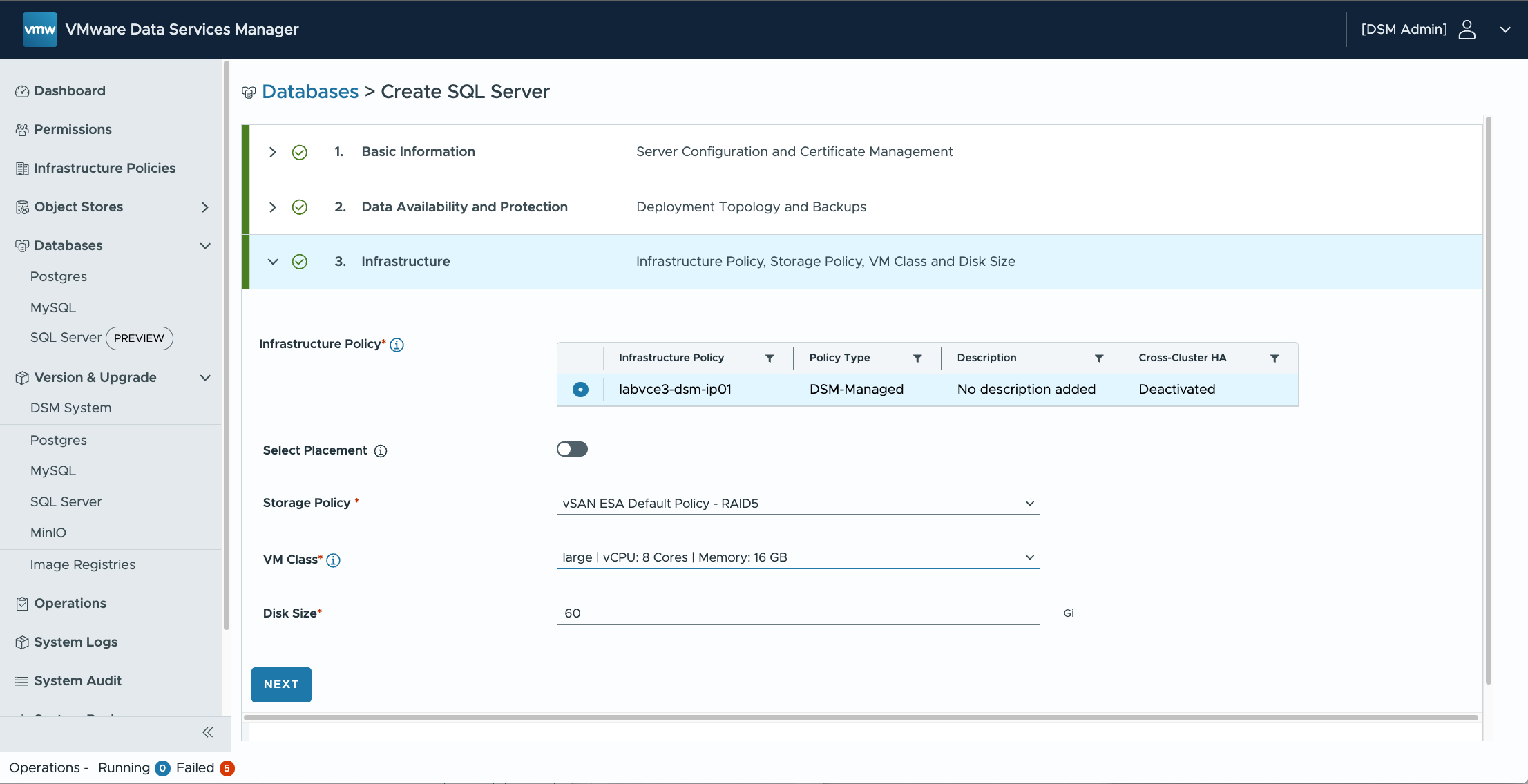
Next you pick the infrastructure policy and storage policy. Depending on how MS SQL is licensed, you can define an infrastructure policy so that MS SQL workloads only run on a particular vSphere cluster, which matters for MS SQL licensing.
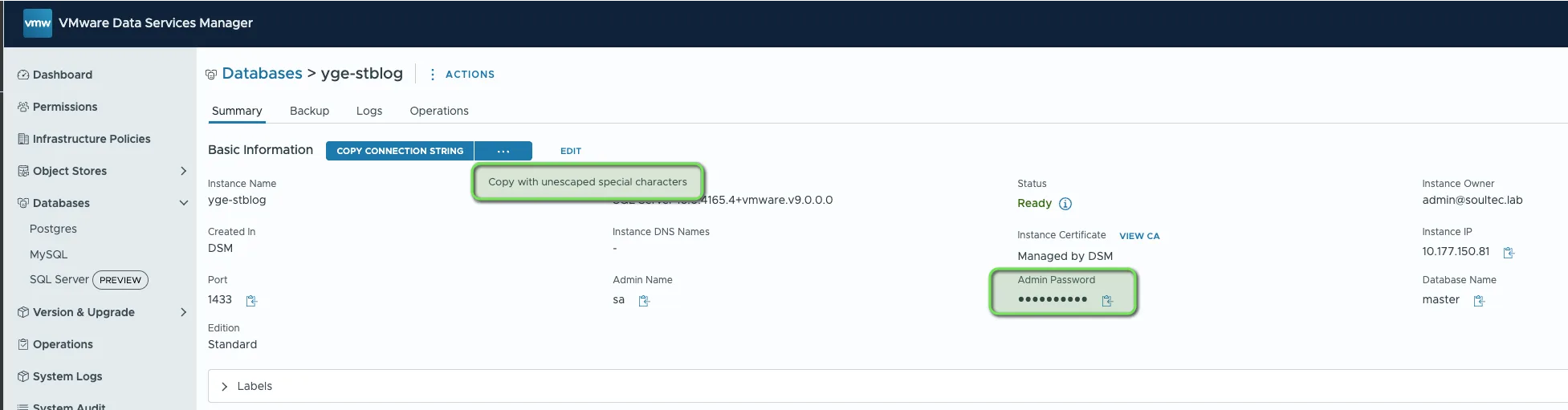
Once provisioning succeeds, the instance can be reached with SSMS or another tool. Copy the admin password or the connection string. Careful: choosing “copy connection string” gives you escaped characters. For access with SSMS you need the unescaped special characters, or the admin password.
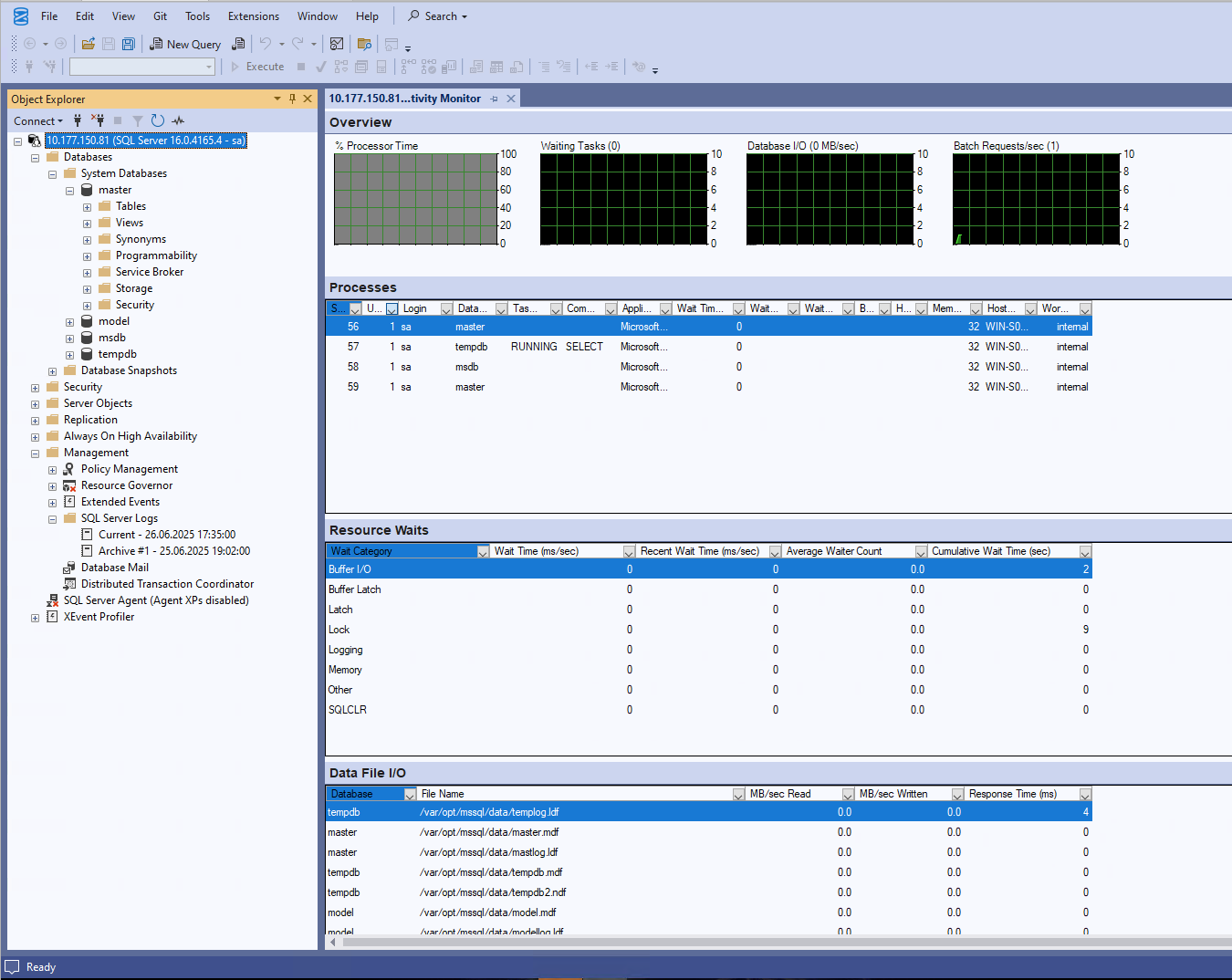
Access with SSMS:
Optional configuration

The MS SQL instance can optionally be integrated with Active Directory.
Further reading

You might also like