

build 7bbbddf7 | content blog-content@c8490fa · 338 posts | profiles 20 · corpus 267 | 0 skipped | | format
apiVersion: soultec.ch/v1kind: Postmetadata: name: broadcom-support-portal locale: en labels: author: daniel-stadelmann series: how-to capability/migration: 3.54 vendor/vmware: 0.88 annotations: source: blog-content/posts/en/broadcom-support-portal.md route: /en/insights/broadcom-support-portal/ schema: /nerd/schema/posts.json markdown: /en/insights/broadcom-support-portal.mdspec: title: Broadcom Support Portal Challenge date: 2024-06-03 author: daniel-stadelmann locale: en summary: >- The VMware tools moved to the Broadcom portals on 6 May. Since then there has been disillusion and, in places, bewilderment. A lot of accounts are simply empty. capabilities: [migration] vendors: [vmware] series: how-to hero: /blog-assets/broadcom-support-portal/hero.webp migrated: 2026-08-24 translationReviewed: false draft: false sections: - body: | The VMware tools moved to the Broadcom portals on 6 May. Since then there has been disillusion and, in places, bewilderment. A lot of accounts are simply empty. soulTec is trying to shed some light. If nothing shows up for you after logging in, check which of the following cases fits best. The fix follows below. 1. The customer no longer had active entitlements. As Broadcom announced beforehand, those were not migrated. 2. The Broadcom account existed before the migration and no password reset was done through the personalised link Broadcom sent out in early May. 3. The Broadcom account was created after the migration. ##### Case 1 In the first case the situation is clear: new subscriptions have to be bought. We are happy to help. ##### Case 2 Cases 2 and 3 are harder at the moment. In case 2 the fastest route is to call Broadcom on +41 21 547 94 56 and ask for the site ID. In the phone menu do not pick "VMware", pick "Accounts". The site ID request can then be made from the Broadcom support profile. The support engineer can confirm the request directly and get you your access. ![](/blog-assets/broadcom-support-portal/01.webp) ##### Case 3 In case 3 the profile has to be built. ![](/blog-assets/broadcom-support-portal/02.webp) Then enter the site ID (ask Broadcom Support if you do not know it) and your personal phone number. ![](/blog-assets/broadcom-support-portal/03.webp) ![](/blog-assets/broadcom-support-portal/04.webp) After that the request can be confirmed by the organisation's super user or by calling support. In the phone menu do not pick "VMware", pick "Accounts". [This link](https://knowledge.broadcom.com/external/article?articleId=142873) is Broadcom's official description.status: corpus: 267 alsoLike: - {ref: posts/vmware-solution-designer, score: 0.77} - {ref: services/engineering, score: 0.62} - {ref: services/datacenter-lifecycle, score: 0.57}
{ "apiVersion": "soultec.ch/v1", "kind": "Post", "metadata": { "name": "broadcom-support-portal", "locale": "en", "labels": { "author": "daniel-stadelmann", "series": "how-to", "capability/migration": "3.54", "vendor/vmware": "0.88" }, "annotations": { "source": "blog-content/posts/en/broadcom-support-portal.md", "route": "/en/insights/broadcom-support-portal/", "schema": "/nerd/schema/posts.json", "markdown": "/en/insights/broadcom-support-portal.md" } }, "spec": { "title": "Broadcom Support Portal Challenge", "date": "2024-06-03", "author": "daniel-stadelmann", "locale": "en", "summary": "The VMware tools moved to the Broadcom portals on 6 May. Since then there has been disillusion and, in places, bewilderment. A lot of accounts are simply empty.", "capabilities": [ "migration" ], "vendors": [ "vmware" ], "series": "how-to", "hero": "/blog-assets/broadcom-support-portal/hero.webp", "migrated": "2026-08-24", "translationReviewed": false, "draft": false }, "sections": [ { "body": "The VMware tools moved to the Broadcom portals on 6 May. Since then there has been disillusion and, in places, bewilderment. A lot of accounts are simply empty. soulTec is trying to shed some light. If nothing shows up for you after logging in, check which of the following cases fits best. The fix follows below.\n\n1. The customer no longer had active entitlements. As Broadcom announced beforehand, those were not migrated.\n2. The Broadcom account existed before the migration and no password reset was done through the personalised link Broadcom sent out in early May.\n3. The Broadcom account was created after the migration.\n\n##### Case 1\n\nIn the first case the situation is clear: new subscriptions have to be bought. We are happy to help.\n\n##### Case 2\n\nCases 2 and 3 are harder at the moment. In case 2 the fastest route is to call Broadcom on +41 21 547 94 56 and ask for the site ID. In the phone menu do not pick \"VMware\", pick \"Accounts\". The site ID request can then be made from the Broadcom support profile. The support engineer can confirm the request directly and get you your access.\n\n![](/blog-assets/broadcom-support-portal/01.webp)\n\n##### Case 3\n\nIn case 3 the profile has to be built.\n\n![](/blog-assets/broadcom-support-portal/02.webp)\n\nThen enter the site ID (ask Broadcom Support if you do not know it) and your personal phone number.\n\n![](/blog-assets/broadcom-support-portal/03.webp)\n\n![](/blog-assets/broadcom-support-portal/04.webp)\n\nAfter that the request can be confirmed by the organisation's super user or by calling support. In the phone menu do not pick \"VMware\", pick \"Accounts\". [This link](https://knowledge.broadcom.com/external/article?articleId=142873) is Broadcom's official description." } ], "status": { "corpus": 267, "alsoLike": [ { "ref": "posts/vmware-solution-designer", "score": "0.77" }, { "ref": "services/engineering", "score": "0.62" }, { "ref": "services/datacenter-lifecycle", "score": "0.57" } ] }}
apiVersion = "soultec.ch/v1"kind = "Post"[metadata]name = "broadcom-support-portal"locale = "en"[metadata.labels]author = "daniel-stadelmann"series = "how-to""capability/migration" = "3.54""vendor/vmware" = "0.88"[metadata.annotations]source = "blog-content/posts/en/broadcom-support-portal.md"route = "/en/insights/broadcom-support-portal/"schema = "/nerd/schema/posts.json"markdown = "/en/insights/broadcom-support-portal.md"[spec]title = "Broadcom Support Portal Challenge"date = 2024-06-03author = "daniel-stadelmann"locale = "en"summary = "The VMware tools moved to the Broadcom portals on 6 May. Since then there has been disillusion and, in places, bewilderment. A lot of accounts are simply empty."capabilities = ["migration"]vendors = ["vmware"]series = "how-to"hero = "/blog-assets/broadcom-support-portal/hero.webp"migrated = 2026-08-24translationReviewed = falsedraft = false[[sections]]body = '''The VMware tools moved to the Broadcom portals on 6 May. Since then there has been disillusion and, in places, bewilderment. A lot of accounts are simply empty. soulTec is trying to shed some light. If nothing shows up for you after logging in, check which of the following cases fits best. The fix follows below.1. The customer no longer had active entitlements. As Broadcom announced beforehand, those were not migrated.2. The Broadcom account existed before the migration and no password reset was done through the personalised link Broadcom sent out in early May.3. The Broadcom account was created after the migration.##### Case 1In the first case the situation is clear: new subscriptions have to be bought. We are happy to help.##### Case 2Cases 2 and 3 are harder at the moment. In case 2 the fastest route is to call Broadcom on +41 21 547 94 56 and ask for the site ID. In the phone menu do not pick "VMware", pick "Accounts". The site ID request can then be made from the Broadcom support profile. The support engineer can confirm the request directly and get you your access.![](/blog-assets/broadcom-support-portal/01.webp)##### Case 3In case 3 the profile has to be built.![](/blog-assets/broadcom-support-portal/02.webp)Then enter the site ID (ask Broadcom Support if you do not know it) and your personal phone number.![](/blog-assets/broadcom-support-portal/03.webp)![](/blog-assets/broadcom-support-portal/04.webp)After that the request can be confirmed by the organisation's super user or by calling support. In the phone menu do not pick "VMware", pick "Accounts". [This link](https://knowledge.broadcom.com/external/article?articleId=142873) is Broadcom's official description.'''[status]corpus = 267[[status.alsoLike]]ref = "posts/vmware-solution-designer"score = "0.77"[[status.alsoLike]]ref = "services/engineering"score = "0.62"[[status.alsoLike]]ref = "services/datacenter-lifecycle"score = "0.57"
<?xml version="1.0" encoding="UTF-8"?><manifest kind="Post"> <apiVersion>soultec.ch/v1</apiVersion> <metadata> <name>broadcom-support-portal</name> <locale>en</locale> <labels> <author>daniel-stadelmann</author> <series>how-to</series> <entry key="capability/migration">3.54</entry> <entry key="vendor/vmware">0.88</entry> </labels> <annotations> <source>blog-content/posts/en/broadcom-support-portal.md</source> <route>/en/insights/broadcom-support-portal/</route> <schema>/nerd/schema/posts.json</schema> <markdown>/en/insights/broadcom-support-portal.md</markdown> </annotations> </metadata> <spec> <title>Broadcom Support Portal Challenge</title> <date>2024-06-03</date> <author>daniel-stadelmann</author> <locale>en</locale> <summary>The VMware tools moved to the Broadcom portals on 6 May. Since then there has been disillusion and, in places, bewilderment. A lot of accounts are simply empty.</summary> <capabilities> <item>migration</item> </capabilities> <vendors> <item>vmware</item> </vendors> <series>how-to</series> <hero>/blog-assets/broadcom-support-portal/hero.webp</hero> <migrated>2026-08-24</migrated> <translationReviewed>false</translationReviewed> <draft>false</draft> </spec> <sections> <section> <body>The VMware tools moved to the Broadcom portals on 6 May. Since then there has been disillusion and, in places, bewilderment. A lot of accounts are simply empty. soulTec is trying to shed some light. If nothing shows up for you after logging in, check which of the following cases fits best. The fix follows below.1. The customer no longer had active entitlements. As Broadcom announced beforehand, those were not migrated.2. The Broadcom account existed before the migration and no password reset was done through the personalised link Broadcom sent out in early May.3. The Broadcom account was created after the migration.##### Case 1In the first case the situation is clear: new subscriptions have to be bought. We are happy to help.##### Case 2Cases 2 and 3 are harder at the moment. In case 2 the fastest route is to call Broadcom on +41 21 547 94 56 and ask for the site ID. In the phone menu do not pick "VMware", pick "Accounts". The site ID request can then be made from the Broadcom support profile. The support engineer can confirm the request directly and get you your access.![](/blog-assets/broadcom-support-portal/01.webp)##### Case 3In case 3 the profile has to be built.![](/blog-assets/broadcom-support-portal/02.webp)Then enter the site ID (ask Broadcom Support if you do not know it) and your personal phone number.![](/blog-assets/broadcom-support-portal/03.webp)![](/blog-assets/broadcom-support-portal/04.webp)After that the request can be confirmed by the organisation's super user or by calling support. In the phone menu do not pick "VMware", pick "Accounts". [This link](https://knowledge.broadcom.com/external/article?articleId=142873) is Broadcom's official description. </body> </section> </sections> <status> <corpus>267</corpus> <alsoLike> <item> <ref>posts/vmware-solution-designer</ref> <score>0.77</score> </item> <item> <ref>services/engineering</ref> <score>0.62</score> </item> <item> <ref>services/datacenter-lifecycle</ref> <score>0.57</score> </item> </alsoLike> </status></manifest>
How-To · 2024-06-03

Broadcom Support Portal Challenge

The VMware tools moved to the Broadcom portals on 6 May. Since then there has been disillusion and, in places, bewilderment. A lot of accounts are simply empty.

2024-06-03Date
Daniel StadelmannAuthor
1Min read
Topics Migration 3.54
Vendors VMware 0.88

The VMware tools moved to the Broadcom portals on 6 May. Since then there has been disillusion and, in places, bewilderment. A lot of accounts are simply empty. soulTec is trying to shed some light. If nothing shows up for you after logging in, check which of the following cases fits best. The fix follows below.

  1. The customer no longer had active entitlements. As Broadcom announced beforehand, those were not migrated.
  2. The Broadcom account existed before the migration and no password reset was done through the personalised link Broadcom sent out in early May.
  3. The Broadcom account was created after the migration.
Case 1

In the first case the situation is clear: new subscriptions have to be bought. We are happy to help.

Case 2

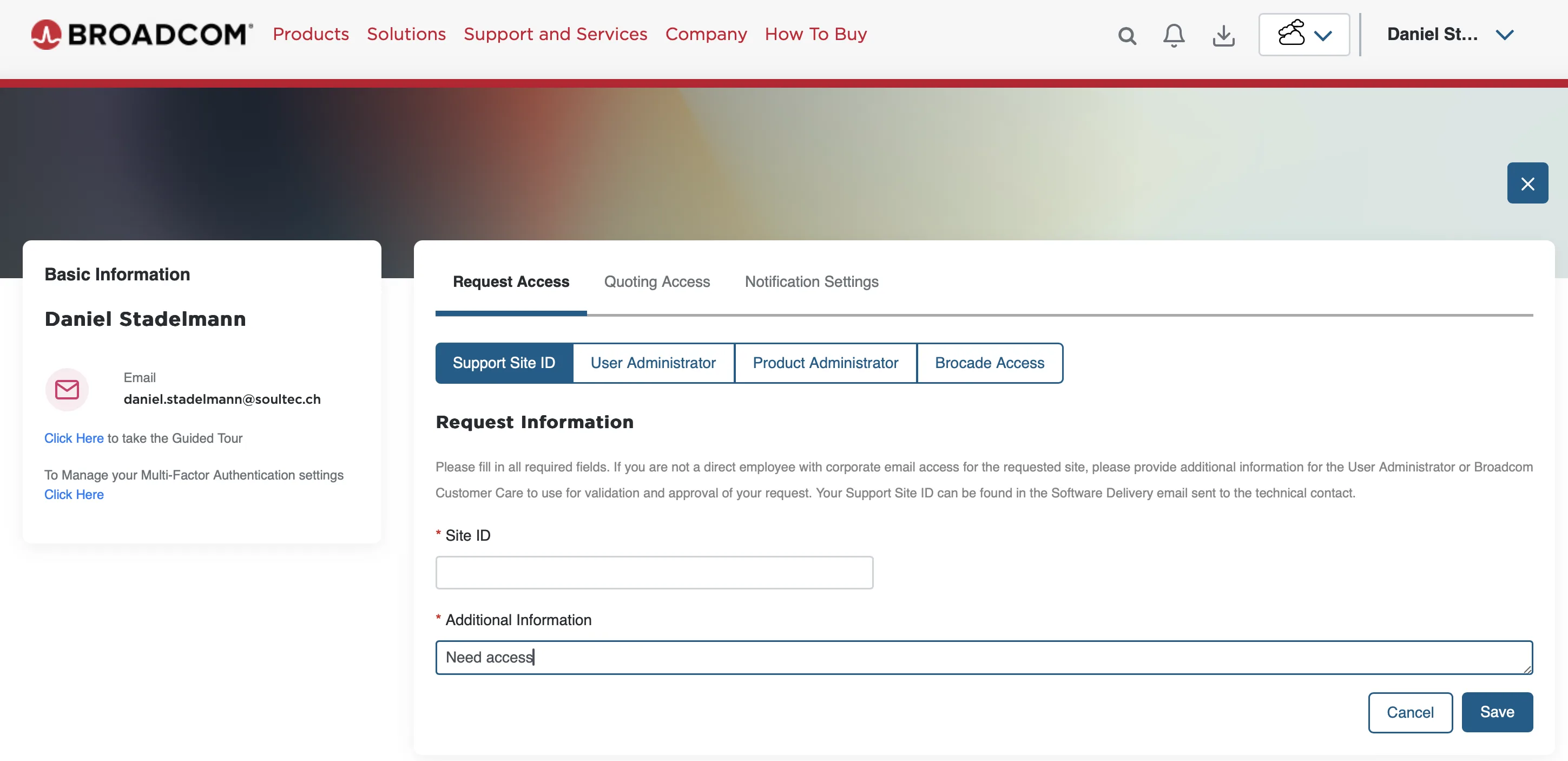
Cases 2 and 3 are harder at the moment. In case 2 the fastest route is to call Broadcom on +41 21 547 94 56 and ask for the site ID. In the phone menu do not pick “VMware”, pick “Accounts”. The site ID request can then be made from the Broadcom support profile. The support engineer can confirm the request directly and get you your access.
Case 3

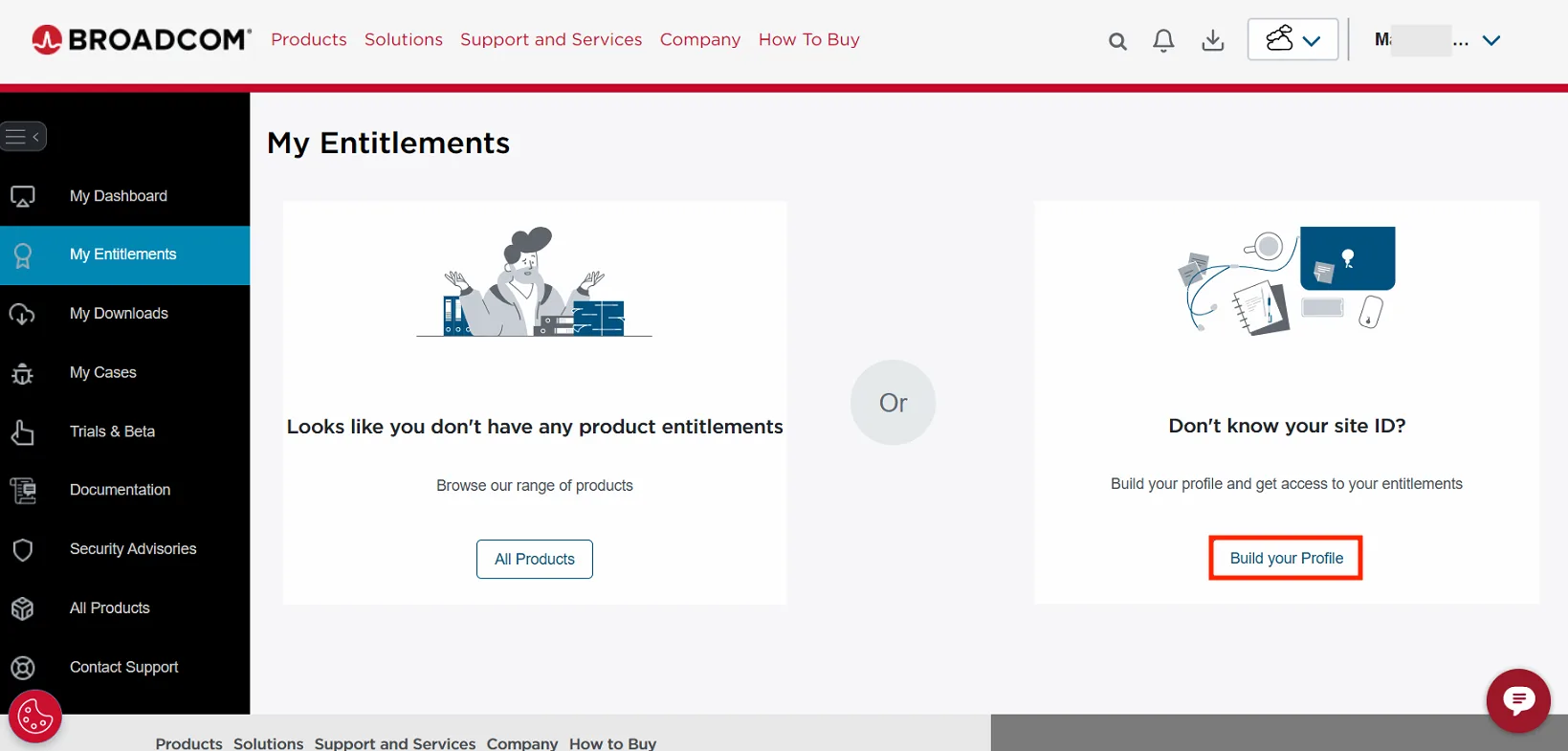
In case 3 the profile has to be built.
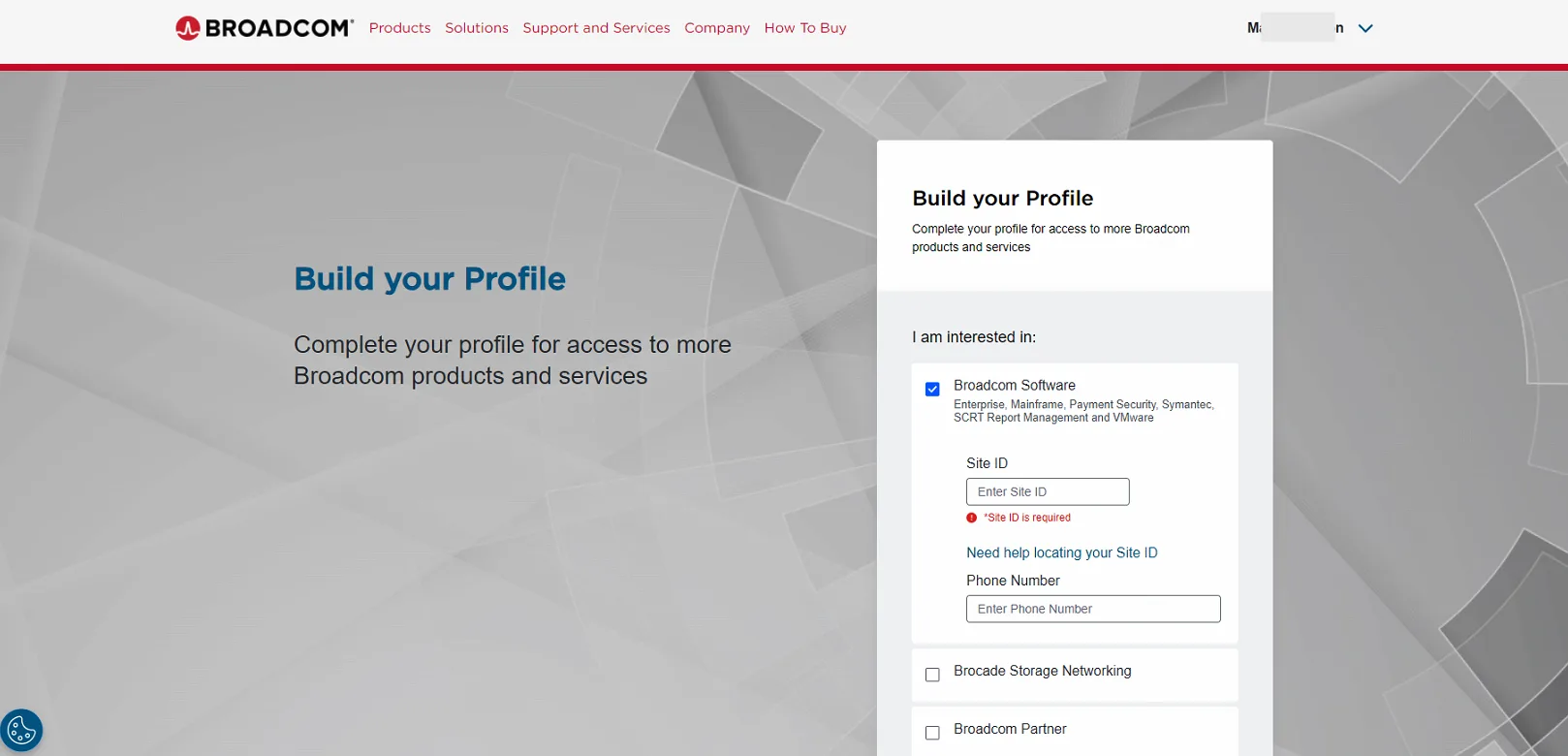
Then enter the site ID (ask Broadcom Support if you do not know it) and your personal phone number.
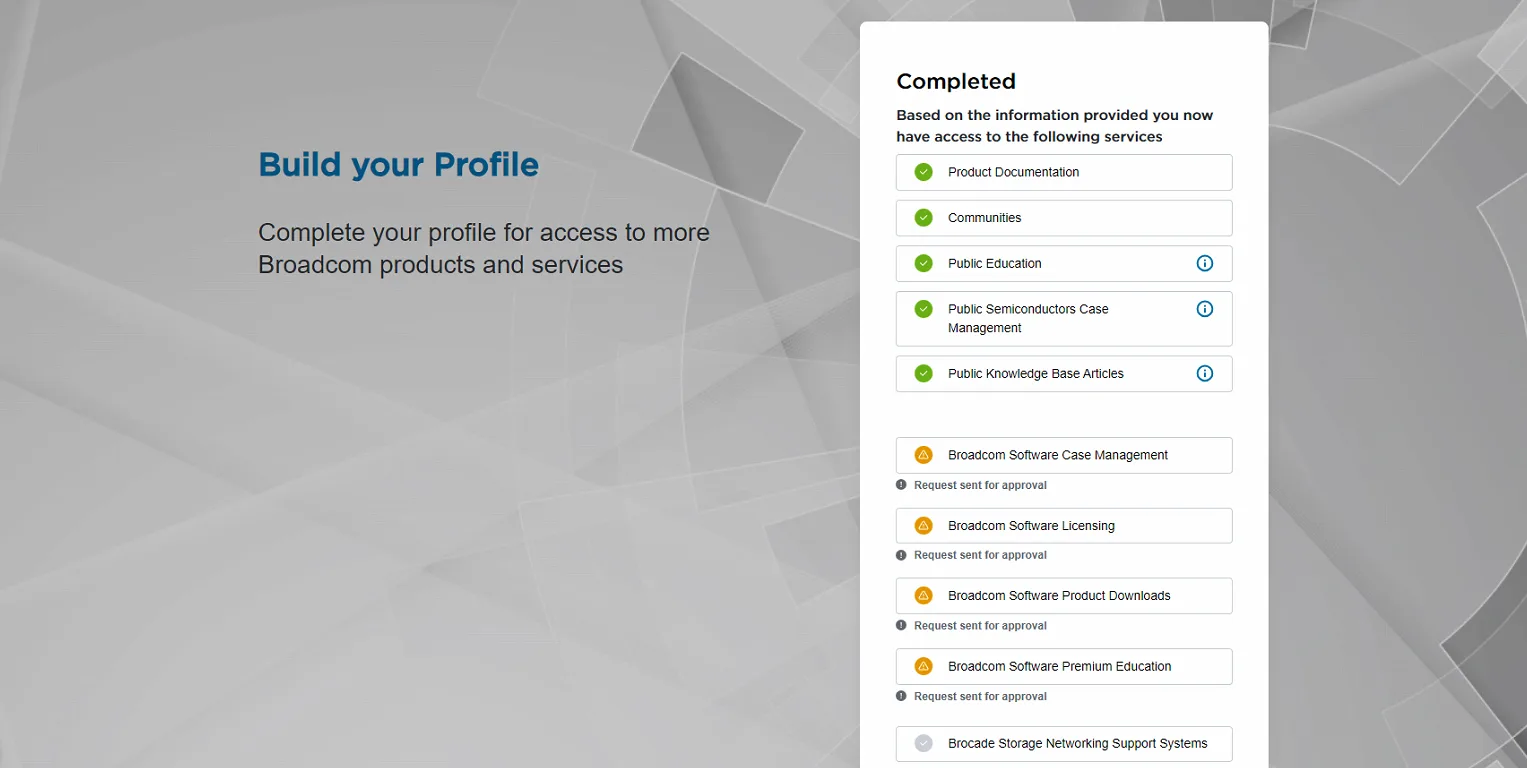
After that the request can be confirmed by the organisation’s super user or by calling support. In the phone menu do not pick “VMware”, pick “Accounts”. This link is Broadcom’s official description.
You might also like