

build 7bbbddf7 | content blog-content@c8490fa · 338 posts | profiles 20 · corpus 267 | 0 skipped | | format
apiVersion: soultec.ch/v1kind: Postmetadata: name: vmware-cloud-foundation-90-installer locale: de labels: author: yannick-gerber capability/cloud: 1.94 capability/virtualization: 1.37 vendor/vmware: 0.88 annotations: source: blog-content/posts/de/vmware-cloud-foundation-90-installer.md route: /de/insights/vmware-cloud-foundation-90-installer/ schema: /nerd/schema/posts.json markdown: /de/insights/vmware-cloud-foundation-90-installer.mdspec: title: VCF und VVF 9.0 Installer – First Look date: 2025-06-23 author: yannick-gerber locale: de summary: >- Der VMware Cloud Foundation Installer ermöglicht die Installation einer VCF (VMware Cloud Foundation) oder VVF (vSphere Foundation) Infrastruktur. capabilities: [cloud, virtualization] vendors: [vmware] hero: /blog-assets/vmware-cloud-foundation-90-installer/hero.webp legacySlug: vmware-cloud-foundation-90-installer migrated: 2026-08-24 draft: false sections: - body: | Der VMware Cloud Foundation Installer ermöglicht die Installation einer VCF (VMware Cloud Foundation) oder VVF (vSphere Foundation) Infrastruktur. VCF Installer ist die Evolution des Cloud Builders, mit erheblichen Verbesserungen. Das Upgrade von vSphere 8U3 oder VCF 5.2 ist in-place, VVF/VCF 9.0 kann via Brownfield sowie Greenfield Installation erfolgen. - heading:

Installation VCF Installer

body: | Die Installation erfolgt via OVA, dieser kann z.B. bei einer neuen Installation auf dem ersten ESX Host erfolgen. ![](/blog-assets/vmware-cloud-foundation-90-installer/01.webp) Download: [https://support.broadcom.com/group/ecx/productfiles?subFamily=VMware%20Cloud%20Foundation&displayGroup=VMware%20Cloud%20Foundation%209&release=9.0.0.0&os=&servicePk=&language=EN](https://support.broadcom.com/group/ecx/productfiles?subFamily=VMware%20Cloud%20Foundation&displayGroup=VMware%20Cloud%20Foundation%209&release=9.0.0.0&os=&servicePk=&language=EN) Filename: VCF-SDDC-Manager-Appliance-9.0.0.0.24703748.ova ![](/blog-assets/vmware-cloud-foundation-90-installer/02.webp) - heading:

First Look

body: | ![](/blog-assets/vmware-cloud-foundation-90-installer/03.webp) Folgende Optionen stehen zur Verfügung: - Depot Settings - Deployment Wizard für VCF - Deployment Wizard für VVF - Deployment via JSON File - heading:

Depot Settings

body: | Die VCF Installer Appliance is lediglich 2GB gross, die weiteren OVA Files für vCenter, NSX Manager, VCF Operations und Automation können via Depot Settings automatisch heruntergeladen werden. Dazu ist der Download Token im Broadcom Portal nötig ([hier](https://soultec.ch/how-to-broadcom-download-token/) findest du wie man diesen erstellt). ![](/blog-assets/vmware-cloud-foundation-90-installer/04.webp) ![](/blog-assets/vmware-cloud-foundation-90-installer/05.webp) - heading:

Deployment Wizard

body: | ![](/blog-assets/vmware-cloud-foundation-90-installer/06.webp) ### Wizard – Wichtige Infos - die DNS Einträge der Appliances (VCF Operations, vCenter etc) müssen in Vorhinein auf dem DNS-Server erstellt werden. VCF Installer wird ein FQDN Lookup während der Installation machen, dieser muss erfolgreich sein, um weiterfahren zu können. - Es können bestehende vCenter und VCF Operations (Version 9.0) Appliances importiert werden - Beim VCF Wizard kann die VCF Automation Installation übersprungen werden. - 3 ESX Host nötig bei vSAN – oder zwei bei NFS, FC (VMFS) Storage ### VMware Cloud Foundation Deployment Wizard ![](/blog-assets/vmware-cloud-foundation-90-installer/07.webp) Nachfolgend führt der Wizard durch die nötigen Konfiguration für eine VCF 9.0 Fleet. ![](/blog-assets/vmware-cloud-foundation-90-installer/08.webp) ![](/blog-assets/vmware-cloud-foundation-90-installer/09.webp) FQDN Lookup des VCF Installers: ![](/blog-assets/vmware-cloud-foundation-90-installer/10.webp) Wird der Wizard abgebrochen, werden die Daten gespeichert: ![](/blog-assets/vmware-cloud-foundation-90-installer/11.webp) ### vSphere Foundation Deployment Wizard Beim VVF Wizard steht keine Option für NSX und VCF Automation bereit, dazu muss der VCF Wizard verwendet werden. ![](/blog-assets/vmware-cloud-foundation-90-installer/12.webp) - heading:

VCF Deployment via JSON

body: | Beispiele für JSON Files haben wir auf GitHub veröffentlicht: [https://github.com/soultecag/vcf-9/tree/main/vcf-installer](https://github.com/soultecag/vcf-9/tree/main/vcf-installer) ![](/blog-assets/vmware-cloud-foundation-90-installer/14.webp) - heading:

Fazit

body: | Die Wizards für VVF und VCF Deployment sind sehr ausgereift, in den kommenden Tagen werden wir mehr rundum VCF und VVF 9.0 hier im Blog posten. Hast du Fragen zum Update auf VVF oder VCF 9.0, sind wir gerne für dich da.status: corpus: 267 alsoLike: - {ref: posts/vcf-full-stack-ab-oktober-2027-mythos-oder-wahrheit, score: 1.00} - {ref: posts/ms-secure-boot-cert-expiry-2026, score: 1.00} - {ref: solutions/vmware/vsphere-foundation, score: 1.00}
{ "apiVersion": "soultec.ch/v1", "kind": "Post", "metadata": { "name": "vmware-cloud-foundation-90-installer", "locale": "de", "labels": { "author": "yannick-gerber", "capability/cloud": "1.94", "capability/virtualization": "1.37", "vendor/vmware": "0.88" }, "annotations": { "source": "blog-content/posts/de/vmware-cloud-foundation-90-installer.md", "route": "/de/insights/vmware-cloud-foundation-90-installer/", "schema": "/nerd/schema/posts.json", "markdown": "/de/insights/vmware-cloud-foundation-90-installer.md" } }, "spec": { "title": "VCF und VVF 9.0 Installer – First Look", "date": "2025-06-23", "author": "yannick-gerber", "locale": "de", "summary": "Der VMware Cloud Foundation Installer ermöglicht die Installation einer VCF (VMware Cloud Foundation) oder VVF (vSphere Foundation) Infrastruktur.", "capabilities": [ "cloud", "virtualization" ], "vendors": [ "vmware" ], "hero": "/blog-assets/vmware-cloud-foundation-90-installer/hero.webp", "legacySlug": "vmware-cloud-foundation-90-installer", "migrated": "2026-08-24", "draft": false }, "sections": [ { "body": "Der VMware Cloud Foundation Installer ermöglicht die Installation einer VCF (VMware Cloud Foundation) oder VVF (vSphere Foundation) Infrastruktur. VCF Installer ist die Evolution des Cloud Builders, mit erheblichen Verbesserungen. Das Upgrade von vSphere 8U3 oder VCF 5.2 ist in-place, VVF/VCF 9.0 kann via Brownfield sowie Greenfield Installation erfolgen." }, { "heading": "

Installation VCF Installer

",
"body": "Die Installation erfolgt via OVA, dieser kann z.B. bei einer neuen Installation auf dem ersten ESX Host erfolgen.\n\n![](/blog-assets/vmware-cloud-foundation-90-installer/01.webp)\n\nDownload: [https://support.broadcom.com/group/ecx/productfiles?subFamily=VMware%20Cloud%20Foundation&displayGroup=VMware%20Cloud%20Foundation%209&release=9.0.0.0&os=&servicePk=&language=EN](https://support.broadcom.com/group/ecx/productfiles?subFamily=VMware%20Cloud%20Foundation&displayGroup=VMware%20Cloud%20Foundation%209&release=9.0.0.0&os=&servicePk=&language=EN)\n\nFilename: VCF-SDDC-Manager-Appliance-9.0.0.0.24703748.ova\n\n![](/blog-assets/vmware-cloud-foundation-90-installer/02.webp)" }, { "heading": "

First Look

",
"body": "![](/blog-assets/vmware-cloud-foundation-90-installer/03.webp)\n\nFolgende Optionen stehen zur Verfügung:\n\n- Depot Settings\n- Deployment Wizard für VCF\n- Deployment Wizard für VVF\n- Deployment via JSON File" }, { "heading": "

Depot Settings

",
"body": "Die VCF Installer Appliance is lediglich 2GB gross, die weiteren OVA Files für vCenter, NSX Manager, VCF Operations und Automation können via Depot Settings automatisch heruntergeladen werden. Dazu ist der Download Token im Broadcom Portal nötig ([hier](https://soultec.ch/how-to-broadcom-download-token/) findest du wie man diesen erstellt).\n\n![](/blog-assets/vmware-cloud-foundation-90-installer/04.webp)\n\n![](/blog-assets/vmware-cloud-foundation-90-installer/05.webp)" }, { "heading": "

Deployment Wizard

",
"body": "![](/blog-assets/vmware-cloud-foundation-90-installer/06.webp)\n\n### Wizard – Wichtige Infos\n\n- die DNS Einträge der Appliances (VCF Operations, vCenter etc) müssen in Vorhinein auf dem DNS-Server erstellt werden. VCF Installer wird ein FQDN Lookup während der Installation machen, dieser muss erfolgreich sein, um weiterfahren zu können.\n- Es können bestehende vCenter und VCF Operations (Version 9.0) Appliances importiert werden\n- Beim VCF Wizard kann die VCF Automation Installation übersprungen werden.\n- 3 ESX Host nötig bei vSAN – oder zwei bei NFS, FC (VMFS) Storage\n\n### VMware Cloud Foundation Deployment Wizard\n\n![](/blog-assets/vmware-cloud-foundation-90-installer/07.webp)\n\nNachfolgend führt der Wizard durch die nötigen Konfiguration für eine VCF 9.0 Fleet.\n\n![](/blog-assets/vmware-cloud-foundation-90-installer/08.webp)\n\n![](/blog-assets/vmware-cloud-foundation-90-installer/09.webp)\n\nFQDN Lookup des VCF Installers:\n\n![](/blog-assets/vmware-cloud-foundation-90-installer/10.webp)\n\nWird der Wizard abgebrochen, werden die Daten gespeichert:\n\n![](/blog-assets/vmware-cloud-foundation-90-installer/11.webp)\n\n### vSphere Foundation Deployment Wizard\n\nBeim VVF Wizard steht keine Option für NSX und VCF Automation bereit, dazu muss der VCF Wizard verwendet werden.\n\n![](/blog-assets/vmware-cloud-foundation-90-installer/12.webp)" }, { "heading": "

VCF Deployment via JSON

",
"body": "Beispiele für JSON Files haben wir auf GitHub veröffentlicht: [https://github.com/soultecag/vcf-9/tree/main/vcf-installer](https://github.com/soultecag/vcf-9/tree/main/vcf-installer)\n\n\n![](/blog-assets/vmware-cloud-foundation-90-installer/14.webp)" }, { "heading": "

Fazit

",
"body": "Die Wizards für VVF und VCF Deployment sind sehr ausgereift, in den kommenden Tagen werden wir mehr rundum VCF und VVF 9.0 hier im Blog posten.\n\nHast du Fragen zum Update auf VVF oder VCF 9.0, sind wir gerne für dich da." } ], "status": { "corpus": 267, "alsoLike": [ { "ref": "posts/vcf-full-stack-ab-oktober-2027-mythos-oder-wahrheit", "score": "1.00" }, { "ref": "posts/ms-secure-boot-cert-expiry-2026", "score": "1.00" }, { "ref": "solutions/vmware/vsphere-foundation", "score": "1.00" } ] }}
apiVersion = "soultec.ch/v1"kind = "Post"[metadata]name = "vmware-cloud-foundation-90-installer"locale = "de"[metadata.labels]author = "yannick-gerber""capability/cloud" = "1.94""capability/virtualization" = "1.37""vendor/vmware" = "0.88"[metadata.annotations]source = "blog-content/posts/de/vmware-cloud-foundation-90-installer.md"route = "/de/insights/vmware-cloud-foundation-90-installer/"schema = "/nerd/schema/posts.json"markdown = "/de/insights/vmware-cloud-foundation-90-installer.md"[spec]title = "VCF und VVF 9.0 Installer – First Look"date = 2025-06-23author = "yannick-gerber"locale = "de"summary = "Der VMware Cloud Foundation Installer ermöglicht die Installation einer VCF (VMware Cloud Foundation) oder VVF (vSphere Foundation) Infrastruktur."capabilities = ["cloud", "virtualization"]vendors = ["vmware"]hero = "/blog-assets/vmware-cloud-foundation-90-installer/hero.webp"legacySlug = "vmware-cloud-foundation-90-installer"migrated = 2026-08-24draft = false[[sections]]body = "Der VMware Cloud Foundation Installer ermöglicht die Installation einer VCF (VMware Cloud Foundation) oder VVF (vSphere Foundation) Infrastruktur. VCF Installer ist die Evolution des Cloud Builders, mit erheblichen Verbesserungen. Das Upgrade von vSphere 8U3 oder VCF 5.2 ist in-place, VVF/VCF 9.0 kann via Brownfield sowie Greenfield Installation erfolgen."[[sections]]heading = "

Installation VCF Installer

"
body = '''Die Installation erfolgt via OVA, dieser kann z.B. bei einer neuen Installation auf dem ersten ESX Host erfolgen.![](/blog-assets/vmware-cloud-foundation-90-installer/01.webp)Download: [https://support.broadcom.com/group/ecx/productfiles?subFamily=VMware%20Cloud%20Foundation&displayGroup=VMware%20Cloud%20Foundation%209&release=9.0.0.0&os=&servicePk=&language=EN](https://support.broadcom.com/group/ecx/productfiles?subFamily=VMware%20Cloud%20Foundation&displayGroup=VMware%20Cloud%20Foundation%209&release=9.0.0.0&os=&servicePk=&language=EN)Filename: VCF-SDDC-Manager-Appliance-9.0.0.0.24703748.ova![](/blog-assets/vmware-cloud-foundation-90-installer/02.webp)'''[[sections]]heading = "

First Look

"
body = '''![](/blog-assets/vmware-cloud-foundation-90-installer/03.webp)Folgende Optionen stehen zur Verfügung:- Depot Settings- Deployment Wizard für VCF- Deployment Wizard für VVF- Deployment via JSON File'''[[sections]]heading = "

Depot Settings

"
body = '''Die VCF Installer Appliance is lediglich 2GB gross, die weiteren OVA Files für vCenter, NSX Manager, VCF Operations und Automation können via Depot Settings automatisch heruntergeladen werden. Dazu ist der Download Token im Broadcom Portal nötig ([hier](https://soultec.ch/how-to-broadcom-download-token/) findest du wie man diesen erstellt).![](/blog-assets/vmware-cloud-foundation-90-installer/04.webp)![](/blog-assets/vmware-cloud-foundation-90-installer/05.webp)'''[[sections]]heading = "

Deployment Wizard

"
body = '''![](/blog-assets/vmware-cloud-foundation-90-installer/06.webp)### Wizard – Wichtige Infos- die DNS Einträge der Appliances (VCF Operations, vCenter etc) müssen in Vorhinein auf dem DNS-Server erstellt werden. VCF Installer wird ein FQDN Lookup während der Installation machen, dieser muss erfolgreich sein, um weiterfahren zu können.- Es können bestehende vCenter und VCF Operations (Version 9.0) Appliances importiert werden- Beim VCF Wizard kann die VCF Automation Installation übersprungen werden.- 3 ESX Host nötig bei vSAN – oder zwei bei NFS, FC (VMFS) Storage### VMware Cloud Foundation Deployment Wizard![](/blog-assets/vmware-cloud-foundation-90-installer/07.webp)Nachfolgend führt der Wizard durch die nötigen Konfiguration für eine VCF 9.0 Fleet.![](/blog-assets/vmware-cloud-foundation-90-installer/08.webp)![](/blog-assets/vmware-cloud-foundation-90-installer/09.webp)FQDN Lookup des VCF Installers:![](/blog-assets/vmware-cloud-foundation-90-installer/10.webp)Wird der Wizard abgebrochen, werden die Daten gespeichert:![](/blog-assets/vmware-cloud-foundation-90-installer/11.webp)### vSphere Foundation Deployment WizardBeim VVF Wizard steht keine Option für NSX und VCF Automation bereit, dazu muss der VCF Wizard verwendet werden.![](/blog-assets/vmware-cloud-foundation-90-installer/12.webp)'''[[sections]]heading = "

VCF Deployment via JSON

"
body = '''Beispiele für JSON Files haben wir auf GitHub veröffentlicht: [https://github.com/soultecag/vcf-9/tree/main/vcf-installer](https://github.com/soultecag/vcf-9/tree/main/vcf-installer)![](/blog-assets/vmware-cloud-foundation-90-installer/14.webp)'''[[sections]]heading = "

Fazit

"
body = '''Die Wizards für VVF und VCF Deployment sind sehr ausgereift, in den kommenden Tagen werden wir mehr rundum VCF und VVF 9.0 hier im Blog posten.Hast du Fragen zum Update auf VVF oder VCF 9.0, sind wir gerne für dich da.'''[status]corpus = 267[[status.alsoLike]]ref = "posts/vcf-full-stack-ab-oktober-2027-mythos-oder-wahrheit"score = "1.00"[[status.alsoLike]]ref = "posts/ms-secure-boot-cert-expiry-2026"score = "1.00"[[status.alsoLike]]ref = "solutions/vmware/vsphere-foundation"score = "1.00"
<?xml version="1.0" encoding="UTF-8"?><manifest kind="Post"> <apiVersion>soultec.ch/v1</apiVersion> <metadata> <name>vmware-cloud-foundation-90-installer</name> <locale>de</locale> <labels> <author>yannick-gerber</author> <entry key="capability/cloud">1.94</entry> <entry key="capability/virtualization">1.37</entry> <entry key="vendor/vmware">0.88</entry> </labels> <annotations> <source>blog-content/posts/de/vmware-cloud-foundation-90-installer.md</source> <route>/de/insights/vmware-cloud-foundation-90-installer/</route> <schema>/nerd/schema/posts.json</schema> <markdown>/de/insights/vmware-cloud-foundation-90-installer.md</markdown> </annotations> </metadata> <spec> <title>VCF und VVF 9.0 Installer – First Look</title> <date>2025-06-23</date> <author>yannick-gerber</author> <locale>de</locale> <summary>Der VMware Cloud Foundation Installer ermöglicht die Installation einer VCF (VMware Cloud Foundation) oder VVF (vSphere Foundation) Infrastruktur.</summary> <capabilities> <item>cloud</item> <item>virtualization</item> </capabilities> <vendors> <item>vmware</item> </vendors> <hero>/blog-assets/vmware-cloud-foundation-90-installer/hero.webp</hero> <legacySlug>vmware-cloud-foundation-90-installer</legacySlug> <migrated>2026-08-24</migrated> <draft>false</draft> </spec> <sections> <section> <body>Der VMware Cloud Foundation Installer ermöglicht die Installation einer VCF (VMware Cloud Foundation) oder VVF (vSphere Foundation) Infrastruktur. VCF Installer ist die Evolution des Cloud Builders, mit erheblichen Verbesserungen. Das Upgrade von vSphere 8U3 oder VCF 5.2 ist in-place, VVF/VCF 9.0 kann via Brownfield sowie Greenfield Installation erfolgen.</body> </section> <section> <heading>

Installation VCF Installer

</heading>
<body>Die Installation erfolgt via OVA, dieser kann z.B. bei einer neuen Installation auf dem ersten ESX Host erfolgen.![](/blog-assets/vmware-cloud-foundation-90-installer/01.webp)Download: [https://support.broadcom.com/group/ecx/productfiles?subFamily=VMware%20Cloud%20Foundation&amp;displayGroup=VMware%20Cloud%20Foundation%209&amp;release=9.0.0.0&amp;os=&amp;servicePk=&amp;language=EN](https://support.broadcom.com/group/ecx/productfiles?subFamily=VMware%20Cloud%20Foundation&amp;displayGroup=VMware%20Cloud%20Foundation%209&amp;release=9.0.0.0&amp;os=&amp;servicePk=&amp;language=EN)Filename: VCF-SDDC-Manager-Appliance-9.0.0.0.24703748.ova![](/blog-assets/vmware-cloud-foundation-90-installer/02.webp) </body> </section> <section> <heading>

First Look

</heading>
<body>![](/blog-assets/vmware-cloud-foundation-90-installer/03.webp)Folgende Optionen stehen zur Verfügung:- Depot Settings- Deployment Wizard für VCF- Deployment Wizard für VVF- Deployment via JSON File </body> </section> <section> <heading>

Depot Settings

</heading>
<body>Die VCF Installer Appliance is lediglich 2GB gross, die weiteren OVA Files für vCenter, NSX Manager, VCF Operations und Automation können via Depot Settings automatisch heruntergeladen werden. Dazu ist der Download Token im Broadcom Portal nötig ([hier](https://soultec.ch/how-to-broadcom-download-token/) findest du wie man diesen erstellt).![](/blog-assets/vmware-cloud-foundation-90-installer/04.webp)![](/blog-assets/vmware-cloud-foundation-90-installer/05.webp) </body> </section> <section> <heading>

Deployment Wizard

</heading>
<body>![](/blog-assets/vmware-cloud-foundation-90-installer/06.webp)### Wizard – Wichtige Infos- die DNS Einträge der Appliances (VCF Operations, vCenter etc) müssen in Vorhinein auf dem DNS-Server erstellt werden. VCF Installer wird ein FQDN Lookup während der Installation machen, dieser muss erfolgreich sein, um weiterfahren zu können.- Es können bestehende vCenter und VCF Operations (Version 9.0) Appliances importiert werden- Beim VCF Wizard kann die VCF Automation Installation übersprungen werden.- 3 ESX Host nötig bei vSAN – oder zwei bei NFS, FC (VMFS) Storage### VMware Cloud Foundation Deployment Wizard![](/blog-assets/vmware-cloud-foundation-90-installer/07.webp)Nachfolgend führt der Wizard durch die nötigen Konfiguration für eine VCF 9.0 Fleet.![](/blog-assets/vmware-cloud-foundation-90-installer/08.webp)![](/blog-assets/vmware-cloud-foundation-90-installer/09.webp)FQDN Lookup des VCF Installers:![](/blog-assets/vmware-cloud-foundation-90-installer/10.webp)Wird der Wizard abgebrochen, werden die Daten gespeichert:![](/blog-assets/vmware-cloud-foundation-90-installer/11.webp)### vSphere Foundation Deployment WizardBeim VVF Wizard steht keine Option für NSX und VCF Automation bereit, dazu muss der VCF Wizard verwendet werden.![](/blog-assets/vmware-cloud-foundation-90-installer/12.webp) </body> </section> <section> <heading>

VCF Deployment via JSON

</heading>
<body>Beispiele für JSON Files haben wir auf GitHub veröffentlicht: [https://github.com/soultecag/vcf-9/tree/main/vcf-installer](https://github.com/soultecag/vcf-9/tree/main/vcf-installer)![](/blog-assets/vmware-cloud-foundation-90-installer/14.webp) </body> </section> <section> <heading>

Fazit

</heading>
<body>Die Wizards für VVF und VCF Deployment sind sehr ausgereift, in den kommenden Tagen werden wir mehr rundum VCF und VVF 9.0 hier im Blog posten.Hast du Fragen zum Update auf VVF oder VCF 9.0, sind wir gerne für dich da. </body> </section> </sections> <status> <corpus>267</corpus> <alsoLike> <item> <ref>posts/vcf-full-stack-ab-oktober-2027-mythos-oder-wahrheit</ref> <score>1.00</score> </item> <item> <ref>posts/ms-secure-boot-cert-expiry-2026</ref> <score>1.00</score> </item> <item> <ref>solutions/vmware/vsphere-foundation</ref> <score>1.00</score> </item> </alsoLike> </status></manifest>
Beitrag · 2025-06-23

VCF und VVF 9.0 Installer – First Look

Der VMware Cloud Foundation Installer ermöglicht die Installation einer VCF (VMware Cloud Foundation) oder VVF (vSphere Foundation) Infrastruktur.

2025-06-23Datum
Yannick GerberAutor
2Min. Lesezeit
Themen Cloud 1.94 Virtualisierung 1.37
Hersteller VMware 0.88

Der VMware Cloud Foundation Installer ermöglicht die Installation einer VCF (VMware Cloud Foundation) oder VVF (vSphere Foundation) Infrastruktur. VCF Installer ist die Evolution des Cloud Builders, mit erheblichen Verbesserungen. Das Upgrade von vSphere 8U3 oder VCF 5.2 ist in-place, VVF/VCF 9.0 kann via Brownfield sowie Greenfield Installation erfolgen.

Installation VCF Installer

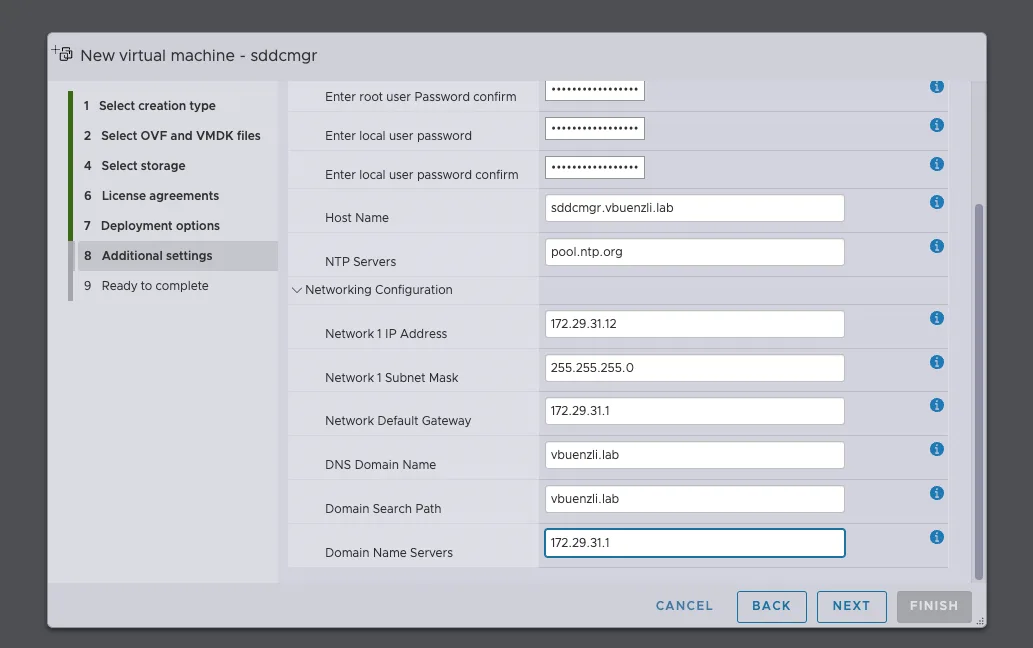
Die Installation erfolgt via OVA, dieser kann z.B. bei einer neuen Installation auf dem ersten ESX Host erfolgen.
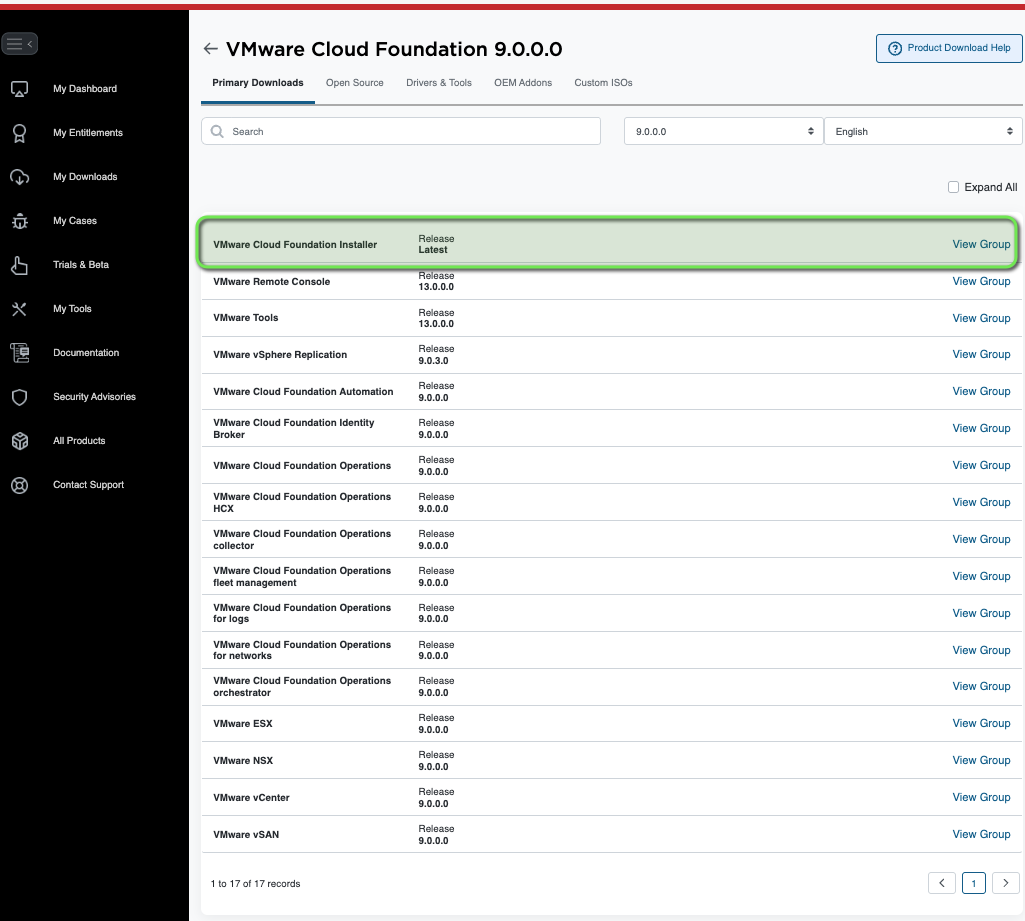
Download: https://support.broadcom.com/group/ecx/productfiles?subFamily=VMware%20Cloud%20Foundation&displayGroup=VMware%20Cloud%20Foundation%209&release=9.0.0.0&os=&servicePk=&language=EN

Filename: VCF-SDDC-Manager-Appliance-9.0.0.0.24703748.ova
First Look
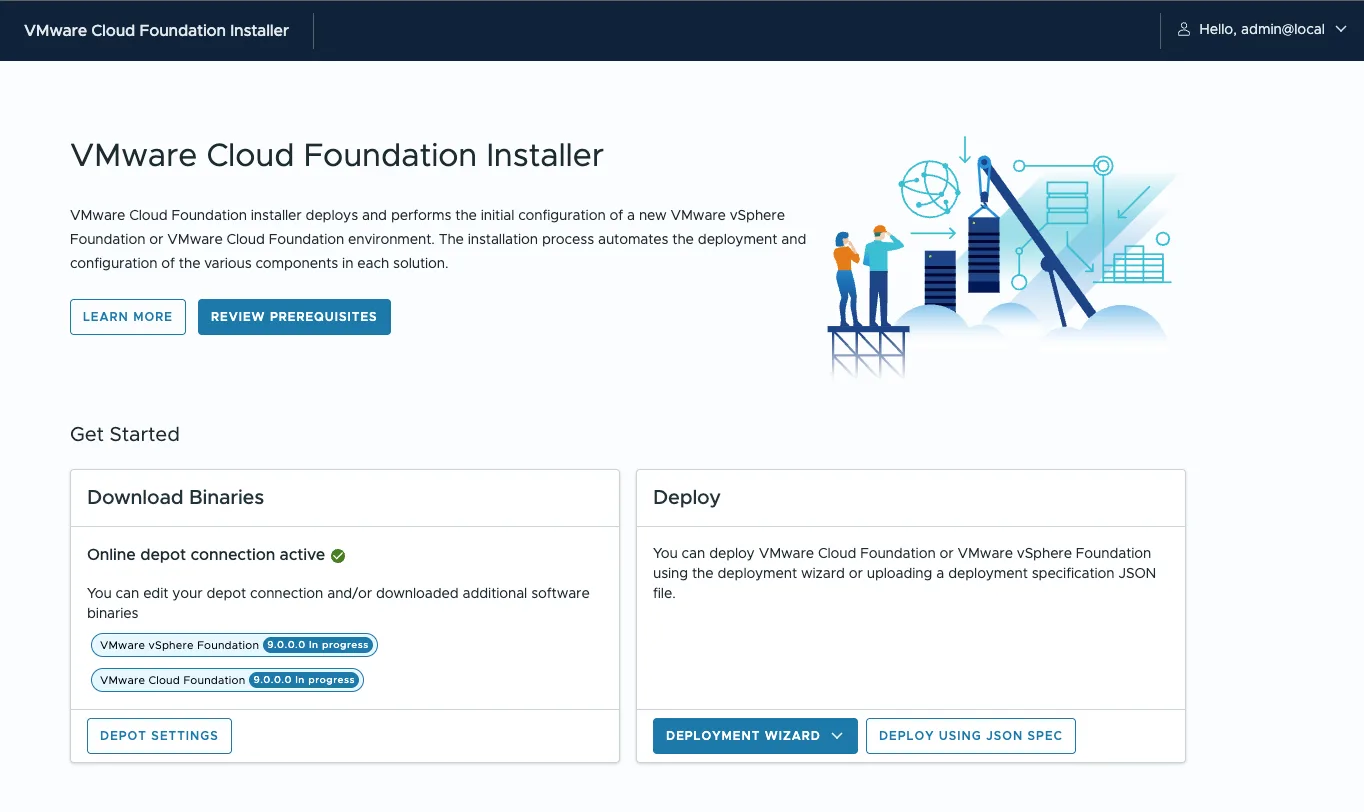
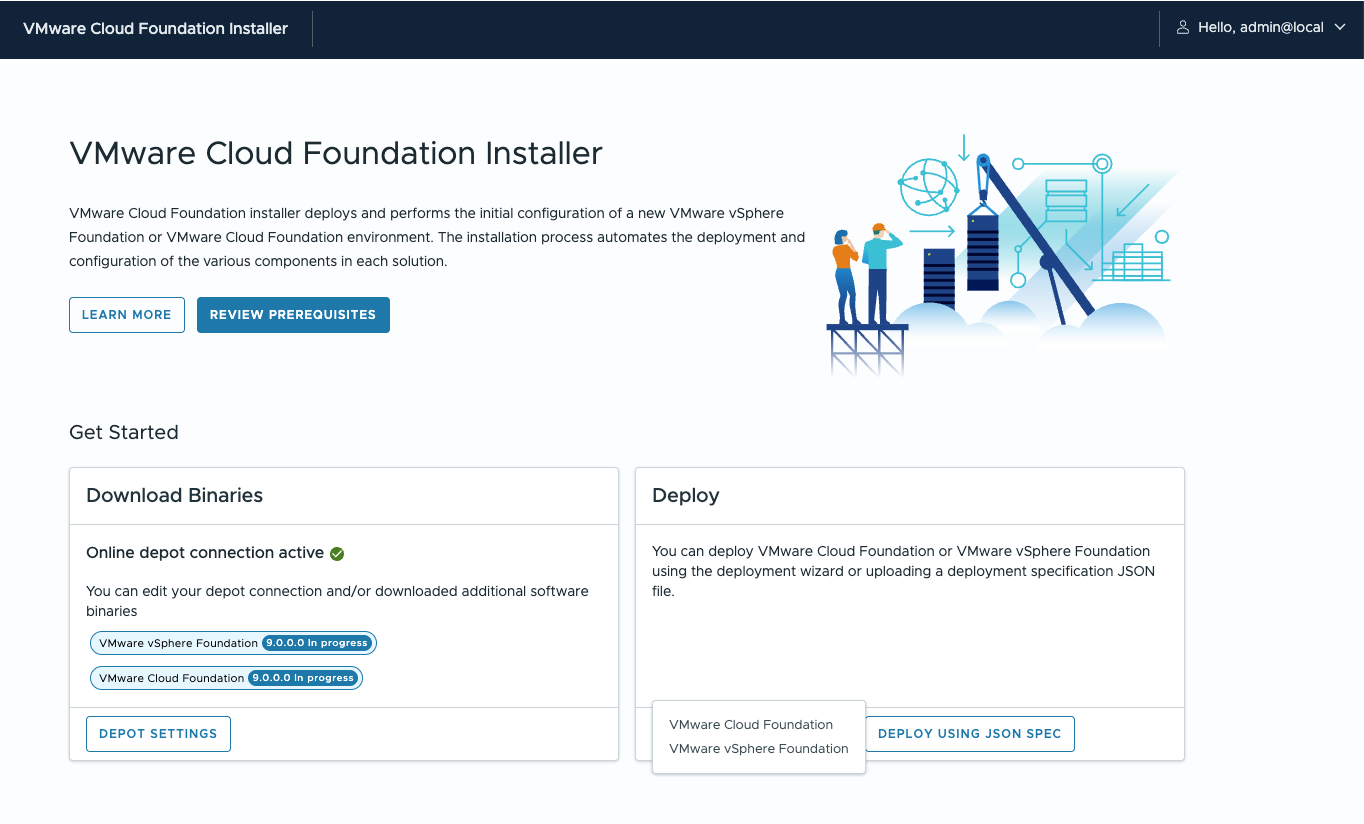
Folgende Optionen stehen zur Verfügung:

  • Depot Settings
  • Deployment Wizard für VCF
  • Deployment Wizard für VVF
  • Deployment via JSON File

Depot Settings

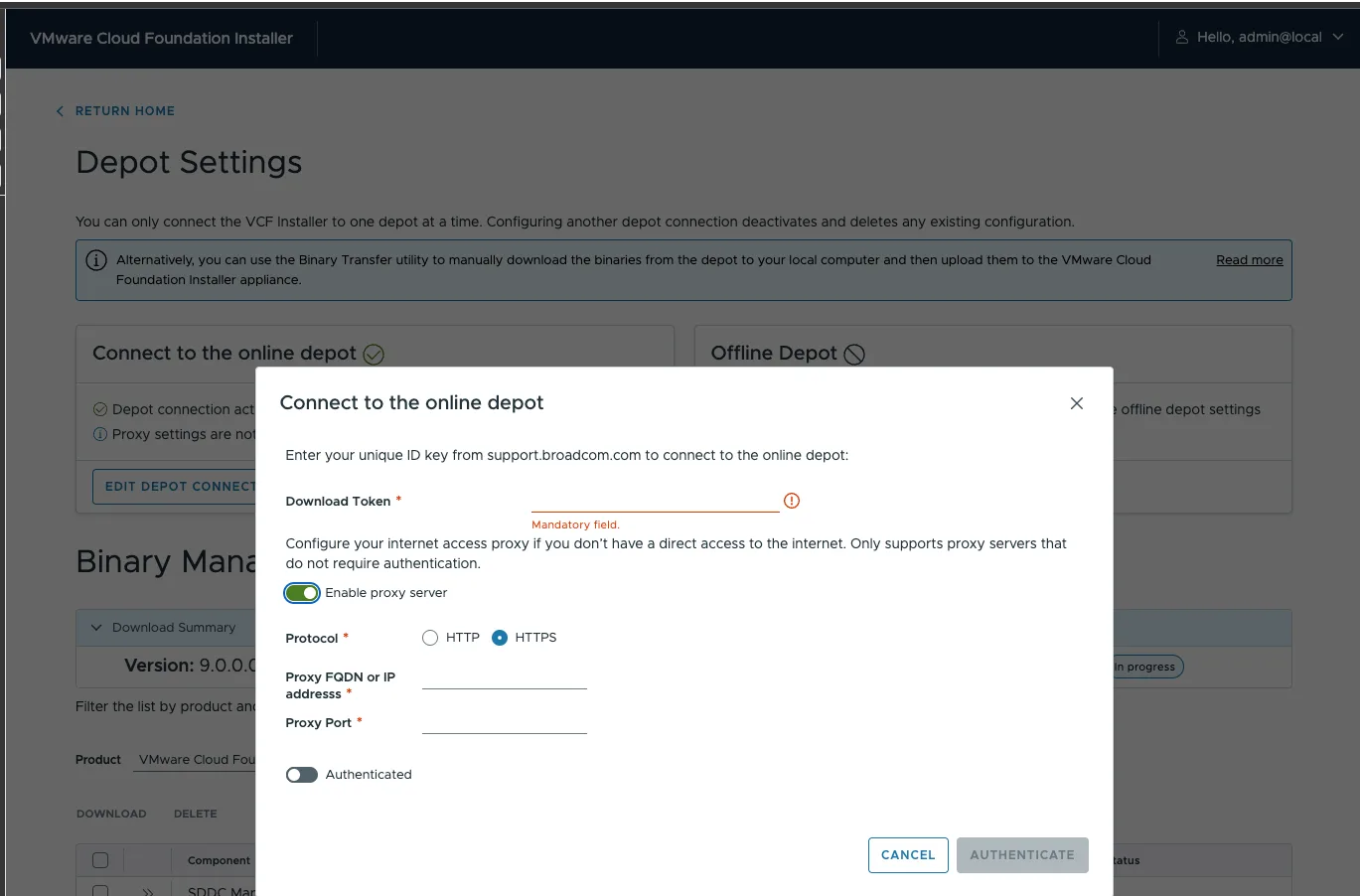
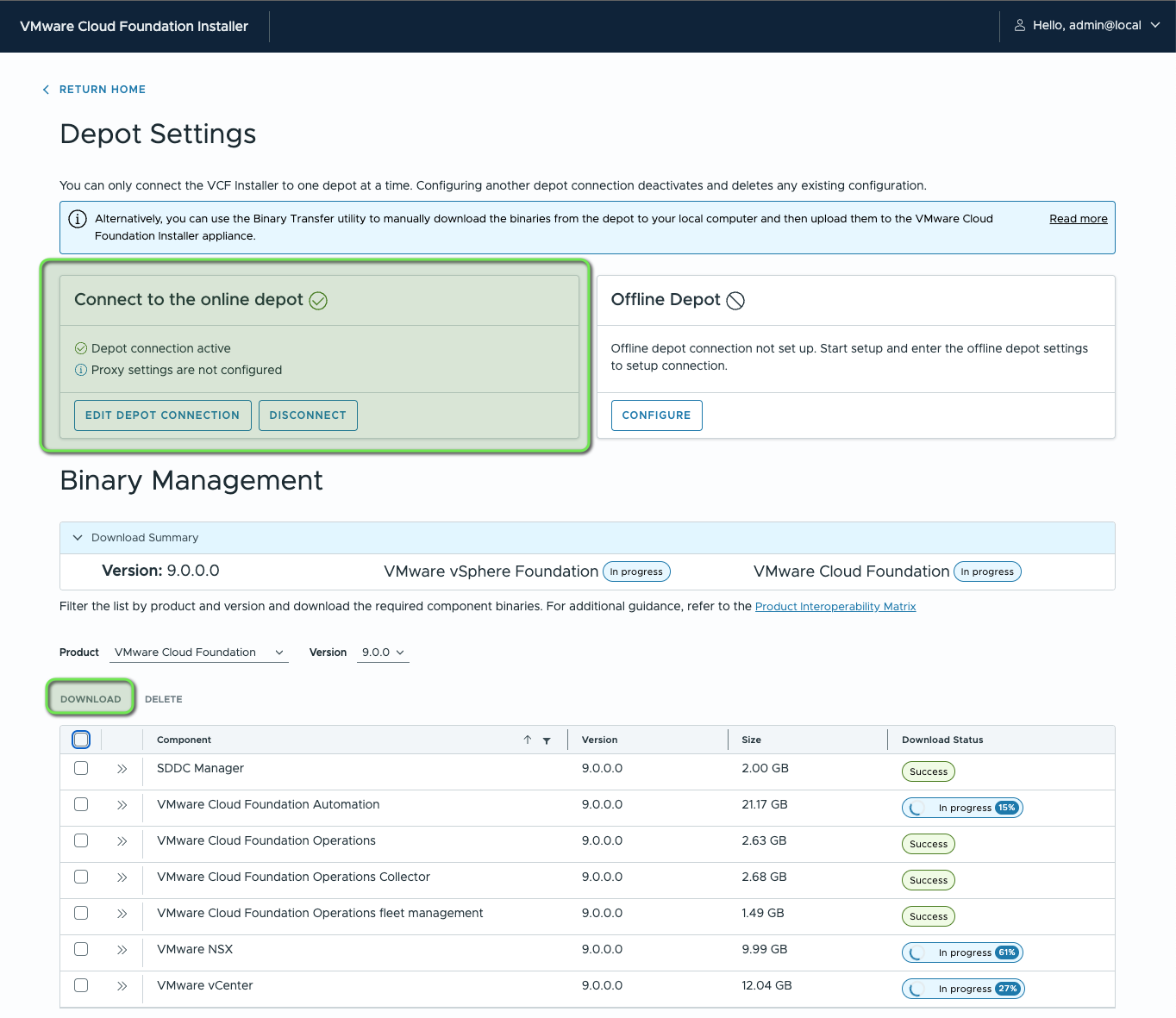
Die VCF Installer Appliance is lediglich 2GB gross, die weiteren OVA Files für vCenter, NSX Manager, VCF Operations und Automation können via Depot Settings automatisch heruntergeladen werden. Dazu ist der Download Token im Broadcom Portal nötig (hier findest du wie man diesen erstellt).
Deployment Wizard
Wizard – Wichtige Infos

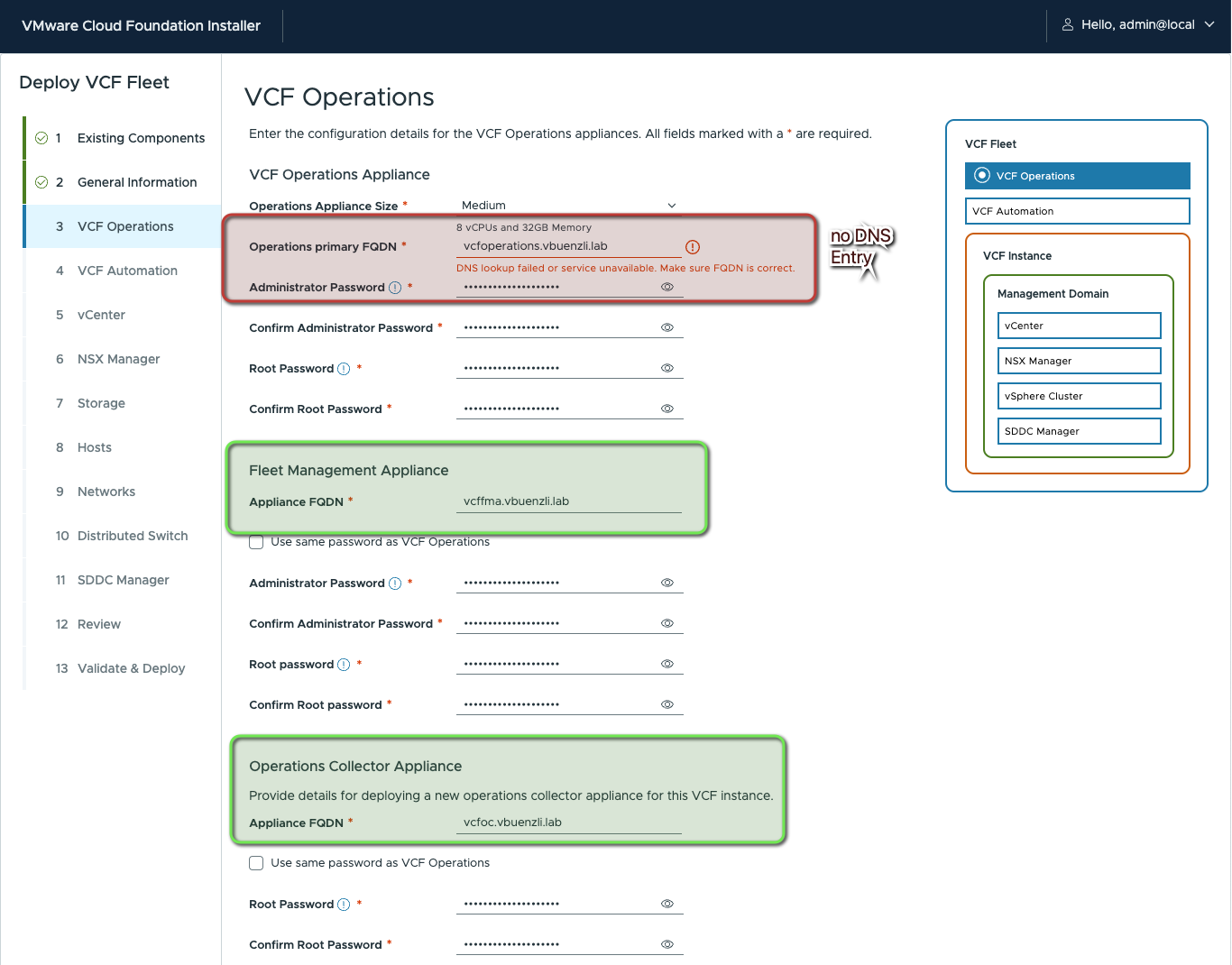
  • die DNS Einträge der Appliances (VCF Operations, vCenter etc) müssen in Vorhinein auf dem DNS-Server erstellt werden. VCF Installer wird ein FQDN Lookup während der Installation machen, dieser muss erfolgreich sein, um weiterfahren zu können.
  • Es können bestehende vCenter und VCF Operations (Version 9.0) Appliances importiert werden
  • Beim VCF Wizard kann die VCF Automation Installation übersprungen werden.
  • 3 ESX Host nötig bei vSAN – oder zwei bei NFS, FC (VMFS) Storage

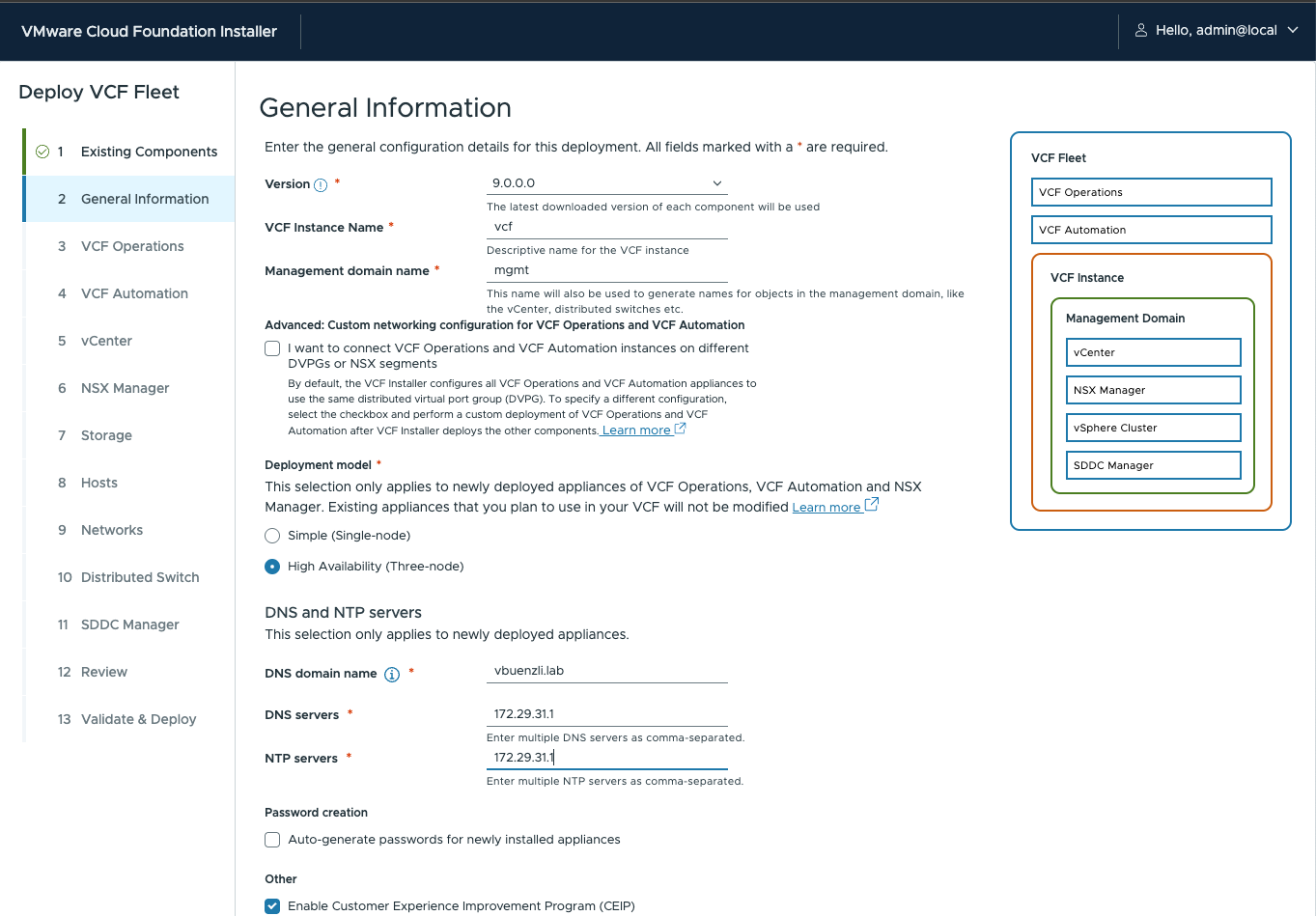
VMware Cloud Foundation Deployment Wizard
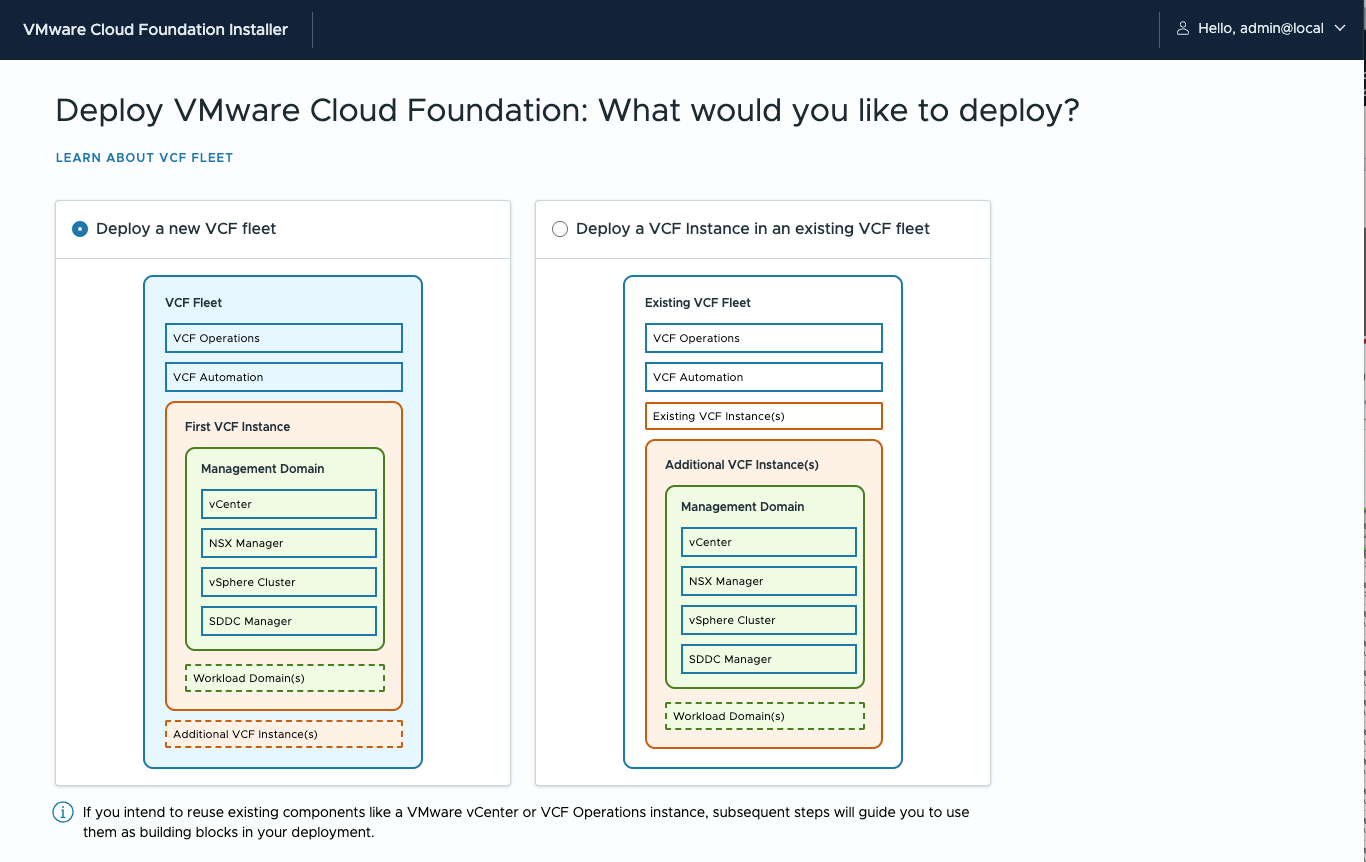
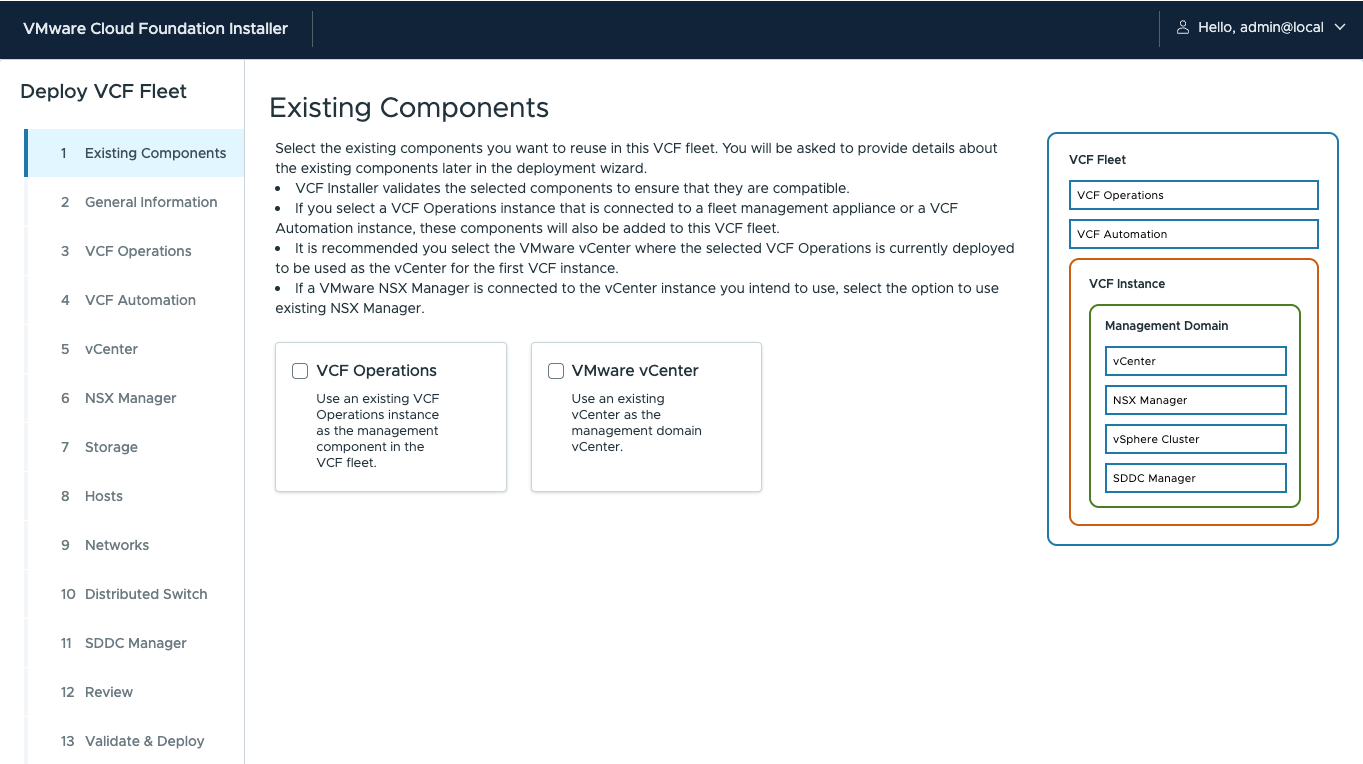
Nachfolgend führt der Wizard durch die nötigen Konfiguration für eine VCF 9.0 Fleet.
FQDN Lookup des VCF Installers:
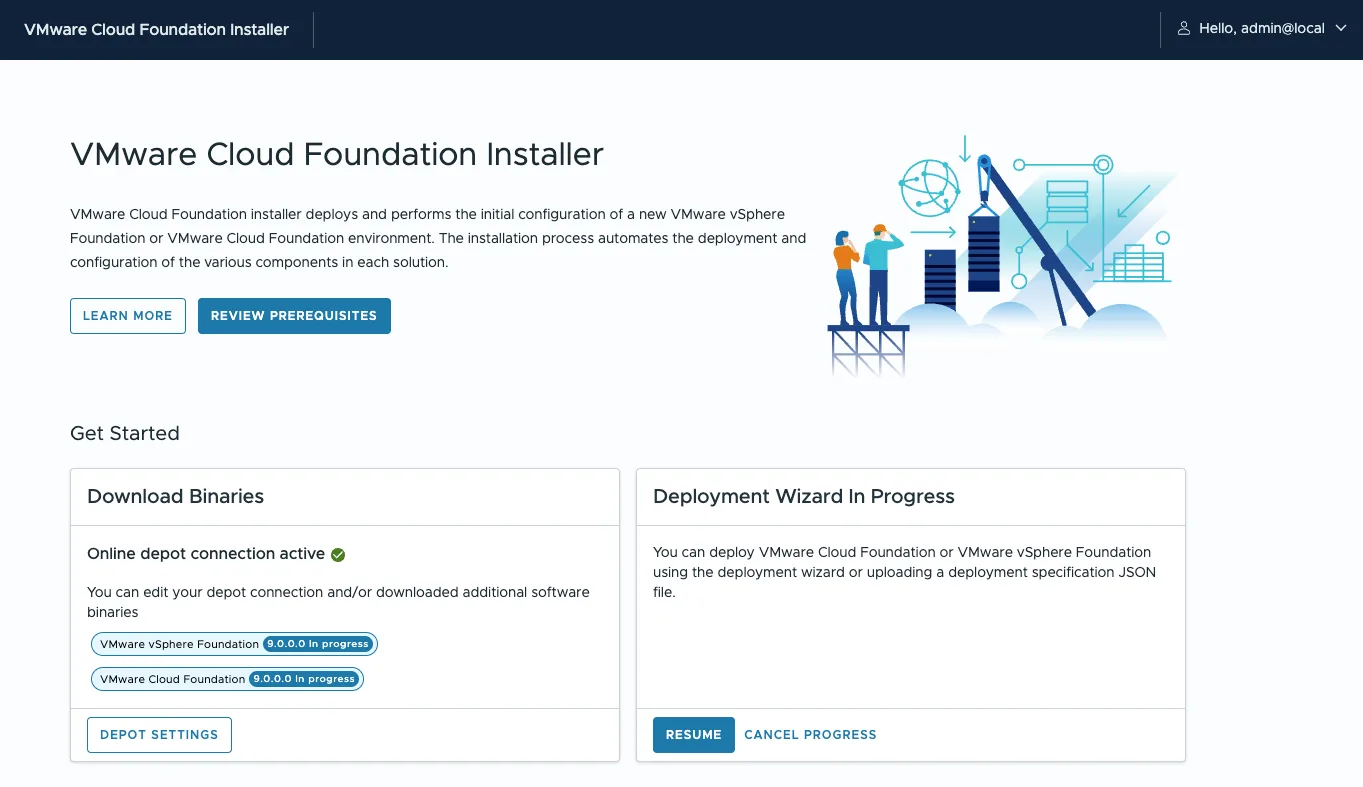
Wird der Wizard abgebrochen, werden die Daten gespeichert:
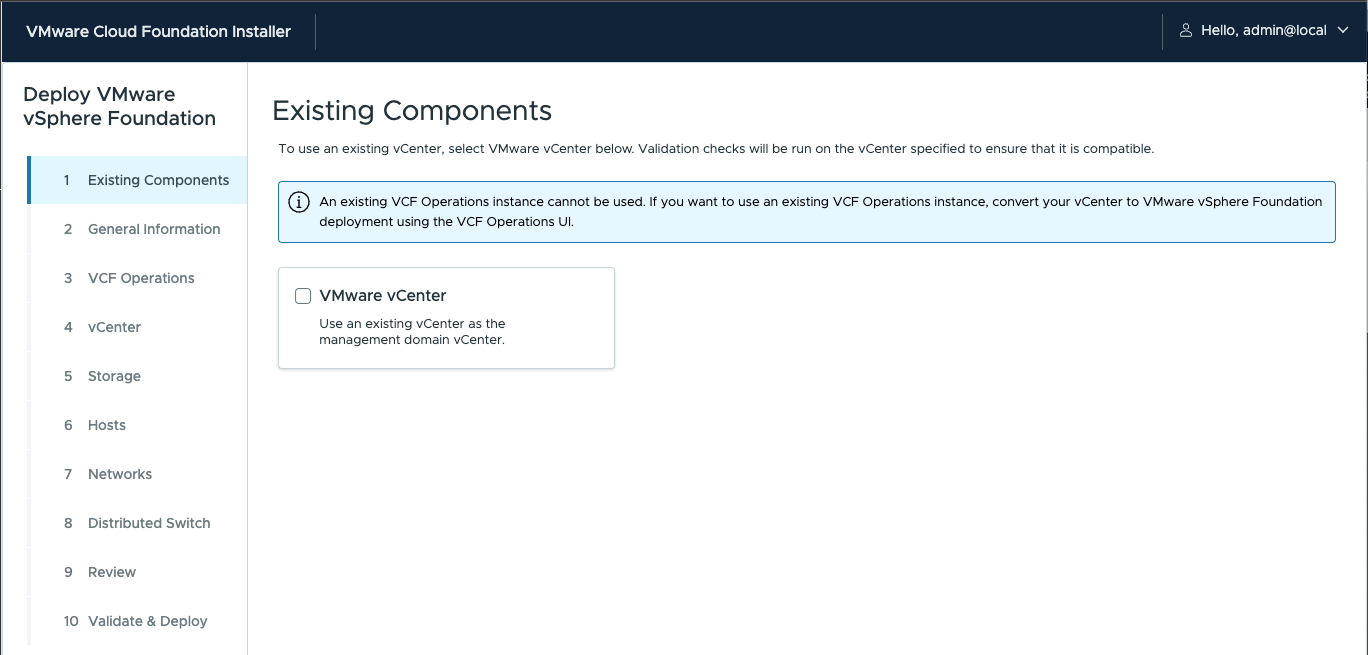
vSphere Foundation Deployment Wizard

Beim VVF Wizard steht keine Option für NSX und VCF Automation bereit, dazu muss der VCF Wizard verwendet werden.
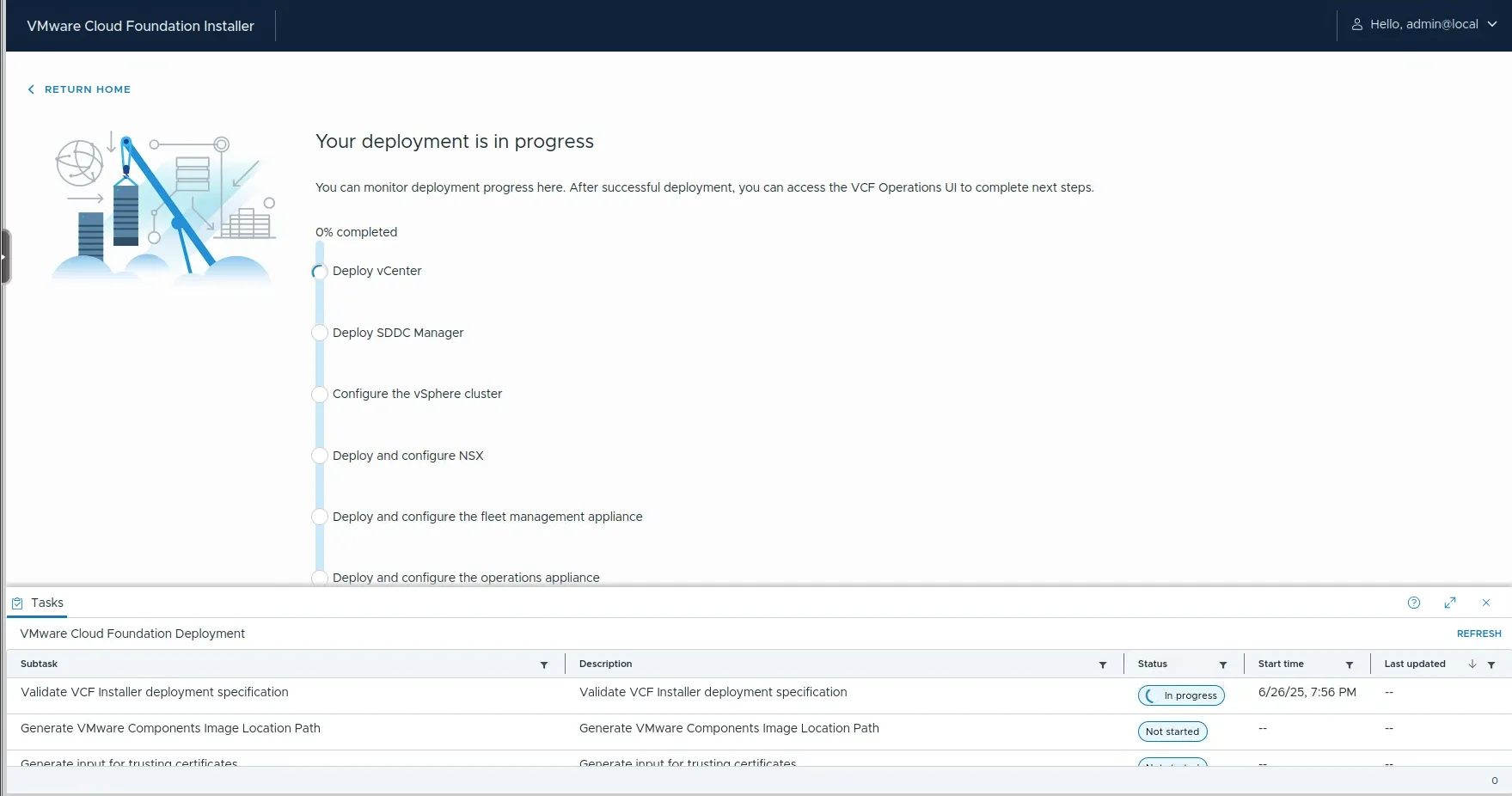
VCF Deployment via JSON

Beispiele für JSON Files haben wir auf GitHub veröffentlicht: https://github.com/soultecag/vcf-9/tree/main/vcf-installer
Fazit

Die Wizards für VVF und VCF Deployment sind sehr ausgereift, in den kommenden Tagen werden wir mehr rundum VCF und VVF 9.0 hier im Blog posten.

Hast du Fragen zum Update auf VVF oder VCF 9.0, sind wir gerne für dich da.
Passt ausserdem