build 7bbbddf7 | content blog-content@c8490fa · 338 posts | profiles 20 · corpus 267 | 0 skipped | | format
apiVersion: soultec.ch/v1kind: Postmetadata: name: automating-vcsa-backup-restore locale: de labels: author: dario-doerflinger series: scripting capability/automation: 1.78 vendor/vmware: 0.88 annotations: source: blog-content/posts/de/automating-vcsa-backup-restore.md route: /de/insights/automating-vcsa-backup-restore/ schema: /nerd/schema/posts.json markdown: /de/insights/automating-vcsa-backup-restore.mdspec: title: VCSA Backup & Restore automatisieren date: 2017-07-20 author: dario-doerflinger locale: de summary: >- In den VMware Communities hatte jemand Mühe, die Datenbank der VCSA zu sichern. Hier ist das Wrapper-Script, das ich um die beiden Python-Scripts von VMware herum geschrieben habe. capabilities: [automation] vendors: [vmware] series: scripting migrated: 2026-08-24 noticeKind: warning noticeText: >- Das Listing unten ist unvollständig. Beim WordPress-Export ging ein Heredoc in der Funktion writeEmail verloren, samt allem zwischen ihm und dem Hauptprogramm. Das Script läuft in dieser Form nicht. Die vollständige Fassung liegt auf GitHub. noticeHref: https://github.com/virtualFrog/PowerCLI-Scripts noticeLabel: Das Script auf GitHub translationReviewed: false draft: false sections: - body: | Ich bin kürzlich über einen Thread in den VMware Communities gestolpert, in dem jemand Mühe hatte, die Datenbank der VCSA zu sichern. Er nutzte das Script von jemand anderem, deshalb teile ich hier das Wrapper-Script, das ich um die beiden Python-Scripts herum geschrieben habe, die VMware in [KB 2091961](https://kb.vmware.com/kb/2091961) veröffentlicht hat. Update: Dieses Script liegt inzwischen auf [GitHub](https://github.com/virtualFrog/PowerCLI-Scripts). - heading:

Das Script

body: | ```bash #!/bin/bash #*************************************************************** # Get Options from the command line #*************************************************************** while getopts "b:r:h" options do case $options in b ) opt_b=$OPTARG;; r ) opt_r=$OPTARG;; h ) opt_h=1;; \? ) opt_h=1;; esac done ############################################### # bkp_rst.sh #============================================= # Name: bkp_rst.sh # Datum: 24.07.2017 # Ziel: Mache ein Backup der vCenter Appliance Datenbank, Restore die Datenbank # # Autor: Dario aka virtualFrog version="1.5" # # Changelog: # 0.1 dario Initial-Setup # 1.0 dario Testing, Testing, Testing # 1.1 dario Added dynamic filename & cleanUp Function # 1.2 dario Added local cleanup # 1.3 dario Changed local cleanup to delete all but most recent 3 files # 1.4 dario Added checkForErrors function and writeMail function # 1.5 dario Added CheckForErrors before every exit statement # Variablen # --------- #log-Variablen log=/var/log/vmware_backup_restore.log #Mail variabeln recipients="[email protected],[email protected]" #NFS-Parameter nfsmount="vcsa" nfsserver="" nfsoptions="nfs4" # Funktionen # ---------- function print_banner { echo " ___ __ ____ ___________ \ \/ // ___\ / ___/\__ \ \ /\ \___ \___ \ / __ \_ \_/ \___ >____ >(____ / \/ \/ \/ " echo "v$version" } function get_parameter { echo "GET_PARAMETER" if [ $opt_h ]; then print_help fi #-------------------------------------- # Check to see if -b was passed in #-------------------------------------- if [ $opt_b ]; then backup_string=$opt_b echo -e "\tBackup: $backup_string" echo "Backup: $backup_string" >> $log echo "" validate_backup_path filename=`hostname`-`date +%Y-%d-%m:%H:%M:%S`.bak todo="backup" echo "" elif [ $opt_r ]; then restore_string=$opt_r echo -e "\tRestore: $restore_string" echo "Restore: $restore_string" >> $log echo "" validate_restore_path todo="restore" echo "" else echo "warning: no parameters supplied." >> $log echo -e "\tKeine Parameter gefunden." print_help fi } function print_help { echo "Gueltige Parameter: -b -r " echo "" echo "To restore you should mount the volume ($nfsmount) on ($nfsserver) which this script copies the backups to" exit 0 } function init_log { echo `date` > $log echo "fzag_bkp_rst.sh in der Version $version auf `hostname -f`" >> $log echo "____________________________________________" >> $log #echo "Nun startet das Script in der Version $version" echo "" } function validate_backup_path { echo "VALIDATE BACKUP PATH" echo -e "\tChecking Backup Path: $backup_string" if [ ! -d "$backup_string" ]; then echo -e "\tDirectory did not exist. Creating.." mkdir -p $backup_string echo -e "\tDirectory created." else echo -e "\tDirectory does exist." fi echo "" } function validate_restore_path { echo "VALIDATE RESTORE PATH" echo -e "\tChecking Backup Path: $restore_string" if [ -f $restore_string ]; then echo -e "\tFile $restore_string exists." echo "File $restore_string exists." >> $log else echo -e "\tFile $restore_string does not exist. Exiting" echo "error: $restore_string does not exist." >> $log checkForErrors exit 1 fi echo "" } function check_python_scripts { echo "CHECK PYTHON SCRIPTS" echo -e "\tChecking if Python Scripts are available" DIR="$( cd "$( dirname "${BASH_SOURCE[0]}" )" && pwd )" if [ -f "$DIR/backup_lin.py" ]; then echo -e "\tBackup Script found, continue.." echo "script for backup found" >> $log if [ -f "$DIR/restore_lin.py" ]; then echo -e "\tRestore Script found, continue.." echo "script for restore found" >> $log else echo -e "\tNo restore script found, exit" echo "error: no python restore script found" >> $log checkForErrors exit 1 fi else echo -e "\tNo backup script found, exit" echo "error: no python backup scripts found" >> $log checkForErrors exit 1 fi echo "" } function create_backup { echo "CREATE BACKUP" echo -e "\tCreating the Backup in the file $backup_string/bk.bak:" DIR="$( cd "$( dirname "${BASH_SOURCE[0]}" )" && pwd )" echo `python $DIR/backup_lin.py -f $backup_string/$filename` >> $log if [ $? -ne 0 ]; then echo -e "\tError: Return code from backup job was not 0" echo "error: return code from backup job was not 0" >> $log checkForErrors exit 1 else if [ -f "$backup_string/$filename" ]; then echo -e "\tSuccess! Backup created." echo "success: backup created" >> $log fi fi echo "" } function restore_db { echo "RESTORE DB" echo -e "\tRestoring Database with supplied Backup-File: $restore_string" DIR="$( cd "$( dirname "${BASH_SOURCE[0]}" )" && pwd )" echo `python $DIR/restore_lin.py -f $restore_string` >> $log if [ $? -ne 0 ]; then echo -e "\tError: Return code from restore job was not 0" echo "error: return code from restore job was not 0" >> $log fi echo "" } function mountNFS { echo "MOUNT NFS" echo -e "\tMounting the given NFS Volume ($nfsmount) on server ($nfsserver)" if [[ ! -d /mnt/bkp ]]; then mkdir -p /mnt/bkp fi mount -t $nfsoptions $nfsserver:$nfsmount /mnt/bkp if [[ $? -ne 0 ]]; then echo -e "\tMount was not successful. Abort the operation" echo "mount was not successful" >> $log checkForErrors exit 1 fi echo "" return 0 } function copyBackup { echo "COPY BACKUP" echo -e "\tCopying Backup to NFS Mount" cp $backup_string/$filename /mnt/bkp/ if [[ $? -ne 0 ]]; then echo -e "\tCopy Operation was not successful. Abort the operation" echo "copy was not successful" >> $log checkForErrors exit 1 fi echo "" } function unMountNFS { echo "UMOUNT NFS" echo -e "\tUnmounting the NFS Mount" umount /mnt/bkp if [[ $? -ne 0 ]]; then echo -e "\tumount Operation was not successful." echo "umount was not successful" >> $log fi echo "" } function cleanUp { echo "CLEAN UP" echo -e "\tCleaning up Backups older than 4 days and all local files but the 3 most recent" find /mnt/bkp -mtime +4 -exec rm -rf {} \; if [[ $? -ne 0 ]]; then echo -e "\tNFS cleanUp Operation was not successful." echo "NFS cleanUp was not successful" >> $log fi cd $backup_string ls -t1 $backup_string |tail -n +3 | xargs rm if [[ $? -ne 0 ]]; then echo -e "\tLocal cleanUp Operation was not successful." echo "local cleanUp was not successful" >> $log fi echo "" } function writeEmail { echo "WRITE EMAIL" echo -e "\tSending the logfile as a mail to $recipients" subject="VCSA Backup has run into a error" from="root@`hostname -f`" body=`cat $log` /usr/sbin/sendmail "$recipients" <> $log service vmware-vdcs stop >> $log restore_db service-control --start vmware-vpxd >> $log service-control --start vmware-vdcs >> $log unMountNFS checkForErrors fi ``` - heading:

Voraussetzungen

body: | Das Script erwartet die Python-Scripts aus [KB 2091961](https://kb.vmware.com/kb/2091961) im selben Verzeichnis. Fehlen sie, bricht es ab. - heading:

Verwendung

body: | Auch wenn ich mir die Mühe gemacht habe, eine Syntax-Hilfe einzubauen, das Script zeigt dir also ohne Parameter, welche du verwenden sollst, sage ich hier genau, wie du es benutzt. Als Erstes trägst du die Variablen für den NFS Server und den Mount ein, auf dem das Backup landen soll: ```bash #NFS-Parameter nfsmount="vcsa" nfsserver="192.168.1.1" nfsoptions="nfs4" ``` ### Backup ```bash ./bkp_rst_1.2.sh -b /tmp/backup ``` Das legt das Verzeichnis an, falls es nicht existiert, und behält einige Backups lokal. Eine Aufräumfunktion löscht alles, was älter als vier Tage ist. ### Restore ```bash ./bkp_rst_1.2.sh -r /tmp/backup/bk.bak ``` Für einen Restore gibst du die Datei an, aus der wiederhergestellt werden soll. Liegt sie auf dem NFS Server, sagt dir das Script ohne Parameter, welcher NFS Server und welcher Mount hinterlegt sind. ### Crontab Das Script ist als Cronjob gedacht. Nimm also «crontab -e» und füge diese Zeile hinzu: ```bash 0 * * * * /bin/bash /usr/bin/bkp_rst_1.2.sh -b /tmp/backup ``` **Achtung bei vSphere 6.5:** In der VCSA 6.5 GA gibt es einen Fehler, der Cron am Ausführen von Scripts hindert. Du musst die Datei «/etc/pam.d/crond» anpassen: Ändere die drei Verweise auf «password-auth» in «system-auth», dann läuft es. Ich hoffe, das wird in Update 1 behoben. Update: In vSphere 6.5 Update 1 GA ist es nicht behoben, vielleicht kommt der Fix in einem Patch. Wenn du dabei Hilfe brauchst, melde dich auf Twitter oder schreib einen Kommentar. So sieht die Ausgabe aus, wenn du das Script von Hand startest: ![Screen Shot 2017-07-20 at 10.18.06](/blog-assets/automating-vcsa-backup-restore/01.webp) Und so sieht sie ohne Parameter aus: ![Screen Shot 2017-07-20 at 10.18.24](/blog-assets/automating-vcsa-backup-restore/02.webp) - heading:
Update

body: | Ich habe das Script eben auf Version 1.5 gehoben. Es räumt lokal besser auf, behält also nur die drei neuesten Dateien, prüft auf Fehler und schickt eine Mail, wenn im Log ein Fehler steht.status: corpus: 267 alsoLike: - {ref: posts/vmware-explore-las-vegas-hackathon-2025, score: 1.00} - {ref: posts/vmware-hackathon-2024-project, score: 1.00} - {ref: solutions/vmware/vmware-cloud-foundation/addon/application-services, score: 0.60}
{ "apiVersion": "soultec.ch/v1", "kind": "Post", "metadata": { "name": "automating-vcsa-backup-restore", "locale": "de", "labels": { "author": "dario-doerflinger", "series": "scripting", "capability/automation": "1.78", "vendor/vmware": "0.88" }, "annotations": { "source": "blog-content/posts/de/automating-vcsa-backup-restore.md", "route": "/de/insights/automating-vcsa-backup-restore/", "schema": "/nerd/schema/posts.json", "markdown": "/de/insights/automating-vcsa-backup-restore.md" } }, "spec": { "title": "VCSA Backup & Restore automatisieren", "date": "2017-07-20", "author": "dario-doerflinger", "locale": "de", "summary": "In den VMware Communities hatte jemand Mühe, die Datenbank der VCSA zu sichern. Hier ist das Wrapper-Script, das ich um die beiden Python-Scripts von VMware herum geschrieben habe.", "capabilities": [ "automation" ], "vendors": [ "vmware" ], "series": "scripting", "migrated": "2026-08-24", "noticeKind": "warning", "noticeText": "Das Listing unten ist unvollständig. Beim WordPress-Export ging ein Heredoc in der Funktion writeEmail verloren, samt allem zwischen ihm und dem Hauptprogramm. Das Script läuft in dieser Form nicht. Die vollständige Fassung liegt auf GitHub.", "noticeHref": "https://github.com/virtualFrog/PowerCLI-Scripts", "noticeLabel": "Das Script auf GitHub", "translationReviewed": false, "draft": false }, "sections": [ { "body": "Ich bin kürzlich über einen Thread in den VMware Communities gestolpert, in dem jemand Mühe hatte, die Datenbank der VCSA zu sichern. Er nutzte das Script von jemand anderem, deshalb teile ich hier das Wrapper-Script, das ich um die beiden Python-Scripts herum geschrieben habe, die VMware in [KB 2091961](https://kb.vmware.com/kb/2091961) veröffentlicht hat.\n\nUpdate: Dieses Script liegt inzwischen auf [GitHub](https://github.com/virtualFrog/PowerCLI-Scripts)." }, { "heading": "

Das Script

",
"body": "```bash\n#!/bin/bash\n\n#***************************************************************\n# Get Options from the command line\n#***************************************************************\nwhile getopts \"b:r:h\" options\ndo\ncase $options in\n b ) opt_b=$OPTARG;;\n r ) opt_r=$OPTARG;;\n h ) opt_h=1;;\n \\? ) opt_h=1;;\nesac\ndone\n\n###############################################\n# bkp_rst.sh\n#=============================================\n# Name: bkp_rst.sh\n# Datum: 24.07.2017\n# Ziel: Mache ein Backup der vCenter Appliance Datenbank, Restore die Datenbank\n#\n# Autor: Dario aka virtualFrog\nversion=\"1.5\"\n#\n# Changelog:\n# 0.1 dario Initial-Setup\n# 1.0 dario Testing, Testing, Testing\n# 1.1 dario Added dynamic filename & cleanUp Function\n# 1.2 dario Added local cleanup\n# 1.3 dario Changed local cleanup to delete all but most recent 3 files\n# 1.4 dario Added checkForErrors function and writeMail function\n# 1.5 dario Added CheckForErrors before every exit statement\n\n# Variablen\n# ---------\n\n#log-Variablen\nlog=/var/log/vmware_backup_restore.log\n\n#Mail variabeln\nrecipients=\"[email protected],[email protected]\"\n\n#NFS-Parameter\nnfsmount=\"vcsa\"\nnfsserver=\"\"\nnfsoptions=\"nfs4\"\n\n# Funktionen\n# ----------\n\nfunction print_banner\n{\n echo \"\n\n___ __ ____ ___________\n\\ \\/ // ___\\ / ___/\\__ \\\n\n \\ /\\ \\___ \\___ \\ / __ \\_\n \\_/ \\___ >____ >(____ /\n \\/ \\/ \\/\n \"\necho \"v$version\"\n}\n\nfunction get_parameter\n{\n echo \"GET_PARAMETER\"\n\n if [ $opt_h ]; then print_help\n fi\n\n #--------------------------------------\n # Check to see if -b was passed in\n #--------------------------------------\n if [ $opt_b ]; then\n backup_string=$opt_b\n echo -e \"\\tBackup: $backup_string\"\n echo \"Backup: $backup_string\" >> $log\n echo \"\"\n validate_backup_path\n filename=`hostname`-`date +%Y-%d-%m:%H:%M:%S`.bak\n todo=\"backup\"\n echo \"\"\n elif [ $opt_r ]; then\n restore_string=$opt_r\n echo -e \"\\tRestore: $restore_string\"\n echo \"Restore: $restore_string\" >> $log\n echo \"\"\n validate_restore_path\n todo=\"restore\"\n echo \"\"\n else\n echo \"warning: no parameters supplied.\" >> $log\n echo -e \"\\tKeine Parameter gefunden.\"\n print_help\n fi\n\n}\n\nfunction print_help\n{\n echo \"Gueltige Parameter: -b -r \"\n echo \"\"\n echo \"To restore you should mount the volume ($nfsmount) on ($nfsserver) which this script copies the backups to\"\n exit 0\n}\n\nfunction init_log\n{\n\n echo `date` > $log\n echo \"fzag_bkp_rst.sh in der Version $version auf `hostname -f`\" >> $log\n echo \"____________________________________________\" >> $log\n\n #echo \"Nun startet das Script in der Version $version\"\n echo \"\"\n}\nfunction validate_backup_path\n{\n echo \"VALIDATE BACKUP PATH\"\n echo -e \"\\tChecking Backup Path: $backup_string\"\n if [ ! -d \"$backup_string\" ]; then\n echo -e \"\\tDirectory did not exist. Creating..\"\n mkdir -p $backup_string\n echo -e \"\\tDirectory created.\"\n else\n echo -e \"\\tDirectory does exist.\"\n fi\n echo \"\"\n}\n\nfunction validate_restore_path\n{\n echo \"VALIDATE RESTORE PATH\"\n echo -e \"\\tChecking Backup Path: $restore_string\"\n if [ -f $restore_string ];\n then\n echo -e \"\\tFile $restore_string exists.\"\n echo \"File $restore_string exists.\" >> $log\n else\n echo -e \"\\tFile $restore_string does not exist. Exiting\"\n echo \"error: $restore_string does not exist.\" >> $log\n checkForErrors\n exit 1\n fi\n echo \"\"\n}\nfunction check_python_scripts\n{\n echo \"CHECK PYTHON SCRIPTS\"\n echo -e \"\\tChecking if Python Scripts are available\"\n DIR=\"$( cd \"$( dirname \"${BASH_SOURCE[0]}\" )\" && pwd )\"\n if [ -f \"$DIR/backup_lin.py\" ]; then\n echo -e \"\\tBackup Script found, continue..\"\n echo \"script for backup found\" >> $log\n if [ -f \"$DIR/restore_lin.py\" ]; then\n echo -e \"\\tRestore Script found, continue..\"\n echo \"script for restore found\" >> $log\n else\n echo -e \"\\tNo restore script found, exit\"\n echo \"error: no python restore script found\" >> $log\n checkForErrors\n exit 1\n fi\n else\n echo -e \"\\tNo backup script found, exit\"\n echo \"error: no python backup scripts found\" >> $log\n checkForErrors\n exit 1\n fi\n echo \"\"\n}\n\nfunction create_backup\n{\n echo \"CREATE BACKUP\"\n echo -e \"\\tCreating the Backup in the file $backup_string/bk.bak:\"\n DIR=\"$( cd \"$( dirname \"${BASH_SOURCE[0]}\" )\" && pwd )\"\n\n echo `python $DIR/backup_lin.py -f $backup_string/$filename` >> $log\n if [ $? -ne 0 ]; then\n echo -e \"\\tError: Return code from backup job was not 0\"\n echo \"error: return code from backup job was not 0\" >> $log\n checkForErrors\n exit 1\n else\n if [ -f \"$backup_string/$filename\" ]; then\n echo -e \"\\tSuccess! Backup created.\"\n echo \"success: backup created\" >> $log\n fi\n fi\n echo \"\"\n}\n\nfunction restore_db\n{\n echo \"RESTORE DB\"\n echo -e \"\\tRestoring Database with supplied Backup-File: $restore_string\"\n DIR=\"$( cd \"$( dirname \"${BASH_SOURCE[0]}\" )\" && pwd )\"\n echo `python $DIR/restore_lin.py -f $restore_string` >> $log\n if [ $? -ne 0 ]; then\n echo -e \"\\tError: Return code from restore job was not 0\"\n echo \"error: return code from restore job was not 0\" >> $log\n fi\n echo \"\"\n\n}\n\nfunction mountNFS\n{\n echo \"MOUNT NFS\"\n echo -e \"\\tMounting the given NFS Volume ($nfsmount) on server ($nfsserver)\"\n if [[ ! -d /mnt/bkp ]]; then\n mkdir -p /mnt/bkp\n fi\n\n mount -t $nfsoptions $nfsserver:$nfsmount /mnt/bkp\n if [[ $? -ne 0 ]]; then\n echo -e \"\\tMount was not successful. Abort the operation\"\n echo \"mount was not successful\" >> $log\n checkForErrors\n exit 1\n fi\n echo \"\"\n return 0\n}\n\nfunction copyBackup\n{\n echo \"COPY BACKUP\"\n echo -e \"\\tCopying Backup to NFS Mount\"\n cp $backup_string/$filename /mnt/bkp/\n if [[ $? -ne 0 ]]; then\n echo -e \"\\tCopy Operation was not successful. Abort the operation\"\n echo \"copy was not successful\" >> $log\n checkForErrors\n exit 1\n fi\n echo \"\"\n}\n\nfunction unMountNFS\n{\n echo \"UMOUNT NFS\"\n echo -e \"\\tUnmounting the NFS Mount\"\n umount /mnt/bkp\n if [[ $? -ne 0 ]]; then\n echo -e \"\\tumount Operation was not successful.\"\n echo \"umount was not successful\" >> $log\n fi\n echo \"\"\n}\n\nfunction cleanUp\n{\n echo \"CLEAN UP\"\n echo -e \"\\tCleaning up Backups older than 4 days and all local files but the 3 most recent\"\n\n find /mnt/bkp -mtime +4 -exec rm -rf {} \\;\n if [[ $? -ne 0 ]]; then\n echo -e \"\\tNFS cleanUp Operation was not successful.\"\n echo \"NFS cleanUp was not successful\" >> $log\n fi\n\n cd $backup_string\n ls -t1 $backup_string |tail -n +3 | xargs rm\n if [[ $? -ne 0 ]]; then\n echo -e \"\\tLocal cleanUp Operation was not successful.\"\n echo \"local cleanUp was not successful\" >> $log\n fi\n echo \"\"\n}\n\nfunction writeEmail\n{\n echo \"WRITE EMAIL\"\n echo -e \"\\tSending the logfile as a mail to $recipients\"\n subject=\"VCSA Backup has run into a error\"\n from=\"root@`hostname -f`\"\n body=`cat $log`\n\n /usr/sbin/sendmail \"$recipients\" <> $log\n service vmware-vdcs stop >> $log\n restore_db\n service-control --start vmware-vpxd >> $log\n service-control --start vmware-vdcs >> $log\n unMountNFS\n checkForErrors\nfi\n```" }, { "heading": "

Voraussetzungen

",
"body": "Das Script erwartet die Python-Scripts aus [KB 2091961](https://kb.vmware.com/kb/2091961) im selben Verzeichnis. Fehlen sie, bricht es ab." }, { "heading": "

Verwendung

",
"body": "Auch wenn ich mir die Mühe gemacht habe, eine Syntax-Hilfe einzubauen, das Script zeigt dir also ohne Parameter, welche du verwenden sollst, sage ich hier genau, wie du es benutzt.\n\nAls Erstes trägst du die Variablen für den NFS Server und den Mount ein, auf dem das Backup landen soll:\n\n```bash\n#NFS-Parameter\nnfsmount=\"vcsa\"\nnfsserver=\"192.168.1.1\"\nnfsoptions=\"nfs4\"\n```\n\n### Backup\n\n```bash\n./bkp_rst_1.2.sh -b /tmp/backup\n```\n\nDas legt das Verzeichnis an, falls es nicht existiert, und behält einige Backups lokal. Eine Aufräumfunktion löscht alles, was älter als vier Tage ist.\n\n### Restore\n\n```bash\n./bkp_rst_1.2.sh -r /tmp/backup/bk.bak\n```\n\nFür einen Restore gibst du die Datei an, aus der wiederhergestellt werden soll. Liegt sie auf dem NFS Server, sagt dir das Script ohne Parameter, welcher NFS Server und welcher Mount hinterlegt sind.\n\n### Crontab\n\nDas Script ist als Cronjob gedacht. Nimm also «crontab -e» und füge diese Zeile hinzu:\n\n```bash\n0 * * * * /bin/bash /usr/bin/bkp_rst_1.2.sh -b /tmp/backup\n```\n\n**Achtung bei vSphere 6.5:** \nIn der VCSA 6.5 GA gibt es einen Fehler, der Cron am Ausführen von Scripts hindert. \nDu musst die Datei «/etc/pam.d/crond» anpassen: Ändere die drei Verweise auf «password-auth» in «system-auth», dann läuft es. Ich hoffe, das wird in Update 1 behoben.\n\nUpdate: In vSphere 6.5 Update 1 GA ist es nicht behoben, vielleicht kommt der Fix in einem Patch.\n\nWenn du dabei Hilfe brauchst, melde dich auf Twitter oder schreib einen Kommentar.\n\nSo sieht die Ausgabe aus, wenn du das Script von Hand startest: \n![Screen Shot 2017-07-20 at 10.18.06](/blog-assets/automating-vcsa-backup-restore/01.webp)\n\nUnd so sieht sie ohne Parameter aus: \n![Screen Shot 2017-07-20 at 10.18.24](/blog-assets/automating-vcsa-backup-restore/02.webp)" }, { "heading": "

Update

",
"body": "Ich habe das Script eben auf Version 1.5 gehoben. Es räumt lokal besser auf, behält also nur die drei neuesten Dateien, prüft auf Fehler und schickt eine Mail, wenn im Log ein Fehler steht." } ], "status": { "corpus": 267, "alsoLike": [ { "ref": "posts/vmware-explore-las-vegas-hackathon-2025", "score": "1.00" }, { "ref": "posts/vmware-hackathon-2024-project", "score": "1.00" }, { "ref": "solutions/vmware/vmware-cloud-foundation/addon/application-services", "score": "0.60" } ] }}
apiVersion = "soultec.ch/v1"kind = "Post"[metadata]name = "automating-vcsa-backup-restore"locale = "de"[metadata.labels]author = "dario-doerflinger"series = "scripting""capability/automation" = "1.78""vendor/vmware" = "0.88"[metadata.annotations]source = "blog-content/posts/de/automating-vcsa-backup-restore.md"route = "/de/insights/automating-vcsa-backup-restore/"schema = "/nerd/schema/posts.json"markdown = "/de/insights/automating-vcsa-backup-restore.md"[spec]title = "VCSA Backup & Restore automatisieren"date = 2017-07-20author = "dario-doerflinger"locale = "de"summary = "In den VMware Communities hatte jemand Mühe, die Datenbank der VCSA zu sichern. Hier ist das Wrapper-Script, das ich um die beiden Python-Scripts von VMware herum geschrieben habe."capabilities = ["automation"]vendors = ["vmware"]series = "scripting"migrated = 2026-08-24noticeKind = "warning"noticeText = "Das Listing unten ist unvollständig. Beim WordPress-Export ging ein Heredoc in der Funktion writeEmail verloren, samt allem zwischen ihm und dem Hauptprogramm. Das Script läuft in dieser Form nicht. Die vollständige Fassung liegt auf GitHub."noticeHref = "https://github.com/virtualFrog/PowerCLI-Scripts"noticeLabel = "Das Script auf GitHub"translationReviewed = falsedraft = false[[sections]]body = '''Ich bin kürzlich über einen Thread in den VMware Communities gestolpert, in dem jemand Mühe hatte, die Datenbank der VCSA zu sichern. Er nutzte das Script von jemand anderem, deshalb teile ich hier das Wrapper-Script, das ich um die beiden Python-Scripts herum geschrieben habe, die VMware in [KB 2091961](https://kb.vmware.com/kb/2091961) veröffentlicht hat.Update: Dieses Script liegt inzwischen auf [GitHub](https://github.com/virtualFrog/PowerCLI-Scripts).'''[[sections]]heading = "

Das Script

"
body = '''```bash#!/bin/bash#***************************************************************# Get Options from the command line#***************************************************************while getopts "b:r:h" optionsdocase $options in b ) opt_b=$OPTARG;; r ) opt_r=$OPTARG;; h ) opt_h=1;; \? ) opt_h=1;;esacdone################################################ bkp_rst.sh#=============================================# Name: bkp_rst.sh# Datum: 24.07.2017# Ziel: Mache ein Backup der vCenter Appliance Datenbank, Restore die Datenbank## Autor: Dario aka virtualFrogversion="1.5"## Changelog:# 0.1 dario Initial-Setup# 1.0 dario Testing, Testing, Testing# 1.1 dario Added dynamic filename & cleanUp Function# 1.2 dario Added local cleanup# 1.3 dario Changed local cleanup to delete all but most recent 3 files# 1.4 dario Added checkForErrors function and writeMail function# 1.5 dario Added CheckForErrors before every exit statement# Variablen# ---------#log-Variablenlog=/var/log/vmware_backup_restore.log#Mail variabelnrecipients="[email protected],[email protected]"#NFS-Parameternfsmount="vcsa"nfsserver=""nfsoptions="nfs4"# Funktionen# ----------function print_banner{ echo "___ __ ____ ___________\ \/ // ___\ / ___/\__ \ \ /\ \___ \___ \ / __ \_ \_/ \___ >____ >(____ / \/ \/ \/ "echo "v$version"}function get_parameter{ echo "GET_PARAMETER" if [ $opt_h ]; then print_help fi #-------------------------------------- # Check to see if -b was passed in #-------------------------------------- if [ $opt_b ]; then backup_string=$opt_b echo -e "\tBackup: $backup_string" echo "Backup: $backup_string" >> $log echo "" validate_backup_path filename=`hostname`-`date +%Y-%d-%m:%H:%M:%S`.bak todo="backup" echo "" elif [ $opt_r ]; then restore_string=$opt_r echo -e "\tRestore: $restore_string" echo "Restore: $restore_string" >> $log echo "" validate_restore_path todo="restore" echo "" else echo "warning: no parameters supplied." >> $log echo -e "\tKeine Parameter gefunden." print_help fi}function print_help{ echo "Gueltige Parameter: -b -r " echo "" echo "To restore you should mount the volume ($nfsmount) on ($nfsserver) which this script copies the backups to" exit 0}function init_log{ echo `date` > $log echo "fzag_bkp_rst.sh in der Version $version auf `hostname -f`" >> $log echo "____________________________________________" >> $log #echo "Nun startet das Script in der Version $version" echo ""}function validate_backup_path{ echo "VALIDATE BACKUP PATH" echo -e "\tChecking Backup Path: $backup_string" if [ ! -d "$backup_string" ]; then echo -e "\tDirectory did not exist. Creating.." mkdir -p $backup_string echo -e "\tDirectory created." else echo -e "\tDirectory does exist." fi echo ""}function validate_restore_path{ echo "VALIDATE RESTORE PATH" echo -e "\tChecking Backup Path: $restore_string" if [ -f $restore_string ]; then echo -e "\tFile $restore_string exists." echo "File $restore_string exists." >> $log else echo -e "\tFile $restore_string does not exist. Exiting" echo "error: $restore_string does not exist." >> $log checkForErrors exit 1 fi echo ""}function check_python_scripts{ echo "CHECK PYTHON SCRIPTS" echo -e "\tChecking if Python Scripts are available" DIR="$( cd "$( dirname "${BASH_SOURCE[0]}" )" && pwd )" if [ -f "$DIR/backup_lin.py" ]; then echo -e "\tBackup Script found, continue.." echo "script for backup found" >> $log if [ -f "$DIR/restore_lin.py" ]; then echo -e "\tRestore Script found, continue.." echo "script for restore found" >> $log else echo -e "\tNo restore script found, exit" echo "error: no python restore script found" >> $log checkForErrors exit 1 fi else echo -e "\tNo backup script found, exit" echo "error: no python backup scripts found" >> $log checkForErrors exit 1 fi echo ""}function create_backup{ echo "CREATE BACKUP" echo -e "\tCreating the Backup in the file $backup_string/bk.bak:" DIR="$( cd "$( dirname "${BASH_SOURCE[0]}" )" && pwd )" echo `python $DIR/backup_lin.py -f $backup_string/$filename` >> $log if [ $? -ne 0 ]; then echo -e "\tError: Return code from backup job was not 0" echo "error: return code from backup job was not 0" >> $log checkForErrors exit 1 else if [ -f "$backup_string/$filename" ]; then echo -e "\tSuccess! Backup created." echo "success: backup created" >> $log fi fi echo ""}function restore_db{ echo "RESTORE DB" echo -e "\tRestoring Database with supplied Backup-File: $restore_string" DIR="$( cd "$( dirname "${BASH_SOURCE[0]}" )" && pwd )" echo `python $DIR/restore_lin.py -f $restore_string` >> $log if [ $? -ne 0 ]; then echo -e "\tError: Return code from restore job was not 0" echo "error: return code from restore job was not 0" >> $log fi echo ""}function mountNFS{ echo "MOUNT NFS" echo -e "\tMounting the given NFS Volume ($nfsmount) on server ($nfsserver)" if [[ ! -d /mnt/bkp ]]; then mkdir -p /mnt/bkp fi mount -t $nfsoptions $nfsserver:$nfsmount /mnt/bkp if [[ $? -ne 0 ]]; then echo -e "\tMount was not successful. Abort the operation" echo "mount was not successful" >> $log checkForErrors exit 1 fi echo "" return 0}function copyBackup{ echo "COPY BACKUP" echo -e "\tCopying Backup to NFS Mount" cp $backup_string/$filename /mnt/bkp/ if [[ $? -ne 0 ]]; then echo -e "\tCopy Operation was not successful. Abort the operation" echo "copy was not successful" >> $log checkForErrors exit 1 fi echo ""}function unMountNFS{ echo "UMOUNT NFS" echo -e "\tUnmounting the NFS Mount" umount /mnt/bkp if [[ $? -ne 0 ]]; then echo -e "\tumount Operation was not successful." echo "umount was not successful" >> $log fi echo ""}function cleanUp{ echo "CLEAN UP" echo -e "\tCleaning up Backups older than 4 days and all local files but the 3 most recent" find /mnt/bkp -mtime +4 -exec rm -rf {} \; if [[ $? -ne 0 ]]; then echo -e "\tNFS cleanUp Operation was not successful." echo "NFS cleanUp was not successful" >> $log fi cd $backup_string ls -t1 $backup_string |tail -n +3 | xargs rm if [[ $? -ne 0 ]]; then echo -e "\tLocal cleanUp Operation was not successful." echo "local cleanUp was not successful" >> $log fi echo ""}function writeEmail{ echo "WRITE EMAIL" echo -e "\tSending the logfile as a mail to $recipients" subject="VCSA Backup has run into a error" from="root@`hostname -f`" body=`cat $log` /usr/sbin/sendmail "$recipients" <> $log service vmware-vdcs stop >> $log restore_db service-control --start vmware-vpxd >> $log service-control --start vmware-vdcs >> $log unMountNFS checkForErrorsfi```'''[[sections]]heading = "

Voraussetzungen

"
body = "Das Script erwartet die Python-Scripts aus [KB 2091961](https://kb.vmware.com/kb/2091961) im selben Verzeichnis. Fehlen sie, bricht es ab."[[sections]]heading = "

Verwendung

"
body = '''Auch wenn ich mir die Mühe gemacht habe, eine Syntax-Hilfe einzubauen, das Script zeigt dir also ohne Parameter, welche du verwenden sollst, sage ich hier genau, wie du es benutzt.Als Erstes trägst du die Variablen für den NFS Server und den Mount ein, auf dem das Backup landen soll:```bash#NFS-Parameternfsmount="vcsa"nfsserver="192.168.1.1"nfsoptions="nfs4"```### Backup```bash./bkp_rst_1.2.sh -b /tmp/backup```Das legt das Verzeichnis an, falls es nicht existiert, und behält einige Backups lokal. Eine Aufräumfunktion löscht alles, was älter als vier Tage ist.### Restore```bash./bkp_rst_1.2.sh -r /tmp/backup/bk.bak```Für einen Restore gibst du die Datei an, aus der wiederhergestellt werden soll. Liegt sie auf dem NFS Server, sagt dir das Script ohne Parameter, welcher NFS Server und welcher Mount hinterlegt sind.### CrontabDas Script ist als Cronjob gedacht. Nimm also «crontab -e» und füge diese Zeile hinzu:```bash0 * * * * /bin/bash /usr/bin/bkp_rst_1.2.sh -b /tmp/backup```**Achtung bei vSphere 6.5:** In der VCSA 6.5 GA gibt es einen Fehler, der Cron am Ausführen von Scripts hindert. Du musst die Datei «/etc/pam.d/crond» anpassen: Ändere die drei Verweise auf «password-auth» in «system-auth», dann läuft es. Ich hoffe, das wird in Update 1 behoben.Update: In vSphere 6.5 Update 1 GA ist es nicht behoben, vielleicht kommt der Fix in einem Patch.Wenn du dabei Hilfe brauchst, melde dich auf Twitter oder schreib einen Kommentar.So sieht die Ausgabe aus, wenn du das Script von Hand startest: ![Screen Shot 2017-07-20 at 10.18.06](/blog-assets/automating-vcsa-backup-restore/01.webp)Und so sieht sie ohne Parameter aus: ![Screen Shot 2017-07-20 at 10.18.24](/blog-assets/automating-vcsa-backup-restore/02.webp)'''[[sections]]heading = "

Update

"
body = "Ich habe das Script eben auf Version 1.5 gehoben. Es räumt lokal besser auf, behält also nur die drei neuesten Dateien, prüft auf Fehler und schickt eine Mail, wenn im Log ein Fehler steht."[status]corpus = 267[[status.alsoLike]]ref = "posts/vmware-explore-las-vegas-hackathon-2025"score = "1.00"[[status.alsoLike]]ref = "posts/vmware-hackathon-2024-project"score = "1.00"[[status.alsoLike]]ref = "solutions/vmware/vmware-cloud-foundation/addon/application-services"score = "0.60"
<?xml version="1.0" encoding="UTF-8"?><manifest kind="Post"> <apiVersion>soultec.ch/v1</apiVersion> <metadata> <name>automating-vcsa-backup-restore</name> <locale>de</locale> <labels> <author>dario-doerflinger</author> <series>scripting</series> <entry key="capability/automation">1.78</entry> <entry key="vendor/vmware">0.88</entry> </labels> <annotations> <source>blog-content/posts/de/automating-vcsa-backup-restore.md</source> <route>/de/insights/automating-vcsa-backup-restore/</route> <schema>/nerd/schema/posts.json</schema> <markdown>/de/insights/automating-vcsa-backup-restore.md</markdown> </annotations> </metadata> <spec> <title>VCSA Backup &amp; Restore automatisieren</title> <date>2017-07-20</date> <author>dario-doerflinger</author> <locale>de</locale> <summary>In den VMware Communities hatte jemand Mühe, die Datenbank der VCSA zu sichern. Hier ist das Wrapper-Script, das ich um die beiden Python-Scripts von VMware herum geschrieben habe.</summary> <capabilities> <item>automation</item> </capabilities> <vendors> <item>vmware</item> </vendors> <series>scripting</series> <migrated>2026-08-24</migrated> <noticeKind>warning</noticeKind> <noticeText>Das Listing unten ist unvollständig. Beim WordPress-Export ging ein Heredoc in der Funktion writeEmail verloren, samt allem zwischen ihm und dem Hauptprogramm. Das Script läuft in dieser Form nicht. Die vollständige Fassung liegt auf GitHub.</noticeText> <noticeHref>https://github.com/virtualFrog/PowerCLI-Scripts</noticeHref> <noticeLabel>Das Script auf GitHub</noticeLabel> <translationReviewed>false</translationReviewed> <draft>false</draft> </spec> <sections> <section> <body>Ich bin kürzlich über einen Thread in den VMware Communities gestolpert, in dem jemand Mühe hatte, die Datenbank der VCSA zu sichern. Er nutzte das Script von jemand anderem, deshalb teile ich hier das Wrapper-Script, das ich um die beiden Python-Scripts herum geschrieben habe, die VMware in [KB 2091961](https://kb.vmware.com/kb/2091961) veröffentlicht hat.Update: Dieses Script liegt inzwischen auf [GitHub](https://github.com/virtualFrog/PowerCLI-Scripts). </body> </section> <section> <heading>

Das Script

</heading>
<body>```bash#!/bin/bash#***************************************************************# Get Options from the command line#***************************************************************while getopts "b:r:h" optionsdocase $options in b ) opt_b=$OPTARG;; r ) opt_r=$OPTARG;; h ) opt_h=1;; \? ) opt_h=1;;esacdone################################################ bkp_rst.sh#=============================================# Name: bkp_rst.sh# Datum: 24.07.2017# Ziel: Mache ein Backup der vCenter Appliance Datenbank, Restore die Datenbank## Autor: Dario aka virtualFrogversion="1.5"## Changelog:# 0.1 dario Initial-Setup# 1.0 dario Testing, Testing, Testing# 1.1 dario Added dynamic filename &amp; cleanUp Function# 1.2 dario Added local cleanup# 1.3 dario Changed local cleanup to delete all but most recent 3 files# 1.4 dario Added checkForErrors function and writeMail function# 1.5 dario Added CheckForErrors before every exit statement# Variablen# ---------#log-Variablenlog=/var/log/vmware_backup_restore.log#Mail variabelnrecipients="[email protected],[email protected]"#NFS-Parameternfsmount="vcsa"nfsserver=""nfsoptions="nfs4"# Funktionen# ----------function print_banner{ echo "___ __ ____ ___________\ \/ // ___\ / ___/\__ \ \ /\ \___ \___ \ / __ \_ \_/ \___ &gt;____ &gt;(____ / \/ \/ \/ "echo "v$version"}function get_parameter{ echo "GET_PARAMETER" if [ $opt_h ]; then print_help fi #-------------------------------------- # Check to see if -b was passed in #-------------------------------------- if [ $opt_b ]; then backup_string=$opt_b echo -e "\tBackup: $backup_string" echo "Backup: $backup_string" &gt;&gt; $log echo "" validate_backup_path filename=`hostname`-`date +%Y-%d-%m:%H:%M:%S`.bak todo="backup" echo "" elif [ $opt_r ]; then restore_string=$opt_r echo -e "\tRestore: $restore_string" echo "Restore: $restore_string" &gt;&gt; $log echo "" validate_restore_path todo="restore" echo "" else echo "warning: no parameters supplied." &gt;&gt; $log echo -e "\tKeine Parameter gefunden." print_help fi}function print_help{ echo "Gueltige Parameter: -b -r " echo "" echo "To restore you should mount the volume ($nfsmount) on ($nfsserver) which this script copies the backups to" exit 0}function init_log{ echo `date` &gt; $log echo "fzag_bkp_rst.sh in der Version $version auf `hostname -f`" &gt;&gt; $log echo "____________________________________________" &gt;&gt; $log #echo "Nun startet das Script in der Version $version" echo ""}function validate_backup_path{ echo "VALIDATE BACKUP PATH" echo -e "\tChecking Backup Path: $backup_string" if [ ! -d "$backup_string" ]; then echo -e "\tDirectory did not exist. Creating.." mkdir -p $backup_string echo -e "\tDirectory created." else echo -e "\tDirectory does exist." fi echo ""}function validate_restore_path{ echo "VALIDATE RESTORE PATH" echo -e "\tChecking Backup Path: $restore_string" if [ -f $restore_string ]; then echo -e "\tFile $restore_string exists." echo "File $restore_string exists." &gt;&gt; $log else echo -e "\tFile $restore_string does not exist. Exiting" echo "error: $restore_string does not exist." &gt;&gt; $log checkForErrors exit 1 fi echo ""}function check_python_scripts{ echo "CHECK PYTHON SCRIPTS" echo -e "\tChecking if Python Scripts are available" DIR="$( cd "$( dirname "${BASH_SOURCE[0]}" )" &amp;&amp; pwd )" if [ -f "$DIR/backup_lin.py" ]; then echo -e "\tBackup Script found, continue.." echo "script for backup found" &gt;&gt; $log if [ -f "$DIR/restore_lin.py" ]; then echo -e "\tRestore Script found, continue.." echo "script for restore found" &gt;&gt; $log else echo -e "\tNo restore script found, exit" echo "error: no python restore script found" &gt;&gt; $log checkForErrors exit 1 fi else echo -e "\tNo backup script found, exit" echo "error: no python backup scripts found" &gt;&gt; $log checkForErrors exit 1 fi echo ""}function create_backup{ echo "CREATE BACKUP" echo -e "\tCreating the Backup in the file $backup_string/bk.bak:" DIR="$( cd "$( dirname "${BASH_SOURCE[0]}" )" &amp;&amp; pwd )" echo `python $DIR/backup_lin.py -f $backup_string/$filename` &gt;&gt; $log if [ $? -ne 0 ]; then echo -e "\tError: Return code from backup job was not 0" echo "error: return code from backup job was not 0" &gt;&gt; $log checkForErrors exit 1 else if [ -f "$backup_string/$filename" ]; then echo -e "\tSuccess! Backup created." echo "success: backup created" &gt;&gt; $log fi fi echo ""}function restore_db{ echo "RESTORE DB" echo -e "\tRestoring Database with supplied Backup-File: $restore_string" DIR="$( cd "$( dirname "${BASH_SOURCE[0]}" )" &amp;&amp; pwd )" echo `python $DIR/restore_lin.py -f $restore_string` &gt;&gt; $log if [ $? -ne 0 ]; then echo -e "\tError: Return code from restore job was not 0" echo "error: return code from restore job was not 0" &gt;&gt; $log fi echo ""}function mountNFS{ echo "MOUNT NFS" echo -e "\tMounting the given NFS Volume ($nfsmount) on server ($nfsserver)" if [[ ! -d /mnt/bkp ]]; then mkdir -p /mnt/bkp fi mount -t $nfsoptions $nfsserver:$nfsmount /mnt/bkp if [[ $? -ne 0 ]]; then echo -e "\tMount was not successful. Abort the operation" echo "mount was not successful" &gt;&gt; $log checkForErrors exit 1 fi echo "" return 0}function copyBackup{ echo "COPY BACKUP" echo -e "\tCopying Backup to NFS Mount" cp $backup_string/$filename /mnt/bkp/ if [[ $? -ne 0 ]]; then echo -e "\tCopy Operation was not successful. Abort the operation" echo "copy was not successful" &gt;&gt; $log checkForErrors exit 1 fi echo ""}function unMountNFS{ echo "UMOUNT NFS" echo -e "\tUnmounting the NFS Mount" umount /mnt/bkp if [[ $? -ne 0 ]]; then echo -e "\tumount Operation was not successful." echo "umount was not successful" &gt;&gt; $log fi echo ""}function cleanUp{ echo "CLEAN UP" echo -e "\tCleaning up Backups older than 4 days and all local files but the 3 most recent" find /mnt/bkp -mtime +4 -exec rm -rf {} \; if [[ $? -ne 0 ]]; then echo -e "\tNFS cleanUp Operation was not successful." echo "NFS cleanUp was not successful" &gt;&gt; $log fi cd $backup_string ls -t1 $backup_string |tail -n +3 | xargs rm if [[ $? -ne 0 ]]; then echo -e "\tLocal cleanUp Operation was not successful." echo "local cleanUp was not successful" &gt;&gt; $log fi echo ""}function writeEmail{ echo "WRITE EMAIL" echo -e "\tSending the logfile as a mail to $recipients" subject="VCSA Backup has run into a error" from="root@`hostname -f`" body=`cat $log` /usr/sbin/sendmail "$recipients" &lt;&gt; $log service vmware-vdcs stop &gt;&gt; $log restore_db service-control --start vmware-vpxd &gt;&gt; $log service-control --start vmware-vdcs &gt;&gt; $log unMountNFS checkForErrorsfi``` </body> </section> <section> <heading>

Voraussetzungen

</heading>
<body>Das Script erwartet die Python-Scripts aus [KB 2091961](https://kb.vmware.com/kb/2091961) im selben Verzeichnis. Fehlen sie, bricht es ab.</body> </section> <section> <heading>

Verwendung

</heading>
<body>Auch wenn ich mir die Mühe gemacht habe, eine Syntax-Hilfe einzubauen, das Script zeigt dir also ohne Parameter, welche du verwenden sollst, sage ich hier genau, wie du es benutzt.Als Erstes trägst du die Variablen für den NFS Server und den Mount ein, auf dem das Backup landen soll:```bash#NFS-Parameternfsmount="vcsa"nfsserver="192.168.1.1"nfsoptions="nfs4"```### Backup```bash./bkp_rst_1.2.sh -b /tmp/backup```Das legt das Verzeichnis an, falls es nicht existiert, und behält einige Backups lokal. Eine Aufräumfunktion löscht alles, was älter als vier Tage ist.### Restore```bash./bkp_rst_1.2.sh -r /tmp/backup/bk.bak```Für einen Restore gibst du die Datei an, aus der wiederhergestellt werden soll. Liegt sie auf dem NFS Server, sagt dir das Script ohne Parameter, welcher NFS Server und welcher Mount hinterlegt sind.### CrontabDas Script ist als Cronjob gedacht. Nimm also «crontab -e» und füge diese Zeile hinzu:```bash0 * * * * /bin/bash /usr/bin/bkp_rst_1.2.sh -b /tmp/backup```**Achtung bei vSphere 6.5:** In der VCSA 6.5 GA gibt es einen Fehler, der Cron am Ausführen von Scripts hindert. Du musst die Datei «/etc/pam.d/crond» anpassen: Ändere die drei Verweise auf «password-auth» in «system-auth», dann läuft es. Ich hoffe, das wird in Update 1 behoben.Update: In vSphere 6.5 Update 1 GA ist es nicht behoben, vielleicht kommt der Fix in einem Patch.Wenn du dabei Hilfe brauchst, melde dich auf Twitter oder schreib einen Kommentar.So sieht die Ausgabe aus, wenn du das Script von Hand startest: ![Screen Shot 2017-07-20 at 10.18.06](/blog-assets/automating-vcsa-backup-restore/01.webp)Und so sieht sie ohne Parameter aus: ![Screen Shot 2017-07-20 at 10.18.24](/blog-assets/automating-vcsa-backup-restore/02.webp) </body> </section> <section> <heading>

Update

</heading>
<body>Ich habe das Script eben auf Version 1.5 gehoben. Es räumt lokal besser auf, behält also nur die drei neuesten Dateien, prüft auf Fehler und schickt eine Mail, wenn im Log ein Fehler steht.</body> </section> </sections> <status> <corpus>267</corpus> <alsoLike> <item> <ref>posts/vmware-explore-las-vegas-hackathon-2025</ref> <score>1.00</score> </item> <item> <ref>posts/vmware-hackathon-2024-project</ref> <score>1.00</score> </item> <item> <ref>solutions/vmware/vmware-cloud-foundation/addon/application-services</ref> <score>0.60</score> </item> </alsoLike> </status></manifest>
Scripting · 2017-07-20

VCSA Backup & Restore automatisieren

In den VMware Communities hatte jemand Mühe, die Datenbank der VCSA zu sichern. Hier ist das Wrapper-Script, das ich um die beiden Python-Scripts von VMware herum geschrieben habe.

2017-07-20Datum
Dario DörflingerAutor
7Min. Lesezeit
Themen Automation 1.78
Hersteller VMware 0.88

Dieser Beitrag ist von 2017. Er bleibt online, weil er nach wie vor nachgefragt wird, beschreibt aber einen Produktstand von damals.

Ich bin kürzlich über einen Thread in den VMware Communities gestolpert, in dem jemand Mühe hatte, die Datenbank der VCSA zu sichern. Er nutzte das Script von jemand anderem, deshalb teile ich hier das Wrapper-Script, das ich um die beiden Python-Scripts herum geschrieben habe, die VMware in KB 2091961 veröffentlicht hat.

Update: Dieses Script liegt inzwischen auf GitHub.

Das Script

#!/bin/bash

#***************************************************************
# Get Options from the command line
#***************************************************************
while getopts "b:r:h" options
do
case $options in
                b ) opt_b=$OPTARG;;
                r ) opt_r=$OPTARG;;
                h ) opt_h=1;;
                \? ) opt_h=1;;
esac
done

###############################################
# bkp_rst.sh
#=============================================
# Name: bkp_rst.sh
# Datum: 24.07.2017
# Ziel: Mache ein Backup der vCenter Appliance Datenbank, Restore die Datenbank
#
# Autor: Dario aka virtualFrog
version="1.5"
#
# Changelog:
# 0.1                   dario           Initial-Setup
# 1.0                   dario           Testing, Testing, Testing
# 1.1                   dario           Added dynamic filename & cleanUp Function
# 1.2                   dario           Added local cleanup
# 1.3                   dario           Changed local cleanup to delete all but most recent 3 files
# 1.4                   dario           Added checkForErrors function and writeMail function
# 1.5                   dario           Added CheckForErrors before every exit statement

# Variablen
# ---------

#log-Variablen
log=/var/log/vmware_backup_restore.log

#Mail variabeln
recipients="[email protected],[email protected]"

#NFS-Parameter
nfsmount="vcsa"
nfsserver=""
nfsoptions="nfs4"

# Funktionen
# ----------

function print_banner
{
        echo "

___  __ ____   ___________
\  \/ // ___\ /  ___/\__  \

 \   /\  \___ \___ \  / __ \_
  \_/  \___  >____  >(____  /
           \/     \/      \/
                            "
echo "v$version"
}

function get_parameter
{
        echo "GET_PARAMETER"

        if [ $opt_h ]; then print_help
        fi

        #--------------------------------------
        # Check to see if -b was passed in
        #--------------------------------------
        if [ $opt_b ]; then
                backup_string=$opt_b
                echo -e "\tBackup: $backup_string"
                echo "Backup: $backup_string" >> $log
                echo ""
                validate_backup_path
                filename=`hostname`-`date +%Y-%d-%m:%H:%M:%S`.bak
                todo="backup"
                echo ""
        elif [ $opt_r ]; then
                restore_string=$opt_r
                echo -e "\tRestore: $restore_string"
                echo "Restore: $restore_string" >> $log
                echo ""
                validate_restore_path
                todo="restore"
                echo ""
        else
                echo "warning: no parameters supplied." >> $log
                echo -e "\tKeine Parameter gefunden."
                print_help
        fi

}

function print_help
{
        echo "Gueltige Parameter: -b  -r "
        echo ""
        echo "To restore you should mount the volume ($nfsmount) on ($nfsserver) which this script copies the backups to"
        exit 0
}

function init_log
{

                echo `date` > $log
                echo "fzag_bkp_rst.sh in der Version $version auf `hostname -f`" >> $log
                echo "____________________________________________" >> $log

                #echo "Nun startet das Script in der Version $version"
                echo ""
}
function validate_backup_path
{
        echo "VALIDATE BACKUP PATH"
        echo -e "\tChecking Backup Path: $backup_string"
        if [ ! -d "$backup_string" ]; then
                echo -e "\tDirectory did not exist. Creating.."
                mkdir -p $backup_string
                echo -e "\tDirectory created."
        else
                echo -e "\tDirectory does exist."
        fi
        echo ""
}

function validate_restore_path
{
        echo "VALIDATE RESTORE PATH"
        echo -e "\tChecking Backup Path: $restore_string"
        if [ -f $restore_string ];
        then
                echo -e "\tFile $restore_string exists."
                echo "File $restore_string exists." >> $log
        else
                echo -e "\tFile $restore_string does not exist. Exiting"
                echo "error: $restore_string does not exist." >> $log
                checkForErrors
                exit 1
        fi
        echo ""
}
function check_python_scripts
{
        echo "CHECK PYTHON SCRIPTS"
        echo -e "\tChecking if Python Scripts are available"
        DIR="$( cd "$( dirname "${BASH_SOURCE[0]}" )" && pwd )"
        if [ -f "$DIR/backup_lin.py" ]; then
                echo -e "\tBackup Script found, continue.."
                echo "script for backup found" >> $log
                if [ -f "$DIR/restore_lin.py" ]; then
                        echo -e "\tRestore Script found, continue.."
                        echo "script for restore found" >> $log
                else
                        echo -e "\tNo restore script found, exit"
                        echo "error: no python restore script found" >> $log
                        checkForErrors
                        exit 1
                fi
        else
                echo -e "\tNo backup script found, exit"
                echo "error: no python backup scripts found" >> $log
                checkForErrors
                exit 1
        fi
        echo ""
}

function create_backup
{
        echo "CREATE BACKUP"
        echo -e "\tCreating the Backup in the file $backup_string/bk.bak:"
        DIR="$( cd "$( dirname "${BASH_SOURCE[0]}" )" && pwd )"

        echo `python $DIR/backup_lin.py -f $backup_string/$filename` >> $log
        if [ $? -ne 0 ]; then
                echo -e "\tError: Return code from backup job was not 0"
                echo "error: return code from backup job was not 0" >> $log
                checkForErrors
                exit 1
        else
                if [ -f "$backup_string/$filename" ]; then
                        echo -e "\tSuccess! Backup created."
                        echo "success: backup created" >> $log
                fi
        fi
        echo ""
}

function restore_db
{
        echo "RESTORE DB"
        echo -e "\tRestoring Database with supplied Backup-File: $restore_string"
        DIR="$( cd "$( dirname "${BASH_SOURCE[0]}" )" && pwd )"
        echo `python $DIR/restore_lin.py -f $restore_string` >> $log
        if [ $? -ne 0 ]; then
                echo -e "\tError: Return code from restore job was not 0"
                echo "error: return code from restore job was not 0" >> $log
        fi
        echo ""

}

function mountNFS
{
        echo "MOUNT NFS"
        echo -e "\tMounting the given NFS Volume ($nfsmount) on server ($nfsserver)"
        if [[ ! -d /mnt/bkp ]]; then
                mkdir -p /mnt/bkp
        fi

        mount -t $nfsoptions $nfsserver:$nfsmount /mnt/bkp
        if [[ $? -ne 0 ]]; then
                echo -e "\tMount was not successful. Abort the operation"
                echo "mount was not successful" >> $log
                checkForErrors
                exit 1
        fi
        echo ""
        return 0
}

function copyBackup
{
        echo "COPY BACKUP"
        echo -e "\tCopying Backup to NFS Mount"
        cp $backup_string/$filename /mnt/bkp/
        if [[ $? -ne 0 ]]; then
                echo -e "\tCopy Operation was not successful. Abort the operation"
                echo "copy was not successful" >> $log
                checkForErrors
                exit 1
        fi
        echo ""
}

function unMountNFS
{
        echo "UMOUNT NFS"
        echo -e "\tUnmounting the NFS Mount"
        umount /mnt/bkp
        if [[ $? -ne 0 ]]; then
                echo -e "\tumount Operation was not successful."
                echo "umount was not successful" >> $log
        fi
        echo ""
}

function cleanUp
{
        echo "CLEAN UP"
        echo -e "\tCleaning up Backups older than 4 days and all local files but the 3 most recent"

        find /mnt/bkp -mtime +4 -exec rm -rf {} \;
        if [[ $? -ne 0 ]]; then
                echo -e "\tNFS cleanUp Operation was not successful."
                echo "NFS cleanUp was not successful" >> $log
        fi

        cd $backup_string
        ls -t1 $backup_string |tail -n +3 | xargs rm
        if [[ $? -ne 0 ]]; then
                echo -e "\tLocal cleanUp Operation was not successful."
                echo "local cleanUp was not successful" >> $log
        fi
        echo ""
}

function writeEmail
{
        echo "WRITE EMAIL"
        echo -e "\tSending the logfile as a mail to $recipients"
        subject="VCSA Backup has run into a error"
        from="root@`hostname -f`"
        body=`cat $log`

        /usr/sbin/sendmail "$recipients" <> $log
        service vmware-vdcs stop >> $log
        restore_db
        service-control --start vmware-vpxd >> $log
        service-control --start vmware-vdcs >> $log
        unMountNFS
        checkForErrors
fi

Voraussetzungen

Das Script erwartet die Python-Scripts aus KB 2091961 im selben Verzeichnis. Fehlen sie, bricht es ab.

Verwendung

Auch wenn ich mir die Mühe gemacht habe, eine Syntax-Hilfe einzubauen, das Script zeigt dir also ohne Parameter, welche du verwenden sollst, sage ich hier genau, wie du es benutzt.

Als Erstes trägst du die Variablen für den NFS Server und den Mount ein, auf dem das Backup landen soll:

#NFS-Parameter
nfsmount="vcsa"
nfsserver="192.168.1.1"
nfsoptions="nfs4"

Backup

./bkp_rst_1.2.sh -b /tmp/backup

Das legt das Verzeichnis an, falls es nicht existiert, und behält einige Backups lokal. Eine Aufräumfunktion löscht alles, was älter als vier Tage ist.

Restore

./bkp_rst_1.2.sh -r /tmp/backup/bk.bak

Für einen Restore gibst du die Datei an, aus der wiederhergestellt werden soll. Liegt sie auf dem NFS Server, sagt dir das Script ohne Parameter, welcher NFS Server und welcher Mount hinterlegt sind.

Crontab

Das Script ist als Cronjob gedacht. Nimm also «crontab -e» und füge diese Zeile hinzu:

0 * * * * /bin/bash /usr/bin/bkp_rst_1.2.sh -b /tmp/backup

Achtung bei vSphere 6.5:
In der VCSA 6.5 GA gibt es einen Fehler, der Cron am Ausführen von Scripts hindert.
Du musst die Datei «/etc/pam.d/crond» anpassen: Ändere die drei Verweise auf «password-auth» in «system-auth», dann läuft es. Ich hoffe, das wird in Update 1 behoben.

Update: In vSphere 6.5 Update 1 GA ist es nicht behoben, vielleicht kommt der Fix in einem Patch.

Wenn du dabei Hilfe brauchst, melde dich auf Twitter oder schreib einen Kommentar.

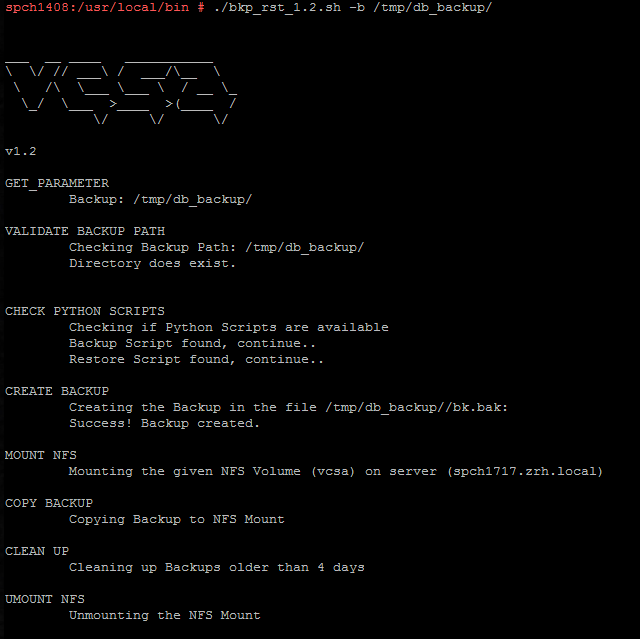
So sieht die Ausgabe aus, wenn du das Script von Hand startest:
Screen Shot 2017-07-20 at 10.18.06

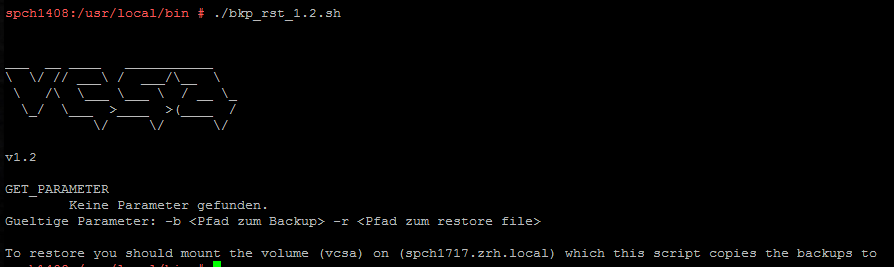
Und so sieht sie ohne Parameter aus:
Screen Shot 2017-07-20 at 10.18.24

Update

Ich habe das Script eben auf Version 1.5 gehoben. Es räumt lokal besser auf, behält also nur die drei neuesten Dateien, prüft auf Fehler und schickt eine Mail, wenn im Log ein Fehler steht.

Passt ausserdem